

Uvod
This manual provides comprehensive instructions for the setup, operation, and maintenance of your MASTER & DYNAMIC MH40 Over-Ear Headphones. Please read this guide thoroughly to ensure optimal performance and longevity of your device.
Sadržaj paketa
Provjerite jesu li svi artikli prisutni u vašem paketu:
- MASTER & DYNAMIC MH40 Over-Ear Headphones
- Audio Cable with In-line Microphone
- USB-C Charging Cable (for Bluetooth functionality)
- Canvas Carrying Case
- Korisnički priručnik (ovaj dokument)
Proizvod gotovview
The MH40 headphones are designed with premium materials for durability and comfort. Key components include:
- Forged Aluminum Body: Provides a robust and lightweight structure.
- Lambskin Ear Pads: Offer comfort for extended listening sessions.
- Custom Neodymium Drivers: Engineered for superior sound reproduction.
- Podesiva traka za glavu: Osigurava sigurno i udobno pristajanje.
- Odvojivi kabeli: For both audio and charging.

Figure 1: MASTER & DYNAMIC MH40 Over-Ear Headphones, showcasing black metal and camo leather design.
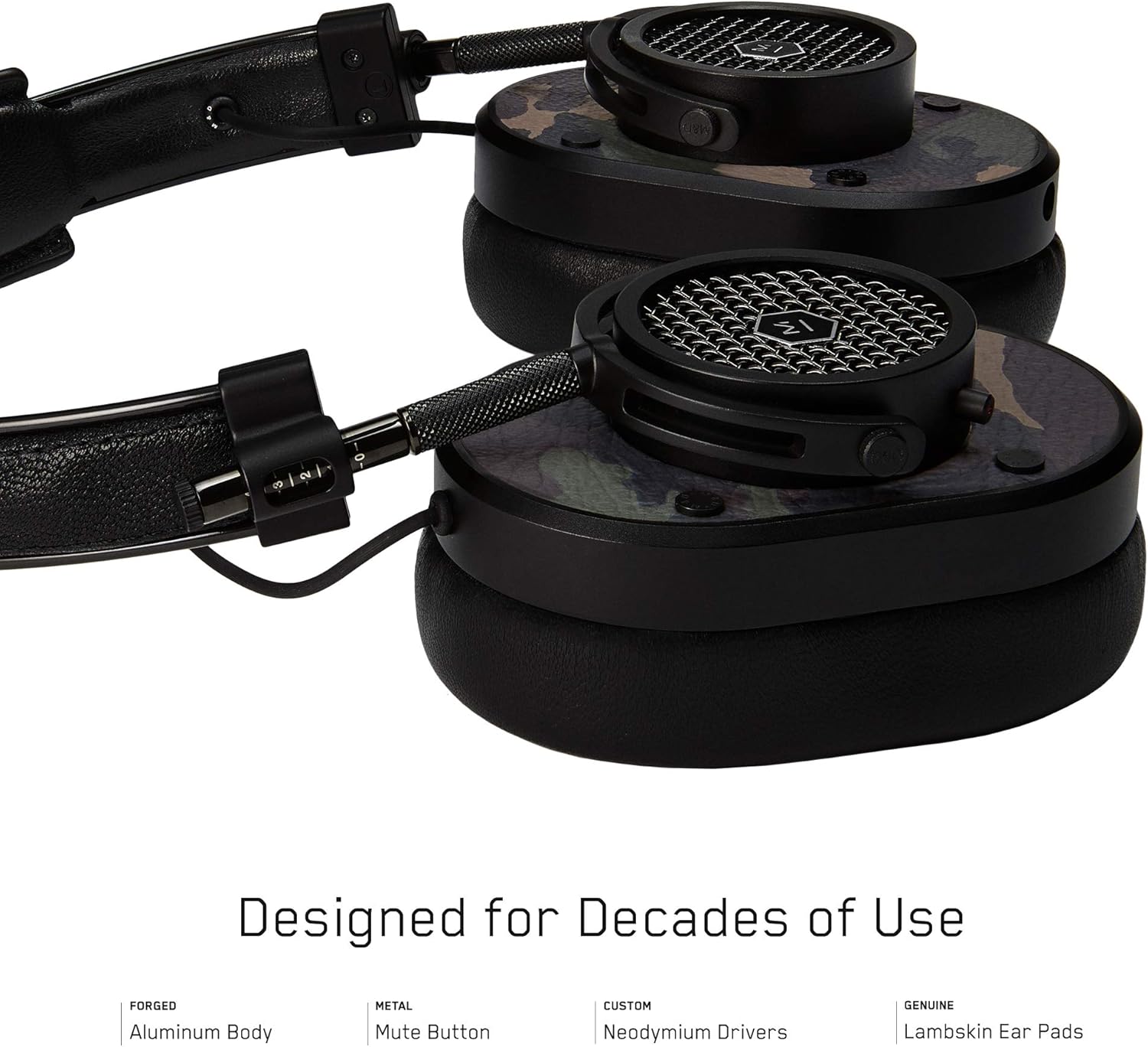
Slika 2: Detaljno view of the MH40 headphone earcups, highlighting the lambskin ear pads, metal grille, and adjustable hinge.
Postavljanje
1. Podešavanje prilagodbe
- Gently extend or retract the metal arms on each side of the headband to adjust the height.
- Position the earcups so they fully cover your ears, ensuring a comfortable and secure fit.
- The lambskin ear pads are designed to conform to your head shape for optimal sound isolation and comfort.
2. Žičana veza
- Locate the audio input port on the left earcup.
- Insert one end of the provided audio cable into the headphone's audio input.
- Connect the other end of the audio cable to your audio device's 3.5mm jack.
3. Bluetooth uparivanje (bežična veza)
The MH40 headphones support Bluetooth connectivity for wireless audio. Ensure the headphones are charged before pairing.
- Uključivanje: Press and hold the power button (usually located on one of the earcups) until the indicator light flashes.
- Način uparivanja: Continue holding the power button or press a dedicated Bluetooth pairing button (if available) until the indicator light flashes rapidly, indicating pairing mode.
- Povezivanje uređaja: On your audio device (smartphone, tablet, computer), navigate to Bluetooth settings and select "MH40" from the list of available devices.
- Potvrda: The indicator light on the headphones will turn solid blue or green once successfully paired.
Note: The Bluetooth range is approximately 10 meters (33 feet).
Upute za rad
Audio reprodukcija
- Reproduciraj/pauziraj: Press the multi-function button (often on the in-line microphone or earcup) once.
- Sljedeća pjesma: Press the multi-function button twice rapidly.
- Prethodni zapis: Press the multi-function button three times rapidly.
- Kontrola glasnoće: Use the volume up/down buttons on the in-line microphone or dedicated earcup controls.
Upravljanje pozivima
- Odgovori/prekini poziv: Jednom pritisnite višenamjenski gumb.
- Odbij poziv: Pritisnite i držite višenamjensku tipku otprilike 2 sekunde.
- Isključi mikrofon: The MH40 features a dedicated mute button, typically located on the earcup or in-line control. Press to mute/unmute during a call.
Održavanje
- Čišćenje: Use a soft, dry cloth to wipe the headphones. For leather parts, use a specialized leather cleaner if necessary. Avoid harsh chemicals or abrasive materials.
- Skladištenje: When not in use, store the headphones in the provided canvas carrying case to protect them from dust and scratches.
- Održavanje kabela: Handle cables gently. Avoid sharp bends or excessive pulling to prevent damage. The retractable cable feature helps manage cable length.
- Jastučići za uši: The magnetic ear pads are removable for cleaning or replacement. Gently pull them off and reattach by aligning the magnets.
Rješavanje problema
Nema zvuka
- Wired: Ensure the audio cable is securely connected to both the headphones and the audio source. Check the volume level on both the headphones and the source device.
- Bluetooth: Verify that the headphones are powered on and successfully paired with your device. Check the volume levels. Try re-pairing the headphones.
Nije moguće uparivanje putem Bluetootha
- Provjerite jesu li slušalice u načinu rada za uparivanje (brzo trepćuća indikatorska lampica).
- Provjerite je li Bluetooth omogućen na izvornom uređaju.
- Približite slušalice uređaju (unutar 10 metara).
- Turn off and on both the headphones and your device, then attempt pairing again.
- If previously paired, try "forgetting" the device on your source and re-pairing.
Mikrofon ne radi
- Provjerite je li gumb za isključivanje mikrofona uključen.
- Ensure the audio cable with the in-line microphone is fully inserted.
- Verify microphone input settings on your connected device.
Tehnički podaci
| Naziv modela | MH40 |
| Tehnologija povezivanja | Žičani, Bluetooth |
| Bežična komunikacijska tehnologija | Bluetooth |
| Materijal | Copper (components), Lambskin (ear pads), Canvas (carrying case) |
| Vrsta kontrole | Call Control, Touch |
| Značajka kabela | Na uvlačenje |
| Težina artikla | 0.36 kilograma (12.7 unci) |
| Vrsta audio upravljačkog programa | Dinamički upravljački program |
| Bluetooth domet | 10 metara |
| Oblik slušalice | Nad uho |
| Posebne značajke | Carrying case included, Lightweight, Microphone Included, Noise Isolation, Wireless |
| Dimenzije proizvoda | 7.48 x 6.3 x 2.76 inča |
| Proizvođač | MASTER & DYNAMIC |
| Boja | Black Metal / Camo Leather |
| Postavljanje uha | Preko uha |
| Kontrola buke | Zvučna izolacija |
| UPC | 858901007099 |
Jamstvo i podrška
For detailed warranty information and customer support, please refer to the official MASTER & DYNAMIC webweb-mjesto ili se izravno obratite njihovoj korisničkoj službi. Sačuvajte dokaz o kupnji za slučaj zahtjeva za jamstvo.
Mrežna podrška: www.masterdynamic.com/support (Examppoveznica, stvarna poveznica može se razlikovati)