
Uvod
This manual provides essential instructions for the Jam Audio Out There Active Noise Cancelling On-Ear Bluetooth Headphones. Please read this guide thoroughly to ensure proper use, maintenance, and to maximize your listening experience. These headphones offer active noise cancellation, Bluetooth connectivity, hands-free calling, and a comfortable on-ear design.
Što je u kutiji
Provjerite jesu li svi artikli prisutni u pakiranju:
- Out There Headphones
- AUX kabel (3.5 mm)
- USB kabel za punjenje
- Kratki vodič za početak (detaljne upute potražite u ovom priručniku)

Image: Contents of the Jam Audio Out There headphone package, including the headphones, AUX cable, and USB charging cable.
Proizvod gotovview i Kontrole
Familiarize yourself with the headphone's layout and controls for optimal use.
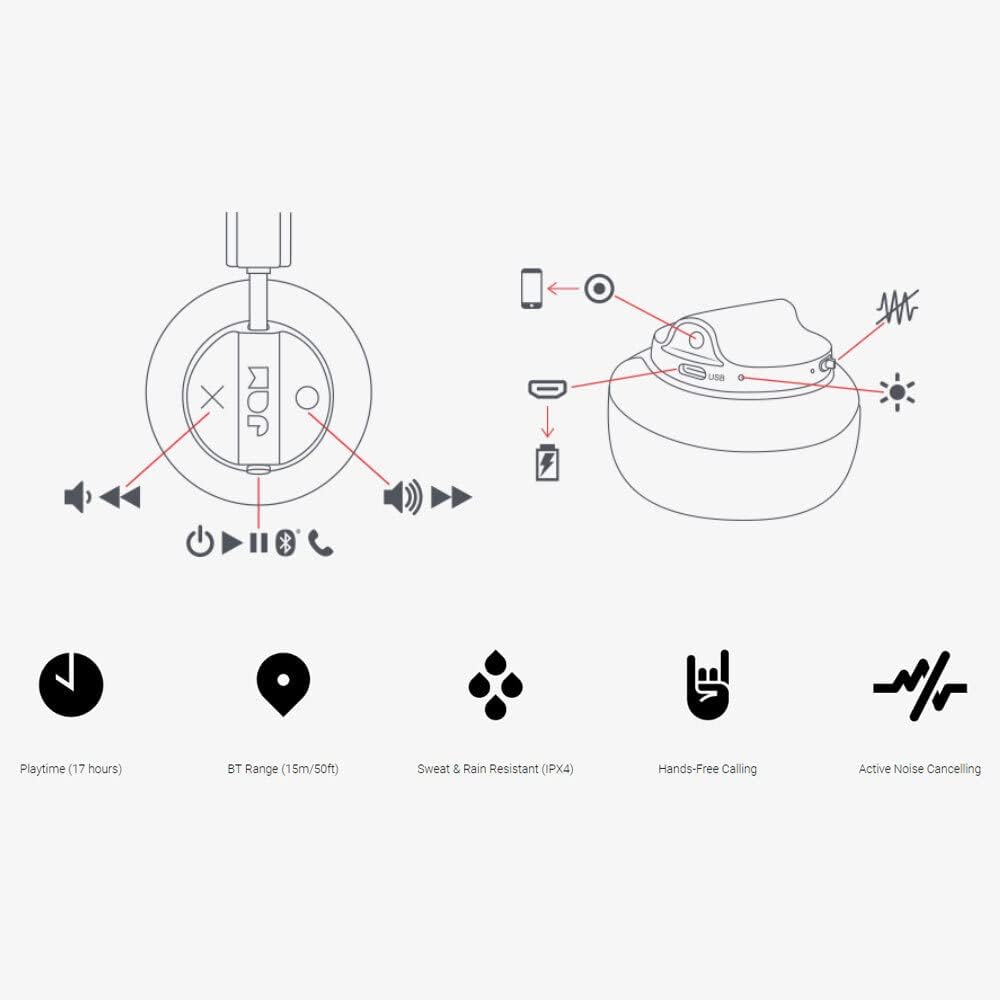
Image: Detailed diagram illustrating the control buttons and ports on the Jam Audio Out There headphones, including power, volume, track navigation, call management, and the charging port.
- Gumb za napajanje: Pritisnite i držite za uključivanje/isključivanje.
- Pojačavanje/sljedeći zapis: Kratki pritisak za povećanje glasnoće, dugi pritisak za sljedeću pjesmu.
- Smanjivanje glasnoće/prethodna pjesma: Kratki pritisak za smanjenje glasnoće, dugi pritisak za prethodnu pjesmu.
- Reproduciraj/pauziraj/odgovori na poziv: Single press to play/pause music or answer/end a call.
- Active Noise Cancelling (ANC) Switch: Toggle to activate or deactivate noise cancellation.
- Priključak za punjenje: Mikro USB priključak za punjenje.
- AUX-in priključak: 3.5 mm priključak za žičanu audio vezu.
Postavljanje
1. Punjenje slušalica
Before first use, fully charge your headphones. Connect the provided USB charging cable to the charging port on the headphones and the other end to a USB power source. The LED indicator will show charging status and turn off when fully charged. A full charge takes approximately 2 hours and provides up to 17 hours of playtime.

Image: The Jam Audio Out There headphones provide up to 17 hours of playtime on a single charge.
2. Uključivanje/isključivanje
- To power on: Press and hold the Power button for 3 seconds. The LED indicator will flash.
- To power off: Press and hold the Power button for 3 seconds. The LED indicator will turn off.
3. Bluetooth uparivanje
- Provjerite jesu li slušalice isključene.
- Press and hold the Power button for 5 seconds until the LED indicator flashes red and blue, indicating pairing mode.
- Na svom uređaju (pametnom telefonu, tabletu, računalu) omogućite Bluetooth i potražite dostupne uređaje.
- Select "JAM Out There" from the list of devices.
- Once paired, the LED indicator on the headphones will turn solid blue.
- The headphones have a Bluetooth range of up to 15 meters (50 feet).

Image: The Jam Audio Out There headphones offer Bluetooth compatibility, allowing a range of up to 15 meters or 50 feet from your connected device.
Upute za rad
Reprodukcija glazbe
- Reproduciraj/pauziraj: Jednom pritisnite gumb za reprodukciju/pauzu.
- Sljedeća pjesma: Dugo pritisnite tipku za pojačavanje glasnoće.
- Prethodni zapis: Dugo pritisnite tipku za smanjivanje glasnoće.
- Podešavanje glasnoće: Kratko pritisnite tipke za pojačavanje ili stišavanje glasnoće.
Hands-free pozivanje
- Odgovori/prekini poziv: Jednom pritisnite gumb za reprodukciju/pauzu.
- Odbij poziv: Pritisnite i držite tipku za reprodukciju/pauzu 2 sekunde.
- Nazovite: Initiate the call from your connected device. The audio will automatically transfer to the headphones.
- Music will automatically pause during a call and resume after the call ends.
Aktivno potiskivanje buke (ANC)
- To activate ANC: Slide the ANC switch to the ON position. The ANC indicator light will illuminate.
- To deactivate ANC: Slide the ANC switch to the OFF position. The ANC indicator light will turn off.
- Using ANC can reduce ambient noise, enhancing your listening experience. Note that ANC can be used independently or with Bluetooth audio.
Wired Connection (AUX-in)
For a wired connection, use the provided 3.5mm AUX cable. Plug one end into the headphone's AUX-in port and the other into your audio device. This allows you to continue listening even if the headphone battery is depleted or if Bluetooth is not available.
Održavanje
- Čišćenje: Obrišite slušalice mekom, suhom krpom. Nemojte koristiti jake kemikalije ili abrazivne materijale.
- Skladištenje: Slušalice čuvajte na hladnom i suhom mjestu, dalje od ekstremnih temperatura.
- Vodootpornost: These headphones are IPX4 rated, meaning they are resistant to sweat and light splashes of water. Do not submerge them in water or expose them to heavy rain. Ensure the charging port cover is securely closed when not charging to maintain water resistance.
- Njega baterije: Kako biste produžili vijek trajanja baterije, izbjegavajte često potpuno pražnjenje slušalica. Redovito ih punite, čak i ako ih ne koristite dulje vrijeme.
Rješavanje problema
| Problem | Otopina |
|---|---|
| Slušalice se ne uključuju | Provjerite jesu li slušalice napunjene. Spojite ih na izvor napajanja pomoću USB kabela. |
| Nije moguće uparivanje putem Bluetootha |
|
| Nema zvuka ili je mala glasnoća |
|
| Aktivno poništavanje buke ne radi | Ensure the ANC switch is in the ON position and the ANC indicator light is illuminated. |
| Headphones falling apart or breaking | While the product is designed for durability, excessive force or improper handling can cause damage. Handle with care. If issues persist, refer to warranty information. |
Tehnički podaci
- Naziv modela: Vani
- Broj modela: HX-HP303BK
- Povezivost: Bluetooth, 3.5 mm Jack (AUX-in)
- Bežični domet: Do 15 metara (50 stope)
- Trajanje baterije: Do 17 sati
- Kontrola buke: Aktivno poništavanje buke
- Vodootpornost: IPX4 Rated (Sweat and Rain Resistant)
- Položaj uha: Na uhu
- Materijal: Guma, silikon
- Težina artikla: 5.1 unce (0.32 funta)
- Dimenzije proizvoda: 8.58 x 3.19 x 8.66 inča
- Uključene komponente: Headphones, Charging Cord, AUX Cable
Video proizvodaview
Pogledajte ovaj službeni video o proizvodu za vizualni pregledview of the Jam Audio product line, including the Out There headphones.
Video: An official Jam Audio sizzle video showcasing various products, including the Out There headphones, highlighting their design and features.
Jamstvo i podrška
For warranty information, product registration, or technical support, please refer to the official Jam Audio webweb-mjesto ili se obratite njihovoj korisničkoj službi. Sačuvajte dokaz o kupnji za slučaj zahtjeva za jamstvo.