
Notifier DAA2-5025
Notifier DAA2-5025 Digital AmpKorisnički priručnik za lifier
Model: DAA2-5025 | Brand: Notifier
Uvod
This manual provides essential information for the safe and efficient operation, installation, and maintenance of the Notifier DAA2-5025 Digital Amplifier. The DAA2-5025 is a 50W, 25V digital amplifier designed for integration into fire alarm and emergency communication systems, operating on 120 VAC. Please read this manual thoroughly before installation or operation.
Sigurnosne informacije
UPOZORENJE: Ovaj uređaj radi s visokom glasnoćomtage (120 VAC). Installation and servicing must be performed by qualified personnel only. Disconnect all power sources before servicing to prevent electric shock.
OPREZ: To reduce the risk of fire or electric shock, do not expose this appliance to rain or moisture. Do not open the enclosure; there are no user-serviceable parts inside. Refer all servicing to qualified service personnel.
- Uvijek se pridržavajte lokalnih i nacionalnih električnih propisa.
- Osigurajte ispravno uzemljenje jedinice.
- Ne blokirajte otvore za ventilaciju.
- Koristite samo navedene zamjenske dijelove.
Postavljanje i instalacija
The DAA2-5025 is designed for surface mount installation within a compatible enclosure. Ensure the mounting location is dry, well-ventilated, and free from excessive dust or vibration.
Montaža Amplifter
- Identify a suitable mounting surface that can support the unit's weight (approximately 2 pounds).
- Osigurajte amplifier's mounting plate to the surface using appropriate fasteners.
- Osigurajte dovoljan prostor oko uređaja za ventilaciju i pristup priključcima ožičenja.
Električni priključci
Before making any electrical connections, ensure all power is disconnected at the circuit breaker.
- Ulazna snaga: Connect the 120 VAC power supply to the designated terminals. Observe correct polarity (Line, Neutral, Ground).
- Audio izlaz: Connect the 25V audio output to the speaker lines or distribution system. Ensure correct impedance matching.
- Kontrolni ulazi/izlazi: Connect any necessary control signals (e.g., activation, supervision) as per system design. Refer to the system's specific wiring diagrams.

Figure 1: The Notifier DAA2-5025 Digital Amplifier, showing the main circuit board, power supply unit, and various connection points. This view highlights the internal components and robust construction.
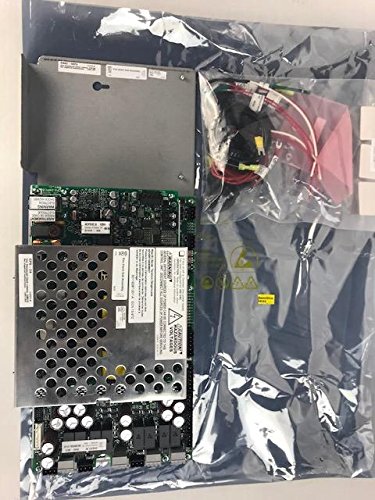
Figure 2: The Notifier DAA2-5025 Digital Amplifier along with its accessory components, as typically received in its packaging. This image provides a view of the complete product and included parts before installation.
Upute za rad
The DAA2-5025 operates as part of a larger fire alarm or emergency communication system. Its operation is typically controlled by the main system panel.
- Uključivanje: Once all connections are secure and verified, apply 120 VAC power to the unit. The amplifier will perform a self-test.
- Pokazatelji stanja: Observe the status LEDs on the unit (if present) for normal operation, fault conditions, or active signals. Refer to the system's specific documentation for LED indicator meanings.
- Audio izlaz: The amplifier will output audio signals (e.g., voice messages, tones) when activated by the control panel. Ensure speaker lines are properly connected and terminated.
- Nadzor: The DAA2-5025 typically includes supervision circuits to monitor speaker lines and amplifier status, reporting any faults back to the main control panel.
Održavanje
The Notifier DAA2-5025 is designed for reliable, long-term operation with minimal maintenance. However, periodic inspection is recommended.
- Godišnji pregled: Visually inspect the unit for any signs of damage, loose connections, or excessive dust accumulation.
- Čišćenje: If necessary, gently clean the exterior of the unit with a soft, dry cloth. Do not use liquid cleaners or solvents. Ensure power is off before cleaning.
- Ažuriranja firmvera: Any firmware updates should only be performed by qualified Notifier service technicians.
- Rezervna baterija (ako je primjenjivo): If the system utilizes a battery backup for the amplifier, ensure batteries are inspected and replaced according to manufacturer recommendations.
Rješavanje problema
Before attempting any troubleshooting, ensure all power is disconnected. If the issue persists after basic checks, contact qualified service personnel.
| Problem | Mogući uzrok | Otopina |
|---|---|---|
| No Power/Unit Off | No 120 VAC input; Blown fuse; Internal fault. | Check power supply and circuit breaker. Verify fuse (if accessible and user-replaceable). Contact service if power is present but unit remains off. |
| Nema audio izlaza | Incorrect wiring; Speaker line fault; Amplifier fault; No audio signal from control panel. | Verify speaker wiring and connections. Check speaker line impedance. Confirm audio signal from control panel. Check amplifier status indicators. |
| Fault Indicator Active | Speaker line open/short; Amplifier internal fault; Power supply issue. | Inspect speaker lines for damage. Consult system documentation for specific fault codes. Contact service for internal faults. |
Tehnički podaci
| Atribut | Detalj |
|---|---|
| Model | DAA2-5025 |
| Marka | Obavijestilac |
| Opis | Digitalni Amplifier, 50W, 25V, 120 VAC |
| Izlazna snaga | 50 vata |
| Izlazni voltage | 25 volti |
| Ulazni voltage | 120 VAC |
| Vrsta montaže | Površinska montaža |
| Težina artikla | 2 funti (0.91 kg) |
| ASIN | B07B66SSRY |
| UPC | 670875920132 |
| Datum prve dostupnosti | 24. svibnja 2016 |
| Proizvođač | Notifier |
Informacije o jamstvu
Notifier products typically come with a manufacturer's limited warranty covering defects in materials and workmanship. For specific warranty terms and conditions, please refer to the documentation provided with your purchase or contact Notifier customer support. Keep your proof of purchase for warranty claims.
Korisnička podrška
For technical assistance, troubleshooting beyond this manual, or information on replacement parts, please contact Notifier customer support or your authorized Notifier distributor. You can find contact information on the official Notifier website or through your system installer.
Mrežni resursi: Visit the official Notifier webstranica za dokumentaciju o proizvodu, često postavljana pitanja i kontakte za podršku.
Ask a question about this manual
Ask about setup, troubleshooting, compatibility, parts, safety, or missing instructions. Manuals+ will review the question and use this page’s manual context to help answer it.