
Uvod
The Plugable UD-3900H USB 3.0 Universal Docking Station offers flexible expandability for both modern and legacy laptops. This DisplayLink-powered docking station provides 12 port expansion, including dual video outputs, Gigabit Ethernet, audio, and six USB ports. It is designed for broad compatibility across Windows, macOS, and ChromeOS environments, making it ideal for mixed laptop setups in home offices, corporate environments, and educational settings.
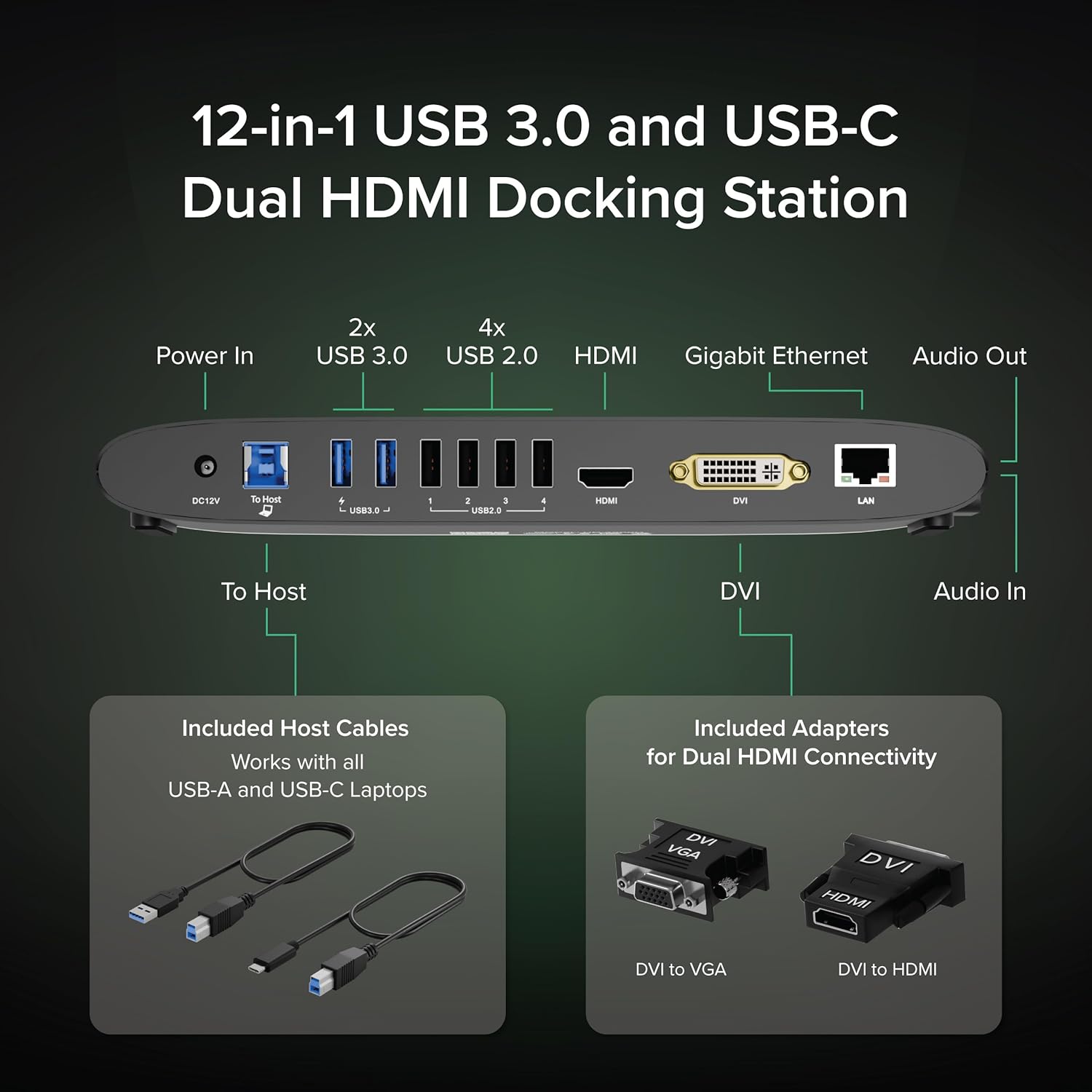
Image: The Plugable UD-3900H docking station, showcasing its compact design and multiple connectivity options.
Postavljanje
1. Što je u kutiji
Your Plugable UD-3900H package includes the following items:
- Plugable UD-3900H Docking Station
- Power Adapter (UL Listed)
- USB-B to USB-C Cable
- USB-B na USB-A kabel
- DVI na HDMI adapter
- DVI na VGA adapter
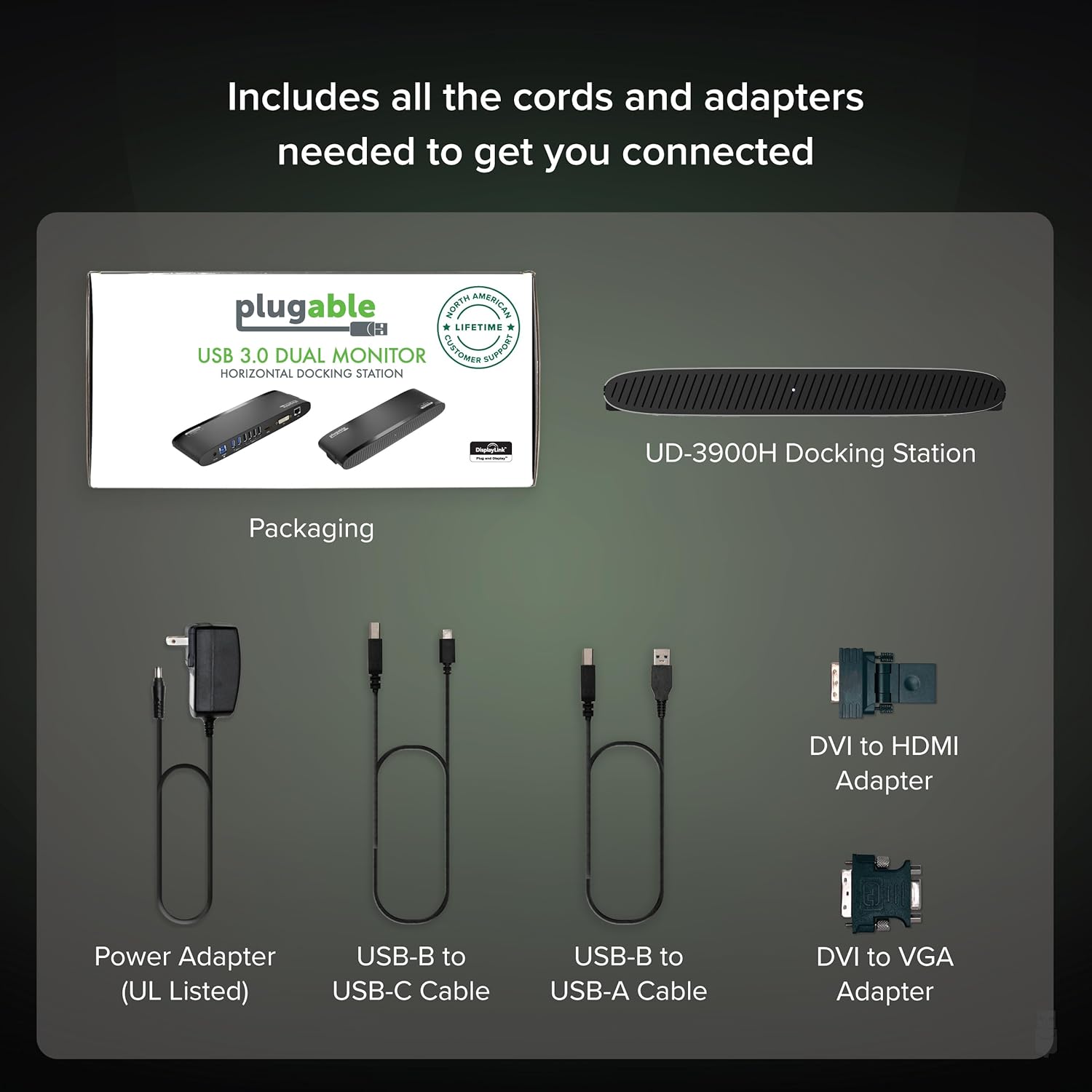
Image: All included components of the Plugable UD-3900H docking station: the unit, power adapter, USB cables, and DVI adapters.
2. Spajanje priključne stanice
- Priključite napajanje: Plug the included power adapter into the DC 12V port on the back of the docking station, then plug it into a wall outlet.
- Spajanje na glavno prijenosno računalo: Use either the USB-B to USB-C cable or the USB-B to USB-A cable to connect the docking station to your laptop's available USB port.
- Spoji zaslone:
- For the first display, use an HDMI cable to connect your monitor to the HDMI port on the docking station.
- For the second display, use the DVI port. You can connect a DVI monitor directly, or use the included DVI to HDMI adapter for an HDMI monitor, or the DVI to VGA adapter for a VGA monitor.
- Povežite periferne uređaje: Plug your USB devices (keyboard, mouse, printer, etc.) into the available USB 3.0 or USB 2.0 ports. Connect your Ethernet cable to the LAN port for a wired network connection. Connect headphones/speakers to the audio out port and a microphone to the audio in port.
Slika: Detaljna view of the rear ports on the UD-3900H, including power, host connection, USB 3.0, USB 2.0, HDMI, DVI, and LAN.
3. Instalacija upravljačkog programa
The Plugable UD-3900H utilizes DisplayLink technology for video output. Drivers are essential for proper functionality.
- Windows: Drivers are typically installed automatically via Windows Update when the dock is first connected to an internet-enabled system. If not, or for corporate deployments, manual installation is available.
- MacOS: Manual driver installation is required. Download the DisplayLink Manager App from the Plugable website. Follow the on-screen instructions, including granting 'Screen Recording' permission in System Settings for display functionality.
- OS Chrome: No driver installation is typically needed.

Image: Step-by-step guide for installing the DisplayLink driver on macOS, highlighting the necessary security permissions.
Video: A Plugable Technologies video demonstrating how to install the DisplayLink Manager App, particularly useful if displays are not working.
Upute za rad
1. Konfiguracija zaslona
The UD-3900H supports dual external displays up to 1920x1200 @ 60Hz. This includes systems like Apple M1, M2, M3, M4, or M5, which natively support only one external display.
- Primarni zaslon: Connects via the HDMI port.
- Sekundarni zaslon: Connects via the DVI port, which can be adapted to HDMI or VGA using the included adapters.
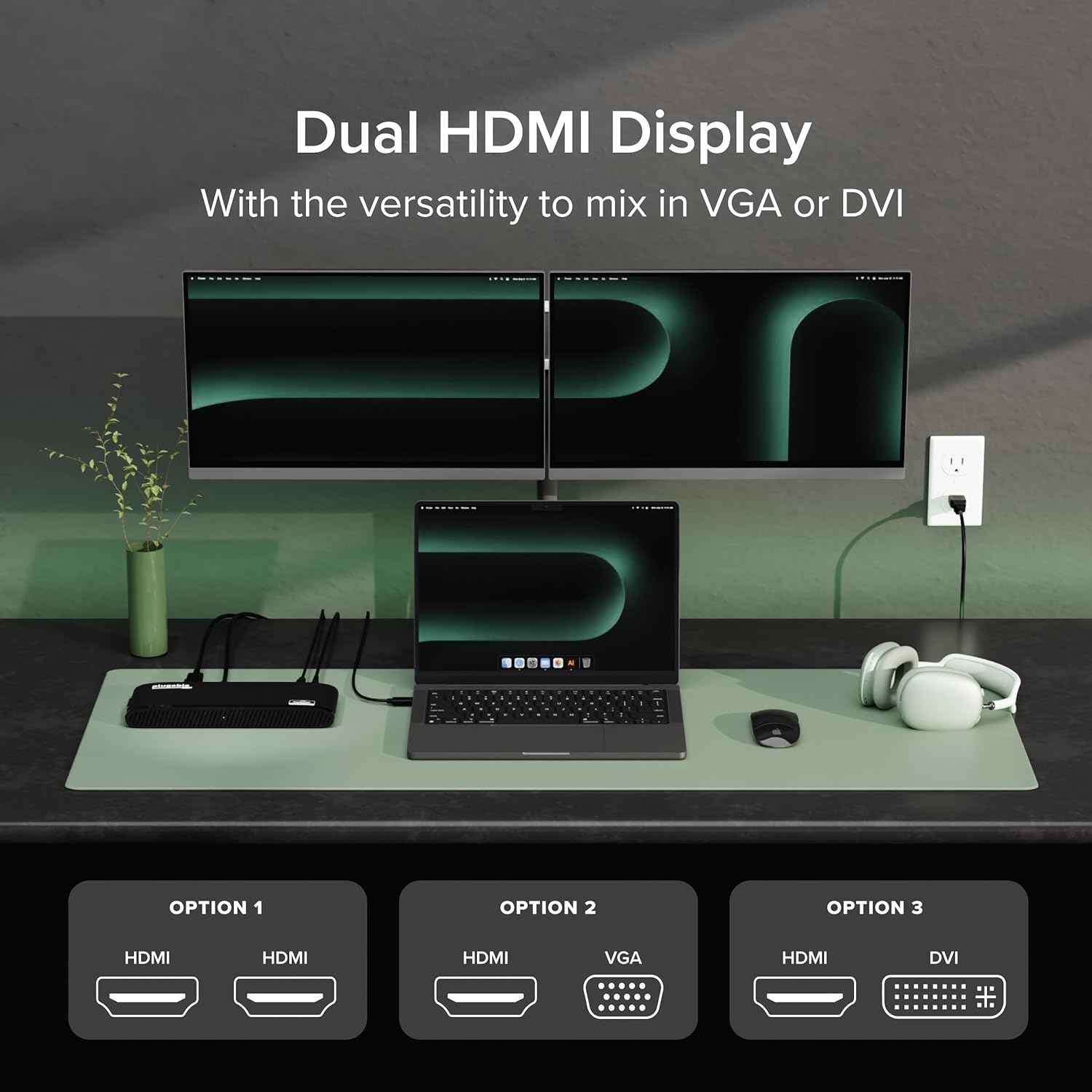
Image: A laptop connected to two external monitors, demonstrating the dual display capability of the docking station.

Image: Visual representation of the flexible dual display options, including HDMI, DVI, and VGA connections with adapters.
2. USB portovi
The docking station provides a total of six USB ports:
- 2x USB 3.0 Ports: Za brzi prijenos podataka i punjenje kompatibilnih uređaja.
- 4x USB 2.0 Ports: Ideal for connecting keyboards, mice, and other standard peripherals.
3. Network and Audio
- Gigabitni Ethernet: Provides a stable and fast wired network connection, superior to Wi-Fi for critical tasks.
- Audio ulaz/izlaz: Dedicated 3.5mm jacks for connecting headphones/speakers and a microphone.
4. Univerzalna kompatibilnost
The UD-3900H is compatible with a wide range of operating systems and laptop types:
- Windows: 7 do 11.
- MacOS: 10.14+ (Mojave and later), including Apple Silicon M1, M2, M3, M4, and M5 systems.
- OS Chrome: 100.x ili noviji.

Image: Icons representing Windows, macOS, and ChromeOS, indicating the broad operating system compatibility of the docking station.
Održavanje
To ensure the longevity and optimal performance of your Plugable UD-3900H docking station, follow these maintenance guidelines:
- Čišćenje: Use a soft, dry, lint-free cloth to gently wipe the exterior of the docking station. Avoid using liquid cleaners, aerosols, or solvents.
- Ventilacija: Ensure the docking station is placed in a well-ventilated area to prevent overheating. Do not block the ventilation grilles.
- Skladištenje: Kada se ne koristi dulje vrijeme, priključnu stanicu pohranite na hladnom i suhom mjestu, dalje od izravne sunčeve svjetlosti i ekstremnih temperatura.
- Uprava za kabele: Avoid excessive bending or tugging on connected cables to prevent damage to the ports and cables themselves.
Rješavanje problema
Evo rješenja za uobičajene probleme s kojima se možete susresti:
- Displays Not Working:
- Ensure all display cables are securely connected to both the docking station and your monitors.
- Verify that the DisplayLink drivers are correctly installed. For macOS, this often requires manual installation and granting 'Screen Recording' permissions. Refer to the 'Driver Installation' section.
- Try restarting your computer and the docking station.
Video: A Plugable Technologies video demonstrating how to install the DisplayLink Manager App, particularly useful if displays are not working.
- Nema punjenja laptopa: This docking station does not provide power delivery to charge your laptop. Your laptop will require its own power adapter connected directly.
- Intermittent USB Device Connection: Ensure the USB cable connecting the dock to your laptop is secure. Try connecting the device to a different USB port on the dock.
- Problemi s mrežnom povezivošću: Check the Ethernet cable connection. Ensure your router/modem is functioning correctly.
- Problemi sa zvukom: Verify that your audio devices are correctly plugged into the audio jacks. Check your computer's sound settings to ensure the DisplayLink audio output is selected.

Image: A visual reminder that the Plugable UD-3900H docking station does not provide laptop charging.
Tehnički podaci
| Marka | Mogućnost priključka |
| Broj modela | UD-3900H |
| Kompatibilnost operativnog sustava | Chrome OS, Windows 10, Windows 11, Windows 8.1, macOS 10.14 Mojave+ |
| Težina artikla | 11.4 unci |
| Dimenzije proizvoda (DxŠxV) | 23.88 x 7.87 x 3.05 cm |
| Boja | Crna |
| Hardversko sučelje | USB tip C, USB 3.0 |
| Ukupno USB priključaka | 6 (2x USB 3.0, 4x USB 2.0) |
| Video izlaz | Dual HDMI (up to 1920x1200 @ 60Hz), DVI (with HDMI/VGA adapters) |
| Ethernet | Gigabit Ethernet (LAN) |
| Audio | 3.5mm Audio In (Microphone), 3.5mm Audio Out (Headphones/Speakers) |
| Wattage | 24 W |
Jamstvo i podrška
The Plugable UD-3900H is designed for reliability and comes with comprehensive support:
- Doživotna podrška: Includes lifetime support from Plugable's North American team of connectivity experts.
- Dvogodišnje pokriće: Backed by a 2-year warranty, certified to exceed industry standards.
For further assistance, please visit the official Plugable webweb-mjesto ili izravno kontaktirajte njihov tim za podršku.