
1. Uvod
The Flashpoint Zoom Li-Ion Mini R2 TTL Flash is a compact and powerful flash unit designed for use with select Sony mirrorless cameras, including models such as A7RIII, a7rII, a7R, a58, a99, ILCE6000L, a77II, RX10, and the a9. This flash features an integrated R2 radio transceiver, enabling wireless triggering and control. It can function as a master unit to command other Flashpoint and Godox R2-compatible slave units, offering versatile lighting solutions for various photographic scenarios.
2. Sigurnosne mjere opreza
- Ne rastavljajte niti modificirajte bljeskalicu. Popravke smije obavljati samo ovlašteno servisno osoblje.
- Bljeskalicu držite suhom. Ne izlažite je kiši, vlazi ili visokoj vlažnosti zraka.
- Do not touch the flash tube after firing, as it can be hot.
- Čuvati izvan dohvata djece.
- Use only the specified battery and charger. Improper use can lead to fire, explosion, or electric shock.
- Avoid direct eye exposure to the flash, especially at close range, as it can impair vision.
3. Proizvod je gotovview
3.1 Sadržaj paketa
- Flashpoint Zoom Li-Ion Mini Flash Unit
- Mini stalak
- Slučaj zaštite
- Diffuser (assumed from 'Dif' in product data)
3.2 Flash Components
Familiarize yourself with the main components of your Flashpoint Zoom Li-Ion Mini R2 TTL Flash.

Slika 3.2.1: Ispred view of the Flashpoint Zoom Li-Ion Mini R2 TTL Flash, showing the flash head and main body.
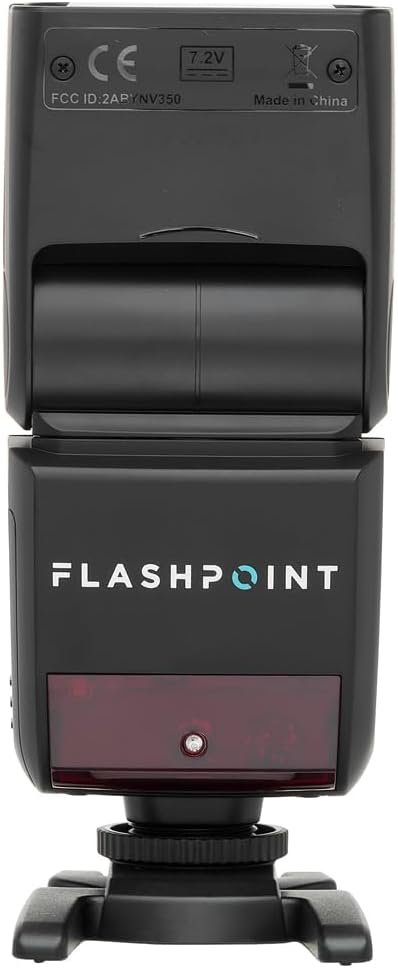
Slika 3.2.2: Stražnji view of the flash, highlighting the LCD display and control buttons for mode, zoom, sync, and power.

Slika 3.2.3: The flash unit with its built-in wide-angle diffuser panel extended from the flash head.
4. Postavljanje
4.1 Ugradnja baterije
- Pronađite odjeljak za baterije sa strane bljeskalice.
- Slide the battery cover release latch and open the compartment.
- Insert the Li-Ion battery, ensuring correct polarity as indicated inside the compartment.
- Zatvorite poklopac odjeljka za baterije dok se sigurno ne učvrsti na mjestu.

Slika 4.1.1: Strana view of the flash unit, indicating the battery compartment with a 'BATT.PUSH' label.
4.2 Montiranje na kameru
- Provjerite je li bljeskalica isključena.
- Slide the flash's hot shoe foot into your Sony camera's hot shoe mount.
- Tighten the locking ring on the flash foot to secure it to the camera. Do not overtighten.
4.3 Uključivanje/isključivanje
Press and hold the power button (usually marked with a ⚡ or power symbol) on the rear control panel to turn the flash on or off.
5. Upute za rad
5.1 Osnovni načini rada
The Flashpoint Zoom Li-Ion Mini R2 TTL Flash supports various operating modes:
- TTL Autoflash Mode: Automatically sets the flash output for correct exposure.
- Ručni (M) način rada: Allows manual adjustment of flash power output.
- Višestruki (stroboskopski) način rada: Ispali niz brzih bljeskova tijekom jedne ekspozicije.
- S1/S2 Optički podređeni načini rada: Triggers the flash optically when another flash fires.
Koristite NAČIN RADA button on the control panel to cycle through these modes.

Slika 5.1.1: Detaljan view of the flash control panel, showing buttons for MODE, ZOOM, SYNC, SLAVE, GR/CH, and the SET dial.
5.2 R2 Wireless System
The integrated R2 radio transceiver provides wireless control. Set the flash to Master or Slave mode and configure the group (GR) and channel (CH) settings to match your R2-compatible transmitter or other R2 flashes. Refer to your R2 transmitter's manual for detailed wireless setup.
5.3 Podešavanje glave bljeskalice
The flash head can be rotated and tilted to bounce light off ceilings or walls for softer illumination.
- Horizontalna rotacija: 0 do 270 stupnjeva.
- Vertikalni nagib: -7 do 90 stupnjeva.

Slika 5.3.1: Illustration demonstrating the flexible rotation and tilt capabilities of the flash head.
5.4 Funkcija zumiranja
The flash features an automatically zooming flashhead from 24-105mm. This adjusts the flash coverage to match the focal length of your lens. In manual mode, you can also adjust the zoom manually using the ZUM dugme.
6. Održavanje
- Čišćenje: Use a soft, dry cloth to clean the flash unit. For stubborn dirt, use a slightly damp cloth with mild detergent, then wipe dry. Do not use organic solvents like thinner or benzene.
- Skladištenje: When not in use for extended periods, remove the battery and store the flash in a cool, dry place, preferably in its protective case.
- Njega baterije: Recharge the Li-Ion battery regularly, even if not in use, to maintain its lifespan. Avoid fully discharging the battery.
7. Rješavanje problema
If you encounter issues with your Flashpoint Zoom Li-Ion Mini R2 TTL Flash, refer to the following common problems and solutions:
| Problem | Mogući uzrok/rješenje |
|---|---|
| Bljeskalica se ne aktivira. | Check if the flash is powered on. Ensure the battery is charged and correctly installed. Verify the flash is securely mounted on the camera hot shoe. Check camera flash settings. |
| Izlaz bljeskalice je nedosljedan ili nepravilan. | Ensure TTL mode is selected for automatic exposure, or adjust manual power settings. Check for obstructions between the flash and subject. Verify flash head zoom matches lens focal length. |
| Bežično okidanje ne uspijeva. | Confirm that the flash and transmitter are set to the same R2 group and channel. Ensure both units are within range and have fresh batteries. Check for radio interference. |
| Difficulty mounting flash on camera hot shoe. | Ensure the locking ring is fully loosened. Some camera hot shoes may have tighter tolerances; apply firm, even pressure. If persistent, verify compatibility with your specific camera model. |
| Unable to update firmware via micro-USB port. | The micro-USB port may be recessed. Try using a micro-USB cable with a very slim connector housing. If issues persist, contact Flashpoint customer support for guidance on compatible cables or alternative update methods. |
8. Specifikacije
| Značajka | Specifikacija |
|---|---|
| Vodeći broj | 82ft / 25m (at ISO 100) |
| Vrijeme recikliranja | 0.1 do 1.7 sekundi |
| Raspon zuma | 24-105mm (Auto/Manual) |
| Bounce Head Rotation | Horizontal: 0 to 270 degrees |
| Bounce Head Tilt | Vertical: -7 to 90 degrees |
| Dimenzije (D x Š x V) | 8.4 x 7.2 x 2.8 inča |
| Težina artikla | 1.87 funti |
| Kompatibilni nosači | Sony Alpha |
| Broj modela | Zoom-Lion Mini |
| ASIN | B07CV42KFV |
9. Jamstvo i podrška
9.1 Informacije o jamstvu
Flashpoint products typically come with a limited manufacturer's warranty. For specific details regarding the warranty period and terms for your Zoom Li-Ion Mini R2 TTL Flash, please refer to the warranty card included with your product or visit the official Flashpoint webmjesto.
9.2 Korisnička podrška
For technical assistance, troubleshooting beyond this manual, or service inquiries, please contact Flashpoint customer support. Contact information can usually be found on the Flashpoint webweb-mjestu ili u dokumentaciji vašeg proizvoda.