
1. Uvod
Thank you for choosing the Zerone LP-838 Small Power Amplifier. This manual provides essential information for the safe and efficient operation of your device. Please read these instructions thoroughly before use and retain them for future reference.
2. Proizvod je gotovview
2.1 Ključne značajke
- Kompaktan i prenosiv dizajn.
- RCA and 3.5mm audio input compatibility.
- High-power audio amplifier chip for 2.1 channel output.
- Adjustable Treble, Bass, and Volume controls.
- Durable all-aluminum alloy shell for electromagnetic interference reduction.
2.2 Identifikacija komponente
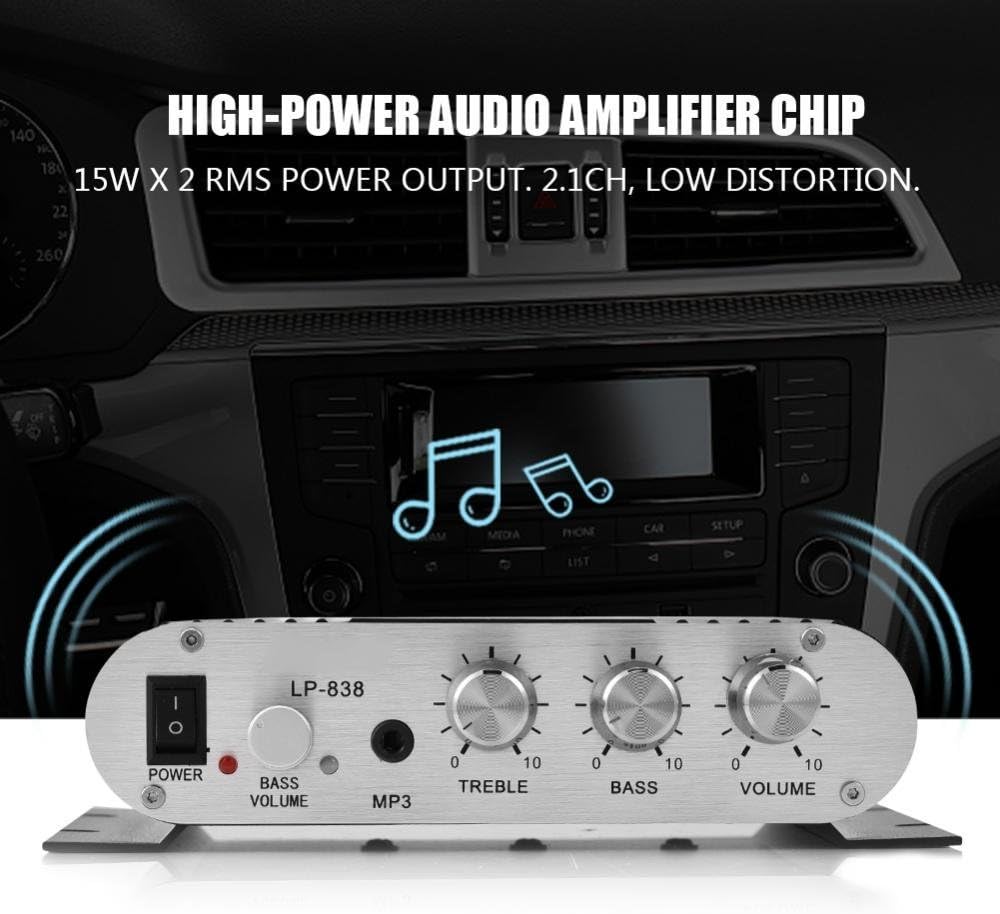
Slika 1: Kontrole i ulazi na prednjoj ploči
This image displays the front panel of the LP-838 amplifier. From left to right, it features a power switch, a bass volume knob, a 3.5mm MP3 input jack, and three rotary knobs for Treble, Bass, and Master Volume control. The unit also supports RCA audio input, as indicated by the text overlay.
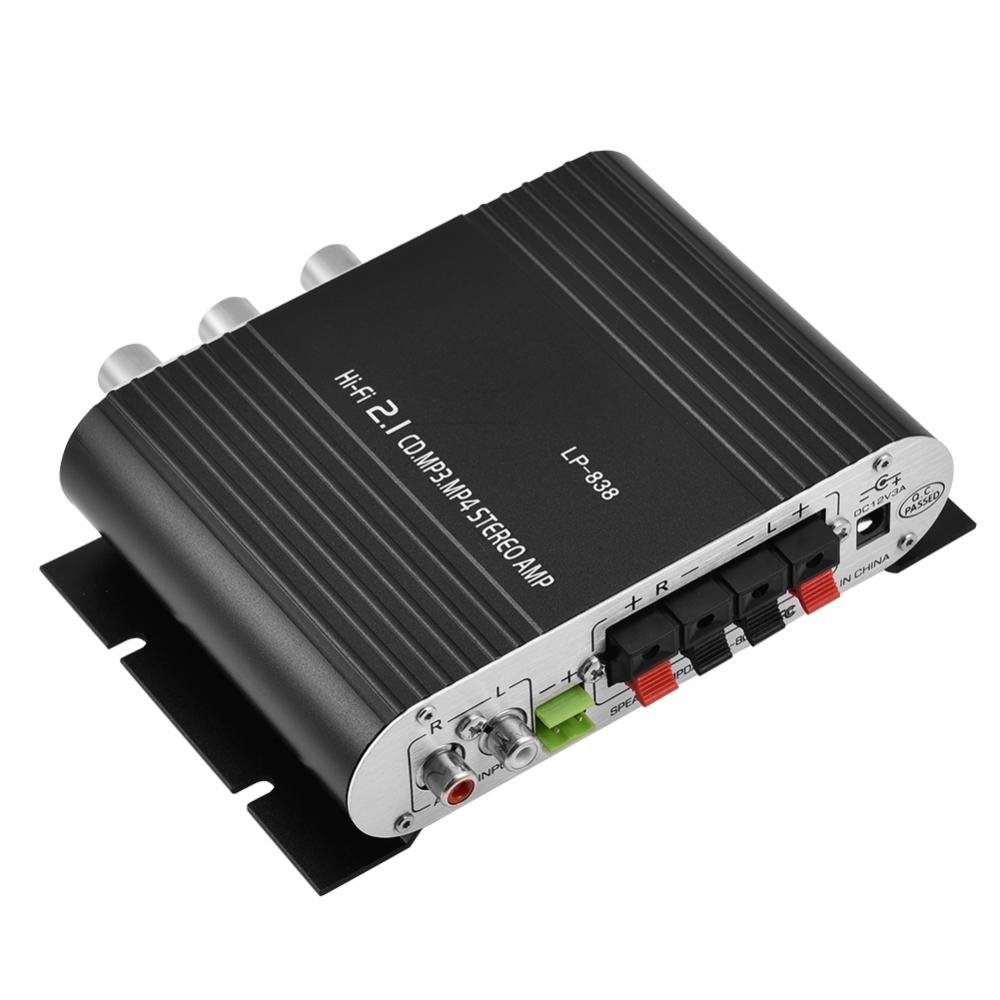
Slika 2: Priključci na stražnjoj ploči
This image shows the rear panel of the LP-838 amplifier. On the left are the RCA audio input jacks (red for right, white for left). In the center are the spring-clip speaker terminals for connecting left and right speakers. On the right is the DC 12V/3A power input jack and a 'Q.C. PASSED' stamp, indicating quality control.
Prednja ploča:
- Prekidač za napajanje: Uključuje / isključuje ampLifier on/off.
- BASS VOLUME Knob: Podešava razinu basa audio izlaza.
- MP3 ulaz: 3.5 mm priključak za spajanje prijenosnih audio uređaja.
- TREBLE gumb: Podešava visokofrekventni odziv.
- Gumb za bas: Podešava niskofrekventni odziv.
- Gumb za jačinu zvuka: Kontrolira ukupnu izlaznu glasnoću.
Stražnji panel:
- AUDIO INPUT (RCA): Red and white RCA jacks for connecting audio sources (e.g., DVD players, computers).
- SPEAKER OUTPUTS (+R -R +L -L): Spring-clip terminals for connecting passive speakers. Ensure correct polarity (+ to + and - to -).
- Ulaz istosmjerne struje 12 V/3 A: Power input jack for connecting the external power adapter (not included).
3. Postavljanje
- Spojite zvučnike: Connect your passive speakers to the SPEAKER OUTPUT terminals on the rear panel. Ensure the positive (+) terminal of the amplifier connects to the positive (+) terminal of the speaker, and the negative (-) terminal of the amplifier connects to the negative (-) terminal of the speaker. The ampLiferier podržava zvučnike s impedancijom od 4-8 Ohma.
- Spoji audio izvor:
- For RCA input: Connect your audio source (e.g., CD player, TV, computer) to the RCA AUDIO INPUT jacks on the rear panel using an RCA cable.
- For 3.5mm input: Connect your portable audio device (e.g., smartphone, MP3 player) to the MP3 input jack on the front panel using a 3.5mm audio cable.
- Priključite napajanje: Connect a compatible DC 12V/3A power adapter (not included) to the DC 12V/3A input jack on the rear panel. Plug the power adapter into a wall outlet.
Important: Ensure all connections are secure before powering on the ampsredstvo za podsticanje.
4. Upute za rad
- Uključivanje: Flip the POWER switch on the front panel to the 'ON' position. The power indicator light will illuminate.
- Odaberite unos: The amplifier automatically uses the active input. If both RCA and 3.5mm inputs are connected, the 3.5mm input may take precedence.
- Podešavanje glasnoće: Start with the VOLUME knob set to a low level. Begin playing audio from your source, then slowly increase the VOLUME knob to your desired listening level.
- Prilagodite ton: Use the TREBLE and BASS knobs to fine-tune the high and low frequencies according to your preference. The BASS VOLUME knob provides additional control over the bass output.
- Isključivanje: When finished, turn the VOLUME knob down to its minimum setting, then flip the POWER switch to the 'OFF' position.
5. Održavanje
- Čišćenje: Za čišćenje vanjskog dijela koristite meku, suhu krpu ampzaptivač. Ne koristite tekuća sredstva za čišćenje ili otapala.
- Ventilacija: Osigurajte amplifier is placed in a well-ventilated area to prevent overheating. Do not block the ventilation slots.
- Skladištenje: When not in use for extended periods, disconnect the power adapter and store the amplifter na hladnom i suhom mjestu.
6. Rješavanje problema
| Problem | Mogući uzrok | Otopina |
|---|---|---|
| Nema struje | Adapter za napajanje nije spojen ili je neispravan; prekidač za napajanje je isključen. | Ensure power adapter is securely connected and functional. Flip power switch to ON. |
| Nema zvuka | Incorrect audio input connection; speaker wires loose or incorrect polarity; volume too low; audio source issue. | Check audio input cables and connections. Verify speaker wire connections and polarity. Increase volume. Test audio source with another device. |
| Izobličen zvuk | Volume too high; incorrect tone settings; faulty audio source or cable. | Reduce volume. Adjust Treble and Bass knobs. Test with a different audio source or cable. |
| Pjevušenje ili zujanje | Ground loop issue; interference from other electronics; faulty cables. | Ensure all components are properly grounded. Move amplifier away from other electronic devices. Try different audio cables. |
7. Specifikacije
- Marka: Zerone
- Broj modela: Zeroneq8ae3d902g-02 (LP-838)
- Voltage: 14.4 volt (radni)
- Broj kanala: 2
- Impedancija zvučnika: 4-8 Ohma
- Vrsta montaže: Površinska montaža
- Težina artikla: 7.8 unci
- ASIN: B07DM4QJGX
- UPC: 763741184919
- Datum prve dostupnosti: 4. srpnja 2019
8. Informacije o jamstvu
For specific warranty terms and conditions, please refer to the documentation provided at the time of purchase or contact your retailer. Warranty coverage typically includes defects in materials and workmanship under normal use.
9. Podrška
If you encounter issues that cannot be resolved using the troubleshooting guide, please contact the retailer or manufacturer for assistance. Provide your product model number (LP-838) and a detailed description of the problem when seeking support.