
1. Uvod
This manual provides detailed instructions for the installation, operation, and maintenance of your Akozon Digital Programmable Timer. Please read this manual carefully before use to ensure proper function and safety.

Figure 1: Akozon Digital Programmable Timer 12V
2. Proizvod je gotovview i značajke
The Akozon Digital Programmable Timer is a weekly programmable electronic timer designed for precise control of various electrical equipment. Its robust design and advanced features ensure reliable operation.
- Automatsko upravljanje: Automatically turns electrical equipment on and off according to preset schedules.
- Visoka preciznost: Equipped with a high-precision chip for accurate timing.
- Tjedno programiranje: Supports advanced programming for up to one week in advance.
- Više programa: Features 16 ON/OFF settings (programs) for daily or weekly scheduling.
- Rezervno napajanje: Integrated high-performance rechargeable battery maintains time display and stores data for over 12 months during power outages.
- Izdržljiva konstrukcija: Housing made of hard, durable plastic for extended lifespan.
- LCD zaslon: Clear LCD for easy viewing of time and program status.
- Ugradnja na DIN šinu: Designed for convenient installation on a DIN rail.
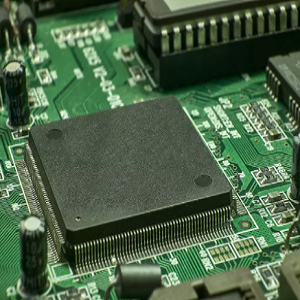
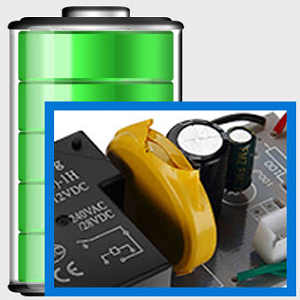
Figure 2: Internal components showing the high-precision chip and rechargeable backup battery.
3. Specifikacije
| Broj modela | Akozonqegcgmk04u-01 |
| Ulazni voltage | 12 V DC/AC |
| Izlazni kapacitet | 25(16)A, 240VAC |
| Potrošnja energije | <1 W |
| Vremenski raspon | 1 minuta do 168 sata |
| Programi | 16 ON/OFF settings (daily/weekly) |
| Vremenska pogreška | <±2 seconds/day |
| Memorija nestanka struje | >12 months (with internal rechargeable battery) |
| Radna temperatura | -20°C do 55°C |
| Metoda instalacije | DIN šina |
| Dimenzije (približno) | 36 mm (Š) x 86 mm (V) x 65 mm (D) |
| Težina (približno) | 120g |
| Prikaz | LCD |

Slika 3: Detaljne dimenzije proizvoda i ključne specifikacije.
4. Sigurnosne informacije
- Uvijek isključite napajanje prije instalacije ili održavanja.
- Instalaciju treba izvršiti kvalificirani električar kako bi se spriječio strujni udar ili oštećenje uređaja.
- Osigurajte unos voltage matches the timer's specifications (12V DC/AC). Connecting to incorrect voltage može oštetiti jedinicu.
- Do not expose the device to excessive moisture or extreme temperatures outside the specified operating range.
- Do not disassemble the timer; refer servicing to qualified personnel.
5. Postavljanje i instalacija
5.1 DIN Rail Installation
The timer is designed for easy installation on a standard 35mm DIN rail. Simply clip the timer onto the rail in your distribution box.

Slika 4: Nprample of the timer installed on a DIN rail within a distribution box.
5.2 Upute za ožičenje
Refer to the wiring diagram below for correct connection. Ensure all connections are secure and comply with local electrical codes.
- Terminali 1 i 2: Power input (12V DC/AC).
- Terminali 3, 4, 5: Output contacts.
- 3: Normalno zatvoreno (NC)
- 4: Uobičajeno (COM)
- 5: Normalno otvoren (NO)

Figure 5: Detailed wiring diagram showing connections for power input and output contacts.

Slika 6: Npramples of wiring methods, including direct load connection and connection via a contactor.
6. Upute za rad
6.1 Initial Setup and Unlocking
- Upon first use, connect the timer to power (12V DC/AC).
- Pritisnite tipku RESETIRANJE button to clear all previous settings and initialize the timer.
- The timer display may be locked. To unlock, press the C/R button four times. The lock icon will disappear from the display. If no operation occurs for 15 seconds, the timer will automatically lock again.
6.2 Postavljanje trenutnog vremena i dana
After unlocking, set the current time and day:
- Pritisnite tipku P button (Program button) once.
- Pritisnite tipku D+ button to set the current day of the week (MO, TU, WE, TH, FR, SA, SU).
- Pritisnite tipku H+ gumb za postavljanje trenutnog sata.
- Pritisnite tipku M+ gumb za postavljanje trenutne minute.
- Pritisnite tipku P button again to exit time setting mode.

Slika 7: Krupni plan view of the timer's control buttons.

Figure 8: Explanation of button functions and display elements, including day, hour, minute, and reset.
6.3 Ručno upravljanje
Pritisnite tipku RUČNI C/R button to cycle through manual control modes:
- NA: Output is continuously ON.
- AUTOMOBIL: Timer operates according to programmed schedules.
- OFF: Output is continuously OFF.
Odaberite AUTO for the timer to follow your programmed settings.
7. Programming ON/OFF Schedules
The timer supports up to 16 ON/OFF programs. Follow these steps to set your desired schedules:
- Pritisnite tipku P gumb za ulazak u način programiranja. Na zaslonu će se prikazati "1 ON".
- Pritisnite D+ za odabir dana/dana za ovaj program. Možete odabrati jedan dan, radnim danima, vikendima ili svim danima.
- Pritisnite H+ to set the ON hour.
- Pritisnite M+ to set the ON minute.
- Pritisnite P ponovno. Na zaslonu će se prikazati "1 ISKLJUČENO".
- Pritisnite D+ to select the day(s) for this OFF program (usually the same as ON, but can be different).
- Pritisnite H+ to set the OFF hour.
- Pritisnite M+ to set the OFF minute.
- Repeat steps 1-8 for additional ON/OFF programs (up to 16). Press P to advance to the next program number.
- Za izlaz iz moda programiranja, pritisnite RUČNI C/R button. Ensure the timer is set to AUTO način rada za izvršavanje programa.
Note: If you need to cancel a program, press the C/R gumb dok viewing the specific ON or OFF program. This will clear the settings for that program.
8. Prijave
The Akozon Digital Programmable Timer is versatile and can be used in various applications, including:
- Controlling lamps and lighting systems (e.g., streetlights, garden lights, neon signs).
- Managing water heaters and preheaters.
- Automating agricultural facilities (e.g., irrigation systems).
- Controlling broadcasting equipment.
- Scheduling household appliances.
- Operating sprayers and bottling equipment.

Slika 9: Npramples of environments where the timer can be used, such as controlling outdoor lighting and industrial equipment.
9. Održavanje
- Održavajte timer čistim i bez prašine. Za čišćenje koristite meku, suhu krpu.
- Nemojte koristiti abrazivna sredstva za čišćenje ili otapala.
- Osigurajte odgovarajuću ventilaciju oko uređaja kako biste spriječili pregrijavanje.
- The internal battery is designed for long-term backup. If the timer consistently loses time or program settings after a power outage, the internal battery may need professional inspection.
10. Rješavanje problema
| Problem | Mogući uzrok | Otopina |
|---|---|---|
| Zaslon je prazan. | No power supply or internal battery depleted. | Check power connections. Allow time for the internal battery to charge (connect to power for several hours). |
| Tajmer ne reagira na pritiske tipki. | Timer is locked. | Pritisnite tipku C/R button four times to unlock. |
| Programi se ne izvršavaju. | Tajmer nije u AUTOMATSKOM načinu rada. Neispravne postavke programa. | Pritisnite RUČNI C/R dok se ne prikaže "AUTO". Ponovnoview i ispravne postavke programa. |
| Vrijeme ili postavke se gube nakon nestanka strujetage. | Internal backup battery is not charging or is depleted. | Ensure the timer is connected to power for sufficient time to charge the internal battery. If the issue persists, contact customer support. |
| Output is always ON or OFF, ignoring programs. | Timer is in manual ON or OFF mode. | Pritisnite RUČNI C/R dok se ne prikaže "AUTO". |
11. Jamstvo i podrška
Akozon products are manufactured to high-quality standards. For warranty information or technical support, please refer to the contact details provided with your purchase or visit the official Akozon webmjesto.
Zadržite svoj dokaz o kupnji za jamstvene zahtjeve.