
LAUNCH LAUNCH CRP919X
LAUNCH X431 CRP919X Korisnički priručnik za automobilski skener
Model: LAUNCH CRP919X
Uvod
The LAUNCH X431 CRP919X is an advanced automotive diagnostic tool designed for comprehensive vehicle system analysis and maintenance. This device offers a wide range of functions, including ECU coding, bi-directional control, and over 35 reset services, making it suitable for both professional technicians and advanced DIY enthusiasts. It supports a vast array of vehicle models from 1996 to 2025, incorporating modern protocols like CAN FD and DoIP, and providing access to FCA SGW.

Što je u kutiji
Upon unboxing your LAUNCH X431 CRP919X, verify that all components are present:
- 2025 LAUNCH ELITE CRP919X OBD2 Scanner x 1
- OBD2 Diagnostic Cable x 1
- DC 5V Charging Cable x 1
- US/UK/EU Plug Adapter x 1
- Multilingual Quick Start Guide x 1

Postavljanje i početna uporaba
- Punjenje uređaja: Connect the DC 5V Charging Cable to the scanner and a power outlet using the provided adapter. Ensure the device is fully charged before first use.
- Uključivanje: Pritisnite i držite gumb za napajanje da biste uključili skener.
- Wi-Fi veza: Navigate to the settings menu and connect the device to a stable Wi-Fi network. This is crucial for software updates and online functions.
- Ažuriranja softvera: After connecting to Wi-Fi, check for and install any available software updates to ensure optimal performance and access to the latest features and vehicle coverage.
- Spajanje s vozilom: Locate the vehicle's OBD2 port (usually under the dashboard). Connect the OBD2 Diagnostic Cable from the scanner to the vehicle's OBD2 port.
Upute za rad
1. Potpuna dijagnostika sustava
The CRP919X provides OE-level full system diagnostics, allowing you to scan all available electronic control units (ECUs) in the vehicle. This includes systems such as Engine, ABS, Airbag, Transmission, TPMS, and more. The tool can read and clear Diagnostic Trouble Codes (DTCs), display live data streams, and access ECU information.
- Automatsko skeniranje VIN broja: This feature automatically identifies the vehicle's VIN (Vehicle Identification Number) for quick and accurate vehicle identification. For older models without Auto VIN capability, manual selection is available.
- Pročitajte kodove: Retrieve current, pending, and permanent diagnostic trouble codes.
- Brisanje kodova: Izbrišite DTC-ove iz memorije vozila nakon što su popravci završeni.
- Prijenos podataka uživo: View real-time data parameters from various sensors and components. The 8-in-1 graphing feature allows for simultaneous display of multiple data streams for detailed analysis.


2. Kodiranje ECU-a
The CRP919X supports advanced ECU coding, a feature typically found in professional OEM scanners. This allows for customization and modification of pre-programmed options within the vehicle's ECUs. Functions include:
- Uncovering Hidden Features: Activate features not enabled at the factory.
- Disabling Unwanted Functions: Turn off features like seatbelt reminder chimes or daytime running lights.
- Coding Retrofitted Components: Integrate new components into the vehicle's system.
- Variant Coding (Offline Programming): Program specific variants or options in ECUs.
- Adaptive Data Resets: Reset learned values for various components.
- Podudaranje komponenti: Match new modules (e.g., ECM, TCM) to the vehicle.
Caution: Always back up the ECU data before performing any coding operations.


3. Dvosmjerno upravljanje (aktivni testovi)
This function allows the scanner to send commands to vehicle ECUs to perform specific tests and verify component functionality. This significantly reduces diagnostic time by pinpointing faulty components without disassembly.
Uobičajeni aktivni testovi uključuju:
- Prilagodljiva glavaamp Podešavanje
- A/C Configuration
- Window Wipers operation
- Doors and Sunroof operation
- Mirrors and Interior Lights control
- Wheel Heating activation
- Horn Assessment
- ABS Pump Motor activation
- Modulating Throttle
- Test zujanja injektora
- Radiator Fan activation


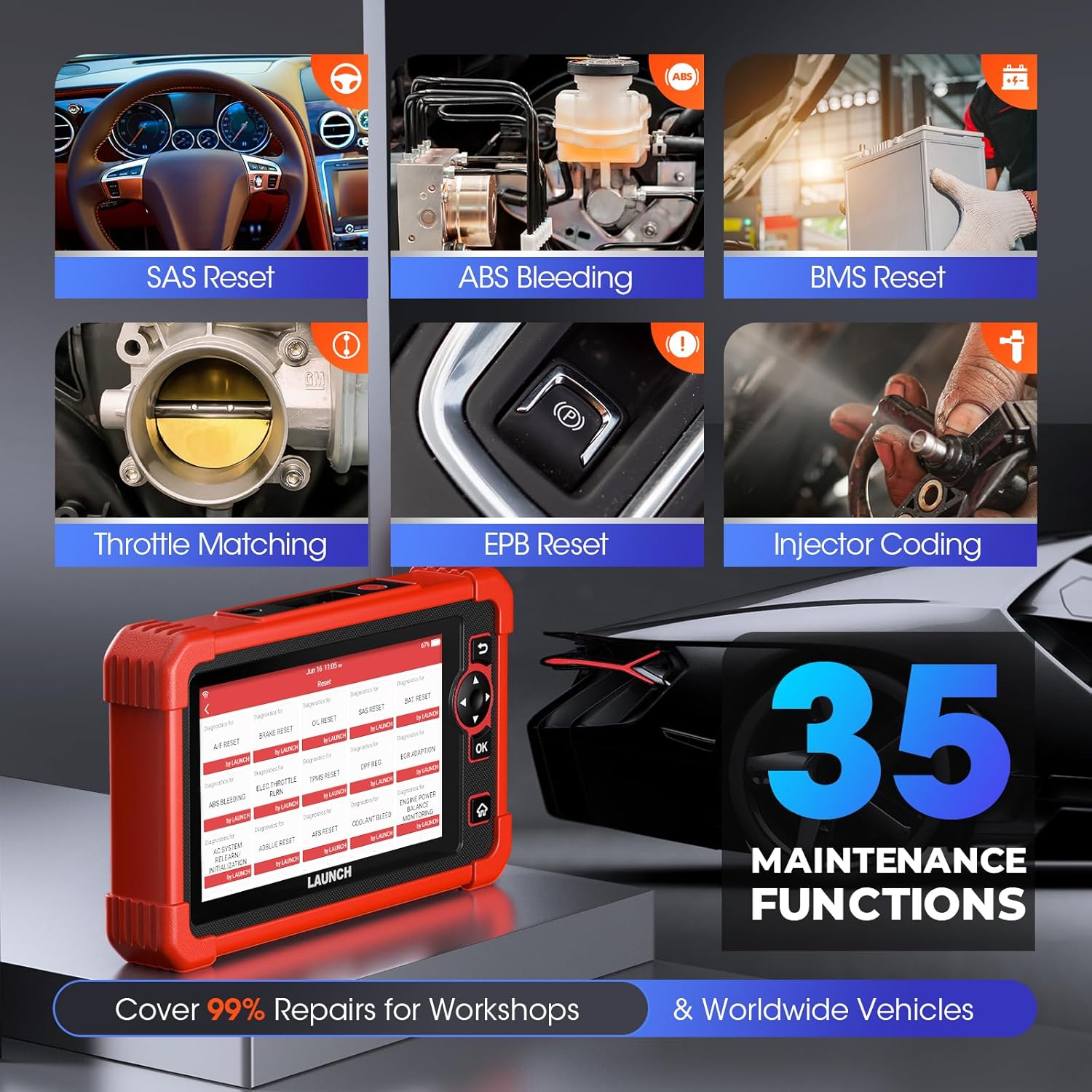
4. Posebne funkcije (35+ usluge resetiranja)
The CRP919X provides access to over 35 commonly used maintenance and reset functions, covering a wide range of vehicle services:
- Resetiranje održavanja ulja
- Kodiranje mlaznica
- Resetiranje EPB-a (elektroničke parkirne kočnice)
- ABS krvarenje
- Kalibracija SAS-a (senzora kuta upravljanja)
- Ponovno naučite gas
- Resetiranje BMS-a (sustava za upravljanje baterijama)
- Regeneracija DPF-a (filtar čestica dizela).
- Popravak zračnih jastuka
- Resetiranje TPMS-a (sustava za nadzor tlaka u gumama)
- Resetiranje zraka/goriva
- Resetiranje AdBluea
- Resetiranje AFS-a (Prilagodljivog sustava prednjih svjetala)
- Resetiranje NOX senzora
- Resetiranje guma
- Način prijevoza
- Kalibracija razine zraka
- Kalibracija sustava Windows
- Kalibracija CCS-a (tempomat)
- Kalibracija zauzetosti sjedala
- Inicijalizacija krovnog otvora
- Inicijalizacija AC-a
- Adaptivno ponovno učenje senzora položaja radilice
- Usklađivanje mjenjača
- Ravnoteža snaga
- Visoka VoltagDetekcija baterije
- Promjena jezika
- Resetiranje FRM-a
- EVAP test
- Standardizacija sjedala
- A/T Code Reset
- Registracija VIN-a (pisanje)
- Resetirajte upravljačku jedinicu
- EGR Adaptation (New)
- GPF (Gas Particular Filter) Regeneration (New)
- Cylinder Power Balance Test (New)

5. Advanced Protocol Support
- CAN FD: Supports GM models from 2019 and later, eliminating the need for separate CAN FD adapters and offering 6X faster data transfer rates.
- DoIP: Integrates with BMW (F&G chassis), Volvo (2018+), Land Rover, and Jaguar (2017+) models, enabling higher data rates via UDS over TCP/IP and Ethernet.
- FCA AutoAuth SGW: Provides access to FCA vehicles (Chrysler, Jeep, Dodge, Fiat, etc.) produced after 2017 for code clearance, bi-directional control, and special functions. Note: An AutoAuth account must be procured independently.

6. Prošireni moduli (opcionalno)
The CRP919X can be expanded with optional modules for enhanced diagnostic capabilities:
- Tester baterija (BST360): For efficient battery and electrical system health assessments.
- TPMS (X431 TSGUN): For sensor activation, programming, and relearning.
Note: These add-on tools (BST360/X431 TSGUN) are available for separate purchase.
7. Diagnostic Report Sharing & Printing
Upon completion of a scan, the CRP919X generates a comprehensive diagnostic report in PDF format. This report can be easily shared via email or printed, facilitating communication between mechanics and clients.

Održavanje
- Ažuriranja softvera: Regularly connect the device to Wi-Fi and check for software updates. These updates provide new features, expanded vehicle coverage, and performance improvements.
- Čišćenje: Koristite meku, damp krpu za čišćenje uređaja. Izbjegavajte abrazivna sredstva za čišćenje ili otapala.
- Skladištenje: Store the scanner in a cool, dry place, away from direct sunlight and extreme temperatures.
- Njega baterije: Za optimalan vijek trajanja baterije, izbjegavajte često potpuno pražnjenje baterije. Redovito punite uređaj, posebno ako će se skladištiti dulje vrijeme.
Rješavanje problema
This section addresses common issues you might encounter with your LAUNCH X431 CRP919X.
| Problem | Mogući uzrok | Otopina |
|---|---|---|
| Uređaj se ne uključuje. | Slaba baterija; Tipka za napajanje nije dovoljno dugo držana; Kvar uređaja. | Charge the device for at least 30 minutes. Press and hold the power button for 3-5 seconds. If issue persists, contact customer support. |
| Nije moguće povezivanje s vozilom. | OBD2 cable not securely connected; Vehicle ignition off; Vehicle not supported; Faulty OBD2 port. | Ensure cable is firmly connected. Turn vehicle ignition to ON position (engine off). Verify vehicle compatibility. Test with another vehicle if possible. |
| Ažuriranje softvera ne uspijeva. | Unstable Wi-Fi connection; Insufficient storage; Server issues. | Ensure strong Wi-Fi signal. Clear some data/apps if storage is low. Try updating again later. |
| Specific function not working (e.g., ECU Coding). | Vehicle not supported for that function; Software not updated; Incorrect procedure. | Verify vehicle compatibility for the specific function. Ensure software is up to date. Refer to the on-screen instructions or contact support for detailed procedures. |
For issues not listed here or if solutions do not resolve the problem, please refer to the support section.
Tehnički podaci
| Značajka | Detalj |
|---|---|
| Marka | POKRETANJE |
| Model | LAUNCH CRP919X |
| Operativni sustav | Android 10.0 |
| Razlučivost zaslona | 1024x600 |
| Težina artikla | 6.27 funti |
| Dimenzije proizvoda | 12.8 x 11.14 x 5.31 inča |
| Kapacitet baterije | 6100mAh (approx. 12 hours continuous operation) |
| OVAN | 4 GB |
| ROM | 64 GB |
| Povezivost | Dual 2.4G & 5GHz WiFi, 5G WiFi communication |
| Podržani protokoli | CAN FD, DoIP, OBD2 (all 10 modes) |
| Pokrivenost vozila | 150+ brands, 100,000+ models (1996-2025) |
Jamstvo i podrška
LAUNCH je posvećen pružanju visokokvalitetnih proizvoda i izvrsne korisničke usluge.
- Besplatna ažuriranja: Benefit from 2 years of free software updates from the date of purchase (since September 2022).
- Quality Undertaking: The product comes with a 5-Year Quality Undertaking.
- Povrat i zamjena: A 60-Day Return & Replacement policy is available.
- Post-sale Service: 24/7 post-sale service is provided.
- Povratne informacije na mreži: You can submit diagnostic queries online to LAUNCH for expert analysis and troubleshooting.
- Daljinska pomoć: The device supports remote assistance via TeamViewer for swift issue resolution.
For further assistance, please refer to the official LAUNCH support channels or the contact information provided in your quick start guide.
Povezani dokumentiLAUNCH CRP919X


Ask a question about this manual
Ask about setup, troubleshooting, compatibility, parts, safety, or missing instructions. Manuals+ will review the question and use this page’s manual context to help answer it.