
1. Uvod
Thank you for choosing the Logic Life30 Smartwatch. This device is designed to integrate seamlessly into your active lifestyle, offering features such as Bluetooth calling, fitness tracking, sleep monitoring, and real-time notifications. This manual provides detailed instructions for setup, operation, and maintenance to ensure optimal performance and longevity of your smartwatch.

Image 1.1: Logic Life30 Smartwatches in multiple colors, showcasing different display options including a dialer, messages, contacts, time, date, and heart rate monitor.
2. Sigurnosne informacije
- Ne pokušavajte rastavljati, popravljati ili modificirati uređaj. To može poništiti jamstvo i uzrokovati štetu.
- Uređaj držite dalje od ekstremnih temperatura, izravne sunčeve svjetlosti i visoke vlažnosti.
- Izbjegavajte izlaganje uređaja jakim udarcima ili padovima.
- Use only the provided charging cable and adapter. Using unauthorized accessories may cause damage or fire.
- Consult a medical professional before starting any new exercise regimen, especially if you have pre-existing health conditions. The heart rate monitor is for reference only and should not be used for medical diagnosis.
- Držite uređaj izvan dohvata djece i kućnih ljubimaca.
- Uređaj čistite mekom, suhom krpom. Nemojte koristiti jake kemikalije ili abrazivne materijale.
3. Sadržaj paketa
Molimo provjerite sadržaj paketa nakon raspakiranja. Ako bilo koji predmet nedostaje ili je oštećen, obratite se korisničkoj podršci.
- Logic Life30 Smartwatch
- USB kabel za punjenje
- Korisnički priručnik (ovaj dokument)
4. Uređaj prekoview
Familiarize yourself with the physical components of your Logic Life30 Smartwatch.
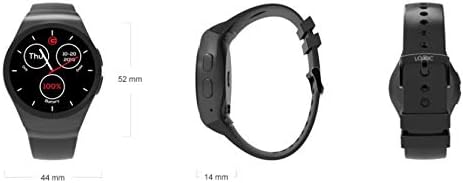
Slika 4.1: Prednja, bočna i stražnja strana views of the Logic Life30 Smartwatch with dimensions (44mm width, 52mm height, 14mm thickness).
4.1 Prednja strana View
- IPS LCD Touch Display: The main interface for interacting with the smartwatch.
4.2 strana View
- Gumb za napajanje: Koristi se za uključivanje/isključivanje uređaja i buđenje/spavanje zaslona.
- Mikrofon: Za glasovne naredbe i pozive.
4.3 Natrag View

Slika 4.2: straga view of the Logic Life30 Smartwatch, highlighting the optical heart rate sensor and magnetic charging contacts.
- Senzor otkucaja srca: Prati vaš otkucaj srca.
- Kontakti za punjenje: For connecting the magnetic USB charging cable.
- Zvučnik: For audio output during calls or media playback.
5. Postavljanje
5.1 Punjenje pametnog sata
- Connect the USB charging cable to a power adapter (not included) or a computer's USB port.
- Align the magnetic end of the charging cable with the charging contacts on the back of the smartwatch. It will snap into place.
- The watch display will show a charging indicator. Allow the device to fully charge before first use (approximately 2 hours).
5.2 Uključivanje/isključivanje
- Za uključivanje: Press and hold the Power Button on the side of the watch until the Logic logo appears.
- Za isključivanje: Press and hold the Power Button, then select "Power Off" on the screen.
5.3 Uparivanje s vašim pametnim telefonom (Bluetooth)
To access all features, including calls, notifications, and data synchronization, pair your Life30 Smartwatch with your smartphone via Bluetooth.
- Ensure your smartwatch is powered on and Bluetooth is enabled on your smartphone.
- On your smartwatch, navigate to the Bluetooth settings.
- On your smartphone, open Bluetooth settings and search for available devices.
- Select "Logic Life30" (or similar name) from the list of found devices on your smartphone.
- Potvrdite zahtjev za uparivanje i na pametnom telefonu i na pametnom satu.
5.4 Companion App Installation
For full functionality, including fitness data tracking and advanced settings, download the recommended companion app from your smartphone's app store. Refer to the smartwatch's display or packaging for the specific app name or QR code.
- Scan the QR code displayed on the smartwatch or in the quick start guide, or search for the app name in your phone's app store.
- Install the app and follow the on-screen instructions to create an account and connect your Life30 Smartwatch.
6. Upute za rad
6.1 Navigacija sučeljem
- Povucite gore/dolje: Pomičite se kroz izbornike ili obavijesti.
- Povucite lijevo/desno: Access different screens, widgets, or app lists.
- Dodirnite: Odaberite stavku ili otvorite aplikaciju.
- Pritisnite tipku za napajanje: Povratak na početni zaslon ili buđenje/spavanje zaslona.
6.2 Komunikacijske značajke
- Upućivanje/primanje poziva: Once paired via Bluetooth, you can dial numbers directly from the watch or answer incoming calls.
- Slanje poruka: View incoming text messages and social media notifications directly on your watch.
- Kontakti: Access your phone's contact list from the smartwatch.
6.3 Praćenje zdravlja i kondicije

Image 6.1: The Logic Life30 Smartwatch supports fitness tracking, monitoring activities like running.
- Monitor otkucaja srca: Access the heart rate app to measure your current heart rate. The watch can also log your heart rate over time.
- Pedometar: Tracks your steps, distance, and estimated calories burned throughout the day.
- Monitor spavanja: Prati vaše obrasce spavanja, uključujući duboki san, lagani san i vrijeme buđenja.
- Podsjetnik za sjedenje: Notifies you when you have been inactive for too long, encouraging you to move.
6.4 Multimedia and Other Features
- Camera/Remote Camera: Use the built-in camera (if available) or control your smartphone's camera remotely from the smartwatch.
- MP3/MP4 Player: Play music or videos stored on the device or control media playback on your connected smartphone.
- Snimač zvuka: Record audio directly from the smartwatch.
- Calculator, Calendar, Alarm, Stopwatch: Standardne uslužne aplikacije.
- Zaštita od krađe: Helps locate your phone if it's out of range or alerts you if the connection is lost.
- Glasovni asistent: Access your phone's voice assistant through the smartwatch.
NIKADA Prilagodba
- Lica za gledanje: Personalize your smartwatch by choosing from various pre-installed watch faces or downloading new ones via the companion app.
- Teme: Adjust the overall visual theme of the smartwatch interface.
7. Održavanje
7.1 Čišćenje pametnog sata
- Wipe the screen and body of the watch with a soft, lint-free cloth.
- Za tvrdokorne mrlje, malo dampen the cloth with water. Avoid using harsh cleaning agents, solvents, or abrasive materials.
- Prije punjenja provjerite jesu li kontakti za punjenje čisti i suhi kako biste spriječili koroziju.
7.2 Skladištenje
- When not in use for extended periods, store the smartwatch in a cool, dry place.
- Charge the device periodically (e.g., every 3 months) to prevent deep discharge of the battery.
8. Rješavanje problema
| Problem | Moguće rješenje |
|---|---|
| Pametni sat se neće uključiti. | Provjerite je li uređaj potpuno napunjen. Spojite ga na punjač na najmanje 30 minuta. |
| Nije moguće upariti sa pametnim telefonom. |
|
| Obavijesti se ne primaju. |
|
| Očitavanja otkucaja srca su netočna. | Pazite da sat čvrsto prianja uz zapešće, ne prečvrsto ili prelabavo. Očistite senzor na stražnjoj strani sata. |
| Zaslon ne reagira. | Restart the smartwatch by pressing and holding the power button. If the issue persists, ensure the screen is clean and dry. |
9. Specifikacije
| Značajka | Detalj |
|---|---|
| Naziv modela | Život30 |
| Marka | Logika |
| Prikaz | 1.3 Inch IPS LCD Touch Screen |
| Povezivost | Bluetooth |
| Bežična komunikacija | Bluetooth |
| Posebne značajke | Email, Sleep Monitor, Notifications, Heart Rate Monitor, Pedometer, Remote Camera, MP3/MP4 Player |
| Unos ljudskog sučelja | Zaslon osjetljiv na dodir |
| Dimenzije proizvoda | 3.81 x 1.3 x 4.5 cm (1.5 x 0.51 x 1.77 inča) |
| Težina artikla | 426 g (0.94 funte) |
| Mogućnosti boja | Silver/White (other colors may be available) |
| Oblik | Krug |
10. Jamstvo i podrška
10.1 Informacije o jamstvu
The Logic Life30 Smartwatch comes with a standard manufacturer's warranty. Please refer to the warranty card included in your package or visit the official Logic webza detaljne uvjete i odredbe u vezi s jamstvenim pokrićem, trajanjem i postupkom podnošenja zahtjeva.
10.2 Korisnička podrška
For technical assistance, troubleshooting, or any questions regarding your Logic Life30 Smartwatch, please contact Logic customer support. Contact information can typically be found on the official Logic webmjestu ili na pakiranju proizvoda.
- Mrežna podrška: Visit the official Logic webstranica za često postavljana pitanja, članke podrške i obrasce za kontakt.
- Podrška e-poštom: Adresu e-pošte korisničke podrške potražite u dokumentaciji proizvoda.
- Telefonska podrška: Brojeve telefona korisničke službe potražite u dokumentaciji proizvoda.