
Easytry123 Easytry2094
Easytry123 Replacement Remote Control User Manual
For Samsung HW-J450/ZA, PS-WJ651, PS-WJ470/ZA, HW-J6502, HW-J650 Audio Soundbar Systems
1. Uvod
This manual provides instructions for the Easytry123 replacement remote control, designed for use with various Samsung audio soundbar systems. This remote control offers basic functionality for compatible models. Please note that as a replacement unit, it may not support all advanced functions of the original remote control.
Kompatibilni modeli:
- Samsung HW-J450/ZA
- Samsung PS-WJ651
- Samsung PS-WJ651/ZA
- Samsung PS-WJ470/ZA
- Samsung HW-J6502
- Samsung HW-J650
2. Postavljanje
2.1 Ugradnja baterije
The remote control requires batteries for operation. Batteries are not included with the remote control and must be purchased separately. This remote typically uses standard Lithium batteries.
- Pronađite odjeljak za baterije na stražnjoj strani daljinskog upravljača.
- Remove the battery compartment cover by sliding or gently prying it open.
- Insert the new batteries, ensuring the correct polarity (+ and -) as indicated inside the compartment.
- Vratite poklopac odjeljka za baterije dok ne klikne sigurno na svoje mjesto.

Figure 1: Remote control with battery compartment open.
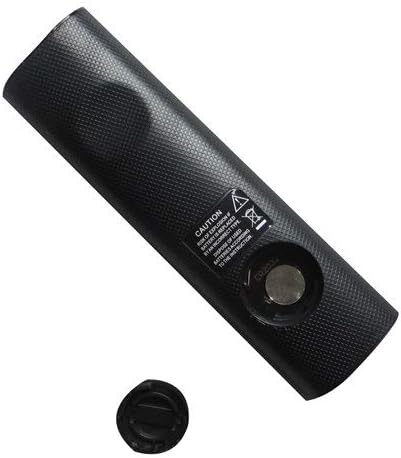
Figure 2: Remote control showing the battery cap detached.
2.2 Početna upotreba
This remote control utilizes infrared (IR) technology. No complex pairing or programming is typically required. Once batteries are installed, point the remote directly at your Samsung soundbar system and begin operation.
3. Upute za rad
The remote control features 15 buttons for various functions. While specific button labels may vary, common functions include:
- Vlast: Uključuje ili isključuje soundbar sustav.
- Pojačavanje/stišavanje glasnoće: Podešava razinu audio izlaza.
- Isključi zvuk: Utišava audio izlaz.
- Ulaz/izvor: Cycles through available audio input sources (e.g., HDMI, Optical, Bluetooth).
- Navigacijski gumbi: Used for menu navigation (if supported by the soundbar and remote).
- Kontrole reprodukcije: Play, Pause, Skip (if controlling a connected media device).
For optimal performance, ensure a clear line of sight between the remote control and the soundbar's IR receiver. The maximum effective range is approximately 10 meters (33 feet).
4. Održavanje
4.1 Zamjena baterije
Replace batteries when the remote control's response becomes inconsistent or stops working. Always replace all batteries at the same time with new ones of the same type. Do not mix old and new batteries, or different types of batteries.
4.2 Čišćenje
To clean the remote control, wipe it with a soft, dry cloth. Do not use liquid cleaners, abrasive pads, or chemical solvents, as these can damage the remote's surface or internal components.
4.3 Skladištenje
Daljinski upravljač čuvajte na hladnom i suhom mjestu, dalje od izravne sunčeve svjetlosti i ekstremnih temperatura. Ako se daljinski upravljač neće koristiti dulje vrijeme, preporučuje se uklanjanje baterija kako biste spriječili curenje.
5. Rješavanje problema
- Daljinski ne reagira:
- Provjerite jesu li baterije ispravno umetnute uz pravilan polaritet.
- Zamijenite baterije novima.
- Ensure there is a clear line of sight between the remote and the soundbar's IR receiver. Remove any obstructions.
- Provjerite jeste li unutar učinkovitog radnog dometa (otprilike 10 metara).
- Some functions do not work:
- As a replacement remote, it may not support all advanced or specific functions of the original equipment. This is normal for universal or replacement remotes.
- Verify that your soundbar model is listed as compatible in the Introduction section.
6. Specifikacije
| Značajka | Specifikacija |
|---|---|
| Marka | Easytry123 |
| Naziv modela | Easytry2094 |
| Tehnologija povezivanja | Infracrveni (IC) |
| Količina gumba | 15 |
| Vrsta kontrolera | Kontrola gumba |
| Maksimalni domet | 10 metara |
| Vrsta baterije | Lithium (not included) |
| Boja | Crna |
| Kompatibilni uređaji | Samsung Audio Soundbar Systems (specific models listed) |
7. Jamstvo i podrška
For warranty information and customer support, please refer to the seller or retailer from whom you purchased this product. Specific warranty terms and support channels are typically provided at the point of sale.
Ask a question about this manual
Ask about setup, troubleshooting, compatibility, parts, safety, or missing instructions. Manuals+ will review the question and use this page’s manual context to help answer it.