
1. Uvod
Thank you for choosing the Easytry123 Replacement Remote Control. This remote is designed to provide convenient control for various Goodman AC Air Conditioner models. It is an infrared, button-controlled device, engineered for ease of use.
Compatible Goodman AC Models include: WMC-24-1-KFAA, WMH241, WMH181A, HDP181A, HG31ES, WMH121, HG31AS, WMH241A.
Important Note: As a replacement unit, this remote control may not support all functions of your original air conditioner remote. Please verify compatibility with your specific AC model before use.
2. Postavljanje: Ugradnja baterije
Your Easytry123 Replacement Remote Control requires two (2) AAA batteries (not included) for operation. Follow these steps to install the batteries:
- Pronađite odjeljak za baterije na stražnjoj strani daljinskog upravljača.
- Press down on the tab and slide the battery compartment cover downwards to open it.
- Umetnite dvije AAA baterije, pazeći da pozitivni (+) i negativni (-) terminali budu ispravno poravnati s oznakama unutar odjeljka.
- Vratite poklopac odjeljka za baterije na mjesto dok ne klikne sigurno.
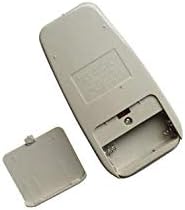
Figure 1: Back of the remote control with the battery cover removed, illustrating the battery compartment for AAA batteries.
After installing the batteries, the remote control is ready for use.
3. Upute za rad
To operate your Goodman AC Air Conditioner using the Easytry123 Replacement Remote Control, follow these general guidelines:
- Point the Remote: Ensure the remote control is pointed directly at the infrared receiver on your Goodman AC unit. Obstructions between the remote and the AC unit can prevent proper communication.
- Uključivanje/isključivanje: Pritisnite tipku VLAST gumb za uključivanje ili isključivanje klima uređaja.
- Podesite temperaturu: Koristite POVEĆANJE TEMPERATURE (▲) i TEMP DOLJE (▼) buttons to set your desired temperature.
- Odaberite način rada: Pritisnite tipku NAČIN RADA button to cycle through available operating modes such as Cool, Fan, Dry, or Heat (if supported by your AC unit).
- Brzina ventilatora: Koristite BRZINA VENTILATORA button to adjust the fan's intensity (e.g., Low, Medium, High, Auto).
- Funkcije mjerača vremena: If your AC unit and this replacement remote support timer functions, refer to your AC unit's original manual for specific timer settings.
Familiarize yourself with the buttons on the remote and their corresponding functions. Due to the nature of replacement remotes, some advanced features present on your original remote may not be available or function identically.
4. Održavanje
Pravilna njega i održavanje produžit će vijek trajanja vašeg daljinskog upravljača:
- Čišćenje: Obrišite daljinski upravljač mekom, suhom krpom. Nemojte koristiti tekuća sredstva za čišćenje, abrazivne spužve ili kemijska otapala jer mogu oštetiti površinu ili unutarnje komponente.
- Zamjena baterije: Replace batteries promptly when the remote's range decreases or it stops responding. Always replace both batteries at the same time with new AAA batteries. Do not mix old and new batteries, or different types of batteries.
- Skladištenje: Ako se daljinski upravljač neće koristiti dulje vrijeme, izvadite baterije kako biste spriječili curenje i moguća oštećenja. Daljinski upravljač čuvajte na hladnom i suhom mjestu, dalje od izravne sunčeve svjetlosti i ekstremnih temperatura.
- Izbjegavajte kapi: Protect the remote from physical impact. Dropping the remote can damage its internal circuitry.
5. Rješavanje problema
If you encounter issues with your Easytry123 Replacement Remote Control, please refer to the following troubleshooting steps:
- Daljinski ne reagira:
- Provjerite baterije. Pazite da su ispravno umetnute s ispravnim polaritetom (+/-).
- Zamijenite baterije novim AAA baterijama.
- Ensure there are no obstructions between the remote control and the AC unit's infrared receiver.
- Confirm you are within the effective operating range of the AC unit (typically within 20 feet and direct line of sight).
- Određene funkcije ne rade:
- As a replacement remote, some specific or advanced functions of your original AC remote may not be supported. This is normal for universal or replacement remotes.
- Verify that your AC unit model is listed as compatible in the introduction section of this manual.
- AC Unit Not Responding to Any Remote:
- Ensure the AC unit itself is powered on and receiving electricity.
- Consult your Goodman AC unit's original user manual for troubleshooting steps related to the AC unit's receiver.
6. Specifikacije
| Marka | Easytry123 |
| Broj modela | Easytry3659 |
| Kompatibilni uređaji | Goodman AC Air Conditioners (specific models listed in Introduction) |
| Tehnologija povezivanja | Infracrveni |
| Vrsta kontrolera | Kontrola gumba |
| Vrsta baterije | 2 x AAA baterije (nisu uključene) |
| Posebna značajka | Ergonomski dizajn |
7. Jamstvo i podrška
For any questions, concerns, or support regarding your Easytry123 Replacement Remote Control, please contact the seller directly through the platform where you made your purchase.
Please note that the product typically comes with a return policy of 30 days from the date of purchase. Refer to your purchase details for specific return and warranty information.