
Uvod
This manual provides instructions for the ALLIMITY AA59-00741A and AA59-00742A replacement remote control. This remote is designed to function as a direct replacement for various Samsung TV models, offering immediate usability without complex setup procedures. Please read this manual thoroughly to understand the remote's features and operation.
Proizvod gotovview
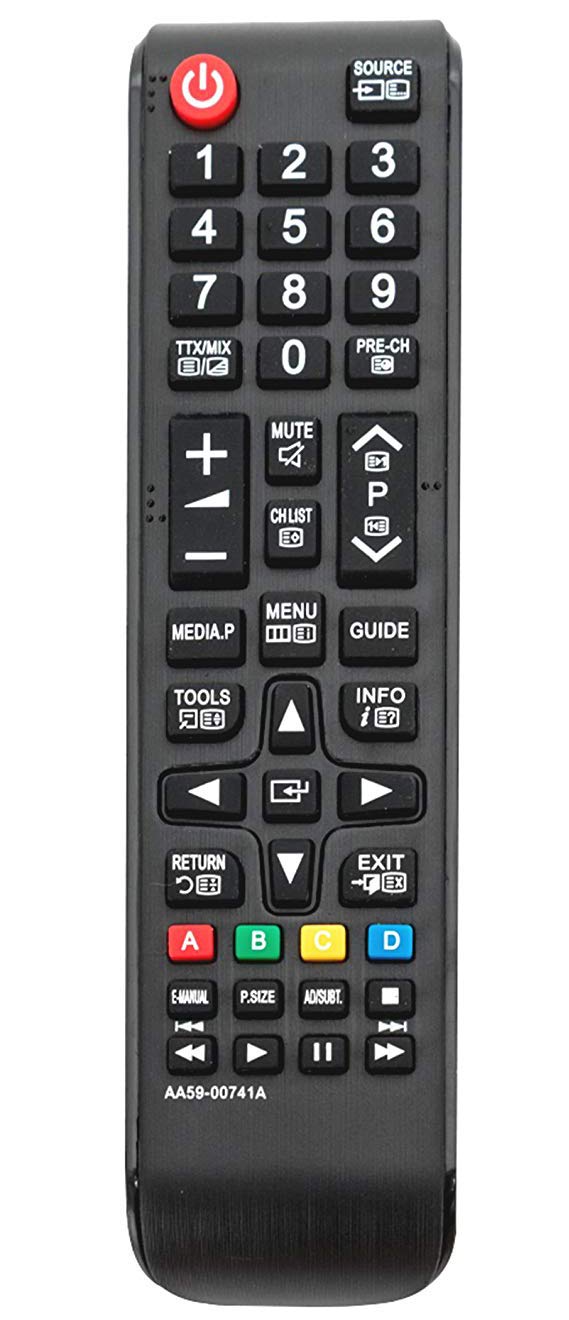
Slika 1: Ispred view of the ALLIMITY AA59-00741A / AA59-00742A replacement remote control. The remote is black with clearly labeled buttons for power, source, numerical input, volume, channel, menu, navigation, and media playback functions.
The ALLIMITY AA59-00741A / AA59-00742A remote control features a standard layout for ease of use. Key functional areas include:
- Gumb za napajanje (crveni, gore lijevo): Uključuje ili isključuje TV.
- Source Button (Top Right): Odabire ulazne izvore (HDMI, AV, itd.).
- Numerička tipkovnica (0-9): Za izravni ulaz kanala.
- Pojačavanje/stišavanje glasnoće (+/-): Podešava glasnoću zvuka.
- Kanal gore/dolje (P^/P˅): Mijenja TV kanale.
- Gumb za isključivanje zvuka: Utišava zvuk televizora.
- Gumb izbornika: Pristup glavnom izborniku televizora.
- Smjerne tipke (gore, dolje, lijevo, desno, Enter): For navigating menus and selections.
- Gumb za povratak: Povratak na prethodni zaslon ili izbornik.
- Gumb za izlaz: Izlazi iz trenutnog izbornika ili funkcije.
- Kontrole reprodukcije medija: Reproduciraj, Pauziraj, Zaustavi, Premotaj naprijed, Premotaj unatrag.
- Gumbi u boji (A, B, C, D): For specific functions within certain TV applications or menus.
Postavljanje
- Ugradnja baterije:
Locate the battery compartment on the back of the remote control. Slide the battery cover downwards or outwards to open it.
Umetnite dvije (2) AAA alkalne baterije, pazeći da pozitivni (+) i negativni (-) terminali budu ispravno poravnati s oznakama unutar odjeljka.
Zatvorite poklopac baterije tako da ga gurnete natrag na mjesto dok ne klikne sigurno.
- Početna uporaba:
This remote control is designed to work with compatible Samsung TV models without any programming or pairing. Once batteries are installed, it is ready for immediate use.
Upute za rad
Point the remote control directly at your Samsung TV's infrared receiver for optimal performance. Ensure there are no obstructions between the remote and the TV.
- Uključivanje/isključivanje: Pritisnite tipku Vlast gumb jednom.
- Promjena kanala: Koristite P^ (Channel Up) or P˅ (Channel Down) buttons. Alternatively, use the numeric keypad to enter a channel number directly.
- Podešavanje glasnoće: Pritisnite tipku + (Volume Up) or - (Volume Down) buttons.
- Isključivanje zvuka: Pritisnite tipku Isključi zvuk button to temporarily silence the TV. Press again to restore audio.
- Odabir izvora unosa: Pritisnite tipku Izvor gumb za kretanje kroz dostupne ulazne izvore (npr. HDMI1, HDMI2, AV).
- Pristup izbornicima: Pritisnite tipku Jelovnik button to open the TV's main menu. Use the directional pad and Uđi gumb za navigaciju i odabir opcija.
- Reprodukcija medija: Use the dedicated media control buttons (Play, Pause, Stop, Rewind, Fast Forward) when watching content from a connected media device or USB.
Održavanje
- Zamjena baterije: Replace batteries when the remote's response becomes sluggish or stops working. Always replace both batteries with new AAA alkaline batteries.
- Čišćenje: Obrišite daljinski upravljač mekom, suhom krpom. Nemojte koristiti tekuća sredstva za čišćenje ili abrazivne materijale jer mogu oštetiti daljinski upravljač.
- Skladištenje: Daljinski upravljač čuvajte na hladnom i suhom mjestu, dalje od izravne sunčeve svjetlosti i ekstremnih temperatura. Ako se ne koristi dulje vrijeme, izvadite baterije kako biste spriječili curenje.
Rješavanje problema
- Daljinski ne reagira:
Provjerite jesu li baterije ispravno umetnute s ispravnim polaritetom.
Zamijenite stare baterije novim AAA alkalnim baterijama.
Ensure there is a clear line of sight between the remote control and the TV's infrared sensor.
Verify that the remote control model (AA59-00741A / AA59-00742A) is compatible with your specific Samsung TV model.
- Povremeni rad: To često ukazuje na slabu bateriju. Zamijenite baterije.
- Određeni gumbi ne rade: Check for any physical obstructions or debris under the button. If the issue persists after cleaning and battery replacement, the remote may require replacement.
Tehnički podaci
| Značajka | Detalj |
|---|---|
| Marka | SVEVEČINSTVO |
| Brojevi modela | AA59-00741A, AA59-00742A |
| Tehnologija povezivanja | Infracrveni (IC) |
| Kompatibilni uređaji | Various Samsung TV models (refer to product description for full list) |
| Posebna značajka | Nije potrebno programiranje |
| Vrsta baterije | 2 x AAA alkalne baterije (nisu uključene) |
| Maksimalni domet | Otprilike 10 metara (33 stope) |
| Količina gumba | 20 |
Jamstvo i podrška
For warranty information or technical support, please refer to the seller's policy on the purchase platform or contact the manufacturer directly. Keep your purchase receipt as proof of purchase.