
1. Važne sigurnosne upute
To reduce the risk of fire, electric shock, or injury, always follow these basic safety precautions when using your Arctic-Pro Portable Digital Ice Maker Machine:
- Pročitajte sve upute prije uporabe.
- Ne dodirujte vruće površine. Koristite ručke ili gumbe.
- To protect against electrical hazards, do not immerse cord, plug, or any part of the appliance in water or other liquids.
- Neophodan je strogi nadzor kada bilo koji uređaj koriste djeca ili u blizini djece.
- Isključite utikač iz utičnice kada nije u upotrebi i prije čišćenja. Ostavite da se ohladi prije stavljanja ili skidanja dijelova i prije čišćenja uređaja.
- Ne koristite uređaj s oštećenim kabelom ili utikačem, ili nakon što uređaj ne radi ispravno ili je na bilo koji način oštećen. Za pregled, popravak ili podešavanje obratite se službi za korisnike.
- Korištenje dodataka koje nije preporučio proizvođač uređaja može uzrokovati opasnosti.
- Ne koristiti na otvorenom.
- Nemojte dopustiti da kabel visi preko ruba stola ili pulta ili da dodiruje vruće površine.
- Ne stavljajte na ili blizu vrućeg plinskog ili električnog plamenika ili u zagrijanu pećnicu.
- Uvijek prvo priključite utikač na uređaj, a zatim uključite kabel u zidnu utičnicu. Za isključivanje, isključite bilo koju kontrolu, a zatim izvucite utikač iz zidne utičnice.
- Nemojte koristiti uređaj za druge svrhe osim za namjeravanu upotrebu u kućanstvu.
- Ovaj uređaj je samo za upotrebu u kućanstvu.
- U ovom aparatu nemojte koristiti korozivne kemikalije ili pare.
- This ice maker must be grounded.
- Ne bušite cijevi rashladnog sredstva.
2. Proizvod je gotovview
The Arctic-Pro Portable Digital Ice Maker Machine is designed to produce ice quickly and efficiently. It features a compact design suitable for various settings.
2.1 Komponente
- Jedinica za led
- Uklonjiva košara za led
- Ledena čašica
- Power Cord (3-prong plug)
2.2 Značajke
- Digitalni zaslon: An easy-to-read LCD control panel for selecting ice size, setting timers, and controlling cleaning functions.
- Jasan View Window Lid: Omogućuje promatranje procesa proizvodnje leda.
- Fill Sensor: Detects water level to ensure proper operation.
- Inteligentni senzori: Prevents the ice basket from overfilling.
- Two Ice Cube Sizes: Choose between small (0.75 x 0.75 inches) and large (1 x 0.75 inches) ice cubes.
- Proizvodnja brzog leda: Produces first batch of ice in 6-8 minutes.
- Dnevni kapacitet: Capable of producing up to 26 pounds of ice per day.
- Enhanced Cooling System: Features a fan for efficient heat dissipation.

Figure 1: Key features and components of the ice maker.
Slika 2: Mogućnosti proizvodnje leda.
3. Upute za postavljanje
3.1 Raspakiranje
- Uklonite sav materijal za pakiranje iz jedinice.
- Pregledajte ledomat ima li oštećenja. Ako je oštećen, nemojte ga koristiti i obratite se službi za korisnike.
- Izvadite košaru za led i žlicu za led iz uređaja.
3.2 Početno čišćenje
Prije prve upotrebe očistite unutrašnjost aparata za led:
- Operite košaru za led i žlicu za led toplom vodom i blagim deterdžentom. Temeljito isperite.
- Očistite unutrašnjost ledomata mekom krpom dampened with warm water and a small amount of vinegar or mild detergent. Rinse with clean water and drain.
- Provjerite jesu li svi dijelovi suhi prije ponovnog sastavljanja.
3.3 Postavljanje
- Place the ice maker on a stable, level surface away from direct sunlight and heat sources.
- Ensure there is adequate ventilation around the unit, especially at the back and sides where the cooling fan is located.
- Ostavite najmanje 4 inča prostora oko jedinice za pravilnu cirkulaciju zraka.
3.4 Priključak za napajanje
- Plug the 3-prong power cord into a grounded electrical outlet (115V, 60Hz).
- Allow the unit to rest for at least one hour before adding water and operating, especially if it was tilted during transport.
4. Upute za rad
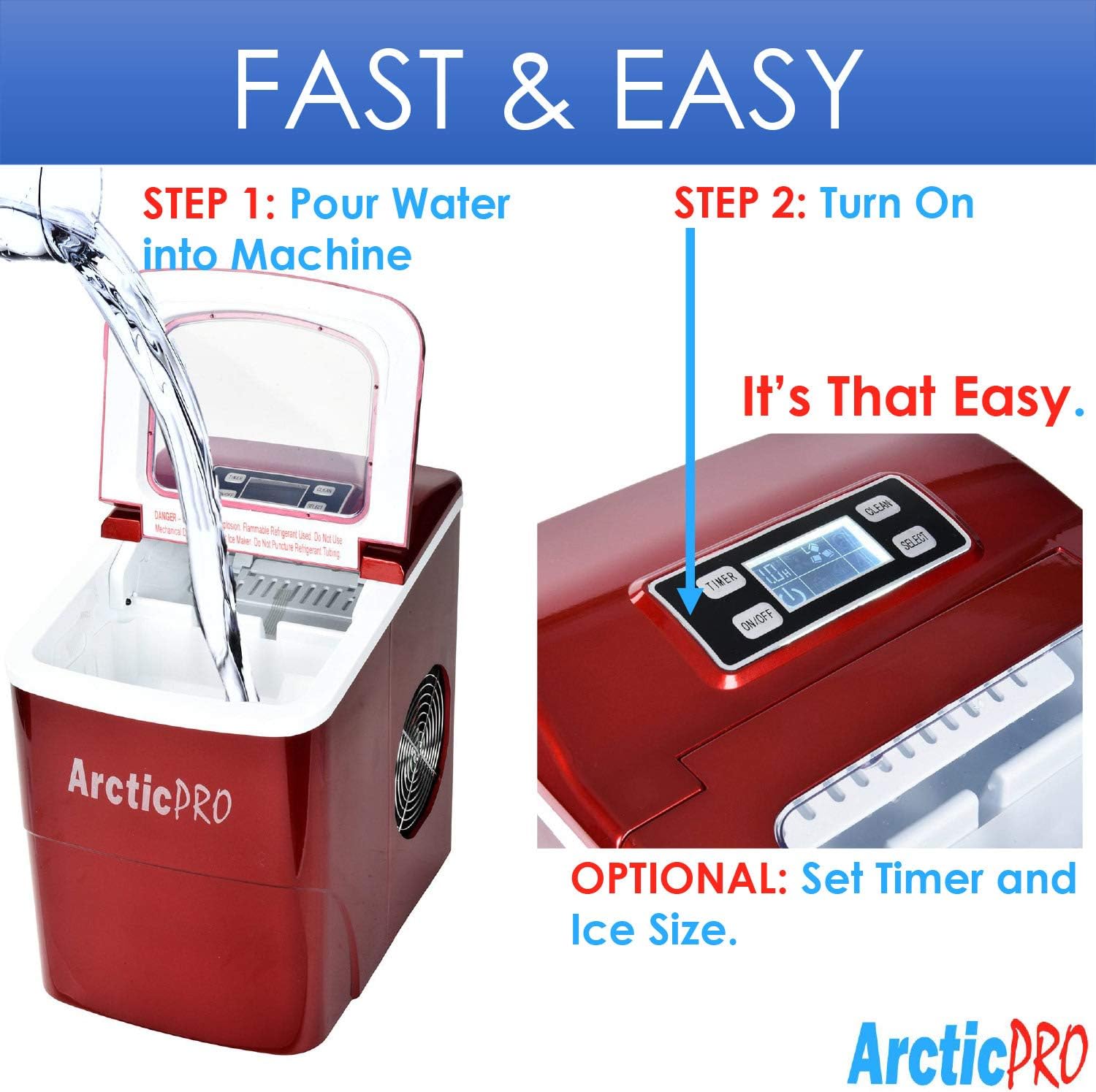
Operating your Arctic-Pro ice maker is a simple two-step process:

Figure 3: Simple operating steps.
4.1 Dodavanje vode
- Otvorite poklopac aparata za led.
- Pour potable water into the water reservoir. Do not exceed the 'MAX FILL LINE' indicated inside the reservoir.
- Zatvorite poklopac.

Video 1: Demonstrates adding water to the ice maker. Note: This video is a customer-generated preview and may not represent official instructions.
4.2 Početak proizvodnje leda
- Pritisnite tipku UKLJUČENO/ISKLJUČENO button on the digital control panel to turn on the unit.
- Koristite ODABERI button to choose your desired ice cube size: Small (S) or Large (L). The selected size will be indicated on the digital screen.
- The ice maker will begin its cycle. The first batch of ice cubes will typically be ready in 6-8 minutes.
4.3 Pokazatelji
- ICE FULL: An indicator light or message on the digital screen will illuminate when the ice basket is full. The unit will automatically pause ice production. Remove ice from the basket to resume production.
- DODAJTE VODU: An indicator light or message will illuminate when the water reservoir is low. Add water to the reservoir to resume ice production.
4.4 Timer Function (Optional)
The digital screen allows you to set a timer for operation. Refer to the specific instructions in your product packaging for detailed timer setup.
5. Održavanje i čišćenje
Redovito čišćenje i održavanje osiguravaju optimalne performanse i dugotrajnost vašeg ledomata.
5.1 Dnevno čišćenje
- After each use, unplug the unit.
- Izvadite košaru za led i ispraznite preostali led.
- Ispustite preostalu vodu iz spremnika pomoću čepa za ispuštanje koji se nalazi na dnu uređaja.
- Obrišite unutrašnjost mekom krpom.
5.2 Tjedno čišćenje
- Perform the daily cleaning steps.
- Prepare a solution of warm water and a small amount of white vinegar or a food-grade ice maker cleaner.
- Pour the solution into the water reservoir and allow it to sit for 10-15 minutes.
- Potpuno iscijedite otopinu.
- Rinse the reservoir thoroughly with clean water multiple times to remove any residue.
- Obrišite vanjštinu mekom, damp tkanina.
5.3 Skladištenje
If storing the ice maker for an extended period:
- Ensure the unit is thoroughly cleaned and completely dry.
- Ostavite poklopac malo otvoren kako biste spriječili rast plijesni i gljivica.
- Čuvati na hladnom i suhom mjestu.
6. Rješavanje problema
Review sljedeće uobičajene probleme i rješenja prije nego što kontaktirate korisničku službu.
| Problem | Mogući uzrok | Otopina |
|---|---|---|
| Ledomat se ne uključuje | Nema napajanja | Check if the power cord is securely plugged into a grounded outlet. Test the outlet with another appliance. |
| Nema proizvodnje leda | Lack of water in reservoir | Add water to the reservoir up to the MAX FILL LINE. |
| Previsoka temperatura okoline | Ensure the ice maker is in a cool environment and not exposed to direct sunlight or heat sources. | |
| Air circulation blocked | Ensure adequate space around the unit for ventilation. Clean any dust from the fan vents. | |
| Kockice leda su premale ili mutne | Temperatura vode previsoka | Use colder water when filling the reservoir. |
| Nagomilavanje minerala | Perform a thorough cleaning and descaling as per maintenance instructions. Use filtered water. | |
| "ICE FULL" indicator is on, but basket is not full | Ice blocking sensor | Rearrange ice in the basket or remove some ice to clear the sensor path. |
| Neuobičajena buka tijekom rada | Zvukovi normalnog rada | Some gurgling or fan noise is normal. If the noise is excessive or unusual, contact customer service. |
7. Specifikacije
| Značajka | Specifikacija |
|---|---|
| Naziv modela | Prijenosni aparat za led |
| Broj modela | 21738 |
| Dimenzije (D x Š x V) | 11.5 cm x 8.75 cm x 12.5 cm |
| Dnevni kapacitet proizvodnje leda | Do 26 funti |
| First Ice Production Time | 6-8 minuta |
| Veličine kockica leda | Mali (0.75 cm x 0.75 cm), Veliki (1 cm x 0.75 cm) |
| Wattage | 100 vata |
| Voltage | 115 volti |
| Razina buke | 45 decibela |
| Materijal | Plastični |
| Uključene komponente | Ice Maker, Ice Basket, Small Ice Scoop |

Slika 4: Dimenzije proizvoda.
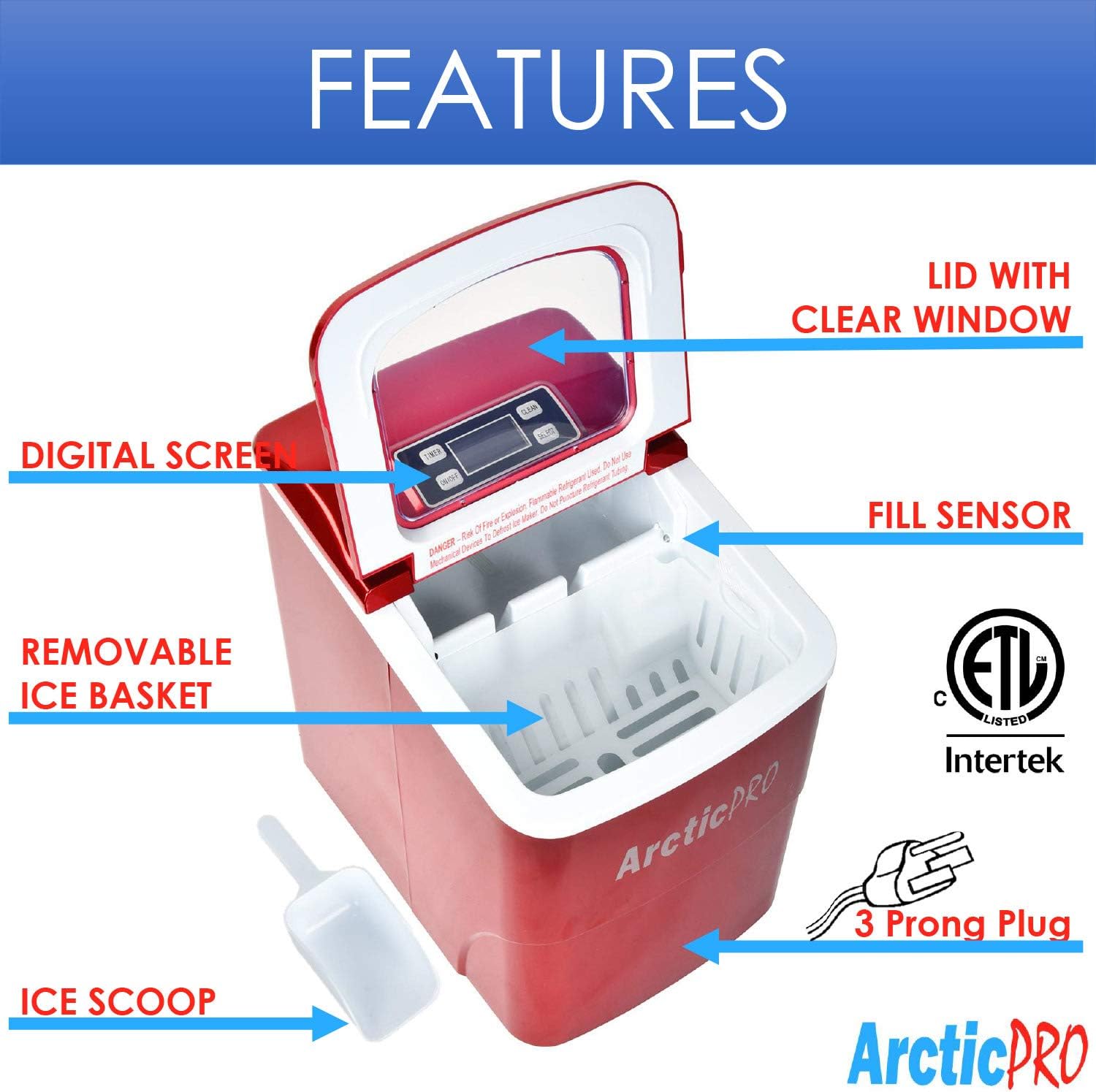
Figure 5: Ice cube size comparison.
8. Jamstvo i korisnička podrška
Arctic-Pro products are manufactured to high-quality standards. For warranty information, product registration, or technical assistance, please refer to the warranty card included with your purchase or visit the official Arctic-Pro webmjesto.
If you encounter any issues not covered in this manual, please contact Arctic-Pro customer support for further assistance.