
Alpha EK 60
Alpha EK-60 61-tipka elektronička klavijatura Korisnički priručnik
Portable Digital Keyboard with Audio Input, Microphone Input, Headphone Output, 255 Tones, Rhythms, LED Display
1. Uvod
Hvala na kupnjiasing the Alpha EK-60 61-Key Electronic Piano Keyboard. This manual provides detailed instructions for the proper setup, operation, and maintenance of your new instrument. The EK-60 is designed to offer a rich musical experience with its versatile features, including a wide range of tones and rhythms, intelligent teaching functions, and various connectivity options. Please read this manual thoroughly before using the product to ensure optimal performance and longevity.
2. Sigurnosne informacije
Kako biste spriječili strujni udar, požar ili oštećenje uređaja, molimo vas da se pridržavate sljedećih mjera opreza:
- Do not expose the keyboard to rain or moisture.
- Do not place objects filled with liquids, such as vases, on the keyboard.
- Nemojte blokirati ventilacijske otvore.
- Koristite samo navedeni adapter za napajanje.
- Ne rastavljajte niti modificirajte uređaj. Za sve servisne radove obratite se kvalificiranom osoblju.
- Čuvati izvan dohvata male djece.
3. Sadržaj paketa
Molimo provjerite jesu li svi sljedeći artikli uključeni u vaš paket:
- 1 x Alpha 61-Key Standard Keyboard EK-60
- 1 x Podesivi stalak
- 1 x držač glazbenih listova
- 1 x strujni adapter
- 1 x Korisnički priručnik (ovaj dokument)
4. Proizvod je gotovview
Familiarize yourself with the components of your Alpha EK-60 keyboard.
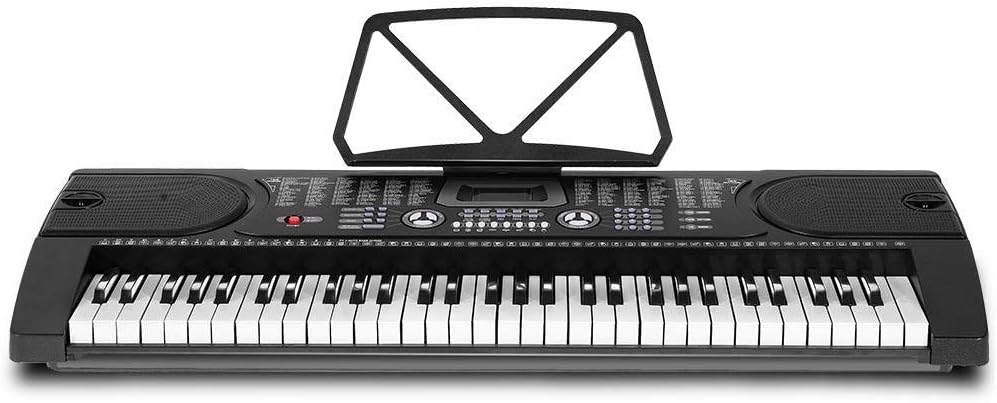
Slika 4.1: Od vrha prema dolje view of the Alpha EK-60 keyboard, highlighting the control panel, integrated speakers, and the 61 standard piano keys.

Figure 4.2: Detail of the LED display for convenient settings adjustment and the battery compartment for portable use.

Slika 4.3: View of the multiple jacks including Audio Input, Microphone Input, and Headphone Output for versatile connectivity.
Ključne karakteristike:
- 61-Key Standard Piano Keyboard
- LED display for easy navigation
- 24 demo pjesama
- 255 timbres (instrument sounds)
- 255 rhythms (accompaniment styles)
- 61 kinds of keyboard percussions
- 8 Panel Percussions
- Master volume, accompaniment volume, and tempo control
- Intelligent teaching function: one-key, follow and ensemble function
- Funkcija programiranja ritma
- Auto chord and chord timbre option
- Funkcionalnost snimanja i reprodukcije
- Sustain and vibrato effects
- Microphone input and speaker output
- Headphone jack for silent practice
- Battery powered option (6 x AA-size batteries, not included)
5. Postavljanje
5.1 Sastavljanje postolja
- Unpack all components of the adjustable stand.
- Connect the horizontal support bars to the vertical legs, ensuring they are securely fastened.
- Adjust the height of the stand to your preferred playing position using the adjustment knobs. The stand is adjustable from 59cm to 79cm in height.
- Place the keyboard securely on top of the assembled stand.
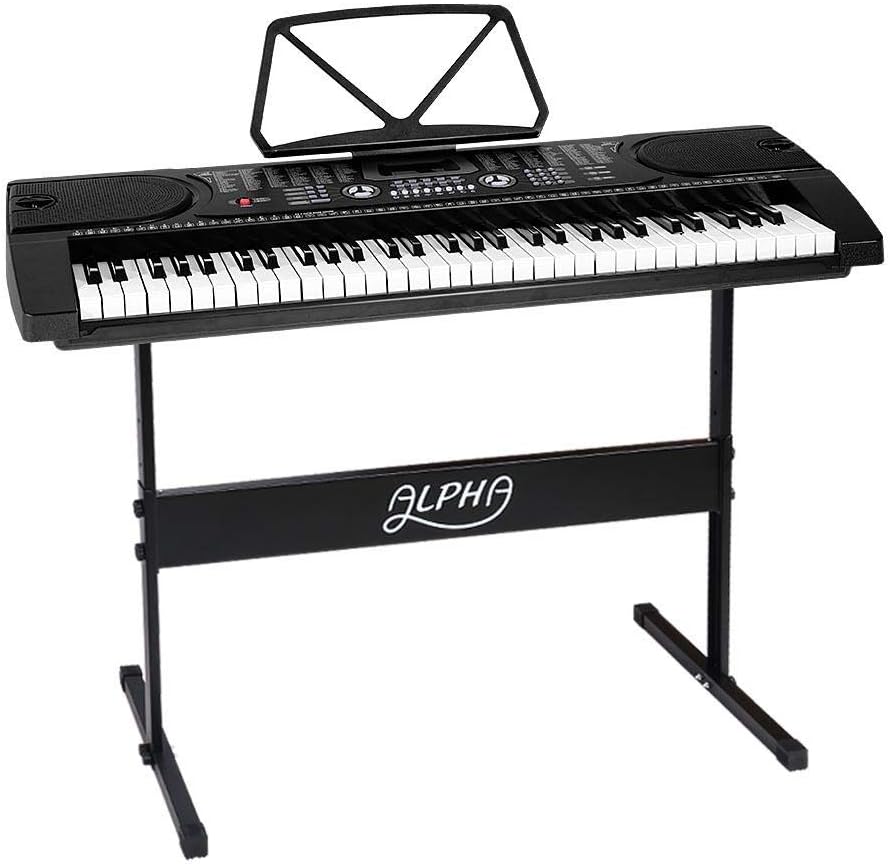
Figure 5.1: The Alpha EK-60 keyboard fully assembled on its adjustable stand, ready for use.
5.2 Uključivanje tipkovnice
The Alpha EK-60 can be powered by the included AC adaptor or by batteries.
Korištenje AC adaptera:
- Connect the DC plug of the power adaptor to the DC 9V input jack on the rear of the keyboard.
- Plug the AC adaptor into a standard wall outlet.
Korištenje baterija:
- Pronađite odjeljak za baterije na donjoj strani tipkovnice.
- Otvorite poklopac odjeljka za baterije.
- Insert 6 x AA-size batteries (not included), ensuring correct polarity (+/-).
- Čvrsto zatvorite poklopac odjeljka za baterije.
Note: When using batteries, disconnect the AC adaptor. The keyboard will automatically switch to battery power if the adaptor is removed.
6. Upute za rad
6.1 Osnovni rad
- Uključivanje/isključivanje: Pritisnite tipku VLAST gumb za uključivanje ili isključivanje tipkovnice.
- Kontrola glasnoće: Koristite GOSPODARSKI OBIM gumb za podešavanje ukupne razine zvuka.
- Tempo kontrola: Koristite TEMPO tipke za podešavanje brzine ritmova i demo pjesama.
6.2 Odabir tonova i ritmova
- Tones (Timbre): Pritisnite tipku TIMBAR button, then use the number pad or +/- buttons to select from 255 different instrument sounds. The selected timbre number will appear on the LED display.
- Ritmovi: Pritisnite tipku RITAM button, then use the number pad or +/- buttons to select from 255 accompaniment rhythms. Press START/STOP za početak ili završetak ritma.
6.3 Intelligent Teaching Function
The EK-60 features a 3-step intelligent teaching system to help you learn to play.
- Jedan ključ: Plays the melody of a demo song by pressing any key.
- Slijedite: Waits for you to play the correct note before proceeding with the melody.
- Zajedno: Plays the accompaniment while you play the melody.
To use, select a demo song, then press the desired teaching mode button (JEDAN KLJUČ, PRATI, ili ANSAMBL).
6.4 Snimanje i reprodukcija
The keyboard allows you to record your performances.
- Pritisnite tipku REC button to start recording. The LED display will indicate recording mode.
- Svirajte željenu melodiju.
- Pritisnite tipku IGRATI button to stop recording and play back your recorded performance.
6.5 Povezivost
- Priključak za slušalice: Spojite slušalice na SLUŠALICA jack for silent practice.
- Ulaz za mikrofon: Spojite mikrofon na ULAZ MIC jack to sing along while playing.
- Audio ulaz/izlaz: Koristite AUDIO ULAZ to connect external audio devices (e.g., MP3 player) and the AUDIO IZLAZ to connect to external speakers or an ampsredstvo za podsticanje.
7. Održavanje
Proper care will ensure the longevity of your Alpha EK-60 keyboard.
- Čišćenje: Obrišite tipkovnicu mekom, suhom krpom. Za tvrdokornu prljavštinu upotrijebite laganoamp cloth and then wipe dry immediately. Do not use abrasive cleaners, waxes, or solvents.
- Skladištenje: When not in use for extended periods, store the keyboard in a cool, dry place away from direct sunlight and extreme temperatures. If using batteries, remove them before long-term storage to prevent leakage.
- Rukovanje: Izbjegavajte ispuštanje tipkovnice ili njezino izlaganje jakim udarcima.
8. Rješavanje problema
If you encounter any issues with your keyboard, refer to the following table for common problems and solutions.
| Problem | Mogući uzrok | Otopina |
|---|---|---|
| Nema zvuka | Volume is too low; Power is off; Headphones connected; Faulty power connection. | Increase master volume; Turn on power; Disconnect headphones; Check power adaptor or replace batteries. |
| Tipke ne reagiraju | Keyboard is in a teaching mode; Internal malfunction. | Exit teaching mode; Power cycle the keyboard. If issue persists, contact support. |
| Rhythm/Demo song not playing | Rhythm/Demo song not selected; START/STOP button not pressed. | Select a rhythm/demo song; Press START/STOP. |
| Izobličen zvuk | Volume too high; External device connected incorrectly. | Reduce volume; Check connections of external devices. |
Ako problem i dalje postoji nakon isprobavanja ovih rješenja, obratite se korisničkoj podršci.
9. Specifikacije
| Značajka | Opis |
|---|---|
| Model | EK-60 |
| Ključevi | 61 Standard Piano Keys |
| Key Width | 1.9 cm |
| Tones (Timbres) | 255 |
| Ritmovi | 255 |
| Demo pjesme | 24 |
| Maksimalna polifonija | 8 |
| Povezivost | Audio Input, Audio Output, Headphone Jack (3.5mm), Microphone Input (3.5mm) |
| Napajanje | AC Adaptor (DC 9V) or 6 x AA-size batteries (not included) |
| Dimenzije (tipkovnica) | 86 cm (D) x 32.5 cm (Š) |
| Dimensions (Overall with Stand) | 86cm (L) x 32.5cm (W) x 59-79cm (H) |
| Težina | 6.2 kilogram |
| Boja | Crna |

Figure 9.1: Detailed dimensions of the Alpha EK-60 keyboard and its adjustable stand.
10. Jamstvo i podrška
10.1 Informacije o jamstvu
The Alpha EK-60 keyboard comes with a Jamstvo 1 godine from the date of purchase. This warranty covers manufacturing defects and ensures the product is free from defects in material and workmanship under normal use. It does not cover damage caused by misuse, accident, unauthorized modification, or normal wear and tear.
10.2 Korisnička podrška
For any queries, technical assistance, or warranty claims, please contact the seller or manufacturer directly. Please have your purchase receipt and product model number (EK-60) ready when contacting support.
Ask a question about this manual
Ask about setup, troubleshooting, compatibility, parts, safety, or missing instructions. Manuals+ will review the question and use this page’s manual context to help answer it.