
1. Uvod
Thank you for choosing the iggual QR Barcode Scanner. This device is designed for efficient and reliable scanning of both 1D and 2D barcodes, offering both manual and automatic scanning modes. It features an ergonomic design for comfortable use and broad compatibility with various operating systems. This manual provides essential information for setting up, operating, and maintaining your scanner.
Ključne karakteristike:
- Ergonomic design with a comfortable trigger button.
- Detects all common 1D and 2D barcodes, including QR codes.
- Supports manual and automatic scanning modes.
- Wired USB connectivity for reliable data transmission.
- Compatible with Windows XP/7/8/10, macOS, Linux, and Android.
2. Sadržaj paketa
Molimo provjerite sadržaj paketa kako biste bili sigurni da su svi artikli prisutni:
- iggual QR Barcode Scanner (Model IGG315651)
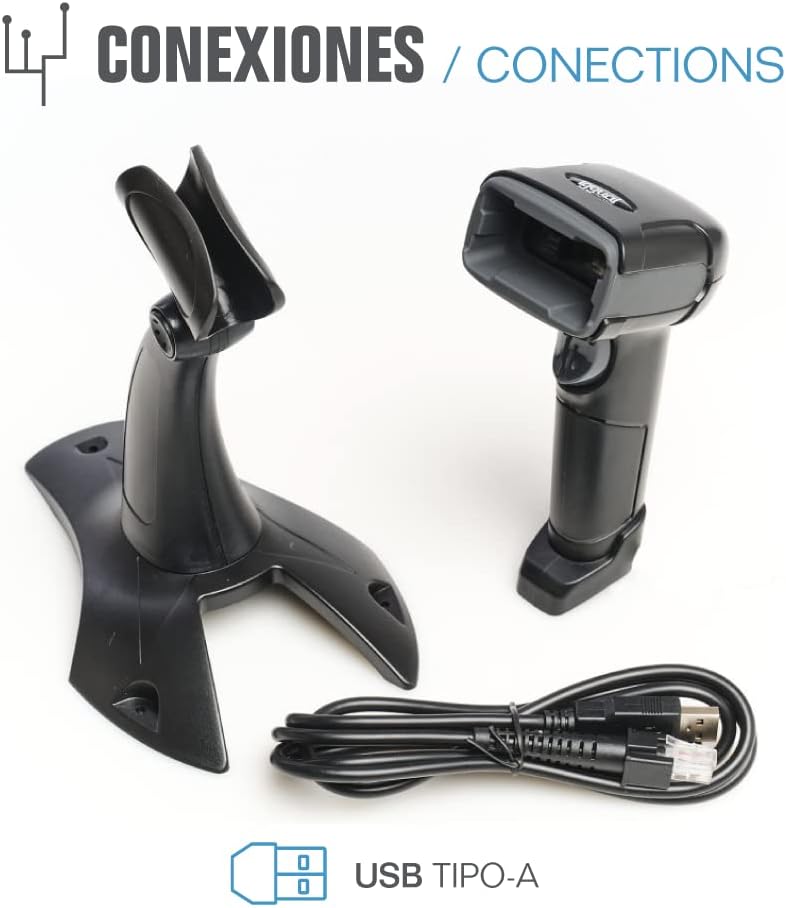
- USB Cable (Type-A)
- Scanner Stand (Optional, depending on package)

Slika 2.1: Package contents including the scanner, stand, and USB Type-A cable.
3. Proizvod je gotovview
Familiarize yourself with the main components of your iggual barcode scanner:
- Prozor za skeniranje: Područje gdje se očitavaju barkodovi.
- Gumb okidač: Activates scanning in manual mode.
- USB priključak: For connecting the scanner to your computer.
- LED indikator: Provides visual feedback on scanning status.
- Zvučni signal: Provides audible feedback on scanning status.

Slika 3.1: The iggual barcode scanner with its optional stand, highlighting the LED indicator and beeper functionality.
4. Postavljanje
4.1 Spajanje skenera
- Connect the USB cable to the USB port on the scanner.
- Plug the other end of the USB cable into an available USB port on your computer or host device.
- The scanner will typically be recognized automatically by your operating system as a standard HID keyboard device. No special drivers are usually required.
4.2 Kompatibilnost sustava
The iggual QR Barcode Scanner is compatible with a wide range of operating systems:
- Windows XP / 7 / 8 / 10
- macOS
- Linux
- Android

Slika 4.1: Operating system compatibility for the iggual barcode scanner.
5. Upute za rad
5.1 Načini skeniranja
Skener podržava dva glavna načina skeniranja:
- Ručni način rada: Press the trigger button to activate the scanner and read a barcode. Release the button after a successful scan.
- Automatski način rada: The scanner continuously emits a scanning beam, reading barcodes as they are presented within its field of view without needing to press the trigger. Refer to the full product manual (if available from iggual.com) for instructions on switching between modes, usually done by scanning specific configuration barcodes.
5.2 Supported Barcode Types
This scanner is capable of reading a wide range of 1D and 2D barcode symbologies, including:
- 2D kodovi: QR Code, Maxi Code, MicroPDF, PDF417
- 1D kodovi: Code 128, EAN-13, EAN-8, Code 39, UPC-A, UPC-E, Code 93, Interleaved 2 of 5, Codabar, MSI, RSS, etc.

Slika 5.1: Scanner capabilities including 200 scans/second, 2D scanning, and supported code types.
5.3 Postupak skeniranja
- Ensure the scanner is properly connected to your host device.
- Open an application where you want the scanned data to appear (e.g., a text editor, spreadsheet, or POS software).
- Point the scanning window at the barcode you wish to read.
- If in manual mode, press and hold the trigger button. If in automatic mode, simply present the barcode.
- A successful scan will be indicated by a short beep and/or a flash of the LED indicator. The scanned data will appear in your active application.
- If the barcode is not read, adjust the distance and angle of the scanner relative to the barcode.
6. Održavanje
6.1 Čišćenje
- To clean the scanner's exterior, use a soft, damp tkanina.
- For the scanning window, use a lint-free cloth and a mild glass cleaner. Avoid abrasive materials or harsh chemicals that could scratch the surface.
- Ensure no liquid enters the scanner's housing.
6.2 Skladištenje
When not in use, store the scanner in a cool, dry place, away from direct sunlight and extreme temperatures.
7. Rješavanje problema
| Problem | Mogući uzrok | Otopina |
|---|---|---|
| Računalo ne prepoznaje skener. | Loose USB connection, faulty USB port, or cable issue. | Ensure USB cable is securely connected. Try a different USB port or cable. Restart the computer. |
| Skener ne čita barkodove. | Barcode damaged, incorrect scanning angle/distance, scanner in wrong mode, or dirty scanning window. | Check barcode integrity. Adjust scanning angle and distance. Ensure scanner is in the correct mode (manual/automatic). Clean the scanning window. |
| Skenirani podaci se prikazuju netočno. | Keyboard layout mismatch or corrupted data. | Ensure your computer's keyboard layout matches the scanner's default output (usually US English). If issues persist, consult the full product manual for advanced configuration. |
8. Specifikacije
| Značajka | Detalj |
|---|---|
| Model | IGG315651 |
| Dimenzije (D x Š x V) | 160 x 80 x 100 mm (6.3 x 3.15 x 3.94 inča) |
| Težina | 120 g (0.26 lbs) |
| Brzina skeniranja | 200 skeniranja/sekundi |
| Senzor slike | 640(H) x 480(V), 256 Grayscale |
| Povezivost | Wired USB (Type-A) |
| Izvor napajanja | Električni s kabelom (napajanje putem USB-a) |
| Operacijski sustavi | Windows XP/7/8/10, macOS, Linux, Android |
| Podržani crtični kodovi | 1D & 2D (QR, Maxi Code, MicroPDF, Code, PDF417, RSS, etc.) |
Slika 8.1: Physical dimensions of the iggual barcode scanner.
9. Jamstvo i podrška
For warranty information, technical support, or to download the complete product manual with advanced configuration options, please visit the official iggual webstranicu ili se obratite lokalnom distributeru.
Službenik Webstranica: www.iggual.com