
Oštar
Upute za uporabu Sharpa za atomski sat
Model: 8541848315
Uvod
The Sharp Atomic Clock provides precise timekeeping and temperature monitoring for your home or office. Featuring a large, easy-to-read display, this clock automatically synchronizes with the atomic time signal (WWVB) broadcast from Fort Collins, Colorado, ensuring accuracy without manual adjustments. It also includes a wireless outdoor sensor to display both indoor and outdoor temperatures.
Značajke proizvoda
- Atomic Time Accuracy: Automatically synchronizes with the WWVB atomic time signal for precise timekeeping.
- Jumbo 3" Easy-to-Read Numbers: Large digital display for clear visibility of time, date, and temperature.
- Indoor/Outdoor Temperature Display: Monitors both indoor ambient temperature and outdoor temperature via a wireless sensor.
- Bežični vanjski senzor: Transmits outdoor temperature data to the main unit.
- Baterija: Operates on batteries for flexible placement (batteries not included).
- Automatic Daylight Saving Time (DST) Adjustment: Automatically adjusts for daylight saving time changes.
- Vremenske zone koje se mogu odabrati: Allows selection of various US time zones.
- 12/24 satni format: Mogućnost prikaza vremena u 12-satnom ili 24-satnom formatu.
- Celsius/Fahrenheit Display: Prebacivanje između temperaturnih jedinica Celzija i Fahrenheita.
Sadržaj paketa
Please ensure all items are present before proceeding with setup.
- Sharp Atomic Clock Main Unit
- Bežični senzor na otvorenom
- Priručnik s uputama
Note: Batteries are not included. The main unit requires 2 AA batteries, and the outdoor sensor requires 2 AA batteries.
Postavljanje
1. Ugradnja baterije
- Open the battery compartment on the back of the main clock unit.
- Insert 2 AA batteries, observing the correct polarity (+ and -).
- Zatvorite poklopac odjeljka za baterije.
- Open the battery compartment on the wireless outdoor sensor.
- Insert 2 AA batteries into the outdoor sensor, observing the correct polarity.
- Close the outdoor sensor's battery compartment cover.
2. Početna sinkronizacija i postavke
After battery installation, the clock will attempt to receive the WWVB atomic time signal and connect to the outdoor sensor. This process may take several minutes or up to 24 hours depending on your location and environmental interference.
- vremenska zona: Press the "TIME ZONE" button (often labeled "UP TIME ZONE") on the back of the clock to cycle through available time zones (PST, MST, CST, EST). Select your desired time zone.
- 12/24 satni format: Press the "12/24" button to switch between 12-hour and 24-hour display.
- Celzijev/Fahrenheit: Press the "°C/°F" button to toggle between Celsius and Fahrenheit temperature display.
- Outdoor Sensor Pairing: If the outdoor temperature does not appear, press the "CHANNEL" button on the main unit to search for the sensor signal. Ensure the outdoor sensor is within range and not obstructed.
For optimal signal reception, place the clock away from large metal objects, electronic devices, and areas with heavy concrete or brick walls. The outdoor sensor should be placed in a shaded, dry location, protected from direct sunlight and precipitation, for accurate readings.
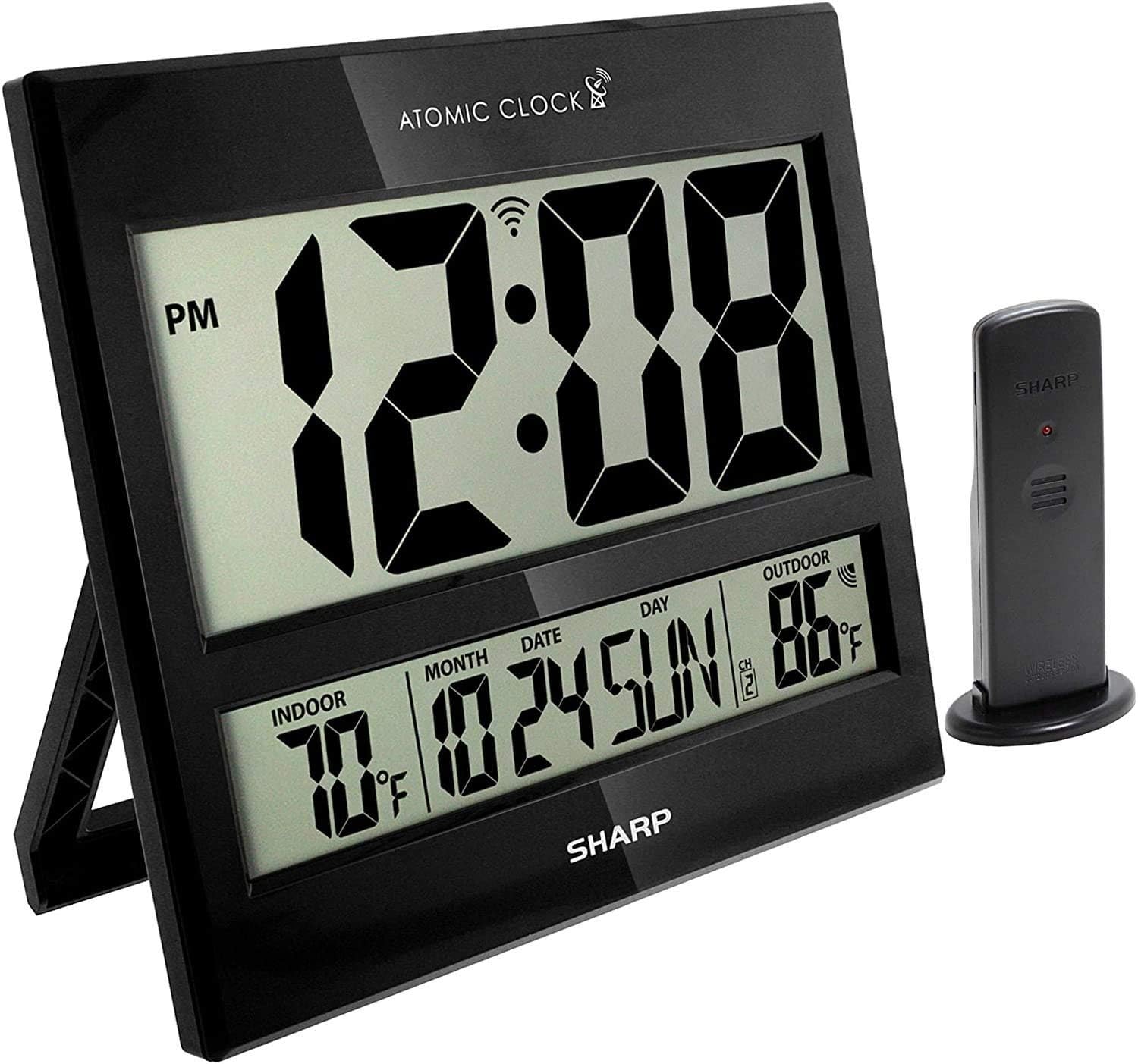
Image: The Sharp Atomic Clock main unit displaying time, indoor temperature, date, and outdoor temperature, alongside its wireless outdoor sensor.
Operacija
Prikaz informacija
The clock's large LCD screen displays the following information:
- Vrijeme: Current time in selected 12-hour or 24-hour format.
- Pokazatelj PM-a: Displays "PM" for afternoon hours in 12-hour format.
- Atomic Signal Indicator: Shows the status of the WWVB atomic time signal reception.
- Unutarnja temperatura: Current temperature measured by the main unit.
- Month/Date/Day: Trenutne informacije iz kalendara.
- Vanjska temperatura: Current temperature measured by the wireless outdoor sensor.
- Outdoor Sensor Channel: Indicates the channel the outdoor sensor is transmitting on.
- Indikator prazne baterije: An icon will appear when batteries are low and need replacement.
Button Functions (Rear Panel)
| Gumb | Funkcija |
|---|---|
| KALENDAR | Press and hold for 2 seconds to manually set calendar (Year, Month, Date, Language). Use UP/DOWN buttons to change values. |
| VRIJEME | Press and hold for 2 seconds to manually set time (DST ON/OFF, Hour, Minute). Use UP/DOWN buttons to change values. |
| 12/24 | Switches between 12-hour and 24-hour time display. |
| KANAL | Press to switch between outdoor sensor channels (1, 2, 3). Press and hold for 2 seconds to pair with the outdoor sensor. |
| ° C / ° F | Prebacuje se između prikaza temperature u Celzijusima i Fahrenheitima. |
| VAL | Initiates a manual search for the WWVB atomic time signal. |
| RESETIRANJE | Resets the clock to factory default settings. Requires a pointed object (e.g., paperclip). |
| UP / TIME ZONE | Increases values during manual setting. Press to cycle through time zones. |
| DOLJE | Decreases values during manual setting. |
Održavanje
- Zamjena baterije: Replace batteries in both the main unit and outdoor sensor when the low battery indicator appears on the display. Always replace all batteries at the same time with new ones.
- Čišćenje: Clean the clock and sensor with a soft, dry cloth. Do not use abrasive cleaners or solvents.
- Položaj vanjskog senzora: Periodically check the outdoor sensor's location to ensure it remains protected from extreme weather conditions, direct sunlight, and moisture.
Rješavanje problema
- Clock not syncing with atomic time:
- Ensure the clock is placed away from electronic interference (TVs, computers, microwaves).
- Try placing the clock near a window facing Fort Collins, Colorado (if applicable to your region).
- Press the "WAVE" button to initiate a manual signal search.
- Za početnu sinkronizaciju dopustite do 24 sata.
- Outdoor temperature not displaying or incorrect:
- Check batteries in the outdoor sensor.
- Ensure the outdoor sensor is within the effective transmission range (typically up to 100 feet, line of sight).
- Press the "CHANNEL" button on the main unit to re-establish connection.
- Verify the outdoor sensor is placed in a location protected from direct sunlight and rain, which can affect readings.
- Zaslon je taman ili prazan:
- Replace all batteries in the main unit with fresh ones.
- Provjerite jesu li baterije umetnute s ispravnim polaritetom.
- Netočno vrijeme ili datum:
- Verify the correct time zone is selected.
- Check if Daylight Saving Time (DST) setting is correct for your region.
- If atomic signal is not received, manually set the time and date using the "TIME" and "CALENDAR" buttons.
Tehnički podaci
| Značajka | Detalj |
|---|---|
| Marka | Oštar |
| Broj modela | 8541848315 |
| UPC | 049353998732 |
| Boja | Sjajni crni |
| Vrsta zaslona | Digitalni LCD |
| Posebna značajka | Atomic Time Synchronization (WWVB), Indoor/Outdoor Temperature |
| Dimenzije proizvoda | 13"W x 1.5"H (Main Unit) |
| Izvor napajanja | Napajanje na baterije |
| Broj potrebnih baterija | Main Unit: 2 AA; Outdoor Sensor: 2 AA |
| Materijal | Plastični |
| Vrsta montaže | Zidni nosač / Stolni stalak |
| Unutarnja/vanjska upotreba | Indoor (Main Unit), Outdoor (Sensor) |
Jamstvo i podrška
Sharp products are manufactured to high-quality standards. For warranty information, technical support, or service inquiries, please refer to the contact information provided with your product packaging or visit the official Sharp webstranicu. Sačuvajte račun kao dokaz o kupnji za slučaj reklamacije.
Ask a question about this manual
Ask about setup, troubleshooting, compatibility, parts, safety, or missing instructions. Manuals+ will review the question and use this page’s manual context to help answer it.