
Laserliner 082.150A
Upute za uporabu Laserliner CoatingTest-Master 082.150A
Model: 082.150A | Brand: Laserliner
1. Uvod i krajview
The Laserliner CoatingTest-Master 082.150A is a precision instrument designed for non-destructive measurement of coating thicknesses on various metal surfaces. It utilizes both magnetic induction and eddy current principles to accurately determine the thickness of non-metallic layers.
This device is capable of measuring non-magnetic coatings such as paint and zinc on steel, as well as insulating coatings like paint and anodized layers on non-ferrous metals. It features automatic identification of the base material (ferrous/ferromagnetic or non-ferrous/non-ferromagnetic), an internal memory for 400 measured values, and options for one-point and two-point calibration. Data transfer and evaluation are facilitated via a USB interface. The illuminated display provides Min/Max/Avg readings for comprehensive analysis.

Figure 1: Laserliner CoatingTest-Master 082.150A device.
2. Sadržaj paketa
Prilikom otvaranja paketa, molimo provjerite jesu li uključeni svi sljedeći elementi:
- Laserliner CoatingTest-Master 082.150A device
- Zaštitna torba za nošenje
- USB kabel za prijenos podataka
- Calibration foils/plates (for one-point and two-point calibration)
- Priručnik s uputama (ovaj dokument)
- Software CD (for data evaluation)
- Baterije (ako su uključene)

Figure 2: Contents of the CoatingTest-Master package.
3. Postavljanje
3.1 Ugradnja baterije
The CoatingTest-Master requires batteries for operation. Locate the battery compartment on the back of the device. Insert the specified battery type (e.g., AAA batteries) ensuring correct polarity as indicated inside the compartment. Close the battery cover securely.
3.2 Uključivanje/isključivanje
Pritisnite i držite Vlast button (usually marked with a power symbol ⏻) to turn the device on. The display will illuminate. To turn off the device, press and hold the Vlast button again until the display shuts down.
4. Upute za rad
4.1 Osnovno mjerenje
To perform a basic coating thickness measurement:
- Provjerite je li uređaj uključen.
- Place the small measuring head firmly and perpendicularly onto the surface to be measured. The device will automatically detect the base material (ferrous or non-ferrous).
- The coating thickness reading will be displayed on the screen in micrometers (µm).
- Lift the measuring head from the surface to prepare for the next measurement.
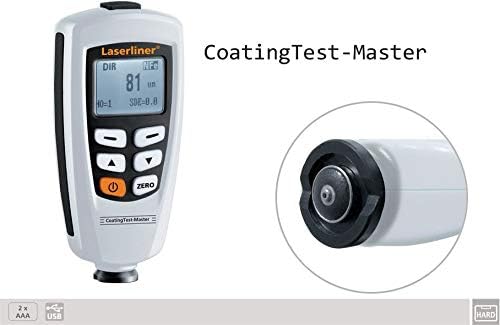
Figure 3: The device features a small measuring head for pinpoint accuracy.
4.2 Kalibracija
For accurate measurements, especially when measuring different types of coatings or base materials, calibration is essential. The CoatingTest-Master supports one-point and two-point calibration.
4.2.1 Kalibracija u jednoj točki
This method uses a single known thickness to adjust the device. Refer to the on-screen prompts or specific manual section for detailed steps on using the provided calibration foils.
4.2.2 Kalibracija u dvije točke
This method uses two known thicknesses (e.g., zero and a specific thickness) for more precise calibration across a range. Follow the device's on-screen instructions for this procedure.
4.3 Upravljanje podacima
The device has an internal memory for up to 400 measured values. Use the navigation buttons to review stored data. To transfer data to a computer, connect the device via the provided USB cable and use the accompanying software for evaluation.
4.4 Funkcije zaslona
The illuminated display shows the current measurement, and can also cycle through Minimum (Min), Maximum (Max), and Average (Avg) values of a series of measurements. Consult the device's on-screen menu for accessing these display modes.
5. Održavanje
Proper maintenance ensures the longevity and accuracy of your CoatingTest-Master.
- Čišćenje: Wipe the device with a soft, dry cloth. Do not use abrasive cleaners or solvents. Ensure the measuring head is kept clean and free of debris.
- Skladištenje: When not in use, store the device in its protective carrying case in a dry, dust-free environment, away from extreme temperatures and direct sunlight.
- Zamjena baterije: Replace batteries promptly when the low battery indicator appears on the display to avoid interruption of measurements and potential data loss.
6. Rješavanje problema
| Problem | Mogući uzrok | Otopina |
|---|---|---|
| Uređaj se ne uključuje. | Prazne ili nepravilno instalirane baterije. | Provjerite polaritet baterija; zamijenite baterije. |
| Netočna očitanja. | Device not calibrated; dirty measuring head; incorrect measurement technique. | Perform calibration; clean measuring head; ensure proper contact with surface. |
| USB data transfer failure. | Incorrect cable connection; software not installed or running; driver issues. | Ensure secure USB connection; install/reinstall software and drivers; try a different USB port. |
7. Specifikacije
| Značajka | Detalj |
|---|---|
| Princip mjerenja | Magnetic Induction (FE) / Eddy Current (NFe) |
| Measuring Range (FE) | 0 – 1250 µm |
| Accuracy (FE) | 0–850 µm: ±(3% + 1 µm); 850–1250 µm: ±5% |
| Measuring Range (NFe) | 0 – 1250 µm |
| Accuracy (NFe) | 0–850 µm: ±(3% + 1 µm); 850–1250 µm: ±5% |
| Base Material Identification | Automatic (Ferrous / Non-Ferrous) |
| Memorija | 400 izmjerenih vrijednosti |
| Kalibriranje | One-point and Two-point |
| Sučelje | USB |
| Prikaz | Illuminated, Min/Max/Avg display |
8. Jamstvo i podrška
Laserliner products are manufactured with high quality standards. For information regarding warranty coverage, technical support, or service, please refer to the warranty card included with your product or visit the official Laserliner webstranicu. Sačuvajte račun kao dokaz o kupnji za bilo kakve reklamacije u jamstvenom roku.
For further assistance, you may contact Laserliner customer service through their official channels. Contact details are typically available on the manufacturer's webmjestu ili pakiranju proizvoda.
Ask a question about this manual
Ask about setup, troubleshooting, compatibility, parts, safety, or missing instructions. Manuals+ will review the question and use this page’s manual context to help answer it.