
1. Uvod
Thank you for choosing the Gembird MUS-6B-01 Optical USB Mouse. This manual provides essential information for setting up, operating, maintaining, and troubleshooting your new mouse. Please read these instructions carefully to ensure optimal performance and longevity of your device.

Image: The official Gembird brand logo, featuring the company name in a stylized font with a geometric design.
2. Proizvod je gotovview
The Gembird MUS-6B-01 is a reliable 6-button optical USB mouse designed for comfortable and precise navigation. Its ambidextrous design makes it suitable for both left and right-handed users.
Ključne karakteristike:
- Optičko praćenje: Pruža glatku i preciznu kontrolu kursora.
- 6 gumba: Includes standard left/right click, scroll wheel, DPI adjustment, and two side buttons for enhanced functionality.
- USB povezivost: Simple plug-and-play connection to your computer.
- Ambidextrous dizajn: Comfortable for both left and right-handed users.
Komponente:
- Gumb lijevog klika
- Desni klik gumb
- Scroll Wheel (also functions as a middle click button)
- Gumb za podešavanje DPI-ja
- Gumb za naprijed (sa strane)
- Gumb za natrag (sa strane)
- Optical Sensor (underside)
- USB Connector (at the end of the cable)
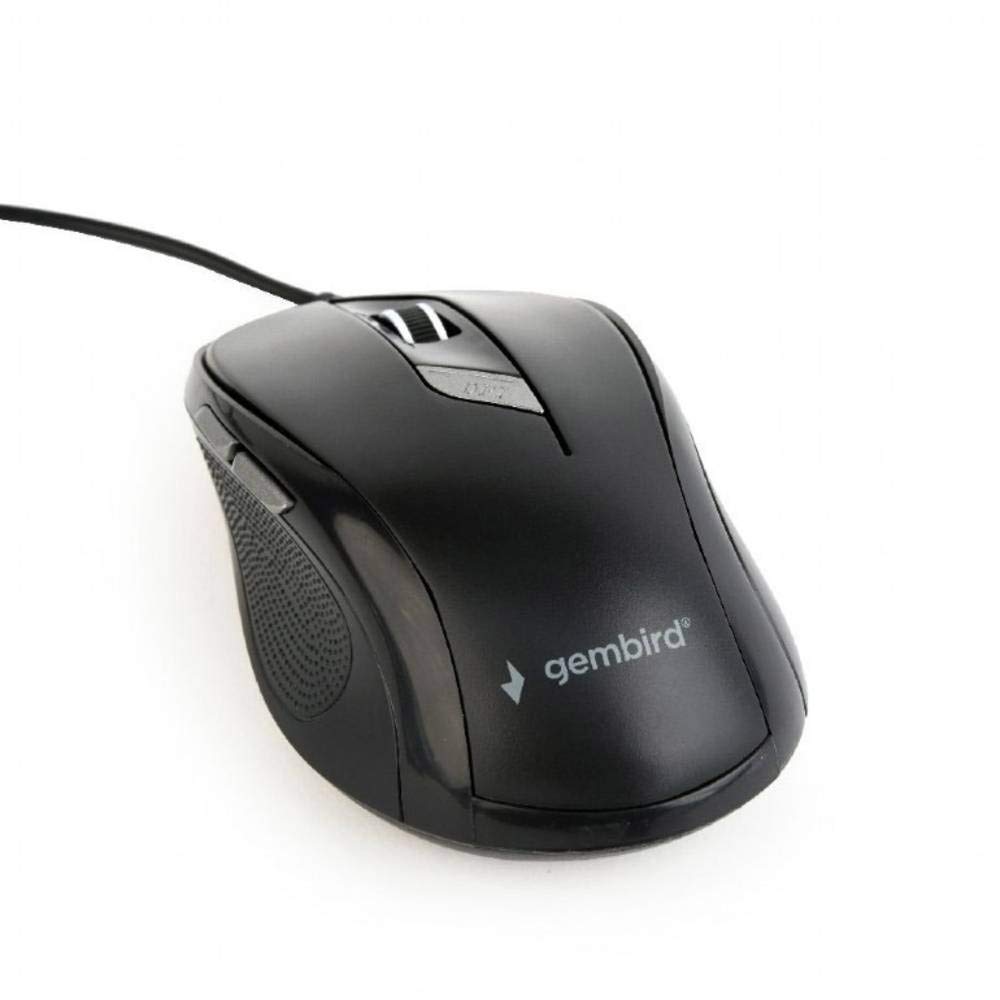
Slika: Pogled odozgo prema dolje view of the Gembird MUS-6B-01 optical USB mouse. The mouse is black with a matte finish, featuring a scroll wheel, left and right click buttons, a DPI button, and two side buttons. A black USB cable extends from the front of the mouse.
3. Postavljanje
Setting up your Gembird MUS-6B-01 mouse is a simple plug-and-play process.
Koraci instalacije:
- Pronađite dostupni USB priključak na vašem računalu.
- Plug the USB connector of the Gembird MUS-6B-01 mouse firmly into the USB port.
- Your operating system (Windows, Linux) will automatically detect and install the necessary drivers. This process may take a few moments.
- Nakon što su upravljački programi instalirani, miš je spreman za upotrebu.
No additional software installation is typically required for basic functionality.
4. Upute za rad
Familiarize yourself with the functions of each button on your Gembird MUS-6B-01 mouse.
Osnovne funkcije:
- Lijevi klik: Primary action, selecting items, opening files.
- Desni klik: Opens context menus, provides additional options.
- Kotačić za pomicanje: Pomičite se gore ili dolje kroz dokumente i web stranice.
- Srednji klik (pritisak kotačića za pomicanje): Often used to open links in new tabs or for specific application functions.
Napredne funkcije:
- Gumb za podešavanje DPI-ja: Located behind the scroll wheel, this button allows you to cycle through different sensitivity (DPI) settings. Press it to change the cursor speed to suit your preference.
- Gumb za naprijed (sa strane): Typically navigates forward in web preglednici ili file istraživači.
- Gumb za pomicanje unatrag (sa strane): Typically navigates backward in web preglednici ili file istraživači.
The functionality of the side buttons may vary depending on the application or operating system settings. Some operating systems allow customization of these buttons.
5. Održavanje
Proper care will help extend the life of your Gembird MUS-6B-01 mouse.
Čišćenje:
- Prije čišćenja isključite miš iz računala.
- Koristite meku, lagano damp, lint-free cloth to wipe the surface of the mouse.
- For stubborn dirt, a small amount of mild soap solution can be applied to the cloth (not directly to the mouse).
- Za čišćenje oko kotačića za pomicanje i između tipki koristite pamučni štapić ili komprimirani zrak.
- Ensure the optical sensor on the underside is clean and free of dust or debris.
- Ne koristite jake kemikalije, abrazivna sredstva za čišćenje niti uranjajte miš u vodu.
Skladištenje:
Kada se miš ne koristi dulje vrijeme, čuvajte ga na čistom, suhom mjestu, dalje od ekstremnih temperatura i izravne sunčeve svjetlosti.
6. Rješavanje problema
If you encounter issues with your Gembird MUS-6B-01 mouse, try the following troubleshooting steps:
| Problem | Moguće rješenje |
|---|---|
| Miš ne reagira |
|
| Erratic or jumpy cursor movement |
|
| Gumbi ne rade |
|
7. Specifikacije
Detailed technical specifications for the Gembird MUS-6B-01 Optical USB Mouse:
| Značajka | Specifikacija |
|---|---|
| Marka | Gembird |
| Naziv modela | MUS-6B-01 |
| Tehnologija povezivanja | Žično (USB) |
| Tehnologija detekcije pokreta | Optički |
| Količina gumba | 6 |
| Orijentacija ruke | Dvoličan |
| Kompatibilni operativni sustavi | Linux, Windows 7, Windows XP (i novije verzije) |
| Hardverska platforma | Osobno računalo |
| Duljina kabela | 5.0 metara |
| Težina artikla | 74 gram |
| Materijal | Plastični |
| Boja | Crna |
| Potrebne baterije | Ne |
8. Sigurnosne informacije
Molimo pridržavajte se sljedećih sigurnosnih smjernica:
- Do not expose the mouse to water or excessive moisture.
- Izbjegavajte ispuštanje ili izlaganje miša jakim udarcima.
- Do not attempt to disassemble or repair the mouse yourself. Refer to qualified service personnel.
- Držite uređaj podalje od ekstremnih temperatura i izravne sunčeve svjetlosti.
- Elektronički otpad odložite odgovorno u skladu s lokalnim propisima.
9. Jamstvo i podrška
Gembird products are designed for reliability and performance. For specific warranty terms and conditions, please refer to the warranty card included with your product or visit the official Gembird website. For technical support or further assistance, please contact your retailer or the Gembird customer service department.