
1. Uvod
This manual provides instructions for the Zerone Universal Remote Control, designed as a replacement for various Haier TV models. It is compatible with Haier HTR-A18M, 55D3550, 40D3500M, and 48D3500 series televisions. This remote control offers direct access to digital TV functions without complex programming.

Image 1.1: The Zerone Universal Remote Control in use, demonstrating its compatibility with Haier HTR-A18M, 55D3550, 40D3500M, and 48D3500 TV models.
2. Postavljanje
2.1 Ugradnja baterije
Daljinski upravljač zahtijeva dvije (2) AAA baterije (nisu uključene) za rad. Slijedite ove korake za umetanje baterija:
- Pronađite odjeljak za baterije na stražnjoj strani daljinskog upravljača.
- Pritisnite zasun prema dolje i pomaknite poklopac baterije.
- Umetnite dvije AAA baterije, pazeći da pozitivni (+) i negativni (-) terminali budu ispravno poravnati s oznakama unutar odjeljka.
- Gurnite poklopac baterije natrag na mjesto dok čvrsto ne klikne.
The remote is ready for use immediately after battery installation; no additional programming is required for compatible Haier TV models.

Slika 2.1: Detaljno view of the remote control, highlighting the battery compartment for AAA battery installation.
3. Upute za rad
3.1 Osnovne funkcije
This remote control provides standard functions for your Haier TV. Point the remote directly at your television's infrared receiver for optimal performance.
- Gumb za napajanje (U): Uključuje ili isključuje televizor.
- Ulazni: Selects video input sources (HDMI, AV, etc.).
- Brojčane tipke (0-9): Izravan odabir kanala.
- GLASNOĆA +/-: Adjusts volume up or down.
- CH +/-: Mijenja kanale gore ili dolje.
- MUČI: Isključuje ili uključuje zvuk televizora.
- JELOVNIK: Pristup glavnom izborniku televizora.
- Navigacijski gumbi (gore, dolje, lijevo, desno, U redu): Navigacija kroz izbornike i potvrđivanje odabira.
- NATRAG / IZLAZ: Povratak na prethodni zaslon ili izlazak iz trenutnog izbornika.
- PRIKAZ: Shows current channel information.
- SAP / AUDIO: Odabire audio jezik ili način rada.
- SPAVATI: Postavlja mjerač vremena za spavanje.
- PICTURE / WIDE: Adjusts picture mode or aspect ratio.
- CH.LIST / FAVORITE: Accesses channel list or favorite channels.
- Media Control Buttons (Play, Pause, Fast Forward, Rewind): Upravlja reprodukcijom medija.
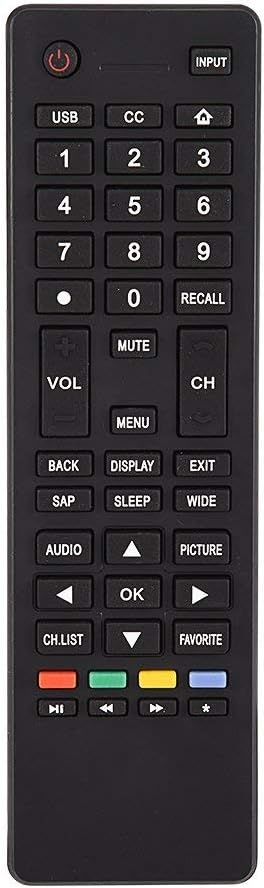
Slika 3.1: Gotovoview of the remote control's button layout for easy identification of functions.
3.2 Radni raspon
The remote control has a stable signal transmission distance of up to 10 meters (33 feet). Actual remote distance may vary depending on environmental factors and the specific model of your TV.
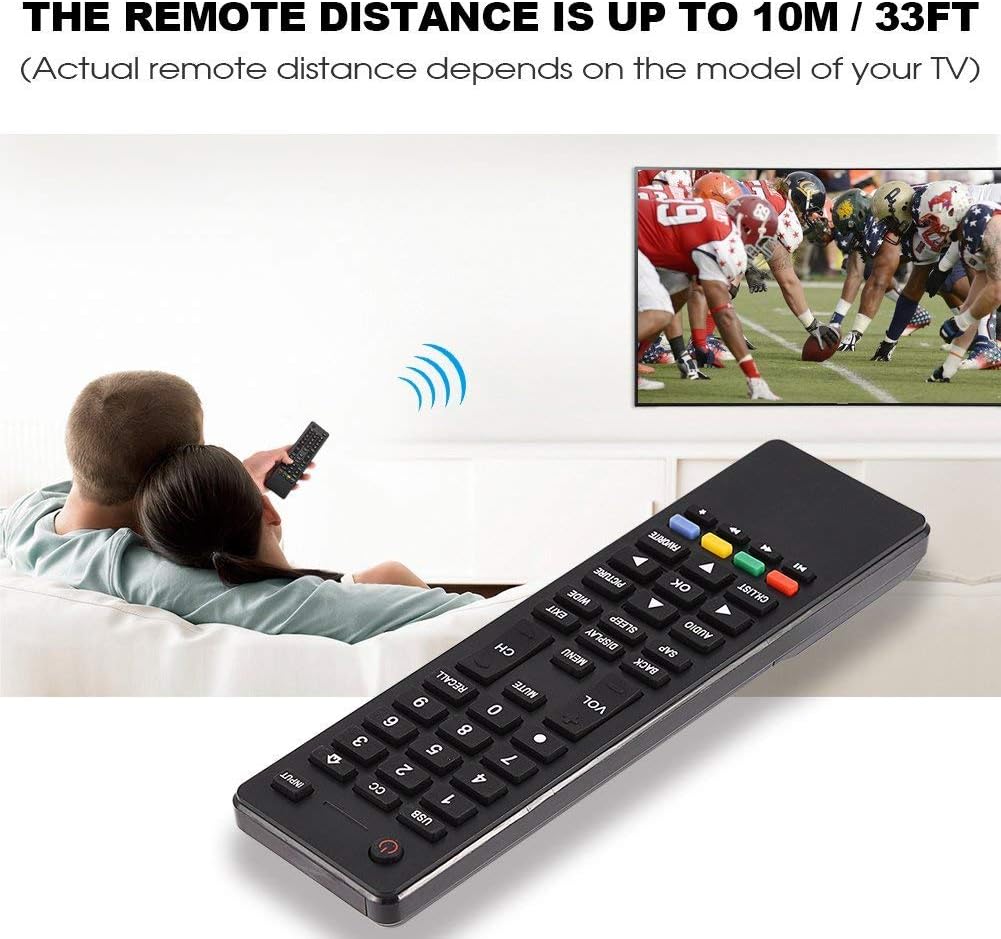
Image 3.2: Visual representation of the remote control's effective operating distance to the television.
4. Održavanje
4.1 Čišćenje
Za čišćenje daljinskog upravljača koristite meku, suhu krpu. Za tvrdokornu prljavštinu lagano obrišiteampen the cloth with water or a mild cleaning solution. Avoid using harsh chemicals or abrasive cleaners, as these can damage the remote's surface or internal components.
4.2 Njega baterija
- Zamijenite baterije kada daljinski upravljač postane spor ili prestane raditi.
- Nemojte miješati stare i nove baterije ili različite vrste baterija.
- Izvadite baterije ako daljinski upravljač nećete koristiti dulje vrijeme kako biste spriječili curenje.
- Iskorištene baterije odložite odgovorno u skladu s lokalnim propisima.
5. Rješavanje problema
5.1 Daljinski upravljač ne odgovara
- Provjerite baterije: Ensure batteries are inserted correctly with the correct polarity (+/-) and are not depleted. Replace with fresh AAA batteries if necessary.
- Linija vidljivosti: Provjerite da nema prepreka između daljinskog upravljača i infracrvenog senzora televizora.
- Udaljenost: Confirm you are within the effective operating range (up to 10 meters / 33 feet).
- TV kompatibilnost: Verify that your TV model is listed as compatible (Haier HTR-A18M, 55D3550, 40D3500M, 48D3500).
5.2 Buttons Not Working Correctly
- Čisti daljinski: Dust or debris under buttons can cause malfunction. Refer to the Maintenance section for cleaning instructions.
- Provjera baterije: Weak batteries can lead to inconsistent button responses. Replace batteries.
6. Specifikacije
| Značajka | Detalj |
|---|---|
| Marka | Zerone |
| Kompatibilni uređaji | Haier HTR-A18M, 55D3550, 40D3500M, 48D3500 TVs |
| Tehnologija povezivanja | Infracrveni |
| Maksimalni domet | 10 metara (33 stope) |
| Vrsta baterije | 2 x AAA (nije uključeno) |
| Vrsta kontrolera | Kontrola gumba |
| Materijal | ABS |
| Broj modela | Zerone9rnag3b5y4-cr |
| UPC | 647213811490 |

Image 6.1: Physical dimensions of the Zerone Universal Remote Control.
7. Informacije o jamstvu
This product is offered as an Amazon Renewed item. Amazon Renewed products are professionally inspected and tested to work and look like new. If you are not satisfied with your purchase, renewed products are eligible for replacement or refund under the Amazon Renewed Guarantee.
Additionally, the manufacturer provides a 90-dnevno ograničeno jamstvo. For specific details regarding the terms and conditions of this warranty, please refer to the documentation provided at the time of purchase or contact customer support.
8. Korisnička podrška
If you encounter any issues or have questions regarding your Zerone Universal Remote Control that are not addressed in this manual, please contact the seller or Amazon Renewed customer service for assistance.
For Amazon Renewed Guarantee claims, please visit the Amazon Renewed program page or contact Amazon customer support directly.