
1. Uvod
This manual provides essential information for the proper installation, operation, and maintenance of the Red Lion CUB4L800 8-Digit Reflective Counter. Please read this manual thoroughly before attempting to install or operate the device to ensure safe and efficient use. Keep this manual for future reference.
2. Sigurnosne informacije
Always observe standard safety precautions during installation and operation of this equipment. Failure to comply with safety warnings may result in injury or damage to the device.
- Električna opasnost: Disconnect all power before installing or servicing the unit.
- Kvalificirano osoblje: Instalaciju i održavanje treba obavljati samo kvalificirano osoblje.
- Uvjeti okoliša: Do not expose the unit to conditions outside its specified operating environment.
- Ispravno ožičenje: Ensure all wiring connections are secure and conform to local electrical codes.
3. Proizvod je gotovview
The Red Lion CUB4L800 is an 8-digit reflective LCD counter designed for industrial applications requiring reliable counting and display. Its reflective display offers excellent visibility in various lighting conditions. The unit features multiple input modes and a compact design for easy integration.
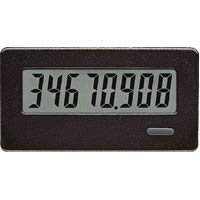
Slika 1: Prednja strana view of the Red Lion CUB4L800 8-Digit Reflective Counter, showing the display and control buttons.
4. Postavljanje i instalacija
Follow these steps for proper installation of your CUB4L800 counter:
- Montaža: The CUB4L800 is designed for panel mounting. Cut a panel opening of the specified dimensions (refer to the specifications section). Insert the counter into the opening and secure it using the provided mounting clips.
- Ožičenje: Refer to the wiring diagram provided with the unit or in the specifications section. Connect the power supply (typically 9-28 VDC) to the designated terminals. Connect the input signal (e.g., from a sensor or switch) to the appropriate input terminals. Ensure all connections are tight and correct.
- Uključivanje: Once all connections are verified, apply power to the unit. The display should illuminate, indicating the unit is operational.
5. Operacija
The CUB4L800 counter is designed for straightforward operation. The reflective display shows the current count value.
- Brojanje: The counter increments or decrements based on the input signals received. The counting mode (up, down, quadrature) is typically configured during initial setup or via internal jumpers/switches.
- Resetting the Count: A dedicated reset input or a front-panel button (if available on your model) can be used to reset the count to zero or a preset value. Consult the specific model's diagram for reset functionality.
- Zadržavanje prikaza: Some models may feature a display hold function, allowing the current count to be frozen on the display while counting continues internally.
6. Održavanje
The CUB4L800 counter requires minimal maintenance to ensure long-term reliable operation.
- Čišćenje: Keep the display and front panel clean. Use a soft, damp cloth with a mild cleaning solution. Do not use abrasive cleaners or solvents, as these can damage the display or housing.
- Inspekcija: Periodically inspect wiring connections for tightness and signs of wear or corrosion.
- Kontrola okoliša: Osigurajte da radno okruženje ostane unutar specificiranih raspona temperature i vlažnosti kako biste spriječili prerani kvar.
7. Rješavanje problema
If you encounter issues with your CUB4L800 counter, refer to the following common problems and solutions:
| Problem | Mogući uzrok | Otopina |
|---|---|---|
| Zaslon je prazan | Nema struje, neispravno ožičenje ili neispravan uređaj. | Check power supply connections. Verify input voltage. If issues persist, contact support. |
| Counter not incrementing/decrementing | No input signal, incorrect input wiring, or sensor malfunction. | Verify input signal presence and strength. Check input wiring for breaks or shorts. Test the sensor independently. |
| Inaccurate count | Noise on input line, incorrect input mode, or fast input signals. | Ensure proper shielding for input cables. Verify input mode settings. Consider using a debouncing circuit for noisy signals. |
If these steps do not resolve the issue, please contact Red Lion technical support.
8. Specifikacije
- Model: CUB4L800
- Prikaz: 8-Digit Reflective LCD
- Ulazni voltage: 9-28 VDC
- Vrsta ulaza: Various (e.g., NPN/PNP, contact closure) - Refer to specific model datasheet for details.
- Radna temperatura: -10°C do 50°C (14°F do 122°F)
- Temperatura skladištenja: -40°C do 70°C (-40°F do 158°F)
- Vlažnost: 85% RH bez kondenzacije
- Montaža: Nosač za ploču
- Dimenzije: Refer to product datasheet for exact dimensions.
9. Jamstvo i podrška
Red Lion Controls products are warranted against defects in material and workmanship for a period of one year from the date of shipment. For full warranty details, please refer to the official Red Lion Controls webstranicu ili se obratite lokalnom distributeru.
For technical assistance, troubleshooting, or service, please visit the Red Lion Controls Support page or contact their customer service department directly. When contacting support, please have your product model number (CUB4L800) and any relevant details about your application readily available.