
Osnove Amazona ABMT1000
Amazon Basics Line Interactive UPS 1000VA/550W User Manual
Model: ABMT1000
Uvod
This manual provides essential information for the safe and efficient operation of your Amazon Basics Line Interactive Uninterruptible Power Supply (UPS) 1000VA/550W. A UPS provides battery backup power and surge protection for connected electronic devices, safeguarding against power outages, surges, and fluctuations. Please read this manual thoroughly before installation and use, and retain it for future reference.

Image: The Amazon Basics Line Interactive UPS 1000VA/550W positioned on a desk, providing power protection for a computer setup.
Važne sigurnosne upute
Please adhere to these safety guidelines to prevent injury or damage to the UPS and connected equipment:
- This UPS is designed for indoor use only.
- Do not install the UPS in direct sunlight, near heat-emitting appliances, or in areas with excessive humidity or dust.
- Provjerite je li UPS spojen na uzemljenu utičnicu izmjenične struje.
- Ne otvarajte UPS casing. Unutra nema dijelova koje korisnik može sam servisirati. Za sve servisne radove obratite se kvalificiranom servisnom osoblju.
- Risk of electric shock. Do not connect or disconnect the UPS during a thunderstorm.
- The battery inside the UPS is not user-replaceable. Attempting to replace the battery yourself may void the warranty and pose a safety risk.
- In case of fire, use a dry chemical fire extinguisher. Water may cause electrical hazards.
Sadržaj paketa
Provjerite jesu li svi artikli prisutni u vašem paketu:
- Amazon Basics Line Interactive UPS 1000VA/550W Unit
- USB komunikacijski kabel
- Korisnički priručnik (ovaj dokument)

Image: USB Communication Cable included with the UPS.
Proizvod gotovview
Prednja ploča

Slika: prednja strana view of the Amazon Basics Line Interactive UPS 1000VA/550W, showing the power button, mute button, and LED indicators.
- Gumb za napajanje: Press to turn the UPS ON or OFF.
- Gumb za isključivanje zvuka: Press to silence audible alarms.
- LED indikatori:
- ONLINE: Illuminates when the UPS is providing utility power to connected devices.
- NA BATERIJU: Svijetli kada UPS radi na baterijsko napajanje.
- AVR (Automatski Voltage Uredba): Illuminates when the UPS is correcting minor voltage fluctuations without switching to battery power.
- PREOPTEREĆENJE: Illuminates if connected equipment exceeds the UPS's capacity.
Stražnja ploča
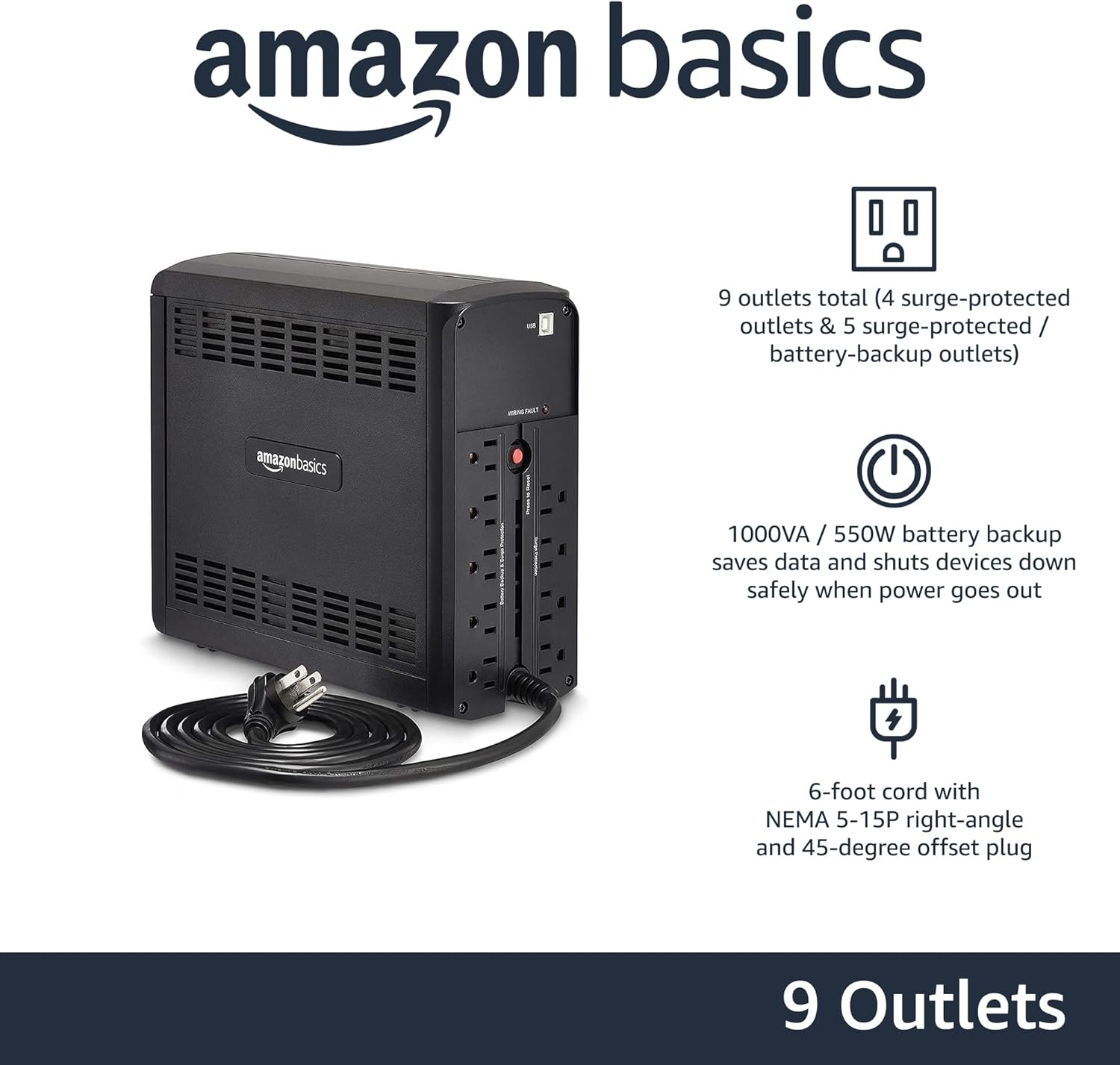
Slika: Stražnja strana view of the Amazon Basics Line Interactive UPS 1000VA/550W, displaying the power cord, battery backup outlets, and surge-only outlets.
- Battery Backup & Surge Protected Outlets (5 outlets): These outlets provide both battery backup power during outages and surge protection. Connect critical devices such as computers, monitors, and network equipment here.
- Surge Protected Outlets (4 outlets): These outlets provide surge protection only. Connect non-critical devices like printers or scanners here.
- USB komunikacijski port: Connects to a computer for power management software (e.g., CyberPower PowerPanel Personal).
- AC ulazni kabel za napajanje: Connects the UPS to a wall outlet.
Postavljanje
- Raspakirajte i pregledajte: Carefully remove the UPS from its packaging. Inspect for any shipping damage. If damage is found, do not use the unit and contact customer support.
- Početno punjenje baterije: Before initial use, connect the UPS to a standard wall outlet and allow it to charge for at least 8 hours. This ensures the battery is fully charged and ready to provide optimal backup power. The UPS will charge whether it is turned ON or OFF.
- Povežite uređaje:
- Plug critical equipment (e.g., computer, monitor, router) into the Rezervna baterija i utičnice zaštićene od prenapona.
- Plug non-critical equipment (e.g., printer, desk lamp) u Utičnice zaštićene od prenapona.
- Oprez: Do not plug laser printers into battery backup outlets, as their high power draw can overload the UPS.
- Spajanje na računalo (nije obavezno): Use the provided USB cable to connect the UPS's USB port to your computer's USB port. This allows for power management software installation, enabling features like automatic shutdown during extended power outages.
- Uključivanje: Press and hold the Power Button on the front panel for approximately 2 seconds until you hear a beep and the UPS powers on.
Upute za rad
Turning the UPS On/Off
- Upaliti: Press and hold the Power Button for 2 seconds. The UPS will beep, and the ONLINE LED will illuminate.
- Isključiti: Press and hold the Power Button for 2 seconds. The UPS will beep, and all LEDs will turn off.
Understanding LED Indicators and Alarms
- ONLINE (Green LED): Solid green indicates the UPS is receiving utility power and providing it to connected devices.
- ON BATTERY (Yellow LED): Solid yellow indicates the UPS is supplying battery power. An audible alarm will sound (beeping every 10 seconds).
- AVR (Yellow LED): Solid yellow indicates the UPS is automatically regulating input voltage bez korištenja baterije.
- OVERLOAD (Red LED): Solid red indicates that the connected load exceeds the UPS's capacity. An audible alarm will sound continuously. Immediately disconnect non-essential equipment from the battery backup outlets until the alarm stops.
- Slaba baterija: When the UPS is on battery power and the battery level is low, the ON BATTERY LED will flash, and the alarm will beep more frequently (every 1 second).
- Alarm za isključivanje zvuka: Press the Mute Button to silence audible alarms. The alarm will reactivate if the condition changes (e.g., low battery).
Vrijeme trajanja baterije
The battery runtime depends on the power consumption of the connected devices. For this 1000VA/550W model:
- At half load (500VA/275W), the UPS provides approximately 7 minuta of backup power.
- At full load (1000VA/550W), the UPS provides approximately 1 minuta of backup power.
It is recommended to save your work and safely shut down your computer during a power outage kako biste spriječili gubitak podataka.
Održavanje
Briga o bateriji
- To maintain optimal battery life, keep the UPS connected to an AC outlet at all times.
- If the UPS is stored for an extended period, recharge the battery every three months for at least 8 hours to prevent battery degradation.
- Batteries have a finite lifespan and will eventually require replacement. If you notice a significant decrease in runtime, contact Amazon Basics customer support for guidance on battery replacement options.
Čišćenje
- Always unplug the UPS from the wall outlet before cleaning.
- Za brisanje vanjskih površina UPS-a koristite meku, suhu krpu.
- Do not use liquid or aerosol cleaners, as they may contain flammable substances or cause electrical shock.
Rješavanje problema
| Problem | Mogući uzrok | Otopina |
|---|---|---|
| UPS se ne uključuje. | Baterija je prazna ili nije spojena. | Connect the UPS to an AC outlet and allow it to charge for 8 hours. Ensure the power cord is securely plugged in. |
| UPS is beeping continuously and OVERLOAD LED is on. | Too many devices connected to battery backup outlets. | Disconnect non-essential equipment from the battery backup outlets until the alarm stops. Ensure total load does not exceed 550W. |
| UPS switches to battery mode frequently. | Unstable utility power or voltage fluktuacije. | This is normal operation for a line interactive UPS. The AVR function is working. If it happens excessively, consult an electrician about your home's wiring. |
| Kratko vrijeme rada baterije. | Baterija je stara ili nije potpuno napunjena. | Ensure the battery is fully charged (8 hours). If the battery is several years old, it may need replacement. Contact Amazon Basics support. |
| UPS ne napaja priključene uređaje. | UPS is off, or outlets are surge-only. | Ensure the UPS is turned on. Verify devices are plugged into the correct battery backup outlets. |
Tehnički podaci
| Značajka | Detalj |
|---|---|
| Broj modela | ABMT1000 |
| Kapacitet | 1000 VA / 550 W |
| Ulazni voltage | 120 V AC |
| Utičnice | 9 total (5 Battery Backup & Surge Protected, 4 Surge Protected) |
| Vrsta baterije | Zatvorena olovna kiselina |
| Tipično vrijeme punjenja | 8 sati do 90% kapaciteta |
| Dimenzije (D x Š x V) | 10.2 x 3.9 x 9 inča (25.91 x 9.91 x 22.86 cm) |
| Težina | 15 funti (6.8 kg) |
| Boja | Crna |

Image: Diagram showing the dimensions of the Amazon Basics Line Interactive UPS 1000VA/550W.
Jamstvo i podrška
This Amazon Basics UPS is backed by a limited 1-year warranty, which includes the battery. For warranty claims, technical support, or questions regarding battery replacement, please contact Amazon Basics customer support through the Amazon webweb-mjesto ili vašu platformu za kupnju.
For the most up-to-date support information, please visit the official Amazon Basics support page or refer to your purchase documentation.
Ask a question about this manual
Ask about setup, troubleshooting, compatibility, parts, safety, or missing instructions. Manuals+ will review the question and use this page’s manual context to help answer it.