
1. Uvod
The ISEEVY ISV-HCDW4 is a versatile WiFi H.265/H.264 video decoder designed to receive and decode network video streams, providing output via HDMI, VGA, and CVBS interfaces. It supports resolutions up to 4K@30P or 1080P@60P and is compatible with various streaming protocols including RTMP, SRT, RTSP, UDP, and HTTP. This manual provides detailed instructions for setting up, operating, and maintaining your video decoder.
2. Značajke
- Supports H.265/H.264 video decoding up to 3840x2160@30P or 1920x1080@60P.
- Compatible with RTMP, SRT, RTSP, UDP, and HTTP streaming protocols.
- Provides local video output through HDMI, VGA, and CVBS interfaces.
- Supports simultaneous decoding of 1 or 4 channels.
- Includes video rotation (90/180/270 degrees) and On-Screen Display (OSD) functions.
- FCC-ID: 2A7CO-ISV-HVCDW5.
3. Sadržaj paketa
Molimo provjerite jesu li svi artikli prisutni u vašem paketu:
- ISEEVY ISV-HCDW4 Video Decoder Unit
- Power Adapter with various international plugs (US, Korea, CHN, EU, UK, AUS standard)
- korisnički priručnik
- Antennas (2x)
4. Proizvod je gotovview
4.1 Izgled uređaja
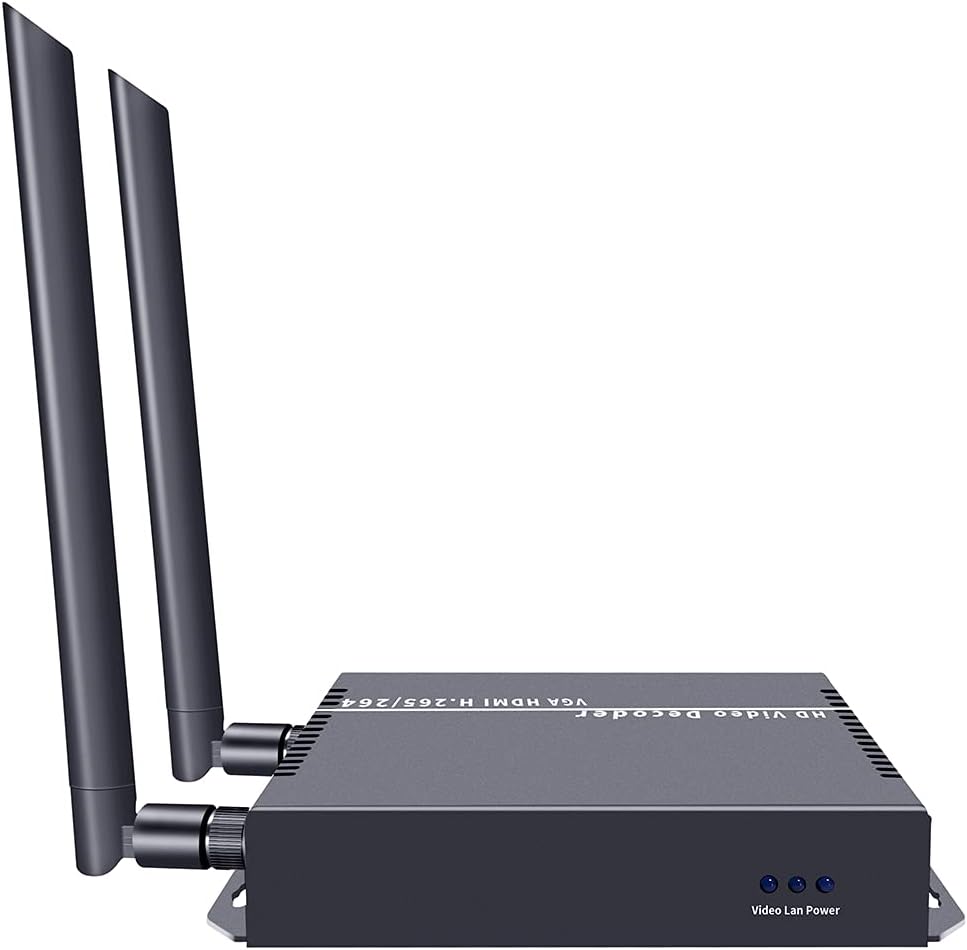
The following images illustrate the physical layout and ports of the ISEEVY ISV-HCDW4 Video Decoder.

Slika 4.1: Prednja i stražnja strana view of the ISEEVY ISV-HCDW4 Video Decoder, showing connectivity options and dual antennas for WiFi.
Slika 4.2: Detaljno view of the decoder's back panel, highlighting the Reset Audio button, CVBS, VGA, HDMI, LAN, and DC12V power input ports.

Slika 4.3: Prednja strana view of the decoder, showing the 'Video Lan Power' indicators.
5. Postavljanje
5.1 Osnovni dijagram spajanja
Follow these steps to set up your ISEEVY ISV-HCDW4 Video Decoder:
- Connect the video source (e.g., camera, media player) to an ISEEVY Video Encoder (sold separately) via HDMI, SDI, or VGA.
- Connect the Video Encoder to your network router via a LAN cable.
- Connect the ISEEVY Video Decoder to the same network router via a LAN cable or WiFi.
- Connect the Video Decoder's HDMI, VGA, or CVBS output to your display device (monitor, TV, projector).
- Connect the included power adapter to the DC12V input on the decoder and plug it into a power outlet.

Figure 5.1: Diagram illustrating the typical system connections for the ISEEVY Video Decoder, showing an encoder feeding into a router, which then connects to multiple decoders and displays.

Figure 5.2: Multi-purpose connection diagram showing an encoder connected to a network switch, which then distributes the stream to a video decoder connected to a display, an NVR, and an STB.
6. Upute za rad
6.1 Pristup Web Sučelje
To configure the decoder, access its web-sučelje za upravljanje:
- Ensure your computer is connected to the same network as the decoder.
- Otvori a web preglednik (npr. Chrome, Firefox).
- Enter the decoder's IP address in the address bar. The default IP address is typically 192.168.1.168, but it may vary or be assigned by DHCP. Refer to the device's OLED display or network tools for the current IP.
- Log in using the default credentials (if prompted).
6.2 Web Sučelje završenoview
The web interface allows you to monitor status, configure decoding parameters, and manage system settings.

Slika 6.1: Web interface screenshot showing the 'Status' page with system information and 'Address setting' for single channel decoding.

Slika 6.2: Web interface screenshot showing the 'Address setting' page configured for 4-channel decoding, allowing individual stream addresses.

Slika 6.3: Web interface screenshot displaying 'System output' settings (resolution, rotation, brightness, contrast, hue, saturation) and 'OSD setting' for on-screen display configuration.
6.3 Decoding Modes
The decoder supports various display modes for single or multiple streams:
Slika 6.4: Npramples of multiple stream display modes, including 1 Stream, Quarter Display, 3 Streams Top, 3 Streams Right, 3 Streams Left, and 3 Streams Bottom.
7. Održavanje
- Keep the device in a cool, dry, and well-ventilated environment.
- Avoid exposing the device to direct sunlight, high temperatures, or humidity.
- Redovito čistite uređaj mekom, suhom krpom. Nemojte koristiti tekuća ili aerosolna sredstva za čišćenje.
- Osigurajte pravilnu ventilaciju tako da ne blokirate otvore na uređaju.
- Povremeno provjeravajte ažuriranja firmvera putem web interface to ensure optimal performance and access to new features.
8. Rješavanje problema
- Nema video izlaza:
- Check all cable connections (HDMI, VGA, CVBS, LAN).
- Ensure the decoder is powered on.
- Verify the input stream address in the web interface is correct and the encoder is sending data.
- Confirm the display device is set to the correct input source.
- Loša kvaliteta videa:
- Check network bandwidth and stability. Insufficient bandwidth can cause pixelation or dropped frames.
- Ensure the encoder is sending a high-quality stream.
- Adjust video output settings (resolution, brightness, contrast) in the web sučelje.
- Ne mogu pristupiti Web sučelje:
- Verify the decoder's IP address and ensure your computer is on the same network segment.
- Check network cable connection to the decoder.
- Try resetting the decoder to factory defaults (refer to the device's reset button or web interface option).
- Problemi sa zvukom:
- Ensure audio is enabled and correctly configured on both the encoder and decoder.
- Check audio connections to the display device.
9. Specifikacije
| Značajka | Specifikacija |
|---|---|
| Marka | iseevy |
| Broj modela | ISV-HCDW4 |
| Video kodek | H.265, H.264 (HEVC, MPEG4-AVC) |
| Max Decoding Resolution | 3840x2160@30P or 1920x1080@60P |
| Video izlazna sučelja | HDMI, VGA, CVBS |
| Podržani protokoli | RTMP, SRT, RTSP, UDP, HTTP |
| Tehnologija povezivanja | Ethernet, HDMI, Wi-Fi |
| Težina artikla | 10.6 unci (otprilike 300 g) |
| Dimenzije proizvoda | 5.39 x 4.13 x 1.1 inča (otprilike 13.7 x 10.5 x 2.8 cm) |
| Ulazna snaga | DC 12V |
10. Jamstvo i podrška
This ISEEVY product comes with a standard manufacturer's warranty. For specific warranty terms, technical support, or service inquiries, please refer to the warranty card included in your package or visit the official ISEEVY webweb-mjesto. Za pomoć se možete obratiti i svom prodavaču.