
Amazon Echo Show 8 (1st Gen, 2019 release)
Echo Show 8 (1st Gen) User Manual
Your comprehensive guide to setting up, operating, and maintaining your Amazon Echo Show 8.
Uvod
The Amazon Echo Show 8 (1st Gen, 2019 release) is a smart display designed to enhance your daily life with Alexa. Featuring an 8-inch HD screen and stereo sound, it allows you to manage your day, connect with loved ones through video calls, enjoy entertainment, control smart home devices, and personalize your experience. This manual provides detailed instructions to help you get the most out of your device.
Što je u kutiji
Upon unboxing your Echo Show 8, ensure all components are present:
- Uređaj Echo Show 8
- Power adapter (30W) with cable (4.9 ft.)
- Vodič za brzi početak
Postavljanje
Setting up your Echo Show 8 is a straightforward process, often simplified by Amazon Wi-Fi simple setup technology.
- Uključivanje: Connect the power adapter to your Echo Show 8 and plug it into a wall outlet. The device will power on automatically.
- Odabir jezika: Slijedite upute na zaslonu za odabir željenog jezika.
- Wi-Fi veza: Select your Wi-Fi network from the list and enter the password. The Echo Show 8 supports dual-band Wi-Fi (802.11a/b/g/n/ac).
- Prijava na Amazon račun: Log in with your Amazon account credentials. If you don't have one, you will be prompted to create one.
- Registracija uređaja: Your device will register to your Amazon account.
- Time Zone and Location: Confirm your time zone and location settings.
- Vodič: The device may offer a brief tutorial on how to navigate and use its features.
Aplikacija Alexa kompatibilna je s uređajima s operativnim sustavima Fire OS, Android i iOS, a dostupna je i putem vašeg web browser for further management and customization.
Upravljanje vašim Echo Showom 8
The Echo Show 8 can be operated using voice commands with Alexa or through its touch screen interface.
Voice Commands (Alexa)
Simply say "Alexa" followed by your command. Exampuključuju:
- "Alexa, kakvo je vrijeme?"
- "Alexa, pusti glazbu."
- "Alexa, nazovi [ime kontakta]."
- "Alexa, show me my photos."
- "Alexa, turn off the lights."

Image: Echo Show 8 displaying current weather conditions, demonstrating its ability to provide glanceable information.
Navigacija dodirnim zaslonom
Swipe down from the top of the screen to access quick settings and the home menu. Swipe left from the right edge to view cards with suggestions and information. Tap on icons and options to interact with the device.
Značajke
The Echo Show 8 offers a wide range of features to simplify and enrich your daily routines:
- Video Calling & Messaging: Connect with friends and family who have the Alexa app or an Echo device with a screen. Make announcements to other devices in your home.

Image: A user making a video call on the Echo Show 8, highlighting its communication capabilities.
- Zabava: Ask Alexa to show you movie trailers, TV shows, movies, or the news. Listen to radio stations, podcasts, and audiobooks.
- Kontrola pametne kuće: Voice control compatible devices or manage them on the easy-to-use display. Ask Alexa to show you security cameras, control lights, and adjust thermostats.

Image: The Echo Show 8 displaying a live feed from a nursery camera, illustrating its smart home monitoring feature.
- Personalizacija: Show off your albums from Amazon Photos. Customize your home screen. Create morning routines to start your day.
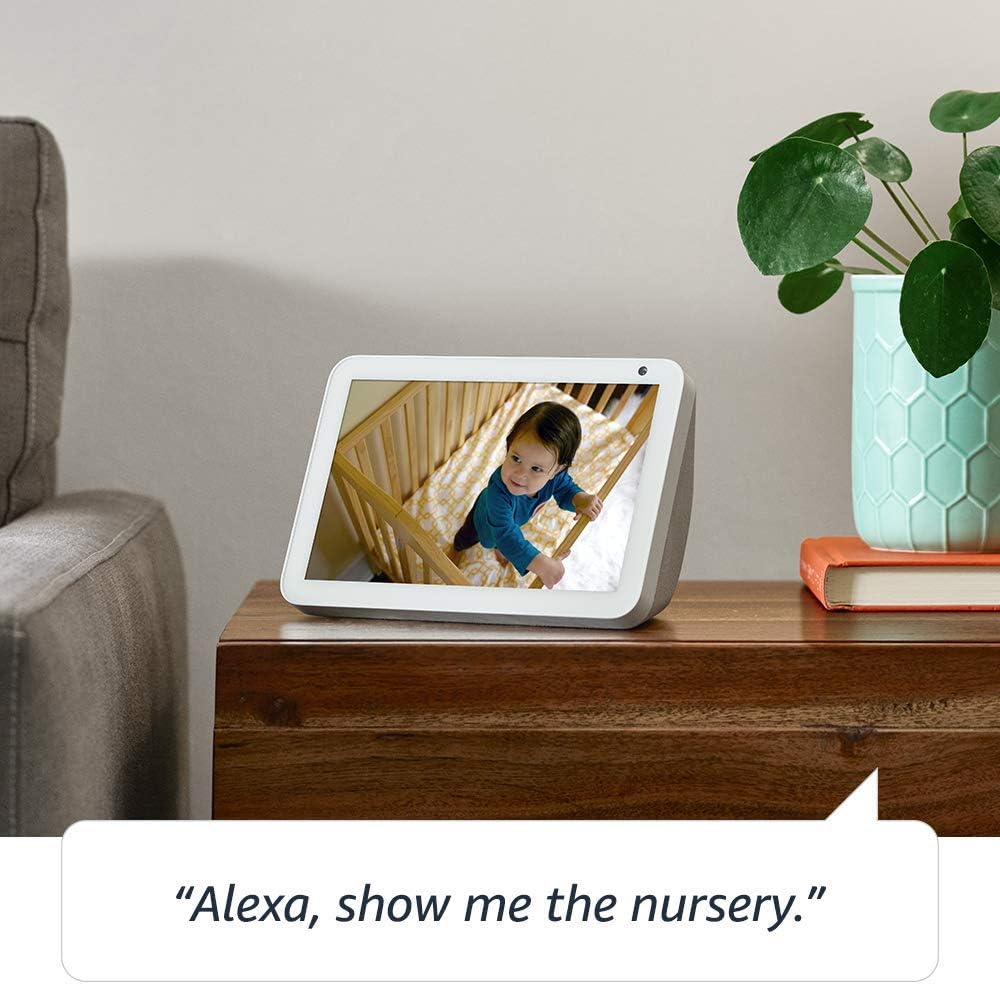
Image: The Echo Show 8 displaying a scenic photo from a user's Amazon Photos album, demonstrating its personalization options.
- Dnevna pomoć: Cook along to step-by-step recipes. Easily update to-do lists and calendars. Glance at weather and traffic on your way out.
Značajke privatnosti
The Echo Show 8 is designed with privacy in mind, offering several controls:
- Gumb za isključivanje mikrofona/kamere: Electronically disconnect the microphones and camera with one press of a button.
- Ugrađeni zatvarač kamere: Slide the built-in shutter to physically cover the camera lens.

Image: A finger activating the physical camera shutter on the Echo Show 8, demonstrating a privacy control feature.
- Tehnologija buđenja riječi: Alexa devices are designed to detect only your chosen wake word (e.g., "Alexa").
- Pokazatelji strujanja: Visual indicators show when Alexa is streaming your request to the cloud.
- Upravljanje snimanjem glasa: Sposobnost da se view and delete your voice recordings through the Alexa app or Alexa Privacy Hub.
For more information, visit the Alexa Privacy Hub.
Održavanje
Kako biste osigurali dugotrajnost i optimalne performanse vašeg Echo Show 8, slijedite ove smjernice za održavanje:
- Čišćenje: Use a soft, lint-free cloth to clean the screen and exterior. Avoid abrasive cleaners or sprays directly on the device.
- Plasman: Place the device on a stable, flat surface away from direct sunlight, heat sources, and moisture. Ensure proper ventilation.
- Ažuriranja softvera: The device automatically receives software updates. Ensure it is connected to Wi-Fi to receive these updates, which improve performance and add new features.
Rješavanje problema
If you encounter issues with your Echo Show 8, try the following steps:
- Bez napajanja:
- Provjerite je li adapter za napajanje sigurno spojen i na uređaj i na ispravnu utičnicu.
- Pokušajte s drugom utičnicom.
- Problemi s Wi-Fi vezom:
- Provjerite je li vaša lozinka za Wi-Fi ispravna.
- Ponovno pokrenite Wi-Fi ruter i modem.
- Približite Echo Show 8 svom Wi-Fi ruteru.
- Alexa ne odgovara:
- Provjerite je li mikrofon isključen (provjerite gumb za isključivanje mikrofona/kamere).
- Govorite jasno i normalnim tonom.
- Try restarting the device by unplugging it for a few seconds and plugging it back in.
- Problemi sa zaslonom:
- Ako zaslon ne reagira, pokušajte ponovno pokrenuti uređaj.
- Provjerite je li zaslon čist i bez mrlja.
- Vraćanje na tvorničke postavke: As a last resort, you can perform a factory reset. This will erase all your personal data and settings. To do this, go to Settings > Device Options > Reset to Factory Defaults.
Tehnički podaci
| Značajka | Detalj |
|---|---|
| Veličina | 7.9”x 5.4”x 3.9” (200mm x 135mm x 99mm) |
| Težina | 36.6 oz (1037 grama) |
| Prikaz | 8.0-inčni zaslon osjetljiv na dodir |
| Fotoaparat | 1MP camera with built-in shutter |
| Wi-Fi povezivanje | Dvopojasni Wi-Fi podržava 802.11a/b/g/n/ac Wi-Fi mreže. Ne podržava povezivanje s ad-hoc (ili peer-to-peer) Wi-Fi mrežama. |
| Bluetooth povezivanje | Napredna distribucija zvuka Profile (A2DP) podrška za streaming zvuka s vašeg mobilnog uređaja na Echo Show 8 ili s Echo Show 8 na vaš Bluetooth zvučnik. Audio/Video Remote Control Profile (AVRCP) za glasovno upravljanje povezanim mobilnim uređajima. Glasovno upravljanje bez upotrebe ruku nije podržano za Mac OS X uređaje. Bluetooth zvučnici koji zahtijevaju PIN kodove nisu podržani. |
| Audio | 2.0” (52 mm) neodymium speakers with passive bass radiator |
| Zahtjevi sustava | Echo Show 8 comes ready to connect to your WiFi. The Alexa app is compatible with Fire OS, Android, and iOS devices and also accessible via your web browser. Supported operating systems. Certain skills and services may require subscription or other fees. |
| Procesor | MediaTek MT 8163 |
| Jezik | Alexa govori engleski i španjolski |
Značajke pristupačnosti
Echo Show 8 uključuje razne značajke pristupačnosti za personalizaciju Alexe prema vašim sposobnostima:
- Dodirnite za Alexu: Pristupite Alexi dodirom putem pločica na zaslonu ili tipkovnice.
- Adaptivno slušanje: Pruža više vremena za dovršetak govora prije nego što Alexa odgovori.
- Željena brzina govora: Kontrolirajte koliko brzo ili sporo Alexa govori.
- Alexa titlovi, titlovi za pozive, skriveni titlovi: Navedite tekstualne titlove za podržani sadržaj.
- Pokaži i ispričaj: Helps customers who are blind or visually impaired identify products by saying “Alexa, what am I holding.”
- GlasView Čitač zaslona: Omogućuje pristup korisnicima koji su slijepi ili slabovidni.
- Povećalo zaslona: Enables zooming in/out and panning around the screen.
- Obavijesti kada je u blizini: Plays notification sounds when you’re detected near your Echo device.
- Čitanje naglas za Kindle: Alexa može naglas čitati vaše Kindle knjige.
- Tekst u stvarnom vremenu: Enables typing live text in a video call.
- Dodatne postavke uključuju inverziju boja, korekciju boja, zvuk zahtjeva i još mnogo toga.
To enable these features, go to Settings → Accessibility on your Echo Show 8.
Jamstvo i podrška
Your Certified Refurbished Echo Show 8 comes with a 1-year limited warranty and service, similar to a new device. Use of Echo Show 8 is subject to Amazon's terms and conditions.
For further assistance, visit the Amazon Device Support page or contact Amazon Customer Service.
Ask a question about this manual
Ask about setup, troubleshooting, compatibility, parts, safety, or missing instructions. Manuals+ will review the question and use this page’s manual context to help answer it.