
ROCCAT ROC-12-940-BN
Roccat Vulcan 122 Mechanical Gaming Keyboard User Manual
Model: ROC-12-940-BN
1. Uvod
The Roccat Vulcan 122 is a high-performance mechanical gaming keyboard designed for precision and durability. It features Roccat's unique Titan switches, advanced AIMO RGB lighting, and a robust aluminum construction. This manual provides detailed instructions for setting up, operating, maintaining, and troubleshooting your keyboard.

Image: The Roccat Vulcan 122 keyboard shown with a Roccat mouse and headset, demonstrating its vivid, dynamic lighting synergy with AIMO.
Ključne karakteristike:
- Unique design with lowered keycaps and reduced reaction time.
- RGB lighting with configurable LED effects and adjustable AIMO effects.
- High-quality and resistant design with robust materials and an anodized aluminum surface.
- Advanced anti-ghosting with N-Key Rollover (NKRO).
- Programmable macro keys and ROCCAT Easy-Shift[+].
2. Postavljanje
2.1 Spajanje tipkovnice
To connect your Roccat Vulcan 122 keyboard:
- Unpack the keyboard and its accessories.
- Uključite USB priključak s tipkovnice u dostupan USB priključak na računalu.
- Operativni sustav će automatski prepoznati i instalirati potrebne upravljačke programe.
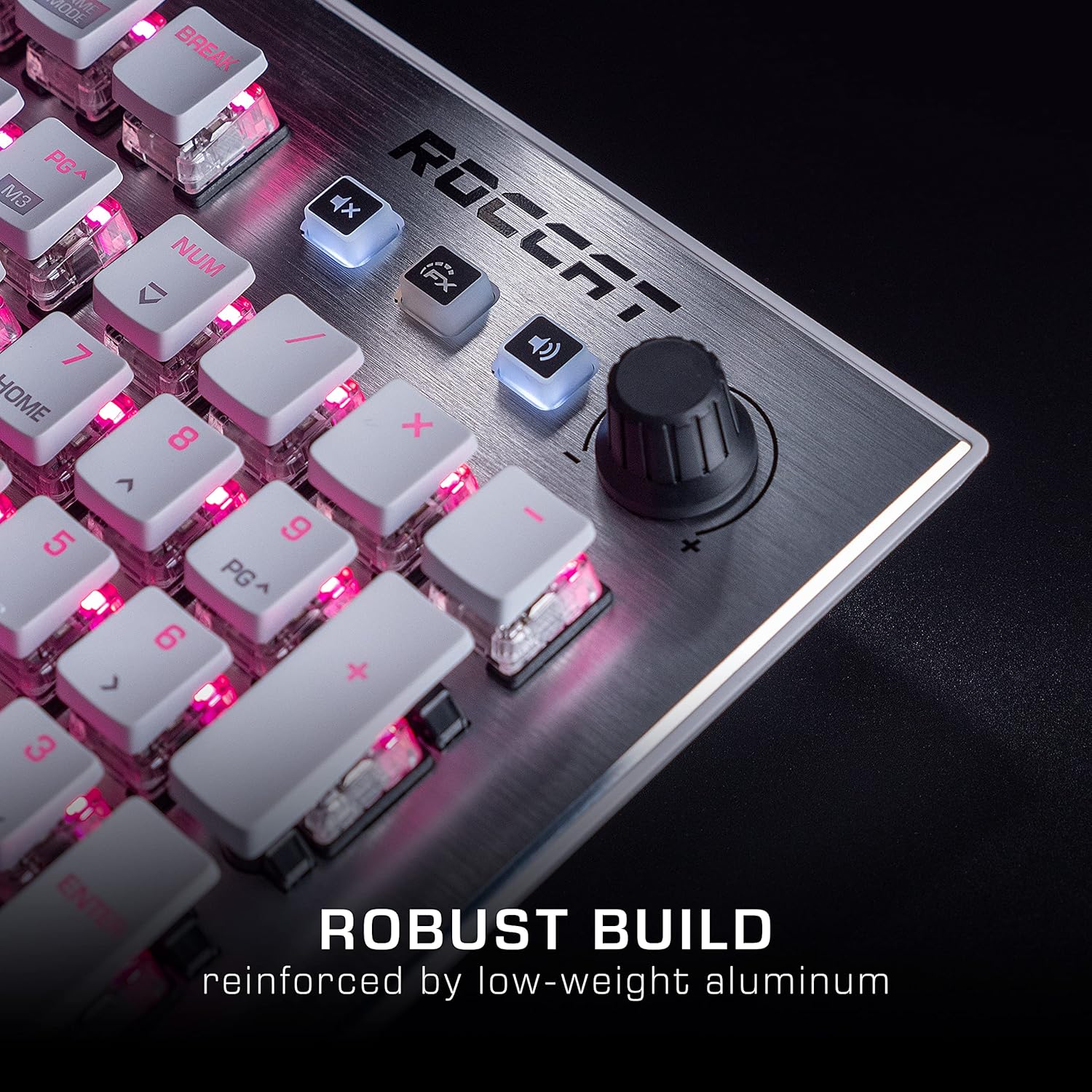
Image: The Roccat Vulcan 122 keyboard shown with its detachable wrist rest, ready for connection.
2.2 Software Installation (ROCCAT Swarm)
For full functionality and customization, install the ROCCAT Swarm software:
- Posjetite službeni ROCCAT webweb mjesto (www.roccat.com) i idite na odjeljak za podršku.
- Preuzmite najnoviju verziju ROCCAT Swarm softvera za vaš operativni sustav.
- Pokrenite instalacijski program i slijedite upute na zaslonu.
- After installation, launch ROCCAT Swarm to configure your keyboard settings, lighting, and macros.
3. Upravljanje tipkovnicom
3.1 Standardne funkcije tipki
The Vulcan 122 functions as a standard QWERTY keyboard. All alphanumeric keys, function keys (F1-F12), navigation keys, and the numeric keypad operate as expected.
3.2 Kontrole medija
The keyboard features dedicated media controls for convenient audio management.
- Gumb za glasnoću: Located in the upper right corner, rotate to adjust system volume.
- Gumb za isključivanje zvuka: Pritisnite za isključivanje/uključivanje zvuka.
- Gumb FX: Cycles through lighting effects or other programmable functions.

Slika: Krupni plan view of the mixer-style media controls on the Roccat Vulcan 122, including the volume knob and dedicated function keys.
3.3 RGB Lighting Customization (AIMO)
The Vulcan 122 features advanced RGB lighting with Roccat's AIMO intelligent lighting system. Use the ROCCAT Swarm software to:
- Select from various pre-set lighting effects.
- Customize individual key illumination.
- Adjust brightness and speed of effects.
- Synchronize lighting with other AIMO-compatible devices.
3.4 Programmable Macro Keys and Easy-Shift[+]
The keyboard includes programmable macro keys and the Easy-Shift[+] function, allowing you to assign secondary functions to keys.
- Use the ROCCAT Swarm software to record and assign macros to designated keys.
- Easy-Shift[+] allows you to double the number of assignable functions by holding down the Easy-Shift[+] key (usually Caps Lock by default, configurable in Swarm) and pressing another key.
3.5 Anti-Ghosting with NKRO
The Vulcan 122 features advanced anti-ghosting technology with N-Key Rollover (NKRO), ensuring that every key press is registered accurately, even when multiple keys are pressed simultaneously.

Image: A hand demonstrating typing on the Roccat Vulcan 122 keyboard, emphasizing the ergonomic design of the keys for comfortable use.
4. Održavanje
4.1 Čišćenje tipkovnice
To ensure the longevity and optimal performance of your Vulcan 122 keyboard, regular cleaning is recommended.
- Prije čišćenja isključite tipkovnicu iz računala.
- Koristite mekanu krpu koja ne ostavlja dlačice dampened with water or a mild cleaning solution to wipe the keycaps and surface. Avoid harsh chemicals.
- For dust and debris between keys, use compressed air. The raised keycap design makes cleaning easier.
- Prije ponovnog spajanja provjerite je li tipkovnica potpuno suha.

Image: A close-up of the Roccat Vulcan 122 keyboard keys, illustrating their design which facilitates easy cleaning and resistance to dust and liquids.
5. Rješavanje problema
If you encounter issues with your Roccat Vulcan 122 keyboard, refer to the following common problems and solutions:
- Tipkovnica ne reagira:
- Provjerite je li USB kabel sigurno spojen i na tipkovnicu i na računalo.
- Pokušajte spojiti tipkovnicu na drugi USB priključak.
- Ponovno pokrenite računalo.
- Check if the keyboard is disabled in your operating system's device manager.
- RGB rasvjeta ne radi ili je neispravna:
- Ensure the ROCCAT Swarm software is installed and up to date.
- Provjerite postavke osvjetljenja unutar Swarm softvera.
- Perform a firmware update for the keyboard via Swarm.
- Tipke se ne registriraju ili se pojavljuju kao ghosting:
- Clean the affected keys as described in the Maintenance section.
- Provjerite je li firmware tipkovnice ažuriran.
- Testirajte tipkovnicu na drugom računalu kako biste isključili probleme specifične za sustav.
- ROCCAT Swarm software not detecting keyboard:
- Provjerite je li tipkovnica ispravno spojena.
- Restart the Swarm software and your computer.
- Reinstall the ROCCAT Swarm software.
- Provjerite ima li konfliktnih softvera ili upravljačkih programa.
6. Specifikacije
| Značajka | Detalj |
|---|---|
| Marka | ROCCAT |
| Naziv modela | Vulkan 122 |
| Broj modela | ROC-12-940-BN |
| Opis tipkovnice | Mehanički |
| Tip prekidača | Taktilni |
| Materijal | Aluminij |
| Posebne značajke | Pozadinsko osvjetljenje |
| Kompatibilni uređaji | Laptop (PC) |
| Podrška za operativni sustav | Windows 10, Windows 7, Windows 8 |
| Dimenzije proizvoda | 46.2 x 23.5 x 3.2 cm |
| Težina artikla | 1.15 kg |

Slika: Eksplodirala view diagram illustrating the components of a Roccat Titan Tactile mechanical switch, highlighting its design for swift and precise response.
7. Jamstvo i podrška
7.1 Informacije o jamstvu
Your Roccat Vulcan 122 keyboard is covered by a manufacturer's warranty. The specific terms and duration of the warranty may vary by region and retailer. Please retain your proof of purchase for warranty claims. For detailed warranty information, refer to the warranty card included with your product or visit the official ROCCAT webmjesto.
7.2 Tehnička podrška
For technical assistance, driver updates, or further inquiries, please visit the official ROCCAT support page:
Često postavljana pitanja, vodiče za rješavanje problema i kontaktne podatke za korisničku podršku možete pronaći na njihovim webmjesto.
Ask a question about this manual
Ask about setup, troubleshooting, compatibility, parts, safety, or missing instructions. Manuals+ will review the question and use this page’s manual context to help answer it.