
Uvod
Thank you for choosing the DEWIN B6 80W LiPo Balance Charger. This intelligent digital balance charger is designed for safe and efficient charging and discharging of various battery types, including LiPo, Li-ion, Li-Fe, NiMH, NiCd, and Pb batteries. Please read this manual thoroughly before operation to ensure proper use and to maximize the performance and lifespan of your charger and batteries.
Sigurnosne informacije
UPOZORENJE: Nepoštivanje ovih sigurnosnih uputa može uzrokovati požar, materijalnu štetu ili tjelesne ozljede.
- Punjač uvijek koristite u dobro prozračenom prostoru, dalje od zapaljivih materijala.
- Nikada ne ostavljajte punjač bez nadzora tijekom rada.
- Ensure the charger is compatible with your battery type and cell count before connecting. Incorrect settings can cause severe damage.
- Do not charge damaged or swollen batteries.
- Držite punjač dalje od vode, vlage i ekstremnih temperatura.
- Use only the original power adapter and cables provided with the charger.
- Čuvati izvan dohvata djece.
- Disconnect the power supply immediately if any abnormal behavior is observed.
Sadržaj paketa
Provjerite jesu li svi artikli prisutni u vašem paketu:
- 1 x DEWIN B6 80W LiPo Balance Charger
- 3 x Cable Sets (various connectors for different battery types)
- 1 x priručnik s uputama
- 1 x Power Adapter (EU Plug, if selected)
Proizvod gotovview
The DEWIN B6 80W LiPo Balance Charger features a robust metal casing for efficient heat dissipation and stable performance. Its intuitive LCD screen displays charging status and parameters, making it easy to monitor your battery's condition.
Ključne karakteristike:
- Metal Casing: Provides strong heat dissipation for stable and reliable operation.
- Ulazni voltage Kontrola: Protects the battery during charging.
- Široka kompatibilnost: Suitable for parallel charging of Li-Po, Li-ion, Li-Fe, NiMH, NiCd, and Pb batteries.
- LCD zaslon: Clear visualization of charging status and parameters.
- Svestrana snaga: Max. 80W charge power / Max. 10W discharge power.
Identifikacija komponente:

This image displays the front of the DEWIN B6 80W LiPo Balance Charger, highlighting its compact dimensions of 133mm (5.2 inches) in length, 87mm (3.4 inches) in width, and 33mm (1.3 inches) in height. The LCD screen is visible, along with the control buttons and balance charging ports on the side.

Ova slika pruža detaljan prikaz view of the charger's LCD screen, which displays charging information such as battery type, current, voltage, and cell count. Below the screen are four control buttons: "Batt Type/Stop", "Dec./Status", "Inc./Status", and "Start/Enter", used for navigation and selection.
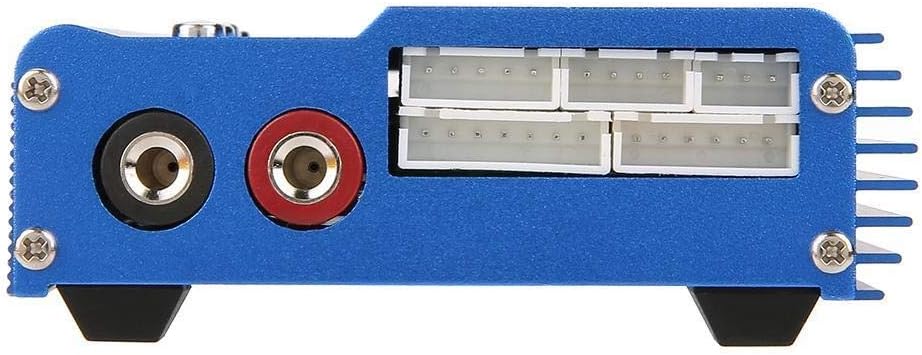
This image shows the side of the charger, specifically the balance charging ports. These ports are labeled for 2, 3, 4, 5, and 6 cell batteries, allowing for precise balancing during charging to ensure optimal battery health and performance.
Postavljanje
- Raspakirajte punjač: Pažljivo izvadite sve komponente iz pakiranja.
- Provjerite ima li oštećenja: Check the charger and all accessories for any signs of damage. Do not use if damaged.
- Priključite napajanje:
- Connect the power adapter to the DC input port on the side of the charger.
- Plug the power adapter into a suitable AC outlet (240V input).

Figure 4: The power adapter with an EU plug, used to power the charger. This image shows the power adapter, which typically comes with an EU plug, used to supply power to the DEWIN B6 charger. Ensure it is securely connected to both the charger and a power outlet.
- Početni zaslon: The LCD screen will light up, displaying the initial menu or standby screen.
Upute za rad
This section outlines the general steps for charging a battery. Specific settings will vary based on battery type.
General Charging Procedure:
- Povežite bateriju:
- Connect the main charging cable from the charger's output ports to your battery's main connector. Ensure correct polarity.
- For LiPo/Li-ion/Li-Fe batteries, also connect the battery's balance lead to the appropriate balance port on the side of the charger (e.g., 3 cells to the '3 cells' port).
- Odaberite vrstu baterije:
- Press the "Batt Type/Stop" button to navigate through the main menu.
- Use the "Inc." and "Dec." buttons to select the correct battery type (e.g., LiPo, NiMH).
- Press "Start/Enter" to confirm your selection.
- Set Charging Parameters:
- After selecting the battery type, the screen will display options for charging mode (e.g., Balance Charge, Fast Charge, Storage, Discharge). Use "Inc." and "Dec." to select the desired mode.
- Press "Start/Enter" to enter parameter adjustment.
- Adjust the charging current (Amps) and cell count (Volts) using "Inc." and "Dec." buttons. Refer to your battery's specifications for recommended charging rates.
- Press "Start/Enter" to confirm each parameter.
- Početak punjenja:
- Once all parameters are set, long-press the "Start/Enter" button. The charger will perform a battery check.
- Confirm the battery information displayed on the screen. If correct, press "Start/Enter" again to begin charging.
- Pratite napredak:
- The LCD will display real-time charging status, including current, voltage, and elapsed time.
- Press "Status" (Inc. or Dec.) to cycle through detailed battery information during charging.
- Kraj punjenja:
- The charger will automatically stop when the battery is fully charged. An audible alert may sound.
- Press "Batt Type/Stop" to stop the charging process manually at any time.
- Odvojite bateriju od punjača.
Održavanje
- Čišćenje: Za čišćenje vanjske strane punjača koristite meku, suhu krpu. Nemojte koristiti tekuća sredstva za čišćenje ili otapala.
- Skladištenje: Čuvajte punjač na hladnom i suhom mjestu, daleko od izravne sunčeve svjetlosti i ekstremnih temperatura.
- Pregled kabela: Regularly inspect all cables and connectors for wear, damage, or corrosion. Replace damaged cables immediately.
- Ventilacija: Ensure the charger's ventilation slots are clear of dust and debris to maintain proper heat dissipation.
Rješavanje problema
| Problem | Mogući uzrok | Otopina |
|---|---|---|
| Punjač se ne uključuje. | No power supply; faulty adapter/cable. | Check power connections. Ensure adapter is plugged in and functional. Try a different outlet. |
| "Connection Break" error. | Battery not connected properly; faulty cable. | Ensure main and balance leads are securely connected. Inspect cables for damage. |
| "Input Voltage Error". | Ulazni voltage je previsok ili prenizak. | Verify the power adapter output voltage je unutar navedenog raspona (DC 10.0-20.0V). |
| Baterija se ne puni/prazni. | Incorrect battery type/parameters selected; battery is fully charged/discharged. | Double-check battery type, cell count, and charging current settings. Ensure the battery is not already at its target state. |
| Punjač se pretjerano zagrijava. | Poor ventilation; overcurrent charging. | Ensure adequate airflow around the charger. Reduce charging current if it exceeds battery specifications. Stop charging if overheating persists. |
Tehnički podaci
| Parametar | Vrijednost |
|---|---|
| Marka | DEWIN |
| Broj modela | POVEZATI829 |
| Operativni svtage Domet | DC 10.0-20.0V |
| Circuit Power (Max Charge) | 80 W |
| Circuit Power (Max Discharge) | 10 W |
| Raspon struje punjenja | 0.1-6.0A |
| Raspon struje pražnjenja | 0.1-2.0A |
| LiPo Balancing Current | 300 mAh po ćeliji |
| Li-ion/LiPo/Li-Fe Cell Count | 1-6 ćelija |
| NiCd/NiMH Cell Count | 1-15 ćelija |
| Pb Battery Voltage | 2-20 V |
| Dimenzije (D x Š x V) | 133 x 87 x 33 mm (5.2 x 3.4 x 1.3 inča) |
| Težina | 661 grama (otprilike) |
| Boja | Crna |
| Certifikati | CE |
Jamstvo i podrška
DEWIN products are designed for reliability and performance. For warranty information or technical support, please refer to the contact details provided with your purchase or visit the official DEWIN webMolimo sačuvajte dokaz o kupnji za potrebe jamstva.
Note: Availability of spare parts is not specified. Software updates are not applicable for this device.