
1. Uvod
This manual provides detailed instructions for the Amazon Basics Aluminum Type-C Docking Station. This device expands the connectivity of your USB-C enabled laptop or tablet, offering a wide range of ports for various peripherals and external displays. Please read this manual thoroughly before use to ensure proper operation and to maximize the product's functionality.
2. Značajke proizvoda
- 11-u-1 dizajn s više priključaka: Integrates Mini DisplayPort, HDMI, VGA, 3 USB-A ports, Ethernet, SD/TF card reader, 3.5mm audio jack, and a Type-C charging port (PD 100W).
- Video izlaz visoke rezolucije: Supports Ultra HD 4K output via Mini DisplayPort/HDMI and Full HD 1080P via VGA, allowing for mirroring or extending your display to HDTVs, monitors, or projectors. Note: 4K resolution is supported at 30Hz refresh rate.
- Brzi prijenos podataka: Three USB 3.0 A ports provide data transfer speeds up to 5Gbps, backward compatible with USB 2.0/1.0.
- Stabilna mrežna veza: 1000Mbps RJ45 Ethernet port ensures a fast and reliable wired network connection.
- Universal Card Reader: Integrated SD and TF slots allow simultaneous reading of universal SD and Micro SD memory cards.
- Isporuka struje: Type-C charging port supports Power Delivery (PD) up to 100 watts for charging your host device.
- Audio povezivanje: 3.5mm audio jack for headphones or speakers.
- Izdržljiva konstrukcija: Features an aluminum pedestal-style housing for enhanced durability and heat dissipation.
3. Sadržaj paketa
- Amazon Basics Aluminum Type-C Docking Station
- korisnički priručnik
4. Proizvod je gotovview and Port Layout
Familiarize yourself with the various ports and their functions on your docking station.

Slika: Krupni plan view of the Amazon Basics Type-C Docking Station's ports, including Ethernet, Mini DisplayPort, HDMI, VGA, and USB-C.
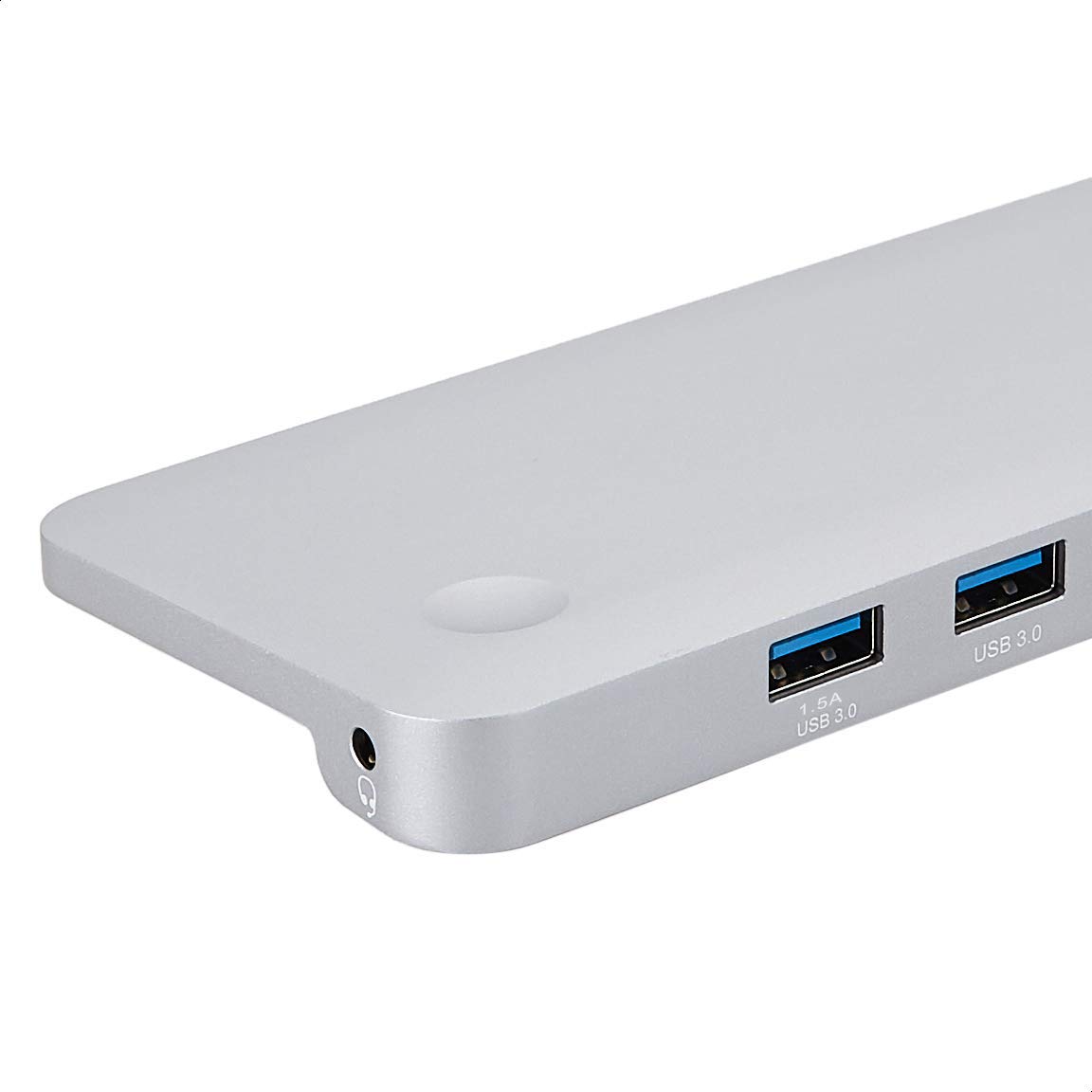
Slika: Detaljna view of the USB 3.0 ports and 3.5mm audio jack on the Amazon Basics Type-C Docking Station.
- USB-C glavni konektor: Connects to your laptop or tablet's USB-C port.
- USB 3.0 priključci (x3): For connecting USB devices such as external hard drives, keyboards, mice, or USB flash drives.
- Utor za SD karticu: Za čitanje standardnih SD memorijskih kartica.
- Utor za TF karticu (Micro SD): Za čitanje Micro SD memorijskih kartica.
- RJ45 Ethernet priključak: Za žičanu mrežnu vezu.
- Mini DisplayPort: Za spajanje na vanjski zaslon.
- HDMI priključak: Za spajanje na vanjski zaslon.
- VGA priključak: Za spajanje na vanjski zaslon.
- 3.5 mm audio utičnica: Za spajanje slušalica ili zvučnika.
- USB-C PD priključak za punjenje: For connecting a USB-C power adapter to charge your host device and power the docking station.
5. Upute za postavljanje
Slijedite ove korake za postavljanje priključne stanice:
- Povezivanje s glavnim uređajem: Plug the integrated USB-C host connector cable from the docking station into an available USB-C port on your laptop or tablet. Ensure your host device's USB-C port supports DisplayPort Alt Mode (DP Alt Mode) for video output functionality.
- Spojite napajanje (opcionalno, ali preporučuje se): If your host device requires charging or if you are connecting power-intensive peripherals, connect your USB-C power adapter (up to 100W) to the USB-C PD Charging Port on the docking station. This will charge your host device and provide stable power to the docking station and connected peripherals.
- Povežite periferne uređaje: Connect your desired peripherals (e.g., external monitors, USB devices, Ethernet cable, SD/TF cards, audio devices) to the corresponding ports on the docking station.

Image: Amazon Basics Type-C Docking Station connected to a laptop, with multiple peripherals like a USB drive and external display cables plugged in.
6. Upute za rad
6.1. Video izlaz
- Connect your monitor or projector to the HDMI, Mini DisplayPort, or VGA port.
- Your operating system should automatically detect the external display. You may need to adjust display settings (e.g., extend, duplicate) in your computer's display preferences.
- The docking station supports 4K resolution at 30Hz refresh rate via HDMI and Mini DisplayPort. For optimal performance, ensure your display and cables support the desired resolution and refresh rate.
- Dual video display is supported, allowing you to mirror or expand your screen across multiple monitors.
6.2. Prijenos podataka putem USB-a
- Plug your USB devices into the USB 3.0 ports.
- The ports support data transfer speeds up to 5Gbps.
6.3. Ethernet veza
- Connect an Ethernet cable from your router or modem to the RJ45 Ethernet port on the docking station.
- Your computer should automatically establish a wired network connection.
6.4. SD/TF Card Reader
- Insert your SD or TF (Micro SD) card into the corresponding slot.
- The cards will appear as removable drives on your computer, allowing you to access and transfer files. Both slots can be used simultaneously.
6.5. Audio izlaz
- Connect your headphones or speakers to the 3.5mm audio jack.
- You may need to select the docking station as the default audio output device in your computer's sound settings.
6.6. Isporuka energije (PD)
- Connect your laptop's USB-C power adapter to the USB-C PD Charging Port on the docking station.
- This port supports up to 100W power delivery to charge your host device while using the docking station.
7. Kompatibilnost
This docking station is compatible with a wide range of USB-C enabled devices, including but not limited to:
- MacBook Pro 2018/2017/2016
- iPad Pro 2018
- Mac mini 2018
- MacBook Air
- iMac 2017
- Samsung Note9
- HUAWEI MateBook X
- Dell XPS 13
- ThinkPad
- Chromebook
Važno: This product functions only with computers that support DisplayPort Alt Mode (DP Alt Mode) via their USB-C port. Please verify your computer's specifications for compatibility before use.
8. Rješavanje problema
- Nema izlaza za prikaz:
- Provjerite podržava li USB-C priključak vašeg glavnog uređaja DisplayPort Alt način rada.
- Check all cable connections (USB-C to host, video cable to monitor).
- Verify the external monitor is powered on and set to the correct input source.
- Pokušajte ponovno pokrenuti računalo.
- 4K Resolution Not Working at 60Hz:
- This docking station supports 4K resolution at a maximum refresh rate of 30Hz. If your monitor is set to 4K@60Hz, it will not display correctly. Adjust your display settings to 4K@30Hz or a lower resolution with a higher refresh rate if desired.
- USB Devices Not Recognized or Disconnecting:
- Ensure the docking station is receiving sufficient power. Connect a USB-C power adapter to the PD port if you are using multiple power-intensive USB devices.
- Try connecting the USB device directly to your computer to confirm it is functional.
- Reconnect the docking station to your computer.
- No Network Connection via Ethernet:
- Provjerite Ethernet kabelsku vezu s priključnom stanicom i usmjerivačem/modemom.
- Verify your network settings on your computer.
- Provjerite da li vaš ruter/modem ispravno radi.
- Nema audio izlaza:
- Ensure your headphones or speakers are properly connected to the 3.5mm audio jack.
- Check your computer's sound settings and select the docking station as the default audio output device.
- Glavni uređaj se ne puni:
- Ensure a compatible USB-C power adapter is connected to the docking station's USB-C PD Charging Port.
- Verify that your host device supports USB-C Power Delivery.
- Provjerite adapter za napajanje i kabel ima li oštećenja.
9. Specifikacije
| Značajka | Specifikacija |
|---|---|
| Marka | Osnove Amazona |
| Broj modela | UTC-DOCK01-PRO |
| Boja | Sivo |
| Dimenzije (DxŠxV) | 28 x 7.5 x 1.4 Centimeters (11.02 x 2.95 x 0.55 Inches) |
| Težina artikla | 317 g (0.32 kilograma) |
| Ukupno portova | 11 |
| USB priključci | 3 x USB 3.0 tipa A |
| Video izlazni priključci | 1 x HDMI, 1 x Mini DisplayPort, 1 x VGA |
| HDMI rezolucija | Do 4K@30Hz |
| Mini DisplayPort Resolution | Do 4K@30Hz |
| Ethernet priključak | RJ45 Gigabit Ethernet (10/100/1000Mbps) |
| Čitač kartica | SD and TF (Micro SD) slots, simultaneous read |
| Audio priključak | 3.5mm Audio Jack |
| USB-C PD priključak za punjenje | Do 100 W |
| Hardversko sučelje | Ethernet, HDMI, Mini DisplayPort, VGA, USB-A, USB-C, SD/TF, Audio |
10. Održavanje
- Čišćenje: Use a soft, dry cloth to clean the docking station. Avoid using liquid cleaners or aerosols.
- Skladištenje: Uređaj čuvajte na hladnom i suhom mjestu, dalje od izravne sunčeve svjetlosti i ekstremnih temperatura.
- Rukovanje: Avoid dropping or subjecting the device to strong impacts. Do not attempt to disassemble or modify the docking station.
11. Sigurnosne informacije
- Uređaj držite dalje od vode, vatre i okruženja s visokom vlagom.
- Ne izlažite uređaj ekstremnim temperaturama.
- Koristite samo kompatibilne adaptere i kabele za napajanje.
- Čuvati izvan dohvata djece.
- Ako je uređaj oštećen ili ne radi ispravno, odmah prekinite korištenje i obratite se korisničkoj podršci.
12. Jamstvo i podrška
This Amazon Basics product comes with a 1-godišnje ograničeno jamstvo from the date of purchase. This warranty covers manufacturing defects and workmanship under normal use. It does not cover damage caused by misuse, accident, modification, or unauthorized repair.
For warranty claims, technical support, or further assistance, please contact Amazon Basics customer service through your Amazon purchase history or the official Amazon Basics support channels.