
1. Uvod
This manual provides detailed instructions for the installation, operation, and maintenance of your BINIZE Android 13 Car Stereo. This 9-inch touchscreen head unit is designed for Toyota Camry models from 2006 to 2011, offering advanced features such as Wireless CarPlay, Android Auto, GPS navigation, WiFi connectivity, and support for a backup camera.
Molimo vas da prije upotrebe proizvoda pažljivo pročitate ovaj priručnik kako biste osigurali njegovu ispravnu funkcionalnost i sigurnost.
2. Postavljanje i instalacija
Pravilna instalacija je ključna za optimalne performanse. Ako niste sigurni u vezi s bilo kojim koracima, preporučuje se da potražite stručnu pomoć.
2.1 Sadržaj paketa
Provjerite jesu li sve komponente prisutne u paketu:
- BINIZE Android 13 Car Stereo Head Unit (9-inch)
- Kabel za napajanje
- RCA Input/Output Cables
- 2 USB kabela
- GPS antena
- Upute za uporabu (ovaj dokument)
- Ulazni kabel kamere
- Rezervna kamera

Figure 2.1: Included components of the BINIZE Android 13 Car Stereo.
2.2 Kompatibilnost vozila
This head unit is specifically designed for Toyota Camry models manufactured between 2006 and 2011.

Figure 2.2: BINIZE Car Stereo installed in a compatible Toyota Camry dashboard.

Figure 2.3: Before and after installation view of the BINIZE Car Stereo in a Toyota Camry.
2.3 Ožičenje i veze
Connect the power harness, RCA cables, USB cables, GPS antenna, and backup camera input as per the wiring diagram provided with your unit. Ensure all connections are secure to prevent malfunctions.
Bilješka: If the provided wiring harness is incompatible with your vehicle, contact customer service for an appropriate replacement.
2.4 Početno uključivanje
After installation, turn on your vehicle's ignition. The head unit should power on automatically. Follow any on-screen prompts for initial setup.
3. Upute za rad
3.1 Početni zaslon i navigacija
The home screen provides access to all main functions and applications. Swipe left or right to navigate through app pages. Tap on an icon to launch the corresponding application.

Figure 3.1: Main interface of the BINIZE Android 13 Car Stereo.
3.2 Bežični CarPlay i Android Auto
The unit supports both Wireless CarPlay and Wireless Android Auto for seamless smartphone integration. Connect your phone via Bluetooth and Wi-Fi to access navigation, music, calls, and messaging apps directly on the car stereo.

Slika 3.2: Funkcionalnost bežičnog CarPlaya i Android Autoa.
3.3 Funkcija zrcalne veze
For apps not supported by CarPlay or Android Auto, use the Mirror Link function to display your smartphone screen (both iOS and Android) on the car stereo. This allows for viewing videos and other content.

Figure 3.3: Mirror Link feature in action.
Video 3.1: Demonstration of the Binize car stereo's features, including screen mirroring.
3.4 GPS navigacija
The unit features a built-in GPS receiver and antenna. You can use pre-installed navigation apps or download others from the Play Store. Both online and offline maps are supported.

Slika 3.4: Sučelje GPS navigacije.
3.5 FM radio
Access FM radio stations with a tuning range of 87.5-108 MHz. Save your favorite stations for quick access.
Slika 3.5: Sučelje FM radija.
3.6 Music and Video Playback
Enjoy lossless music playback and high-definition video. The unit supports various audio and video formats. You can download media apps from the Play Store.
Figure 3.6: Music and Video playback interfaces.
3.7 Digital Signal Processor (DSP) and Equalizer
Customize your audio experience with the built-in DSP. Adjust multi-band EQ settings, equal loudness, and sound field to achieve true stereo surround sound through the 6-speaker output.

Figure 3.7: DSP and Equalizer settings.
Video 3.2: Krajview of the Binize 10 Inch Double Din Touchscreen Android Car Stereo features.
3.8 Funkcionalnost kamere za vožnju unatrag
The unit supports AHD HD reversing cameras. When the vehicle is in reverse, the screen automatically displays the camera feed with reversing guidelines for safer parking.
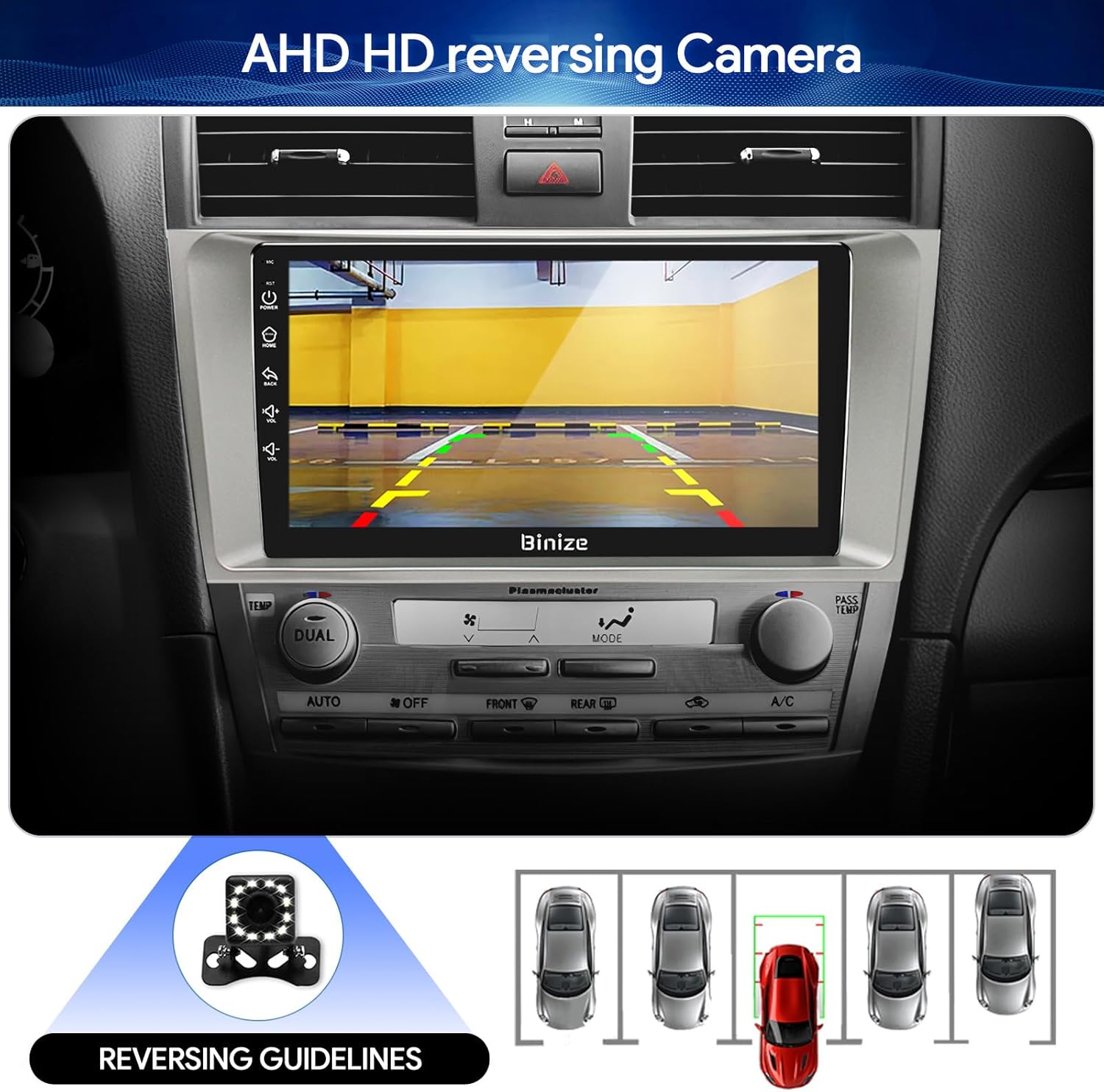
Figure 3.8: Backup camera display with reversing guidelines.
3.9 Bluetooth 5.0 for Hands-Free Calling
Connect your phone via Bluetooth 5.0 for faster network transmission and hands-free calling. Dial, answer, or receive calls directly from the head unit.
Figure 3.9: Bluetooth hands-free calling interface.
4. Održavanje
4.1 Čišćenje zaslona
Zaslon osjetljiv na dodir nježno obrišite mekom krpom koja ne ostavlja dlačice. Izbjegavajte abrazivna sredstva za čišćenje ili jake kemikalije koje bi mogle oštetiti zaslon.
4.2 Ažuriranja softvera
Periodically check for software updates to ensure optimal performance and access to new features. Updates can typically be performed via Wi-Fi or USB.
5. Rješavanje problema
- Bez napajanja: Check all power connections and vehicle's fuse box. Ensure the ignition is on.
- Nema zvuka: Verify speaker connections, volume levels, and EQ settings. Check if the unit is muted.
- Problemi s GPS signalom: Provjerite je li GPS antena pravilno instalirana i ima li jasan view od neba.
- Problemi s Bluetooth vezom: Provjerite je li Bluetooth omogućen i na glavnoj jedinici i na telefonu. Pokušajte raspariti i ponovno upariti uređaje.
- Komande na volanu ne rade: Refer to the "SW Learning" or "Steering Wheel Setting" in the unit's settings menu to configure the controls.
- Screen Lag/Unresponsiveness: Restart the unit. If issues persist, consider a factory reset (note: this will erase personal data).
- Wiring Harness Incompatibility: If the provided wiring harness does not fit your vehicle, contact BINIZE customer service for assistance.
6. Specifikacije
| Značajka | Specifikacija |
|---|---|
| Težina artikla | 2.84 funti |
| Dimenzije paketa | 11.2 x 7.2 x 3.7 inča |
| Veličina zaslona | 10.1 inča |
| Glasovna naredba | Tipke, Mikrofon, Zaslon osjetljiv na dodir |
| Marka | BINIZE |
| Vrsta usluge vozila | Automobil |
| Posebna značajka | Bluetooth, zaslon osjetljiv na dodir |
| Tehnologija povezivanja | Bluetooth, USB, Wi-Fi |
| Vrsta karte | Online and Offline |
| Način audio izlaza | Speaker, Stereo |
| Vrsta montaže | Nosač za nadzornu ploču |
| Rezolucija | 1024 x 600 |
| Operativni sustav | Android |
7. Jamstvo i podrška
BINIZE offers top-notch customer service. If you encounter any problems before or after sale, please contact the BINIZE customer service team via Amazon email. They are committed to assisting you with any issues and can provide support for online updates and warranty information.
For further assistance, please refer to the contact information provided with your purchase or visit the official BINIZE store on Amazon.