
Uvod
This manual provides essential information for the safe and efficient operation of your Domo DO157A Tower Fan. Please read these instructions carefully before use and retain them for future reference.
The Domo DO157A is a versatile appliance combining the functions of an air cooler, fan, and humidifier, designed to enhance your indoor comfort.

Slika: prednja strana view of the Domo DO157A Tower Fan.
Sigurnosne informacije
Uvijek se pridržavajte osnovnih sigurnosnih mjera opreza prilikom korištenja električnih uređaja kako biste smanjili rizik od požara, strujnog udara i tjelesnih ozljeda.
- Osigurajte voltage označeno na uređaju odgovara volti vaše lokalne mrežetage prije spajanja.
- Nemojte uranjati uređaj, utikač ili kabel u vodu ili druge tekućine.
- Isključite uređaj iz utičnice kada ga ne koristite, prije čišćenja ili prije premještanja.
- Držite uređaj izvan dohvata djece.
- Nemojte koristiti uređaj s oštećenim kabelom ili utikačem, ili nakon što uređaj ne radi ispravno ili je na bilo koji način oštećen.
- Refer to the official safety document for detailed safety guidelines: Sigurnosne informacije (PDF).
Komponente proizvoda
Familiarize yourself with the main parts of your Domo DO157A Tower Fan:
- Main Unit (Tower Fan)
- Spremnik za vodu od 7 litara
- Washable Filter System (Honeycomb Cooling Membrane)
- Daljinski upravljač
- Coolpack (for enhanced cooling)
- Upravljačka ploča s LED zaslonom
Slika: View of the tower fan with the filter system removed, showing the honeycomb cooling membrane.
Postavljanje
- Raspakiranje: Carefully remove the appliance from its packaging. Retain packaging for storage or disposal.
- Plasman: Place the tower fan on a firm, level surface. Ensure there is adequate space around the unit for proper airflow.
- Punjenje spremnika za vodu:
- Izvucite spremnik za vodu s donje stražnje strane uređaja.
- Fill the 7-liter water tank with clean, cold water. For enhanced cooling, place the included Coolpack (after freezing) into the water tank.
- Ensure the water level does not exceed the maximum fill line.
- Vratite spremnik za vodu u uređaj dok ne klikne na svoje mjesto.
- Priključak za napajanje: Uključite kabel za napajanje u odgovarajuću električnu utičnicu (230 V).
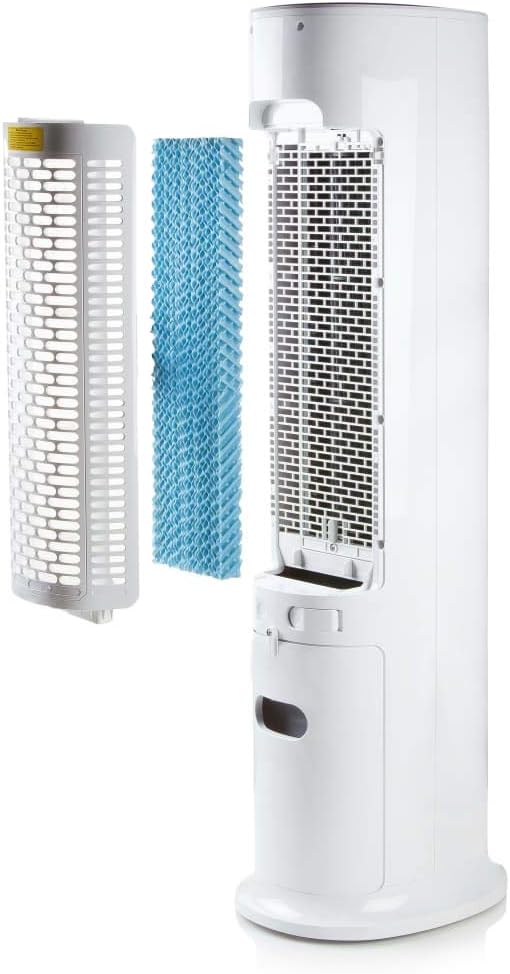
Image: Demonstrating the process of filling the water tank of the tower fan.
Upute za rad
The Domo DO157A can be operated using the control panel on top of the unit or the included remote control.
Funkcije upravljačke ploče i daljinskog upravljača

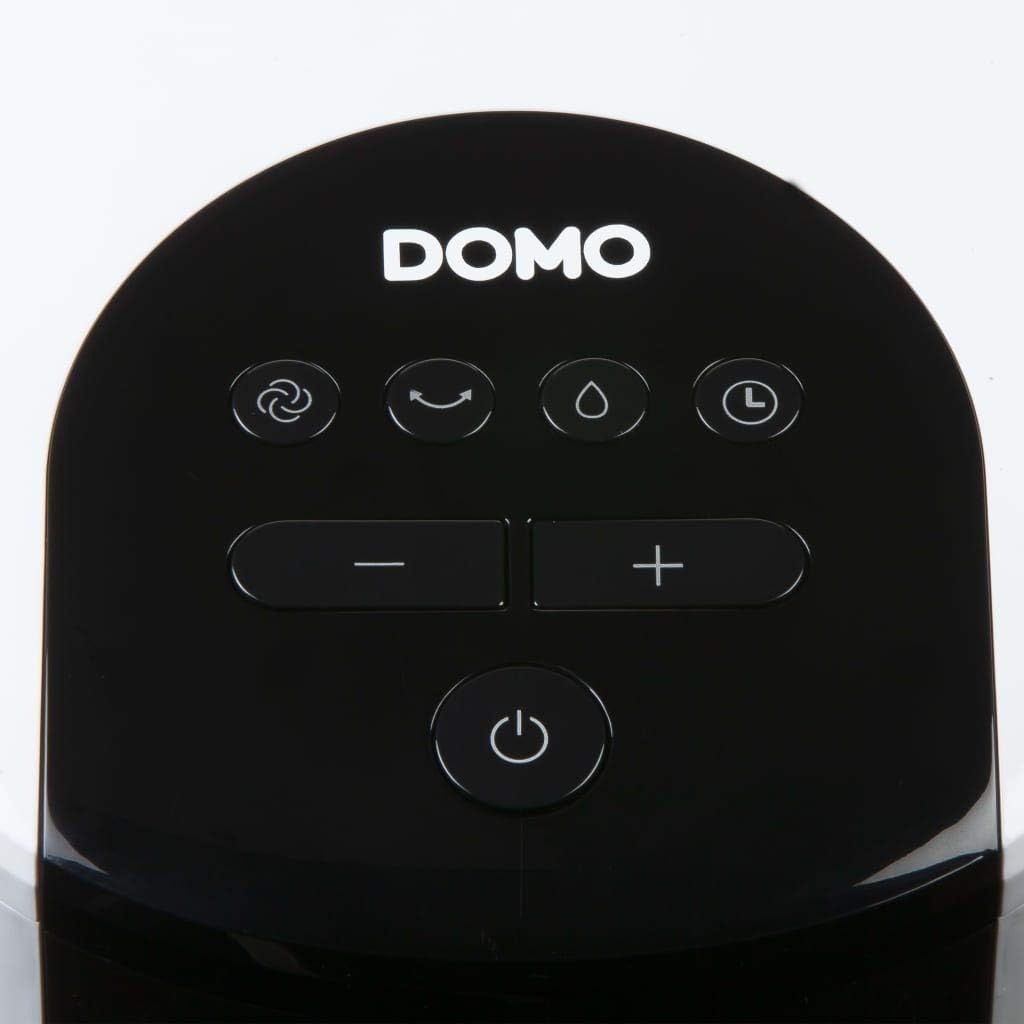
Slika: Krupni plan view of the control panel on the top of the tower fan.
- Gumb za napajanje (⏻): Uključuje ili isključuje jedinicu.
- Gumb za način rada (☺): Cycles through 3 ventilation modes:
- Normalan: Konstantan protok zraka pri odabranoj brzini.
- Prirodno: Simulira prirodni povjetarac s različitim brzinama ventilatora.
- Spavati: Smanjuje brzinu ventilatora i buku za tihi rad tijekom spavanja.
- Speed Buttons (− / +): Podešava brzinu ventilatora (4 razina).
- Tipka za hlađenje/ovlaživanje (💧): Activates or deactivates the air cooling and humidifying function. This function requires water in the tank.
- Gumb tajmera (⏱): Sets the operating timer for up to 10 hours. Each press adds 1 hour.
- Tipka za oscilaciju (↻): Activates or deactivates the oscillation function, allowing the fan to rotate and distribute air over a wider area.
Početni rad
- Press the Power button to turn on the unit. The default mode is usually Normal.
- Use the Speed buttons to select your desired fan speed (1-4).
- To activate cooling/humidifying, press the Cooling/Humidifier button. Ensure the water tank is filled.
- Select a ventilation mode (Normal, Natural, Sleep) using the Mode button.
- Pritisnite tipku Oscilacija za širu raspodjelu zraka.
- Set the timer if desired using the Timer button.

Image: The tower fan operating in a living room, illustrating the airflow direction.
Održavanje
Redovito održavanje osigurava optimalne performanse i produžuje vijek trajanja vašeg uređaja.
Čišćenje eksterijera
- Uvijek isključite jedinicu iz struje prije čišćenja.
- Obrišite vanjske površine mekom, damp tkanina. Nemojte koristiti abrazivna sredstva za čišćenje ili otapala.
- Pazite da voda ne uđe u unutarnje komponente.
Čišćenje spremnika za vodu
- Izvadite spremnik za vodu iz jedinice.
- Ispraznite svu preostalu vodu.
- Clean the tank with mild soap and water. Rinse thoroughly.
- Prije ponovnog umetanja, ostavite spremnik da se potpuno osuši na zraku.
- Clean the water tank regularly, especially if using the humidifying function frequently, to prevent mold or mildew buildup.
Čišćenje sustava filtera
- The high-quality filter system is washable.
- Carefully remove the filter (honeycomb cooling membrane) from the unit as shown in the "Product Components" section.
- Isperite filtar pod tekućom vodom kako biste uklonili prašinu i krhotine.
- Ostavite filtar da se potpuno osuši prije nego što ga ponovno stavite u jedinicu.
- Regular cleaning of the filter is recommended, especially for allergy sufferers, to maintain hygiene and efficiency.
Rješavanje problema
If you encounter issues with your Domo DO157A, refer to the following common problems and solutions:
| Problem | Mogući uzrok | Otopina |
|---|---|---|
| Jedinica se ne uključuje. | Nema napajanja. | Provjerite je li kabel za napajanje sigurno uključen u ispravnu utičnicu. |
| Nema efekta hlađenja. | Spremnik za vodu je prazan ili funkcija hlađenja nije aktivirana. | Fill the water tank. Press the Cooling/Humidifier button to activate the function. Ensure Coolpack is frozen and placed in the tank if desired. |
| Slab protok zraka. | Fan speed is too low; air filter is dirty. | Increase the fan speed. Clean the air filter as per maintenance instructions. |
| Neugodan miris. | Stagnant water in the tank or dirty filter. | Empty and clean the water tank. Clean the filter. Use fresh water. |
Tehnički podaci
| Značajka | Detalj |
|---|---|
| Marka | Domo |
| Naziv / broj modela | DO157A |
| Tip | Tower Fan, Air Cooler, Humidifier |
| Materijal | Plastični |
| Vrsta montaže | Samostojeći |
| Boja | Bijela |
| Kapacitet protoka zraka | 294.29 Cubic Feet per Minute (500 m³/h) |
| Vrsta kontrole | Daljinski upravljač, Upravljačka ploča na uređaju |
| Kapacitet spremnika za vodu | 7 litara |
| Preporučena površina poda | 25 kvadratnih metara |
| Težina proizvoda | 11.2 kilogram |
| Wattage | 65 W |
| Razina buke | 40 decibela |
| Broj brzina | 4 |
| Voltage | 230 volti |
| Dimenzije (D x Š x V) | 34 cm x 26 cm x 106.5 cm |
| Odbrojavanje vremena | Do 10 sati |
| Načini provjetravanja | Normalno, prirodno, spavanje |
| Posebne značajke | Sleep mode, Washable filter system, Oscillation, Coolpack included |
Jamstvo i podrška
For warranty information, please refer to the documentation provided with your purchase or contact Domo customer support. Keep your proof of purchase for warranty claims.
If you require further assistance or have questions not covered in this manual, please contact Domo customer service through their official webweb-mjesto ili kontaktne podatke navedene uz vaš proizvod.