
1. Uvod
This manual provides essential instructions for the safe and efficient operation of your Multilaser MINI TORRE 900W SP380 audio system. Please read this manual thoroughly before using the product and retain it for future reference. Proper use will ensure optimal performance and extend the lifespan of your device.
2. Sigurnosne upute
- Izvor napajanja: Osigurajte da napajanje odgovara voltagZahtjevi navedeni na etiketi proizvoda.
- Ventilacija: Ne blokirajte ventilacijske otvore. Osigurajte dovoljno prostora oko uređaja za pravilan protok zraka.
- Voda i vlaga: Keep the device away from water, rain, and excessive humidity. Do not operate with wet hands.
- Izvori topline: Izbjegavajte postavljanje uređaja u blizinu izvora topline poput radijatora, peći ili drugih uređaja koji proizvode toplinu.
- Čišćenje: Disconnect the power before cleaning. Use a dry, soft cloth. Do not use liquid cleaners or aerosol sprays.
- Servisiranje: Ne pokušavajte sami popravljati uređaj. Sve servisne radove prepustite kvalificiranom servisnom osoblju.
- djeca: Držite uređaj i njegovu dodatnu opremu izvan dohvata djece.
- Plasman: Uređaj postavite na stabilnu, ravnu površinu kako biste spriječili njegov pad.
3. Proizvod je gotovview
The Multilaser MINI TORRE 900W SP380 is a powerful audio system designed for versatile sound reproduction. It features dual speakers, LED lighting, and multiple connectivity options.
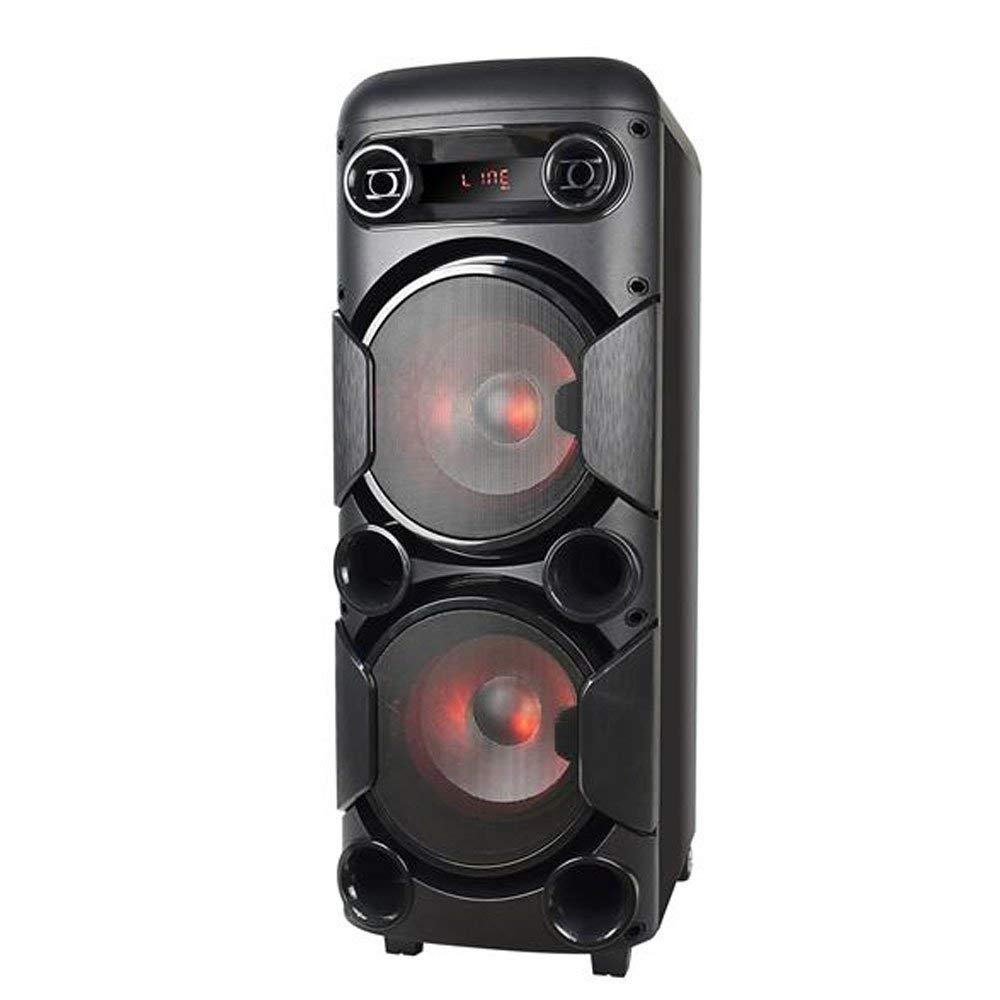
Slika 3.1: Ispred view of the Multilaser MINI TORRE 900W SP380, showcasing its dual speaker design and illuminated LED woofers.
The control panel, located on the top of the unit, provides access to all functions and inputs.

Slika 3.2: Detaljan view of the control panel, including volume knob, equalizer sliders, input ports (USB, TF/Memory Card, Line, Mic 1, Mic 2), and control buttons for mode, light, and playback.
4. Postavljanje
- Raspakiranje: Carefully remove the MINI TORRE from its packaging. Retain the packaging for future transport or storage.
- Plasman: Position the speaker on a flat, stable surface. Ensure there is adequate space around the unit for ventilation. The integrated wheels facilitate easy transport.
- Priključak za napajanje: Connect the power cable to the AC input on the unit and then to a suitable power outlet. The device supports bivolt automatic voltage.
- Početno uključivanje: Flip the power switch (usually located on the control panel) to the "ON" position. The display will illuminate.
5. Upute za rad
5.1. Uključivanje/isključivanje
To power on the device, locate the power switch on the control panel and set it to the "ON" position. To power off, set the switch to "OFF".
5.2. Kontrola glasnoće
Adjust the main volume using the large central VOLUMEN knob on the control panel. Turn clockwise to increase volume and counter-clockwise to decrease.
5.3. Odabir načina
Pritisnite tipku NAČIN RADA button repeatedly to cycle through available input modes: Bluetooth (BT), FM Radio, USB, Memory Card (TF), and Auxiliary (LINE).
5.4. LED rasvjeta
Pritisnite tipku SVJETLO button to toggle the LED lighting effects on the speakers. Multiple light modes may be available.
5.5. Ulaz za mikrofon
Connect a microphone to either the MIC 1 or MIC 2 input. Adjust the microphone volume using the MIC.VOL slider and add echo effect with the ODJEK klizač.
5.6. Sound Equalization
Koristite SOPRANO i BASS sliders to adjust the high and low frequencies of the audio output, respectively, to suit your preference.
6. Povezivost
6.1. Bluetooth uparivanje
- Turn on the MINI TORRE and select Bluetooth (BT) način rada pomoću NAČIN RADA button. The display will show "BT" and a pairing indicator.
- Omogućite Bluetooth na svom pametnom telefonu, tabletu ili drugom kompatibilnom uređaju.
- Tražiti available devices and select "MULTILASER SP380" (or similar name) from the list.
- Once paired, the device will confirm the connection, and you can begin playing audio wirelessly.
6.2. USB / Memory Card Playback
Umetnite USB flash pogon u USB port or a TF (MicroSD) card into the TF / USB slot. The unit will automatically switch to USB or TF mode and begin playing compatible audio files. Use the playback control buttons (REPRODUCIRAJ/PAUZIRAJ, PRETHODNI, SLJEDEĆI) za upravljanje glazbom.
6.3. Auxiliary Input (LINE IN)
Spojite vanjski audio uređaj (npr. MP3 player, prijenosno računalo) na LINIJA input using a 3.5mm audio cable. Select LINIJA način rada s NAČIN RADA gumb. Zvuk će se reproducirati s povezanog uređaja.
6.4. FM radio
Prebaci na FM način rada pomoću NAČIN RADA dugme. Pritisnite i držite REPRODUCIRAJ/PAUZIRAJ button to initiate an automatic scan for FM stations. The unit will save detected stations. Use the PRETHODNI i SLJEDEĆI tipke za navigaciju kroz spremljene postaje.
7. Održavanje
- Čišćenje: Before cleaning, ensure the device is powered off and unplugged. Use a soft, dry, lint-free cloth to wipe the exterior surfaces. Do not use abrasive cleaners, waxes, or solvents.
- Skladištenje: Ako uređaj skladištite dulje vrijeme, isključite ga iz električne utičnice i pohranite ga na hladnom i suhom mjestu, dalje od izravne sunčeve svjetlosti i ekstremnih temperatura.
- Izbjegavajte prepreke: Regularly check that the speaker grilles and ventilation openings are free from dust and debris.
8. Rješavanje problema
| Problem | Mogući uzrok | Otopina |
|---|---|---|
| Nema struje | Power cable not connected; Power outlet not working; Power switch off. | Ensure power cable is securely connected. Test the outlet with another device. Turn the power switch to "ON". |
| Nema zvuka | Glasnoća je preniska; Odabran je pogrešan način unosa; Vanjski uređaj ne reproducira. | Povećajte glasnoću. Pritisnite NAČIN RADA to select the correct input. Ensure the external device is playing and its volume is up. |
| Bluetooth se ne uparuje | Device too far; Bluetooth not enabled on external device; Incorrect mode. | Move devices closer. Ensure Bluetooth is enabled on your external device. Select BT mode on the speaker. |
| USB/TF kartica ne radi | Kartica/pogon nije ispravno umetnut; Nekompatibilno file format; Incorrect mode. | Reinsert the USB drive or TF card. Ensure audio files are in a compatible format (e.g., MP3). Select USB or TF način rada. |
| Statički FM radio | Weak signal; No antenna connected (if applicable). | Reposition the unit or extend the antenna (if present). Perform an auto-scan for stations again. |
9. Specifikacije
Below are the technical specifications for the Multilaser MINI TORRE 900W SP380:

Slika 9.1: Packaging of the Multilaser MINI TORRE 900W SP380, highlighting its main features and technical specifications.
| Značajka | Detalj |
|---|---|
| Marka | Multilaser |
| Model | SP380 |
| Maksimalna izlazna snaga zvučnika | 900 vata RMS |
| Tehnologija povezivanja | Pomoćni, Bluetooth 5.0 |
| Vrsta zvučnika | Tower (2x 8" drivers) |
| Posebne značajke | USB Port, LED Lighting, Microphone Input, Memory Card Slot, FM Radio, Bass Boost, Transport Wheels |
| Dimenzije predmeta (D x Š x V) | 33 cm x 37 cm x 82 cm |
| Težina artikla | 11.95 kilogram |
| Kompatibilni uređaji | Notebook, Smartphone, Tablet |
| Izvor napajanja | Bivolt automatic (AC) |
| Frekvencijski odziv | 60Hz-20KHz |
| Osjetljivost | 89 dB |
| Impedancija | 4 Ohma |
| Uključene komponente | 1x Mini Torre 900W SP380, 1x Cable Set, 1x User Manual |
10. Jamstvo i podrška
The Multilaser MINI TORRE 900W SP380 comes with a Jamstvo 1 godine od datuma kupnje. Ovo jamstvo pokriva nedostatke u proizvodnji u normalnim uvjetima upotrebe.
For warranty claims, technical support, or service inquiries, please contact Multilaser customer support through their official channels. Please have your proof of purchase and product model number (SP380) ready when contacting support.
Bilješka: The warranty does not cover damage caused by misuse, accidents, unauthorized modifications, or failure to follow the instructions in this manual.