
Uvod
This manual provides detailed instructions for the assembly, operation, and maintenance of your Suptek MST002 Monitor Stand. Please read these instructions carefully before use to ensure proper setup and safe operation. This monitor stand is designed to elevate your screen to an ergonomic height and provide additional storage space on your desk.
Značajke proizvoda
- Višenamjenski dizajn: Can be configured as a single-layer or two-layer stand, suitable for monitors, laptops, printers, or gaming consoles.
- Ventilirana površina: Features a perforated platform to promote airflow and prevent device overheating.
- Stabilna i izdržljiva konstrukcija: Made from heavy-duty alloy steel, capable of supporting equipment up to 20 kg (44 lbs).
- Ergonomske prednosti: Podiže vaš monitor na udoban položaj viewing height, helping to improve posture and reduce neck and shoulder strain.
- Protuklizne podloge: Equipped with reinforced bottom rubber pads to prevent sliding and protect your desk surface from scratches.

Image: The Suptek MST002 Monitor Stand configured as a two-layer structure, supporting a monitor and providing storage space.

Image: A laptop placed on the ventilated surface of the stand, with arrows showing air circulation to prevent overheating.
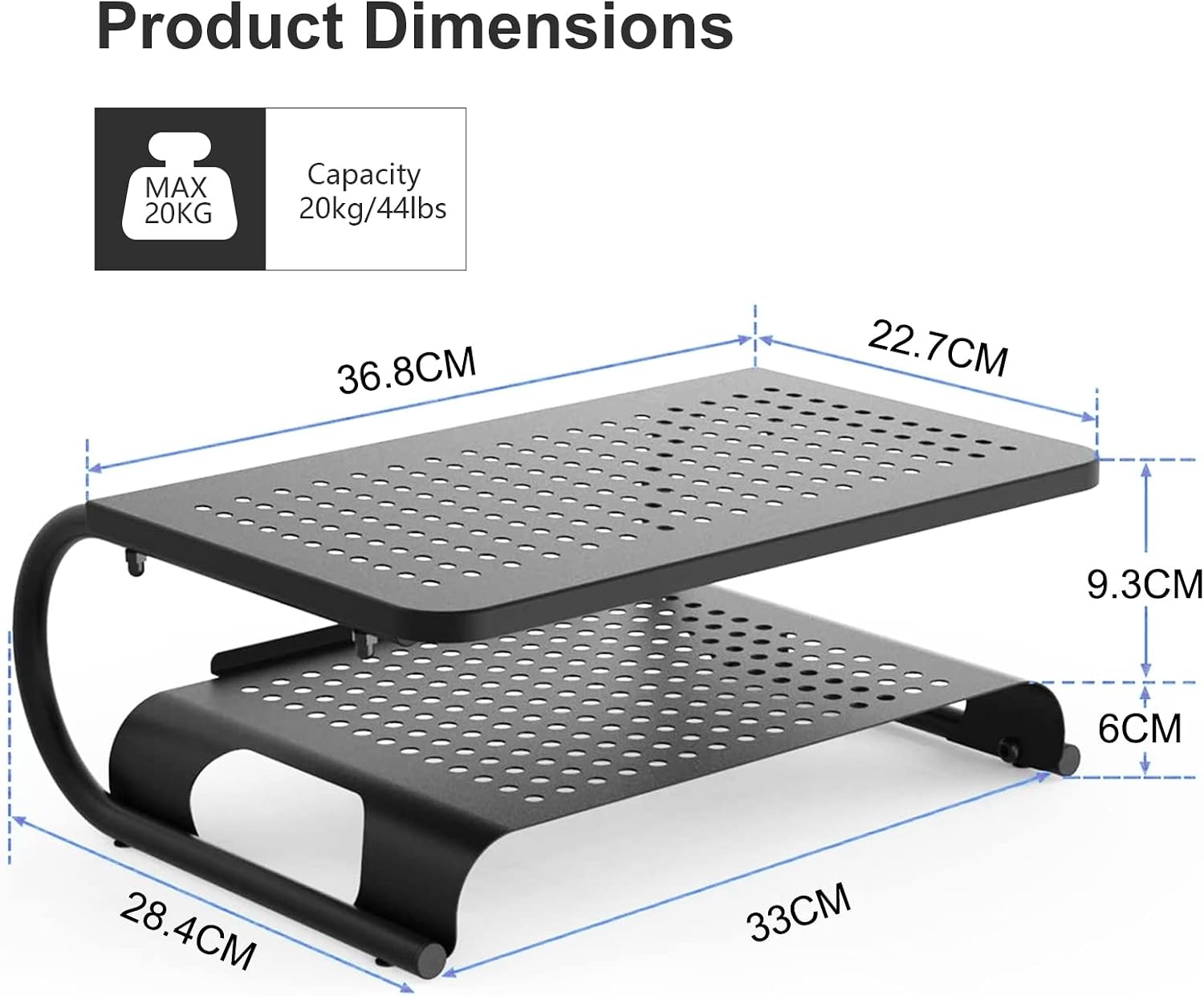
Image: Product dimensions and maximum weight capacity (20kg/44lbs) of the monitor stand.
Sadržaj paketa
Prije početka montaže provjerite jesu li svi dijelovi prisutni:
- Monitor Stand Platforms (2 pieces for two-layer configuration)
- Support Legs/Frames (U-shaped metal frames)
- Assembly Hardware (screws, nuts)
- Assembly Tools (small spanner, Allen key)
- Anti-slip Rubber Pads
- Priručnik s uputama
Upute za postavljanje i sastavljanje
The Suptek MST002 Monitor Stand is designed for quick and easy assembly. You can configure it as a single-layer or a two-layer stand based on your needs.
- Raspakirajte komponente: Pažljivo izvadite sve dijelove iz pakiranja i položite ih na čistu, ravnu površinu. Provjerite jesu li prisutni svi dijelovi navedeni u odjeljku "Sadržaj pakiranja".
- Attach Support Legs to Bottom Platform (Step 1):
Align the U-shaped support legs with the pre-drilled holes on the bottom platform. Secure them using the provided screws and the small spanner. Ensure all connections are firm but do not overtighten.

Image: Step 1 of assembly, showing how to attach the bottom platform using the provided spanner.
- Attach Top Platform (Step 2 - for two-layer configuration):
If you are assembling a two-layer stand, align the top platform with the designated attachment points on the upper part of the support legs. Secure it using the provided screws and the Allen key. Ensure stability.

Image: Step 2 of assembly, demonstrating how to attach the top platform using the Allen key.
- Apply Anti-slip Pads: Attach the anti-slip rubber pads to the bottom of the support legs to prevent movement and protect your desk surface.
- Konačna provjera: Gently shake the assembled stand to ensure all connections are secure and the stand is stable.
Upute za rad
Once assembled, the monitor stand is ready for use. Place your monitor, laptop, or other devices on the top platform. Utilize the lower shelf for storing keyboards, mice, notebooks, or other office supplies.
- Kapacitet težine: Do not exceed the maximum weight capacity of 20 kg (44 lbs) to ensure stability and prevent damage.
- Plasman: Postavite stalak na ravnu, stabilnu površinu kako biste spriječili prevrtanje.
- Ergonomsko pozicioniranje: Position your monitor so that the top of the screen is at or slightly below eye level to maintain a comfortable posture.

Image: The monitor stand in use, demonstrating how it elevates a monitor for improved ergonomics and provides space for a keyboard underneath.

Slika: pramples of the stand's versatile use with various devices such as laptops, printers, and monitors.
Održavanje
To ensure the longevity and proper function of your Suptek MST002 Monitor Stand, follow these simple maintenance guidelines:
- Čišćenje: Obrišite postolje mekom krpomamp krpom. Izbjegavajte abrazivna sredstva za čišćenje ili otapala koja bi mogla oštetiti završnu obradu.
- Inspekcija: Povremeno provjeravajte sve vijke i spojeve kako biste bili sigurni da su čvrsto zategnuti. Po potrebi ih ponovno zategnite.
- Raspodjela težine: Ensure weight is evenly distributed on the stand to maintain stability.
Rješavanje problema
| Problem | Mogući uzrok | Otopina |
|---|---|---|
| Stalak je klimav ili nestabilan. | Labavi vijci ili neravna površina. | Ensure all screws are tightened. Place the stand on a flat, level surface. |
| Desk surface is scratched. | Anti-slip pads are missing or dislodged. | Verify that all anti-slip rubber pads are correctly attached to the bottom of the support legs. |
| Teškoće sastavljanja. | Incorrect alignment of parts. | Refer to the "Setup and Assembly Instructions" section and ensure parts are aligned correctly before tightening screws. |
Tehnički podaci
- Model: MST002
- Materijal: Legirani čelik
- Boja: Crna
- Težina artikla: 2.4 kilogram
- Nosivost: Do 20 kg (44 lbs)
- Broj razina: 2 (configurable to 1)
- Posebne karakteristike: Dual-height design with vented platform for heat dissipation, anti-slip pads.
- Potrebna montaža: Da
Jamstvo i podrška
For warranty information or technical support, please refer to the contact details provided with your purchase or visit the official Suptek webmjesto. Čuvajte račun za jamstvene zahtjeve.