
1. Uvod
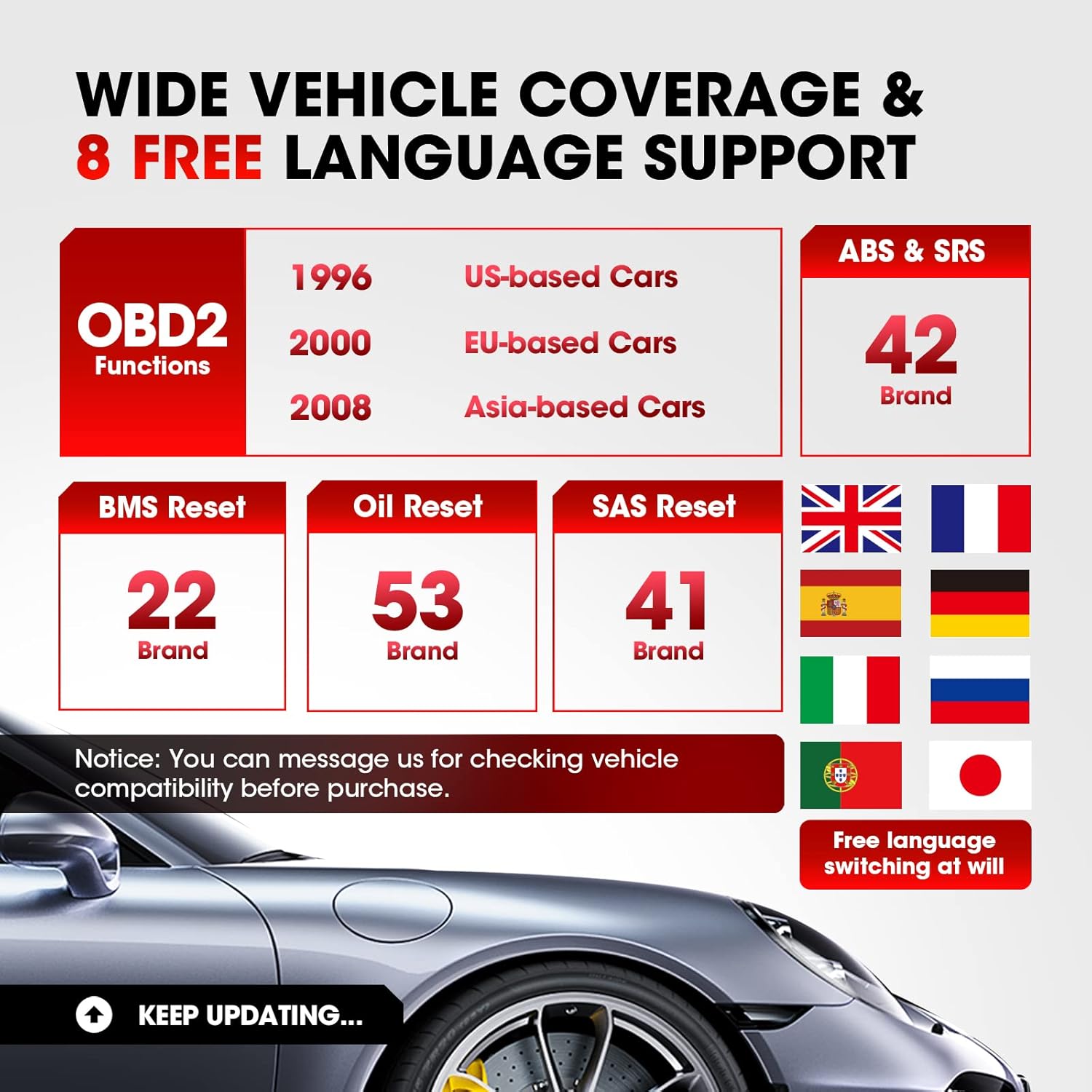
The LAUNCH CR629 is an advanced automotive diagnostic tool designed to assist in vehicle maintenance and troubleshooting. It provides comprehensive diagnostic functions for ABS (Anti-lock Braking System) and SRS (Supplemental Restraint System), including active tests, along with full OBD2 functions and three essential reset services: Oil Reset, Steering Angle Sensor (SAS) Reset, and Battery Management System (BMS) Reset. This manual provides detailed instructions for setting up, operating, and maintaining your CR629 device.
2. Sigurnosne informacije
- Uvijek provodite testiranje automobila u dobro prozračenom prostoru.
- Wear safety eye protection and clothing that meets safety standards.
- Uređaj držite suhim i čistim. Ne izlažite ga ekstremnim temperaturama ili vlazi.
- Avoid contact with hot engine parts or moving components.
- Do not connect or disconnect the device while the vehicle's ignition is on, unless instructed otherwise.
- Refer to the vehicle's service manual for specific service procedures and precautions.
3. Postavljanje
3.1 Spajanje s vozilom
- Pronađite 16-pinski podatkovni priključak (DLC) vozila. Obično se nalazi ispod armaturne ploče na vozačevoj strani.
- Provjerite je li paljenje vozila ISKLJUČENO.
- Plug the CR629's diagnostic cable into the vehicle's DLC. Ensure a secure connection.
- Turn the vehicle's ignition to the ON position (engine off). The CR629 will power on automatically.
3.2 Početno uključivanje i odabir jezika
Upon first use, the device may prompt you to select your preferred language. Use the navigation buttons to select your language and press the 'OK' button to confirm.
3.3 Software Update Process
It is recommended to update the device software regularly to ensure compatibility with the latest vehicle models and diagnostic functions. The CR629 offers lifetime free updates.
- Download and install the update tool on your PC from the official LAUNCH webmjesto.
- Connect the CR629 scanner to your PC using the provided USB cable.
- Follow the on-screen instructions on the update tool to register your scanner and download the latest software package.
- Copy the update package to the memory card (if applicable) or directly to the device as prompted.
- Disconnect the device safely from the PC and restart it to complete the update.
4. Upute za rad
4.1 ABS & SRS Diagnostics with Active Test
The CR629 can diagnose issues within the Anti-lock Braking System (ABS) and Supplemental Restraint System (SRS), including performing active tests to pinpoint problems.
- Čitanje/brisanje DTC-ova: Access the 'Scan' menu, select 'ABS/SRS', then choose 'Read Codes' to view diagnostic trouble codes or 'Erase Codes' to clear them.
- View Prijenos podataka uživo: From the 'Scan' menu, select 'ABS/SRS', then 'Data Stream' to view real-time sensor data in graphical or text format.
- Perform Active Test: Within the 'ABS/SRS' menu, select 'Active Test' to command specific components on and off, verifying their functionality. Note: Active tests are supported for 20 car brands.

4.2 3 Reset Services
The CR629 offers three common reset functions to assist with routine maintenance tasks.
- Resetiranje ulja: Resets the oil life monitoring system after an oil change. Navigate to 'Service' > 'Oil Reset' and follow the prompts.
- SAS resetiranje (senzor kuta upravljanja): Calibrates the steering angle sensor after suspension or steering component replacement. Access 'Service' > 'SAS Reset' and follow the instructions.
- Resetiranje BMS-a (sustav upravljanja baterijom): Re-matches the battery control module and monitoring sensor after battery replacement. Select 'Service' > 'BMS Reset' and proceed as guided.

4.3 Potpune OBD2 funkcije
The device supports all 10 modes of OBD2 tests for most post-1996 OBD2/CAN compliant vehicles.
- Pročitajte kodove: Dohvaća generičke (P0, P2, P3 i U0) i kodove specifične za proizvođača (P1, P3 i U1).
- Brisanje kodova: Clears Diagnostic Trouble Codes (DTCs) and resets monitors.
- I/M spremnost: Checks the readiness of the emission monitoring system.
- Stream podataka: Displays live data from the vehicle's sensors.
- Zamrzni sliku: Shows a snapshot of operating conditions at the time of an emission-related fault.
- Test O2 senzora: Dohvaća rezultate ispitivanja monitora O2 senzora.
- Nadzor na vozilu: Dohvaća rezultate ispitivanja komponenti i sustava pogonskog sklopa povezanih s emisijama.
- Test komponente: Omogućuje testiranje određenih komponenti ili sustava.
- Podaci o vozilu: Dohvaća identifikacijski broj vozila (VIN), ID kalibracije (CALID) i broj za provjeru kalibracije (CVN).
4.4 User-Friendly Features
- 3.5-inch LCD Color Display: Provides clear and easy-to-read diagnostic information.
- Hotkeys (F1/F2/F3): Quick access to frequently used functions directly from the main menu.
- Traženje DTC-a: Built-in library to quickly identify the meaning of diagnostic trouble codes without needing external resources.
- PC Printing: Allows printing of diagnostic reports by connecting the device to a PC.
- Review Podaci: Access historical DTCs, data streams, and freeze frame data for later analysis.


5. Održavanje
5.1 Čišćenje uređaja
Za održavanje performansi i izgleda uređaja, redovito ga čistite mekom,amp tkanina. Nemojte koristiti abrazivna sredstva za čišćenje ili otapala.
5.2 Ažuriranja softvera
Regular software updates ensure your CR629 remains compatible with the latest vehicle models and diagnostic protocols. Refer to section 3.3 for detailed update instructions. Updates are free for the lifetime of the product.
6. Rješavanje problema
If you encounter issues with your LAUNCH CR629, refer to the following common problems and solutions:
- Uređaj se ne uključuje: Ensure the diagnostic cable is securely connected to the vehicle's DLC and the vehicle's ignition is ON. Check the vehicle's battery voltage.
- Greška u komunikaciji: Verify the vehicle is OBD2 compliant. Check for loose connections. Turn the ignition off and then on again. Try the device on another vehicle to rule out a vehicle-specific issue.
- No fault codes found: If the Check Engine Light (MIL) is not illuminated, there may be no current fault codes. Check I/M Readiness status for pending codes.
- Problemi s ažuriranjem: Ensure a stable internet connection and follow the update instructions precisely. Contact customer support if problems persist.
7. Specifikacije
| Značajka | Detalj |
|---|---|
| Marka | POKRETANJE |
| Broj modela | CR629 |
| Izvor napajanja | Napajanje baterijama (putem OBD2 priključka) |
| Dimenzije proizvoda | 4.49 cm D x 1.36 cm Š x 8.46 cm V |
| Veličina zaslona | 3.5 inča |
| Izvorna razlučivost | 320 x 480 |
| Operativni sustav | Windows 7 (for PC connection/updates) |
| Podržani jezici | English, French, German, Spanish, Portuguese, Russian, Japanese, Italian |
8. Jamstvo i podrška
The LAUNCH CR629 comes with a 5-year warranty from the manufacturer. For any technical assistance, warranty claims, or product inquiries, please contact LAUNCH customer service.
- Telefon službe za korisnike: 1-888-756-2936 (pon-pet 9:00 – 6:00 EST)
- Email službe za korisnike: launch-aftersales@outlook.com
- Return & Replacement Policy: Dostupno unutar 60 dana od kupnje.


