
Uvod
Welcome to your new Gembird GHS-U-5.1-01 USB 5.1 Surround Headset. This manual provides essential information for setup, operation, and maintenance to ensure optimal performance and an immersive audio experience.
Sadržaj paketa
Paket treba sadržavati sljedeće stavke:
- Gembird GHS-U-5.1-01 USB 5.1 Surround Headset

Image: Retail packaging for the Gembird GHS-U-5.1-01 USB 5.1 Surround Headset, showing the headset inside a clear window.
Proizvod gotovview
The Gembird GHS-U-5.1-01 is a USB headset designed for immersive audio experiences with 5.1 surround sound. It features an adjustable microphone, built-in volume control, comfortable ear pads, and an adjustable headband for extended use.
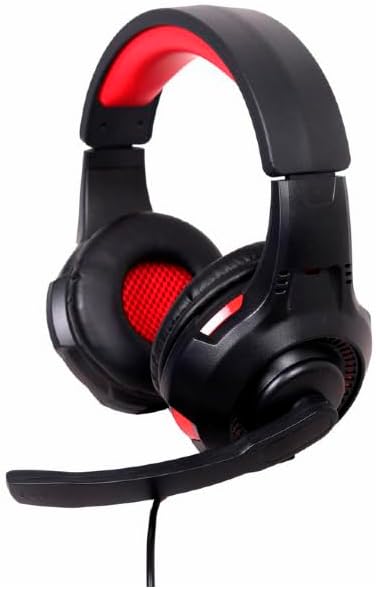
Slika: Kutna view of the Gembird GHS-U-5.1-01 USB 5.1 Surround Headset, showcasing its black and red design with the microphone boom extended.
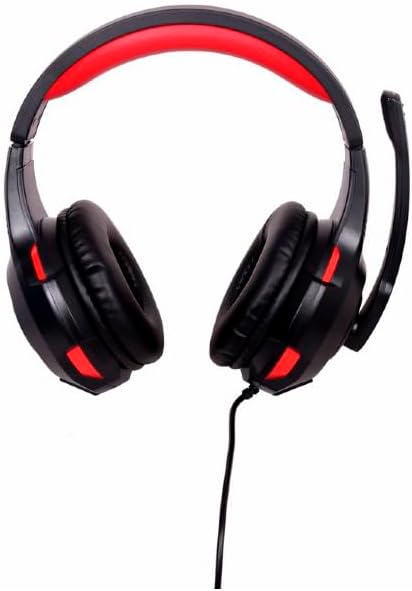
Slika: prednja strana view of the Gembird GHS-U-5.1-01 USB 5.1 Surround Headset, highlighting the adjustable headband and earcups.

Image: Close-up of the in-line control unit for the Gembird GHS-U-5.1-01 headset, showing volume up/down and microphone mute buttons.
Postavljanje
Spajanje slušalica
The Gembird GHS-U-5.1-01 headset connects via a standard USB port.
- Pronađite dostupni USB priključak na vašem računalu.
- Uključite USB priključak slušalica u USB priključak.
- Vaš operativni sustav trebao bi automatski prepoznati i instalirati potrebne upravljačke programe. Ovaj postupak može potrajati nekoliko trenutaka.
- Once installed, the headset will be ready for use as an audio input and output device.
Audio Settings Configuration
For optimal 5.1 surround sound experience, you may need to configure your computer's audio settings.
- Windows: Go to "Sound Settings" (right-click speaker icon in taskbar) > "Sound Control Panel" > "Playback" tab. Select the Gembird headset, click "Configure," and choose "5.1 Surround."
- MacOS: Go to "System Preferences" > "Sound" > "Output" tab. Select the Gembird headset.
Upute za rad
Kontrola glasnoće
The headset features an in-line remote control for easy volume adjustment.
- Koristite "+" gumb za povećanje glasnoće.
- Koristite "-" gumb za smanjenje glasnoće.
Upotreba mikrofona
The adjustable microphone boom allows for precise positioning.
- Position the microphone approximately 1-2 inches from your mouth for clear voice capture.
- Use the microphone mute button on the in-line remote to toggle the microphone on or off.
Podešavanje udobnosti
Adjust the headband to fit comfortably on your head. The ear pads are designed for extended use.
Održavanje
To ensure the longevity and performance of your headset, follow these maintenance guidelines:
- Čišćenje: Use a soft, dry cloth to wipe the headset. Do not use harsh chemicals or abrasive cleaners.
- Skladištenje: Store the headset in a clean, dry place away from extreme temperatures.
- Održavanje kabela: Izbjegavajte oštre savijanja ili pretjerano povlačenje USB kabela kako biste spriječili oštećenja.
Rješavanje problema
Nema zvuka ili mikrofon ne radi
- Provjerite USB vezu: Provjerite je li USB priključak potpuno umetnut u priključak. Pokušajte s drugim USB priključkom.
- Provjerite razine glasnoće: Verify that the volume on the in-line control, your computer's system volume, and application-specific volumes are not muted or set too low.
- Check Audio Settings: Confirm that the Gembird headset is selected as the default playback and recording device in your computer's sound settings.
- Ponovno pokrenite računalo: Sometimes a simple restart can resolve driver or software conflicts.
Problemi s kvalitetom zvuka
- Ažuriranje upravljačkog programa: Provjerite jesu li upravljački programi vašeg operativnog sustava ažurirani.
- Kvaliteta izvora: Poor audio quality may stem from the audio source itself. Test with different audio files ili aplikacije.
Tehnički podaci
| Naziv modela | GHS-U-5.1-01 |
| Povezivost | Žičani USB |
| Form Factor | Na uhu |
| Boja | Crna |
| Materijal | Aluminum (Enclosure) |
| Težina | 0.4 kilogram |
| Dodatne značajke | Adjustable microphone boom, Built-in volume control, Comfortable ear pads, Adjustable headband |
Informacije o jamstvu
This Gembird headset comes with a 24 Month Manufacturer Guarantee. Please retain your proof of purchase for warranty claims. For detailed warranty terms and conditions, refer to the documentation provided with your product or contact Gembird customer support.
podrška
If you encounter issues not covered in this manual or require further assistance, please visit the official Gembird website or contact their customer support for technical assistance.