
Uvod
This manual provides detailed instructions for the installation, operation, maintenance, and troubleshooting of the HP ProDesk 400 G3 MS-7957 motherboard. Please read this manual thoroughly before proceeding with any installation or operation to ensure proper functionality and safety.
Sigurnosne informacije
Uvijek se pridržavajte sljedećih sigurnosnih mjera opreza kako biste spriječili oštećenje matične ploče ili ozljede:
- Prije ugradnje ili uklanjanja bilo kakvih komponenti isključite napajanje iz zidne utičnice.
- Nosite antistatičku narukvicu ili često dodirujte uzemljeni metalni predmet kako biste ispraznili statički elektricitet prije rukovanja matičnom pločom.
- Držite matičnu ploču za rubove kako biste izbjegli dodirivanje osjetljivih komponenti.
- Osigurajte odgovarajuću ventilaciju unutar kućišta računala kako biste spriječili pregrijavanje.
- Držite matičnu ploču dalje od vlage i ekstremnih temperatura.
Proizvod gotovview
The HP ProDesk 400 G3 MS-7957 is a MicroATX motherboard designed for Intel processors with an LGA 1151 socket. It supports DDR4 RAM and features a B250 chipset, offering a reliable foundation for desktop computing.
Ključne značajke
- Compatible CPU Brand: Intel
- Vrsta utičnice: LGA 1151/Socket H4
- Faktor oblika: MicroATX
- I/O konektori: Ethernet (RJ-45), USB 2.0, USB 3.0, VGA, DisplayPort, HD Audio Jack
Identifikacija komponente
Familiarize yourself with the layout of the motherboard to facilitate proper installation and connection of components.

Slika 1: Kutno view of the HP ProDesk 400 G3 MS-7957 motherboard. This image highlights the CPU socket (LGA 1151), four DDR4 RAM slots, PCIe slots, and various headers for front panel connections and storage devices.
Postavljanje i instalacija
Prije nego počnete
- Ensure your computer case is compatible with the MicroATX form factor.
- Gather all necessary components: CPU, RAM, CPU cooler, power supply, storage devices, and graphics card (if not using integrated graphics).
- Prepare your workspace by ensuring it is clean, well-lit, and static-free.
Instalacija matične ploče
- Install the CPU into the LGA 1151 socket. Carefully align the CPU with the socket's notch and gently lower it into place. Close the retention arm.
- Nanesite termalnu pastu na procesor i instalirajte hladnjak procesora prema uputama proizvođača.
- Install the DDR4 RAM modules into the designated slots. Ensure they are fully seated until the clips lock into place.
- Mount the motherboard into the computer case using the appropriate standoffs and screws.
- Spojite glavni 24-pinski ATX konektor za napajanje i 4-pinski ili 8-pinski konektor za napajanje procesora s napajanja na matičnu ploču.
- Install any expansion cards (e.g., graphics card) into the PCIe slots.

Slika 2: Kut od vrha prema dolje view of the HP ProDesk 400 G3 MS-7957 motherboard. This perspective provides a clear view of the processor socket, memory slots, and the layout of the various internal connectors and components.
Povezivanje perifernih uređaja
- Connect SATA storage devices (HDDs/SSDs) to the SATA ports on the motherboard.
- Connect front panel headers (power button, reset button, USB ports, audio jacks) to their respective pins on the motherboard. Refer to your case manual for specific pin assignments.
- Connect external peripherals such as monitor, keyboard, mouse, and Ethernet cable to the rear I/O panel.
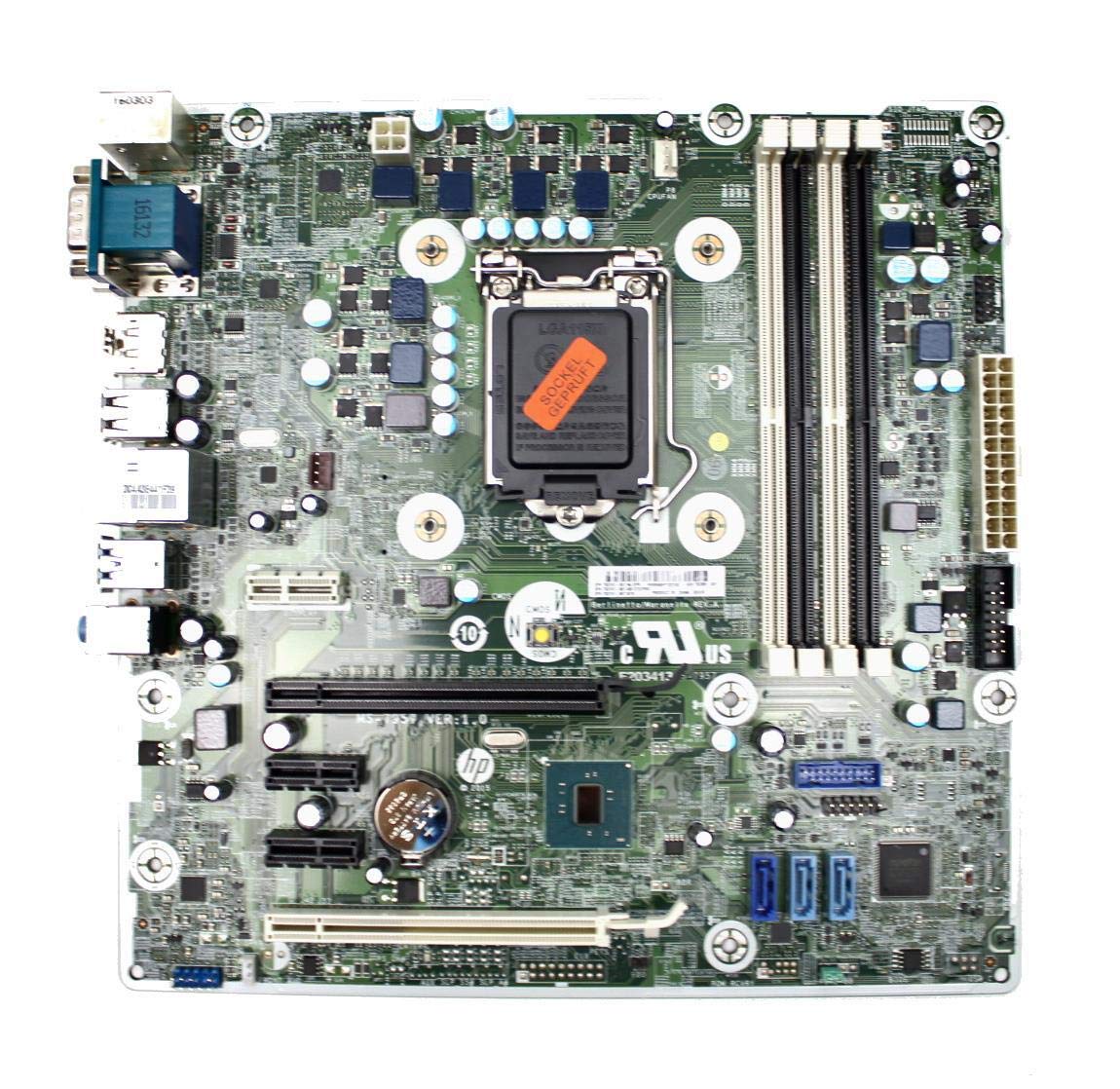
Figure 3: Rear I/O panel of the HP ProDesk 400 G3 MS-7957 motherboard. This image displays the available external connectivity options, including PS/2 ports, serial port, VGA, DisplayPort, USB 2.0, USB 3.0, Ethernet (RJ-45), and HD audio jacks.
Upute za rad
Početno uključivanje
After all components are installed and connected, connect the power cable to the power supply and press the power button on your computer case. The system should initiate the boot process.
Konfiguracija BIOS-a/UEFI-ja
Za pristup uslužnom programu za postavljanje BIOS-a/UEFI-ja pritisnite odgovarajuću tipku (obično Del, F2, F10, ili F12) during the initial boot sequence. Here you can configure boot order, system time, and other hardware settings.
Instalacija upravljačkog programa
After installing your operating system, it is crucial to install the latest drivers for your motherboard's chipset, integrated graphics, audio, and network adapter. These drivers can typically be found on the HP support webweb-mjesto ili proizvođač čipseta webmjesto.
Održavanje
- Čišćenje: Redovito čistite prašinu s matične ploče i komponenti komprimiranim zrakom. Prije čišćenja provjerite je li sustav isključen iz struje.
- Ažuriranja BIOS-a/UEFI-ja: Periodically check for BIOS/UEFI updates from HP's official support website. Updates can improve stability, compatibility, and performance. Follow update instructions carefully to avoid system damage.
- Ažuriranja upravljačkih programa: Redovito ažurirajte sve upravljačke programe sustava kako biste osigurali optimalne performanse i kompatibilnost s novim softverom i hardverom.
Rješavanje problema
Ovaj odjeljak nudi rješenja za uobičajene probleme s kojima se možete susresti:
- Bez napajanja: Check all power connections, including the 24-pin ATX and CPU power cables. Ensure the power supply is switched on and the wall outlet is functional.
- Nema zaslona: Verify that your monitor is connected to the correct video output (VGA or DisplayPort) and is powered on. Reseat the graphics card (if applicable) and RAM modules.
- Nestabilnost/rušenja sustava: This could be due to overheating, faulty RAM, or outdated drivers. Check CPU and GPU temperatures, run memory diagnostic tools, and update drivers.
- Periferni uređaj nije otkriven: Ensure the peripheral is properly connected. Try a different port or update the relevant drivers.
- Problemi s BIOS-om/UEFI-jem: If you encounter issues after changing BIOS settings, try resetting the CMOS by removing the CMOS battery for a few minutes or using the clear CMOS jumper (refer to motherboard diagram for location).
Tehnički podaci
| Značajka | Specifikacija |
|---|---|
| Marka | HP |
| CPU utičnica | LGA 1151 |
| Kompatibilni uređaji | Stolno računalo |
| RAM tehnologija | DDR4 |
| Kompatibilni procesori | Intel Core i3-6xxx, Intel Core i5-6xxx, Intel Core i7-6xxx, Intel Core i3-7xxx, Intel Core i5-7xxx, Intel Core i7-7xxx, Intel Core i3-8xxx, Intel Core i5-8xxx, Intel Core i7-8xxx |
| Vrsta čipseta | Intel B250 |
| Platforma | Windows |
| Naziv modela | MS-7957 |
| Model procesora | Core i3 (Note: Supports i3, i5, i7 as listed above) |
| Tip glavnog priključka za napajanje | 24 igle |
| Sučelje grafičke kartice | PCI Express |
| Available Memory Slots | 4 |
| Total SATA Ports | 6 |
| Ukupno USB priključaka | 2 (Note: Refers to internal headers, rear I/O has more) |
| Ukupno Ethernet priključaka | 1 |
| Total PCIe Ports | 3 |
| Proizvođač | Computer Store Berlin (Reseller/Supplier) |
| Broj dijela | 4061435962741 |
| ASIN | B08CS13PTQ |
Jamstvo i podrška
Ovaj proizvod dolazi s Jamstvo 1 godine od datuma kupnje. Ovo jamstvo pokriva nedostatke u materijalu i izradi pri normalnoj uporabi.
For technical support, warranty claims, or further assistance, please contact your point of purchase or refer to the official HP support resources for the ProDesk 400 G3 series.