
1. Važne sigurnosne upute
Please read all instructions carefully before using the Taurus Rapidissimo Clean Pro steam cleaner. Failure to follow these instructions may result in electric shock, fire, or serious injury.
- Uvijek provjerite je li uređaj isključen iz električne utičnice prije punjenja vodom, čišćenja ili održavanja.
- Ne uranjajte uređaj, kabel za napajanje ili utikač u vodu ili druge tekućine.
- Keep the steam cleaner out of reach of children and pets.
- Exercise extreme caution when using steam. Steam is hot and can cause burns. Keep hands, face, and other body parts away from the steam nozzle.
- Do not open the water tank cap while the appliance is pressurized or hot. Allow it to cool down completely before refilling.
- Use only tap water. Do not add cleaning solutions, perfumes, or other chemicals to the water tank, as this can damage the appliance and void the warranty.
- Do not direct steam at electrical appliances, power outlets, or other electrical components.
- Ako je kabel za napajanje oštećen, mora ga zamijeniti proizvođač, njegov serviser ili slično kvalificirana osoba kako bi se izbjegla opasnost.
2. Proizvod je gotovview i komponente
The Taurus Rapidissimo Clean Pro is a powerful handheld steam cleaner designed for effective, chemical-free cleaning. It operates at 1050W and generates 3 bar pressure for thorough sanitization.

Image: The Taurus Rapidissimo Clean Pro steam cleaner shown with its full set of accessories, including various nozzles, brushes, and cloths.
Uključeni dodaci:
- Proširivo crijevo
- Glass Accessory (Window Squeegee)
- Konusna mlaznica
- Kutna mlaznica
- Okrugla četkica
- Mop Pad / Cloth
- Posuda za mjerenje
- Dimnjak
- Upholstery Cloth
- Steam Head Attachment
- Strugač
- Mlaznica za pukotine
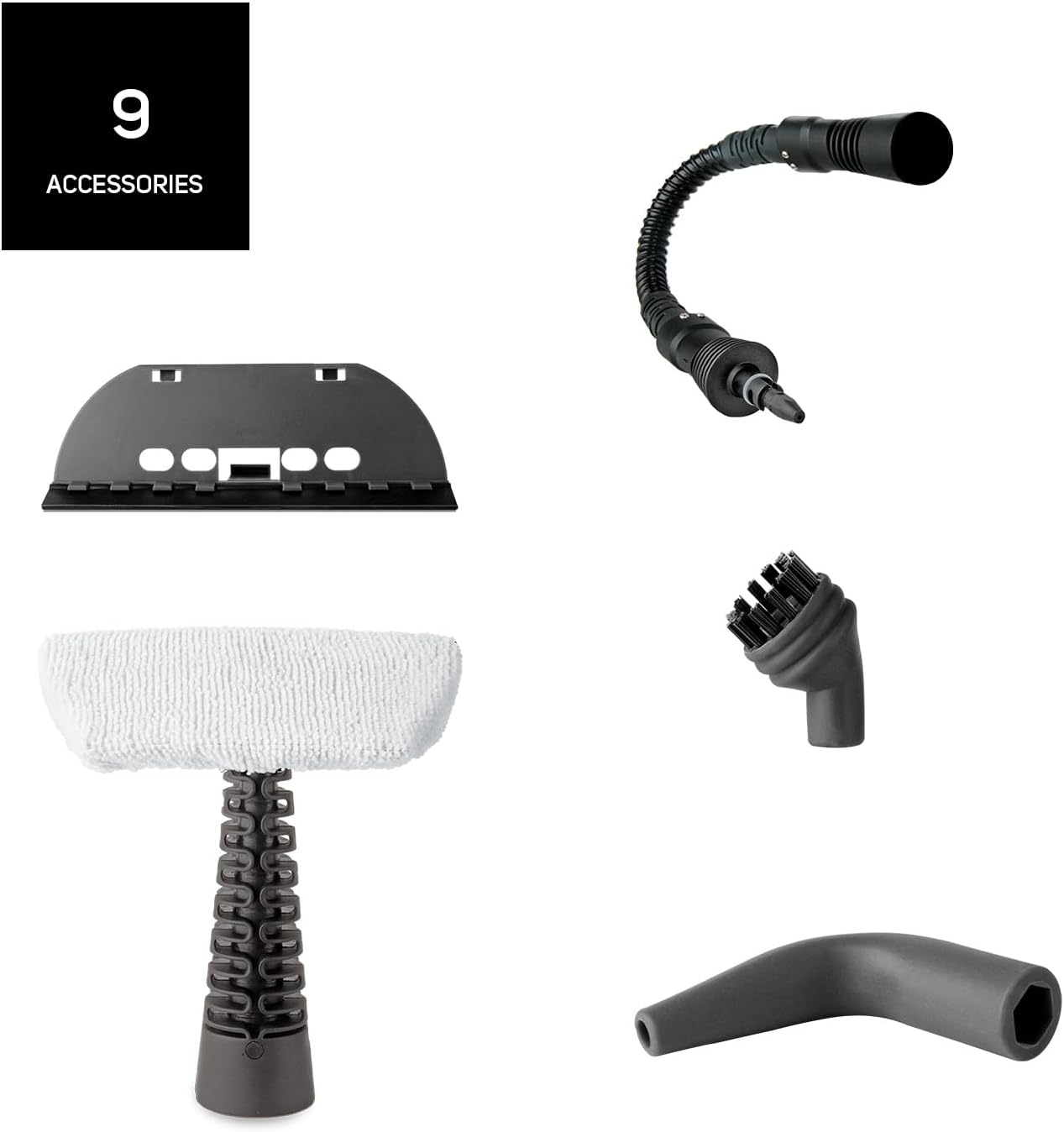
Slika: Detaljna view of the nine distinct accessories provided with the steam cleaner, designed for various cleaning tasks.
3. Postavljanje
- Raspakirajte uređaj: Carefully remove the steam cleaner and all accessories from the packaging.
- Napunite spremnik vode: Unscrew the safety cap of the water tank. Using the provided measuring cup and funnel, fill the tank with up to 350 ml of clean tap water. Do not overfill. Screw the safety cap back on tightly.
- Pričvrstite željeni pribor: Select the appropriate nozzle or brush for your cleaning task and securely attach it to the steam cleaner. For extended reach, connect the extendable hose first, then the desired accessory.
- Spojite na napajanje: Plug the power cord into a suitable grounded electrical outlet. The indicator light will illuminate, signaling that the unit is heating up.
- Vrijeme grijanja: The steam cleaner will be ready for use in approximately 3 minutes. The indicator light will change or turn off when the optimal pressure is reached.
4. Upute za rad
Once the steam cleaner is heated and ready, you can begin cleaning. The unit provides 3 bar pressure and a steam flow of 30 g/min for effective cleaning.
- Initiate Steam: Pritisnite i držite okidač za paru kako biste ispustili paru. Za kontinuiranu paru, neki modeli mogu imati gumb za zaključavanje na okidaču.
- Čišćenje površina: Direct the steam nozzle towards the surface you wish to clean. Move the nozzle slowly over the area to allow the steam to penetrate and loosen dirt.
- Korištenje pribora:
- Okrugla četka: Ideal for scrubbing stubborn dirt on tiles, grout, and oven racks.
- Conical/Angled Nozzle: Perfect for reaching tight corners, crevices, and detailed cleaning.
- Glass Accessory: Use for streak-free cleaning of windows, mirrors, and other glass surfaces.
- Mop Pad/Upholstery Cloth: Attach to the steam head for cleaning larger flat surfaces like floors, countertops, upholstery, and car seats.
- Obrišite: After steaming, wipe the treated surface with a clean, dry cloth to remove loosened dirt and moisture.
- Ponovno punjenje: If the steam output decreases significantly or stops, the water tank may be empty. Unplug the appliance and allow it to cool down for several minutes before carefully unscrewing the safety cap and refilling.

Image: A collage demonstrating the versatility of the steam cleaner, showing it cleaning oven racks, upholstery, and wall tiles.

Image: The steam cleaner being used on a sofa, illustrating its effectiveness against bacteria and viruses through steam.
5. Održavanje
Redovito održavanje osigurava dugotrajnost i optimalne performanse vašeg parnog čistača.
- Čišćenje eksterijera: After each use, ensure the appliance is unplugged and cooled. Wipe the exterior with a soft, damp tkanina. Nemojte koristiti abrazivna sredstva za čišćenje ili otapala.
- Pražnjenje spremnika za vodu: After each use, unplug the appliance and allow it to cool completely. Carefully unscrew the safety cap and empty any remaining water from the tank. This helps prevent mineral buildup.
- Pribor za čišćenje: Wash removable accessories (brushes, cloths) with warm, soapy water and rinse thoroughly. Allow them to air dry completely before storing.
- Uklanjanje kamenca: Depending on your water hardness, mineral deposits may build up inside the tank over time. If you notice reduced steam output, descaling may be necessary. Consult the manufacturer's full manual for specific descaling instructions, typically involving a diluted vinegar solution.
- Skladištenje: Parni čistač i njegov pribor čuvajte na hladnom i suhom mjestu, zaštićeno od izravne sunčeve svjetlosti i izvan dohvata djece.
6. Rješavanje problema
Ako imate problema s čistačem na paru, pogledajte sljedeće uobičajene probleme i rješenja:
| Problem | Mogući uzrok | Otopina |
|---|---|---|
| Nema pare ili vrlo malo pare | Spremnik za vodu je prazan Uređaj se ne zagrijava dovoljno Nakupljanje minerala (kamenac) | Refill water tank (after cooling) Wait for 3 minutes until indicator light signals readiness Perform descaling procedure (refer to full manual) |
| Voda curi iz mlaznice | Accessory not securely attached Overfilling the water tank Uređaj nije potpuno zagrijan | Ensure accessory is firmly clicked into place Do not exceed the MAX fill line Pričekajte da uređaj dostigne punu radnu temperaturu |
| Indikatorska lampica nije upaljena | Uređaj nije uključen Problem s utičnicom Kvar uređaja | Provjerite priključak napajanja Testirajte utičnicu s drugim uređajem Obratite se korisničkoj podršci |
If the problem persists after attempting these solutions, please contact Taurus customer support.
7. Specifikacije
- Naziv modela: Rapidissimo Clean Pro
- Marka: BIK
- Wattage: 1050 W
- Tlak pare: 3 bara
- Protok pare: 30 g/min
- Kapacitet spremnika za vodu: 350 ml
- Vrijeme grijanja: Otprilike 3 minuta
- Težina artikla: 1.6 kilogram
- Faktor oblika: Ručni
- Duljina kabela: 3 meters (extra long)
- Boja: Plava
- Posebne karakteristike: Quick heating, improved performance, high steam flow

Image: A close-up of the steam cleaner's nozzle releasing powerful steam, highlighting its 3.5 bar pressure capability.
8. Jamstvo i podrška
For detailed warranty information, please refer to the warranty card included with your product or visit the official Taurus webstranicu. Sačuvajte dokaz o kupnji za bilo kakve reklamacije u jamstvenom roku.
If you require technical assistance, spare parts, or have any questions not covered in this manual, please contact Taurus customer support through their official channels. Contact information can typically be found on the product packaging or the manufacturer's webmjesto.