
1. Uvod
This manual provides essential instructions for the safe and efficient operation of your Lenco DIR-250 Internet Radio. Please read this manual thoroughly before using the device and retain it for future reference. The Lenco DIR-250 is a versatile audio system offering Internet Radio, DAB+, FM radio, Bluetooth connectivity, Spotify Connect, and USB playback.
2. Sigurnosne informacije
- Ne izlažite uređaj kiši ili vlazi kako biste spriječili požar ili strujni udar.
- Osigurajte pravilnu ventilaciju. Ne blokirajte ventilacijske otvore.
- Koristite samo strujni adapter isporučen s jedinicom.
- Ne otvarajte casing. Za sve servisne radove obratite se kvalificiranom osoblju.
- Držite uređaj dalje od izravne sunčeve svjetlosti, izvora topline i jakih magnetskih polja.
- Izbjegavajte postavljanje teških predmeta na vrh jedinice.
3. Sadržaj paketa
Prilikom raspakiranja provjerite jesu li svi predmeti prisutni:
- Lenco DIR-250 Internet Radio Unit
- Adapter napajanja
- Daljinski upravljač
- Korisnički priručnik (ovaj dokument)
- Antene (2 uključene)
4. Proizvod je gotovview

Slika 4.1: Ispred view of the Lenco DIR-250 Internet Radio and its remote control.

Slika 4.2: Close-up of the right side of the front panel, featuring the TFT LCD display, volume control knob, Dimmer, and Alarm buttons.
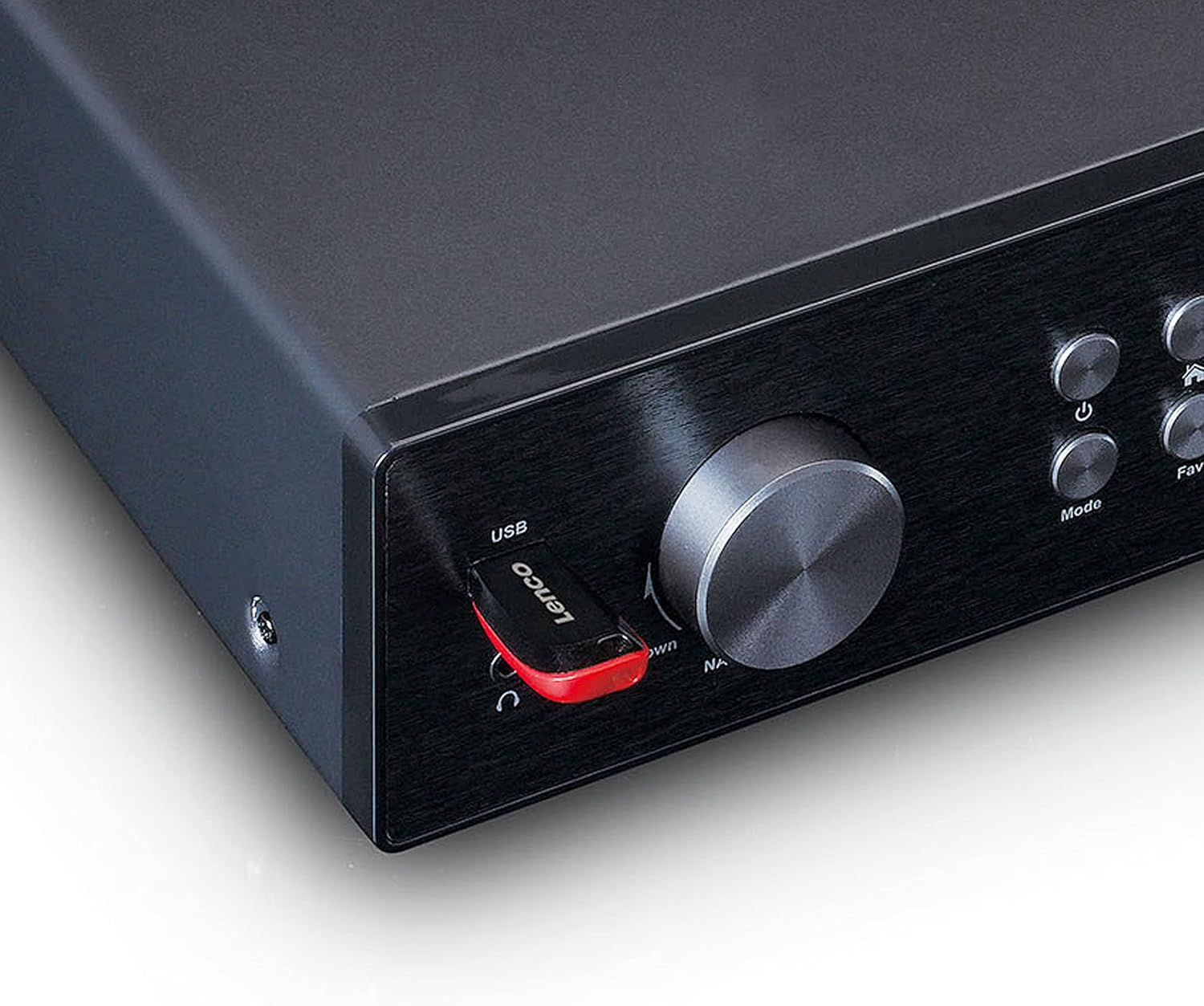
Slika 4.3: Close-up of the left side of the front panel, showing the USB port, headphone jack, Navigate/OK knob, Mode, and Favorite buttons.

Slika 4.4: Rear panel connections, including DC IN, Audio Output (RCA), Analog Input/Output, Optical Output, Coaxial Output, LAN (RJ45), and Antenna ports.
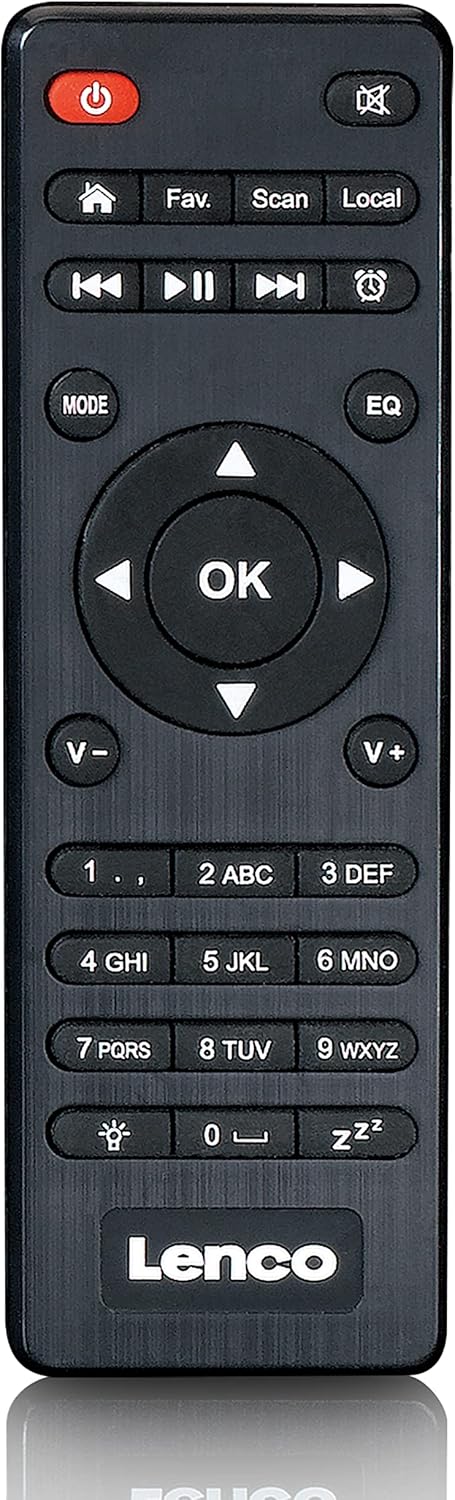
Slika 4.5: The included remote control for convenient operation of the Lenco DIR-250.
5. Postavljanje
5.1. Priključak za napajanje
- Connect the supplied power adapter to the DC IN port on the rear of the unit.
- Uključite strujni adapter u zidnu utičnicu.
5.2. Antenski priključak
For optimal reception of DAB+ and FM radio, connect the provided antennas to their respective ports on the rear panel. Extend the telescopic antenna fully for best results.
5.3. Mrežna veza
The DIR-250 supports both Wi-Fi and Ethernet connections for Internet Radio and Spotify Connect.
- Wi-Fi: Upon first power-on, the unit will guide you through the Wi-Fi setup. Select your network from the list and enter the password using the navigation knob and OK button, or the remote control.
- Ethernet: Connect an Ethernet cable from your router to the LAN port on the rear of the unit. The device will automatically detect the wired connection.
5.4. Čarobnjak za početno postavljanje
The first time you power on the DIR-250, an initial setup wizard will appear on the display. Follow the on-screen prompts to configure language, time, date, and network settings. This ensures the device is ready for use.
6. Operativni
6.1. Osnovne kontrole
The DIR-250 can be operated using the front panel controls or the included remote control.
- Gumb za napajanje: Turns the unit on/off or puts it into standby mode.
- Gumb za glasnoću: Okrenite za podešavanje glasnoće. Pritisnite za isključivanje/uključivanje zvuka.
- Gumb za navigaciju/OK: Rotate to scroll through menus and options. Press to confirm a selection.
- Gumb za način rada: Cycles through available modes (Internet Radio, DAB+, FM, Bluetooth, USB, AUX).
- Fav. Button: Accesses your list of favorite stations or saves the current station as a favorite.
- Gumb za prigušivanje: Podešava svjetlinu zaslona.
- Gumb za alarm: Sets or manages alarms.
6.2. Internet radio
Access thousands of radio stations worldwide via your internet connection.
- Pritisnite tipku Način rada gumb dok se ne odabere "Internet Radio".
- Koristite Navigate/OK knob or remote control to browse stations by location, genre, or search.
- Pritisnite OK za odabir postaje.
- To save a station as a favorite, press and hold the Omiljeni dugme.
6.3. DAB+ radio
Uživajte u visokokvalitetnim digitalnim radio emisijama.
- Pritisnite tipku Način rada button until "DAB+" is selected.
- Radio će automatski pretražiti dostupne DAB+ stanice.
- Koristite Navigate/OK knob or remote to select a station from the list.
6.4. FM radio
Slušajte tradicionalne analogne FM radio stanice.
- Pritisnite tipku Način rada button until "FM" is selected.
- Koristite Skenirati gumb na daljinskom upravljaču ili Navigate/OK knob to search for stations.
- Pritisnite OK to listen to a selected station.
6.5. Bluetooth način
Bežično streamajte zvuk sa svog pametnog telefona, tableta ili drugih uređaja s omogućenom Bluetooth vezom.
- Pritisnite tipku Način rada button until "Bluetooth" is selected. The display will show "Pairing".
- On your external device, enable Bluetooth and search for "Lenco DIR-250".
- Select the device to pair. Once connected, you can play audio from your device through the radio.
6.6. Spotify Connect
Control your music directly from the Spotify app on your smartphone or tablet.
- Ensure your Lenco DIR-250 and your smartphone/tablet are connected to the same Wi-Fi network.
- Otvorite aplikaciju Spotify na svom uređaju.
- Reproducirajte pjesmu i dodirnite ikonu "Dostupni uređaji" (obično ikona zvučnika ili računala).
- Select "Lenco DIR-250" from the list of available devices.
6.7. Reprodukcija s USB-a
Reproduciraj zvuk files (MP3, WAV, AAC) from a USB flash drive.
- Umetnite USB flash pogon u USB priključak na prednjoj ploči.
- Pritisnite tipku Način rada gumb dok se ne odabere "USB".
- Koristite Navigate/OK knob or remote to browse and select audio files.
6.8. AUX ulaz
Spojite vanjske audio uređaje pomoću 3.5 mm audio kabela.
- Connect your external audio device to the AUX IN port on the rear panel.
- Pritisnite tipku Način rada tipku dok se ne odabere "AUX".
- Reproducirajte zvuk s povezanog uređaja.
6.9. Alarm i mjerač vremena za spavanje
Set alarms to wake up to your favorite radio station or use the sleep timer to automatically turn off the radio.
- Alarm: Pritisnite tipku Alarm button on the front panel or remote. Follow the on-screen instructions to set alarm time, source, and volume.
- Isključivanje vremena: Pritisnite tipku Spavati button on the remote control repeatedly to cycle through available sleep timer durations (e.g., 15, 30, 60 minutes, Off).
7. Održavanje
7.1. Čišćenje
To clean the unit, wipe it with a soft, dry cloth. Do not use abrasive cleaners, waxes, or solvents as these may damage the surface. Ensure the unit is unplugged before cleaning.
7.2. Skladištenje
Ako ne planirate koristiti uređaj dulje vrijeme, isključite ga iz električne utičnice i pohranite ga na hladnom i suhom mjestu, dalje od izravne sunčeve svjetlosti i ekstremnih temperatura.
8. Rješavanje problema
| Problem | Mogući uzrok | Otopina |
|---|---|---|
| Nema struje | Adapter za napajanje nije spojen ili je utičnica neispravna. | Provjerite priključke za napajanje. Pokušajte s drugom utičnicom. |
| Nema zvuka | Volume too low, muted, or incorrect input selected. | Increase volume. Check if muted. Select correct input mode. |
| Ne mogu se spojiti na Wi-Fi | Netočna lozinka, izvan dometa ili problem s usmjerivačem. | Verify Wi-Fi password. Move unit closer to router. Restart router. |
| Internet Radio buffering/disconnecting | Weak Wi-Fi signal or slow internet connection. | Improve Wi-Fi signal strength. Check internet speed. Try wired Ethernet connection. |
| Slab DAB+/FM prijem | Antenna not properly connected or extended. | Ensure antennas are fully extended and positioned for best reception. |
| Problemi s Bluetooth uparivanjem | Device not in pairing mode, or already paired with another device. | Ensure DIR-250 is in Bluetooth mode. Disconnect from other devices. |
| Uređaj se zamrzava ili ne reagira | Privremeni softverski kvar. | Unplug the power adapter, wait 10 seconds, then plug it back in to restart the unit. |
9. Specifikacije
| Marka | Lenco |
| Broj modela | A004231 |
| Tehnologija zaslona | LCD |
| Povezivost | Bluetooth V5.0, Ethernet (RJ45), Wi-Fi |
| Podržani radijski bendovi | Internetski radio, DAB+, FM |
| Posebne značajke | Spotify Connect, USB Playback, Alarm, Sleep Timer |
| Dimenzije (D x Š x V) | 43 x 28.7 x 7.2 cm |
| Težina | 1.5 kilograma |
| Izvor napajanja | Žičano (AC adapter) |
| Kompatibilni uređaji | Tablet, Smartphone, USB storage devices |
10. Jamstvo
This product comes with a manufacturer's warranty of 24 months from the date of purchase. Please retain your proof of purchase for warranty claims. The warranty covers defects in materials and workmanship under normal use. It does not cover damage caused by misuse, accidents, unauthorized modifications, or normal wear and tear.
11. Podrška
For technical support, service, or further inquiries regarding your Lenco DIR-250 Internet Radio, please visit the official Lenco website or contact their customer service department. Contact information can typically be found on the Lenco webweb-mjestu ili u jamstvenoj dokumentaciji koja je priložena uz vaš proizvod.
Lenco Official Webstranica: www.lenco.com