
1. Uvod
This manual provides detailed instructions for the Symcode MJ-X5-2D Bluetooth Wireless Barcode Scanner. It covers product features, setup procedures, operating modes, maintenance guidelines, and troubleshooting tips to ensure optimal performance and longevity of your device. Please read this manual thoroughly before using the scanner.
2. Sadržaj paketa
Provjerite jesu li sve dolje navedene stavke prisutne u vašem paketu:
- Symcode MJ-X5-2D Barcode Scanner
- USB kabel za punjenje/podatkovni kabel
- 2.4G Wireless USB Dongle
- Upute za korištenje

Image: Contents of the Symcode MJ-X5-2D Barcode Scanner package, showing the scanner unit, a USB cable, a 2.4G wireless dongle, and the printed user guide.
3. Postavljanje
3.1 Početno punjenje
Before first use, fully charge the scanner. Connect the scanner to a USB power source using the provided USB cable. A full charge typically takes approximately 2 hours and provides up to 5 hours of continuous operation.

Image: The scanner next to a battery icon, illustrating the charging process and battery capacity. The scanner features a 650mAh rechargeable lithium-ion battery.
3.2 Spajanje skenera
The Symcode MJ-X5-2D scanner offers multiple connectivity options:
- USB žičana veza: Connect the scanner directly to your computer using the USB cable. The scanner will function as a plug-and-play device.
- 2.4G bežična veza: Insert the 2.4G USB dongle into your computer's USB port. The scanner will automatically pair with the dongle. This mode offers a barrier-free transmission distance of up to 150m (492ft) and up to 30m (98ft) in a barrier environment.
- Bluetooth veza: Enable Bluetooth on your host device (PC, laptop, tablet, smartphone). Put the scanner into Bluetooth pairing mode (refer to the specific pairing instructions in the included user guide). Select the scanner from your device's Bluetooth list to connect. Bluetooth offers a barrier-free transmission distance of up to 50m (164ft) and up to 15m (49ft) in a barrier environment.

Image: Connectivity options for the scanner, including USB wired, Bluetooth, and 2.4G wireless dongle, compatible with PCs, laptops, tablets, and phones.

Image: Transmission range capabilities for the 2.4GHz Wireless and Bluetooth connections. The 2.4GHz wireless mode offers up to 150m (492ft) barrier-free and 30m (98ft) with barriers. Bluetooth offers up to 50m (164ft) barrier-free and 15m (49ft) with barriers.
4. Načini rada
The scanner supports two primary data uploading modes:
- Način trenutnog slanja: In this mode, scanned barcode data is immediately transmitted to your connected device. This is suitable for real-time data entry.
- Način pohrane: The scanner can store up to 50,000 barcodes in its internal 16MB memory. Data is saved internally and can be uploaded to your device later when needed. This mode is ideal for inventory tasks where an immediate connection is not always available.
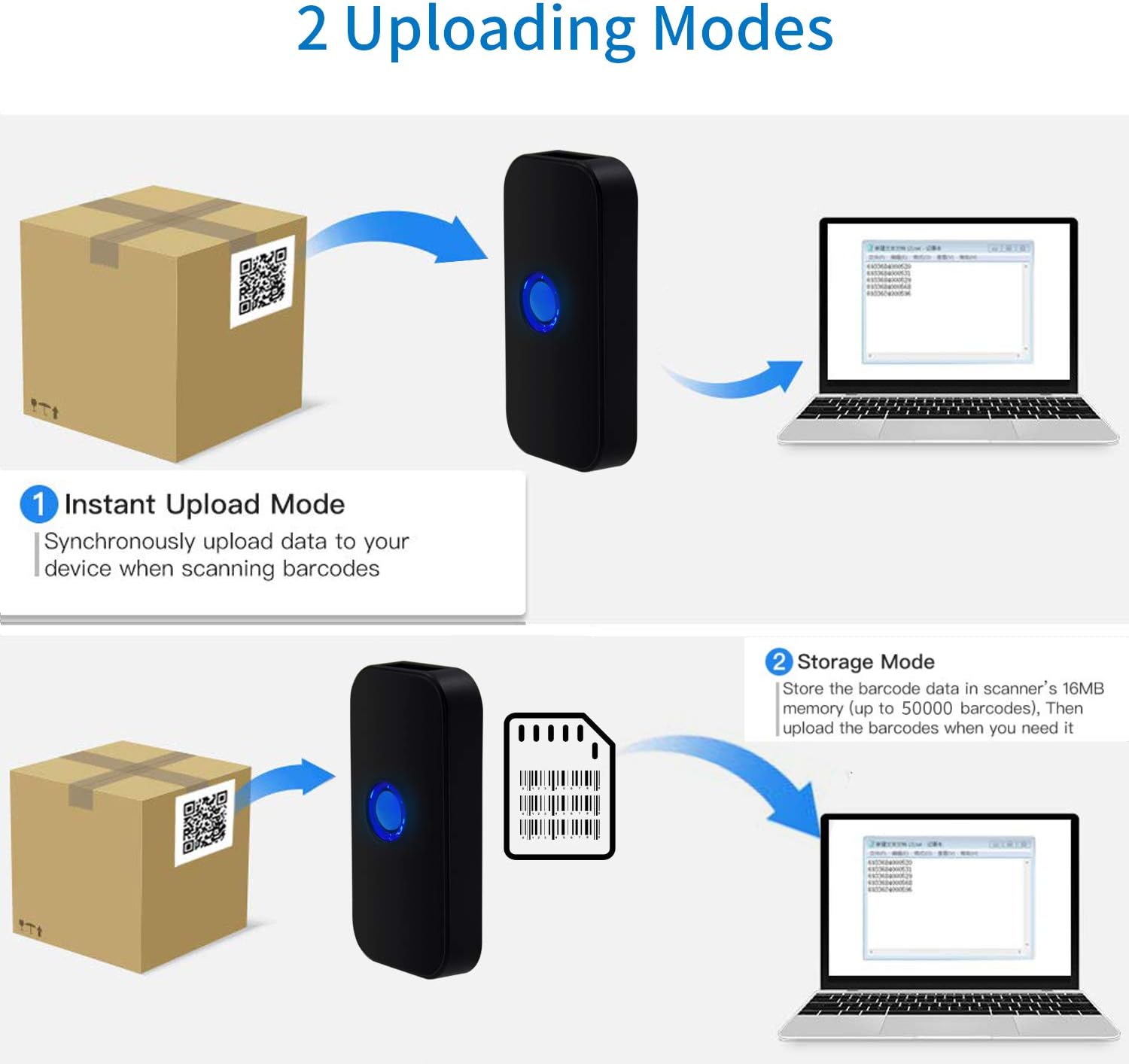
Image: Visual representation of the two data uploading modes. Instant Upload Mode sends data synchronously upon scanning, while Storage Mode saves up to 50,000 barcodes in 16MB memory for later upload.
5. Supported Barcodes
The Symcode MJ-X5-2D scanner is capable of reading both 1D and 2D digital and printed barcodes:
- 1D bar kodovi: Code 128, EAN-13, EAN-8, Code 39, Code 93, UPC-A, UPC-E, Codabar, Interleaved 2 of 5, ISBN, GS1 DataBar, Matrix 2 of 5, Code 11, Industrial 2 of 5, MSI.
- 2D bar kodovi: Data Matrix, PDF417, QR code, Aztec, Maxicode, Hanxin.

Image: The scanner demonstrating its ability to read various 1D and 2D barcodes, including QR codes, from digital displays and printed labels.
6. Održavanje
To ensure the longevity and optimal performance of your scanner, follow these maintenance guidelines:
- Čišćenje: Za čišćenje vanjske strane skenera koristite meku, suhu krpu. Za prozor za skeniranje upotrijebite krpu koja ne ostavlja dlačice lagano obrisanu.ampOčistite blagim, neabrazivnim sredstvom za čišćenje. Izbjegavajte jake kemikalije ili abrazivne materijale.
- Skladištenje: Skener čuvajte na hladnom i suhom mjestu, dalje od izravne sunčeve svjetlosti i ekstremnih temperatura.
- Njega baterije: Avoid fully discharging the battery frequently. If storing for extended periods, charge the battery to about 50% and recharge every few months.
- Zaštita: Protect the scanner from drops and impacts.
7. Rješavanje problema
If you encounter issues with your Symcode MJ-X5-2D scanner, refer to the following common problems and solutions:
- Skener se ne uključuje: Provjerite je li baterija napunjena. Spojite skener na izvor napajanja pomoću USB kabela.
- Scanner not connecting to device:
- For USB wired: Check the cable connection.
- For 2.4G Wireless: Ensure the USB dongle is properly inserted and recognized by your computer.
- For Bluetooth: Confirm Bluetooth is enabled on your device and the scanner is in pairing mode. Re-pair if necessary.
- Skener ne čita barkodove:
- Ensure the barcode is clean, undamaged, and within the scanner's reading range.
- Check if the barcode type is supported by the scanner.
- Verify that the scanner's lens is clean.
- Incorrect characters or unexpected behavior: This can sometimes occur with certain host devices or software configurations. Try resetting the scanner to factory defaults (refer to the full user guide for specific instructions). Ensure your device's input language settings are compatible.
- Scanner beeps/flashes 5 times and shuts off: This indicates a potential internal error or low battery. Try fully charging the device. If the issue persists, a factory reset might be required. Consult the full user guide for reset procedures.
If problems persist after attempting these solutions, please contact Symcode customer support.
8. Specifikacije
| Marka | simbolički kod |
| Broj modela | MJ-X5-2D |
| Tehnologija povezivanja | Bluetooth, 2.4G Wireless, USB |
| Kompatibilni uređaji | Smartphone, PC, Laptop, Tablet |
| Izvor napajanja | Napajanje na baterije |
| Sastav baterije | Litij-ionski |
| Punjiva baterija | Da |
| Boja | Scanner QR 2D (Black) |
| UPC | 791533381758 |
9. Jamstvo i podrška
For warranty information, technical support, or service inquiries, please refer to the contact details provided in the original product packaging or visit the official Symcode webstranicu. Sačuvajte račun kao dokaz o kupnji za slučaj reklamacije.