
Casio DH-12ET
Casio DH-12ET Desktop Calculator User Manual
Model: DH-12ET
Uvod
This manual provides detailed instructions for the proper use and maintenance of your Casio DH-12ET Desktop Calculator. Please read this manual thoroughly before using the calculator to ensure optimal performance and longevity.

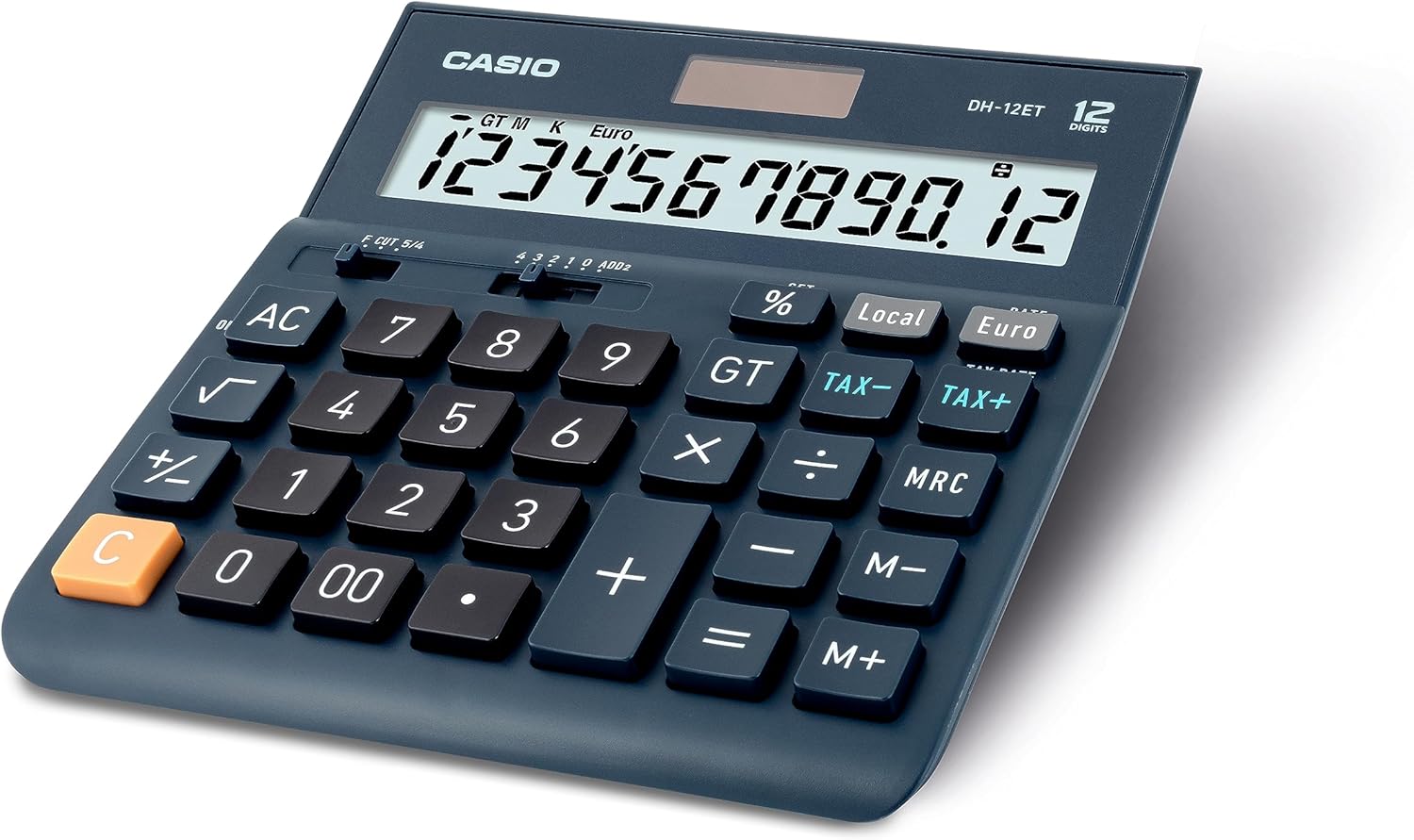
Slika 1: Ispred view of the Casio DH-12ET Desktop Calculator, showing the display and key layout.
Značajke proizvoda
The Casio DH-12ET is a versatile 12-digit desktop calculator designed for various business and personal calculations. Key features include:
- 12-znamenkasti LCD zaslon: Clear display with calculation command indicators and thousands separators.
- Obračun poreza: Dedicated functions for easy and quick calculation of tax additions or subtractions.
- Pretvorba valuta: Ability to convert amounts between two currencies after setting an exchange rate.
- Professional Percentage Izračun: Determine percentage increase and decrease with separate display of calculated values.
- Mark Up Function: Quickly determine margins and markups.
- Funkcija kvadratnog korijena: Calculate square roots.
- Promjena predznaka (+/-): Easily switch between positive and negative values.
- Total Sum Memory (GT): Automatically stores the sum of all calculation results.
- 3-Key Memory: Independent memory functions (M+, M-, MRC) for storing and recalling values.
- Solar/Battery Operated: Dual power source for reliable operation.
- Automatsko isključivanje: Conserves battery life by shutting down after 6 minutes of inactivity.
- Memory Protection Battery: Retains stored data (e.g., currency rates, tax rates) during power loss or battery change.
- Gumene noge: Provides stability on surfaces.
Postavljanje
Napajanje
The Casio DH-12ET calculator operates on a dual power system: solar power and a single LR44 button cell battery. The solar panel provides power in well-lit environments, while the battery acts as a backup in low light conditions or when the solar power is insufficient. The battery also serves as a memory protection battery.
Ugradnja/zamjena baterije
The calculator comes with one LR44 battery pre-installed. If the display becomes dim or unresponsive in low light, the battery may need replacement.
- Provjerite je li kalkulator uključen ISKLJUČENO.
- Pronađite odjeljak za baterije na stražnjoj strani kalkulatora.
- Pomoću malog odvijača uklonite vijak koji pričvršćuje poklopac odjeljka za baterije.
- Carefully remove the old LR44 battery.
- Umetnite novu LR44 bateriju s pozitivnom (+) stranom okrenutom prema gore.
- Vratite poklopac odjeljka za baterije i pričvrstite ga vijkom.
Bilješka: Dispose of used batteries according to local regulations. Do not expose batteries to excessive heat or fire.
Upute za rad
Osnovni proračuni
- Dodatak: Unesite prvi broj, pritisnite +, unesite drugi broj, pritisnite =.
- Oduzimanje: Unesite prvi broj, pritisnite -, unesite drugi broj, pritisnite =.
- Množenje: Unesite prvi broj, pritisnite x, unesite drugi broj, pritisnite =.
- Podjela: Unesite prvi broj, pritisnite ÷, unesite drugi broj, pritisnite =.
- Obriši unos: Pritisnite C to clear the last entered number.
- Sve čisto: Pritisnite AC to clear all entries and reset the calculator.
Obračun poreza
The calculator allows for easy addition or subtraction of a pre-set tax rate.
- Određivanje porezne stope:
- Pritisnite AC i držite % key until "SET" appears on the display.
- Pritisnite POREZNA STOPA (which is the POREZ+ ključ).
- Enter the desired tax rate (e.g., 8 for 8%).
- Pritisnite % to confirm and save the tax rate.
- Dodavanje poreza: Enter the amount, then press POREZ+. The display will show the amount with tax added.
- Oduzimanje poreza: Enter the amount with tax, then press POREZ-. The display will show the original amount before tax.

Slika 2: Steps for changing the tax rate on the Casio DH-12ET calculator.
Pretvorba valuta
The calculator supports conversion between a local currency and a foreign currency (e.g., Euro).
- Setting the Exchange Rate:
- Pritisnite AC i držite % key until "SET" appears.
- Pritisnite STOPA (which is the Euro ključ).
- Enter the exchange rate (e.g., 1.25 if 1 Local unit = 1.25 Euro).
- Pritisnite % to confirm and save the rate.
- Converting Local to Foreign: Enter the local amount, then press Euro.
- Converting Foreign to Local: Enter the foreign amount, then press Lokalno.
Percentage Izračuni
- Calculate Percentage of a Number: Enter number, press x, enter percentagvrijednost e, pritisnite %. (e.g., 100 x 15 % = 15)
- Add Percentage: Enter number, press +, enter percentagvrijednost e, pritisnite %. (e.g., 100 + 15 % = 115)
- Subtract Percentage: Enter number, press -, enter percentagvrijednost e, pritisnite %. (e.g., 100 - 15 % = 85)
Memorijske funkcije
- M+: Dodaje prikazanu vrijednost u memoriju.
- M-: Oduzima prikazanu vrijednost iz memorije.
- MRC:
- Pritisnite jednom za pozivanje vrijednosti pohranjene u memoriji.
- Press twice to clear the memory (M indicator disappears).
- GT (ukupni zbroj):
- Automatically accumulates results of calculations (e.g., after pressing = or %).
- Pritisnite GT za prikaz ukupnog iznosa.
- Pritisnite AC to clear the grand total memory.
Ostale funkcije
- √ (kvadratni korijen): Unesite broj, a zatim pritisnite √ to calculate its square root.
- +/- (promjena predznaka): Mijenja predznak prikazanog broja iz pozitivnog u negativni ili obrnuto.
- Decimal Selector (F CUT 5/4, 4 3 2 1 0 ADD2):
This slider switch controls the decimal point and rounding settings:
- F (Plutajući): Decimal point floats, displaying all digits.
- IZREZATI: Truncates results to the specified number of decimal places.
- 5/4: Rounds results to the specified number of decimal places (standard rounding).
- 4, 3, 2, 1, 0: Specifies the number of decimal places (e.g., '2' for two decimal places).
- ADD2: Automatski dodaje dva decimalna mjesta za izračune valuta.
Održavanje
Čišćenje
To clean the calculator, wipe it gently with a soft, dry cloth. For stubborn dirt, slightly dampen the cloth with water and a mild detergent, then wipe dry immediately. Do not use strong solvents, abrasive cleaners, or spray cleaners directly onto the calculator.
Skladištenje
Kalkulator čuvajte na hladnom i suhom mjestu, dalje od izravne sunčeve svjetlosti, ekstremnih temperatura i visoke vlažnosti. U slučaju duljeg skladištenja preporučuje se uklanjanje baterije kako biste spriječili curenje.
Rješavanje problema
- Zaslon je taman ili prazan:
- Ensure the calculator is in a well-lit area for solar power.
- Check the battery. Replace the LR44 battery if it is depleted.
- Netočni rezultati izračuna:
- Pritisnite AC to clear all previous calculations and memory.
- Verify the decimal selector switch setting.
- Check if any memory functions (M, GT) are active and interfering.
- Tipke ne reagiraju:
- Ensure the calculator is powered on.
- Očistite oko tipki kako biste uklonili sve ostatke.
- If the issue persists, try replacing the battery.
Tehnički podaci
| Značajka | Detalj |
|---|---|
| Model | DH-12ET |
| Prikaz | 12-znamenkasti LCD zaslon |
| Izvor napajanja | Solar / 1 x LR44 Battery (included) |
| Dimenzije (D x Š) | 15.9 cm x 15.1 cm (6.26 in x 5.94 in) |
| Težina | 180 gram |
| Materijal | Plastika, guma |
| Automatsko isključivanje | Otprilike 6 minuta neaktivnosti |
Slika 3: Strana view of the Casio DH-12ET calculator with approximate dimensions.
Jamstvo i podrška
For information regarding warranty coverage, service, or technical support for your Casio DH-12ET Desktop Calculator, please refer to the warranty card included with your product or visit the official Casio webweb-mjesto za vašu regiju. Kontaktni podaci za korisničku podršku obično su dostupni na web-mjestu proizvođača webmjesto.
Casio službenik Webstranica: www.casio.com
Ask a question about this manual
Ask about setup, troubleshooting, compatibility, parts, safety, or missing instructions. Manuals+ will review the question and use this page’s manual context to help answer it.