
SINOTIMER TM919B
TM919B 30A Programmable Electronic Timer Switch User Manual
Model: TM919B
1. Uvod
The SINOTIMER TM919B is a 30A 7-day programmable electronic timer switch designed for automatic control of various electrical equipment. It allows you to set specific ON/OFF times over a 24-hour or 7-day cycle, providing convenience and energy efficiency for applications such as streetlights, lamps, water heaters, air conditioners, and more.
Ključne karakteristike:
- Ideal for household use in DB Boards.
- High capacity: 5000 Watt / 30 Amps.
- Flexible programming: 24 Hours / 7 Days a Week Programmable.
- Automatic time error correction: +/- 30 seconds weekly.
- Multiple programs: Repeat programs with 16 ON/OFF settings.
- Manual ON/OFF control.
2. Proizvod je gotovview
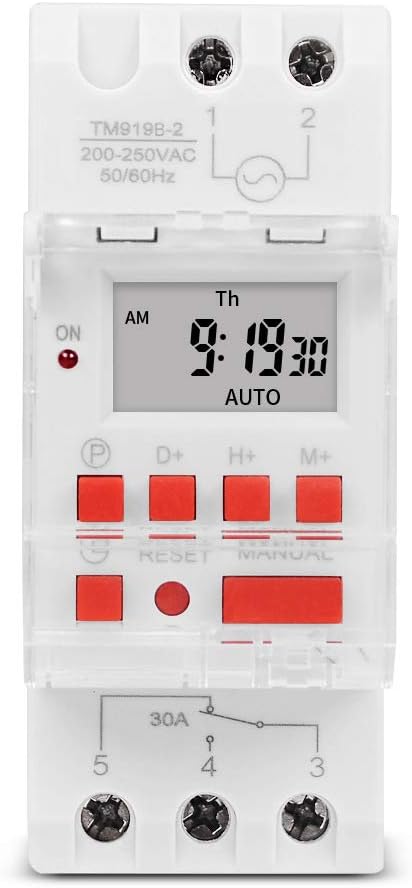
Slika 1: Prednja strana view of the TM919B timer switch, displaying the LCD screen with time and day, and the array of control buttons including P, D+, H+, M+, RESET, and MANUAL.

Slika 2: Kutno view of the TM919B timer switch, showing its side profile and the clear protective cover over the buttons.

Slika 3: Bočna strana view of the TM919B timer switch, detailing the wiring terminals (L, N, 1, 2, 3, 4, 5) and product specifications like voltage i trenutne ocjene.
3. Specifikacije
| Parametar | Vrijednost |
|---|---|
| Raspon temperature | -20°C do +50°C |
| Operativni svtage (Ui) | 110 V |
| Potrošnja energije | 4.5 VA (MAKS.) |
| Prikaz | LCD |
| Preklopni kontakt | 1 preklopni prekidač |
| Programi | 16 ON/OFF settings per day or week |
| Histereza | 2 sec/day (at 25°C) |
| Minimalni interval | 1 minuta |
| Kapacitet | 30 A 250 V AC |
| Black-out Memory | 60 dana |
| Raspon mjerača vremena | 1 minuta do 168 sata |
| Average Error | 1 second/24 hours (at 25°C) |
| Težina artikla | 5.3 ounces (0.2kg) |
| Dimenzije paketa | 3.95 x 3.2 x 2 inča |
| Veličina zaslona | 1.5 inča |
4. Instalacija i ožičenje
The TM919B timer switch is designed for DIN rail mounting, making it suitable for integration into electrical distribution boards. Ensure all power is disconnected before attempting installation.
Dijagram ožičenja:

Figure 4: Wiring diagram for the TM919B. Terminals 1 and 2 are for power input (L and N). Terminals 3, 4, and 5 are for the output, typically used for NO (Normally Open) and NC (Normally Closed) connections to control the load.
- Ulazna snaga: Connect the live (L) and neutral (N) wires to terminals 1 and 2 respectively. Ensure the voltage matches the timer's specification (110V for this model).
- Priključak opterećenja: The timer has a single changeover switch.
- Terminal 3: Normalno zatvoreni (NC) kontakt.
- Terminal 4: Common (COM) contact.
- Terminal 5: Normalno otvoreni (NO) kontakt.
- Connect your load (e.g., lamp, motor) between the common terminal (4) and either the NO (5) or NC (3) terminal, depending on whether you want the load to be ON or OFF when the timer is in its default state.
- Securely fasten all wires to prevent loose connections.
- Once wiring is complete, restore power and proceed with programming.
5. Operating Instructions and Programming
The TM919B timer allows for up to 16 ON/OFF programs. Follow these steps to set the current time and program the timer.
Funkcije gumba:
- P (Program): Ulazi u način rada za programiranje.
- D+ (Day): Prilagođava dan u tjednu.
- H+ (Sat): Podešava sat.
- M+ (Minuta): Podešava minute.
- VRAĆANJE: Resets all settings to factory defaults. Use a pointed object to press.
- PRIRUČNIK: Prebacuje se između načina rada UKLJUČENO, AUTOMATSKI i ISKLJUČENO.
Postavljanje trenutnog vremena:
- Pritisnite tipku D+ gumb za postavljanje trenutnog dana u tjednu.
- Pritisnite tipku H+ gumb za postavljanje trenutnog sata.
- Pritisnite tipku M+ gumb za postavljanje trenutne minute.
- The time will automatically save after a few seconds of inactivity.
Programiranje vremena UKLJUČENO/ISKLJUČENO (do 16 programa):
- Pritisnite tipku P button once. The display will show "1 ON". This is for setting the first ON time.
- Pritisnite H+ i M+ to set the desired hour and minute for the first ON event.
- Pritisnite D+ to select the days of the week for this program. Options include: every day, specific days (e.g., MO-FR, MO-SA, SA-SU), or individual days. If you want the same setting every day, you do not need to press D+.
- Pritisnite tipku P button again. The display will show "1 OFF". This is for setting the first OFF time.
- Pritisnite H+ i M+ to set the desired hour and minute for the first OFF event.
- Pritisnite D+ again if you need to specify different days for the OFF event, or leave it if it matches the ON event's days.
- Repeat steps 1-6 for programs 2 through 16 (e.g., "2 ON", "2 OFF", etc.).
- Nakon što ste postavili sve željene programe, pritisnite tipku PRIRUČNIK button repeatedly until "AUTO" is displayed. This ensures the timer operates according to your programmed schedule.
ručna kontrola:
Pritisnite tipku PRIRUČNIK gumb za cikličko prebacivanje između načina rada:
- NA: Izlaz je trajno UKLJUČEN, poništavajući programirane postavke.
- OFF: Izlaz je trajno ISKLJUČEN, poništavajući programirane postavke.
- AUTOMOBIL: The timer operates according to the programmed ON/OFF schedules. Ensure the timer is in AUTO mode for automatic operation.
6. Održavanje
The TM919B timer switch requires minimal maintenance. Keep the device clean and free from dust. Do not expose it to excessive moisture or extreme temperatures. If the display becomes dim or unresponsive, check the power supply. The internal battery provides backup for settings during power outages for up to 60 days.
7. Rješavanje problema
| Problem | Mogući uzrok | Otopina |
|---|---|---|
| Tajmer se ne uključuje/isključuje u programirano vrijeme. | Not in AUTO mode; incorrect programming; power issue. | Press MANUAL until "AUTO" is displayed. Review programming steps carefully. Check power supply to the timer. |
| Zaslon je prazan ili taman. | No power supply; internal battery low (unlikely for display). | Check power connections. Ensure the timer is receiving power. |
| Ne možete postaviti vrijeme ili programe. | Tipke ne reagiraju; uređaj se zamrznuo. | Press the RESET button using a pointed object. This will clear all settings, so you will need to reprogram. |
| Load not switching. | Incorrect wiring; faulty load; timer output issue. | Verify wiring according to the diagram. Test the load independently. If issues persist, contact support. |
8. Jamstvo i podrška
This SINOTIMER product is covered by a standard manufacturer's warranty against defects in materials and workmanship. For warranty claims or technical support, please contact your retailer or the manufacturer directly. Keep your purchase receipt as proof of purchase.
For further assistance, visit the official SINOTIMER store: SINOTIMER Store on Amazon
Ask a question about this manual
Ask about setup, troubleshooting, compatibility, parts, safety, or missing instructions. Manuals+ will review the question and use this page’s manual context to help answer it.