
Uvod
This manual provides comprehensive instructions for the Elekpia Universal Remote Control, model CT-RC1US-18. This remote is designed for seamless compatibility with a wide range of Toshiba LED LCD HDTV models, including but not limited to CT-90325, CT-90326, CT-90329, CT-8037, CT-90302, CT-90275, CT-90, CT-90366, and CT-RC1US-18. Please read this manual carefully to ensure proper setup and operation of your new remote control.
Postavljanje
Ugradnja baterije
The Elekpia Universal Remote Control requires two (2) 1.5V AA batteries for operation. No programming is needed; simply install the batteries, and the remote will be ready to use with your compatible Toshiba TV.
- Pronađite poklopac pretinca za baterije na stražnjoj strani daljinskog upravljača.
- Pritisnite jezičak i pomaknite poklopac prema dolje kako biste otvorili pretinac.
- Umetnite dvije (2) AA baterije, pazeći da pozitivni (+) i negativni (-) terminali budu ispravno poravnati s oznakama unutar odjeljka.
- Vratite poklopac odjeljka za baterije na mjesto dok ne klikne sigurno.

Slika 1: Prednja i stražnja strana view of the Elekpia Universal Remote Control, highlighting the battery compartment on the rear.
Once batteries are installed, the remote is ready for immediate use with your Toshiba TV. No additional setup or code entry is required.
Upute za rad
This universal remote control is designed to replicate the functions of your original Toshiba TV remote. Point the remote directly at your television's infrared receiver for optimal performance.
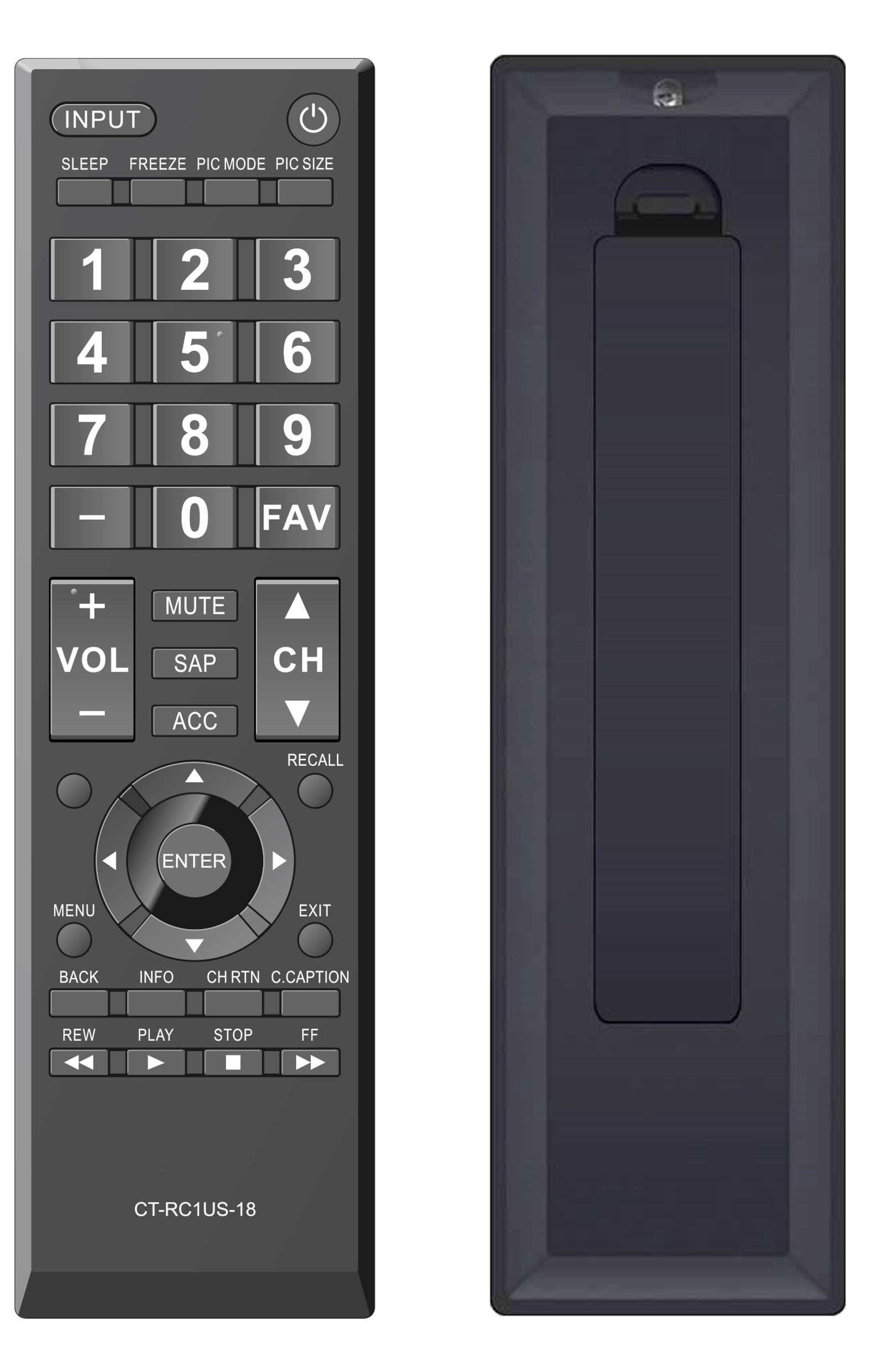
Slika 2: Prednja strana view of the Elekpia Universal Remote Control, displaying the layout of all buttons.
Funkcije gumba
- SNAGA (⏻): Uključuje ili isključuje televizor.
- ULAZNI: Cycles through available input sources (HDMI 1, HDMI 2, AV, etc.).
- SPAVATI: Activates or adjusts the TV's sleep timer function.
- ZAMRZNUTI: Pauses the current image on the screen (functionality may vary by TV model).
- PIC NAČIN: Adjusts picture modes (e.g., Standard, Movie, Dynamic).
- VELIČINA SLIKE: Changes the aspect ratio or picture size.
- Brojčana pločica (0-9): Izravno unosi brojeve kanala.
- - (Crtica): Koristi se za unos podkanala (npr. 7-1).
- OMILJENO: Pristupa popisu omiljenih kanala.
- GLASNOĆA (+/-): Povećava ili smanjuje glasnoću.
- MUČI: Utišava zvuk televizora.
- SAP: Selects Secondary Audio Program (SAP) or alternate audio tracks.
- ACC: Accesses accessibility features or audio settings.
- CH (Gore/Dolje): Mijenja televizijski kanal gore ili dolje.
- PODSJETITI: Prebacuje se između trenutnog i prethodnog viewed kanal.
- Navigacijska tipka (gore, dolje, lijevo, desno, ENTER): Navigates through on-screen menus and confirms selections.
- JELOVNIK: Otvara glavni izbornik televizora.
- EXIT: Closes the current menu or returns to the previous screen.
- NAZAD: Povratak na prethodni izbornik ili zaslon.
- INFO: Prikazuje informacije o trenutnom programu ili ulazu.
- CH RTN (Channel Return): Similar to RECALL, returns to the previous channel.
- C.CAPTION (Closed Caption): Uključuje ili isključuje titlove.
- REW (Rewind), PLAY, STOP, FF (Fast Forward): Controls for media playback (e.g., when using a connected USB device or smart TV apps, if supported by the TV).
Održavanje
Čišćenje daljinskog upravljača
Za održavanje izgleda i funkcionalnosti daljinskog upravljača, redovito ga čistite:
- Za brisanje površine daljinskog upravljača koristite meku, suhu krpu.
- Za tvrdokornu prljavštinu, lagano dampOperite krpu vodom ili blagim, neabrazivnim sredstvom za čišćenje. Izbjegavajte prekomjernu vlagu.
- Ne koristite jake kemikalije, otapala ili abrazivne spužve za čišćenje jer mogu oštetiti završnu obradu daljinskog upravljača ili unutarnje komponente.
Zamjena baterije
Replace batteries when the remote's response becomes sluggish or stops working. Always replace both AA batteries at the same time with new ones. Do not mix old and new batteries, or different types of batteries, as this can lead to leakage or damage.
Skladištenje
If the remote control will not be used for an extended period, remove the batteries to prevent potential leakage and damage to the device.
Rješavanje problema
If you encounter issues with your Elekpia Universal Remote Control, please refer to the following common solutions:
- Daljinski ne reagira:
- Ensure the batteries are correctly installed with the proper polarity (+/-).
- Zamijenite baterije novim AA baterijama.
- Provjerite ima li prepreka između daljinskog upravljača i infracrvenog senzora televizora.
- Ensure you are pointing the remote directly at the TV.
- Neki gumbi ne rade:
- This remote is pre-programmed for Toshiba TVs. Verify your TV model is compatible.
- Clean the remote's surface, especially around the unresponsive buttons, to remove any dirt or debris that might be interfering with button presses.
- TV se ne uključuje/isključuje:
- Confirm the TV is plugged into a working power outlet.
- Pokušajte pritisnuti gumb za uključivanje/isključivanje izravno na televizoru kako biste provjerili je li operativan.
If these steps do not resolve the issue, please refer to the customer support section.
Tehnički podaci
| Broj modela | CT-RC1US-18 |
| Marka | Elekpija |
| Dimenzije proizvoda | 7 x 2 x 0.6 inča |
| Težina artikla | 3 unci |
| Izvor napajanja | 2 x 1.5 V AA baterije (nisu uključene) |
| Kompatibilni uređaji | Toshiba LED LCD HDTVs |
| Maksimalni broj podržanih uređaja | 1 |
| Boja | Crna |
Informacije o jamstvu
Specific warranty details for the Elekpia Universal Remote Control CT-RC1US-18 are not provided in this manual. Please refer to the product packaging, the retailer's return policy, or the manufacturer's official webstranicu za informacije o jamstvenom pokriću i uvjetima.
Korisnička podrška
For further assistance or inquiries regarding your Elekpia Universal Remote Control, please contact the retailer from whom you purchased the product. You may also visit the official Elekpia webstranicu za potencijalne resurse podrške ili kontaktne informacije.