
Važne sigurnosne upute
Please read all instructions carefully before using the projector and retain this manual for future reference. Failure to follow these instructions may result in electric shock, fire, or other injuries or damage.
- Do not block any ventilation openings. Ensure adequate space around the projector for proper airflow.
- Ne izlažite projektor kiši ili vlazi kako biste smanjili rizik od požara ili strujnog udara.
- Koristite samo dodatke/dodatke koje je naveo proizvođač.
- Isključite projektor iz struje tijekom grmljavine ili kada ga ne koristite dulje vrijeme.
- Sve servise prepustite kvalificiranom servisnom osoblju.
- Izbjegavajte izravno izlaganje očiju leći projektora kada je lamp je uključen.
Sadržaj paketa
Provjerite jesu li sve dolje navedene stavke uključene u vaš paket:
- EKASN Creative E450 Mini Projector
- Daljinski upravljač
- Kabel za napajanje
- HDMI kabel
- AV kabel
- korisnički priručnik
Proizvod gotovview
Familiarize yourself with the components and interfaces of your EKASN Creative E450 projector.

Image: The EKASN Creative E450 Mini Projector, showcasing its compact design, front lens, and included remote control and connection cables.
Sučelja i portovi
The projector features multiple ports for versatile connectivity with various devices.

Slika: Bočno view of the EKASN Creative E450 Mini Projector highlighting its various input and output ports, including VGA, Headset, Power, USB, AV, and HDMI.
- VGA priključak: For connecting to computers or laptops with a VGA output.
- Headset/Audio Out: 3.5mm audio jack for connecting external speakers or headphones.
- Ulazna snaga: Spaja se na strujni adapter.
- USB priključak: Supports USB flash drives for media playback. Note: Does not support cord connection or data transfer from devices.
- AV priključak: For connecting devices using an AV cable (e.g., DVD players).
- HDMI priključak: For high-definition video and audio input from devices like TV sticks, Apple TV, Roku, PCs, PS4, laptops, and MacBooks.
Vodič za postavljanje
1. Initial Placement and Screen Size
Place the projector on a stable, flat surface. The projection size can be adjusted by changing the distance between the projector and the screen/wall. For optimal viewing, use the projector in a relatively dark environment.

Image: A diagram illustrating various projection screen sizes (38" to 160") achievable at different projection distances (3.9ft to 13.3ft) with the EKASN Creative E450 Mini Projector.
- Minimum Projection Size: Approximately 33 inches (at 3.7 feet distance).
- Maksimalna veličina projekcije: Up to 170 inches (at 19.7 feet distance).
- Preporučena udaljenost: Adjust to achieve desired screen size and clarity.
2. Uključivanje
- Spojite kabel za napajanje na ulazni priključak za napajanje projektora.
- Uključite drugi kraj kabela za napajanje u utičnicu.
- Pritisnite tipku za napajanje na projektoru ili daljinskom upravljaču kako biste uključili uređaj.
3. Fokus i korekcija trapezoida
To achieve a clear and rectangular image, adjust the focus and keystone correction.

Image: A visual representation of keystone correction, showing how the projected image can be adjusted by ±15 degrees to achieve a perfectly rectangular display.
- Korekcija trapezoida: Locate the keystone adjustment ring/knob near the lens. Rotate it to correct any trapezoidal distortion in the image, making it rectangular. The projector supports manual keystone correction of ±15 degrees.
- Podešavanje fokusa: After correcting the keystone, rotate the focus ring/knob around the lens until the image appears sharp and clear.
4. Povezivanje uređaja
The EKASN Creative E450 supports various input sources.
- HDMI veza: Connect your TV Stick, Apple TV, Roku, PC, PS4, DVD player, laptop, or MacBook to the projector's HDMI port using an HDMI cable.
- Povezivanje s pametnim telefonom:

Image: A visual guide demonstrating how to connect an iPhone (via Lightning to HDMI adapter) and an Android phone (via Micro USB/Type C to HDMI adapter) to the EKASN Creative E450 Mini Projector. Adapters are not included.
- For iPhone: An external Lightning to HDMI adapter is required (not included).
- For Android Phone: A Micro USB/Type C to HDMI adapter is required (not included).
- After connecting the adapter and HDMI cable, ensure you select HDMI as the input source on the projector.
- USB veza: Insert a USB flash drive containing your media files into the USB port. Navigate to the USB input source and select the desired file for playback. Supported formats may vary.
- AV veza: Use the provided AV cable to connect devices with AV output.
- VGA veza: Connect to a computer or laptop using a VGA cable.
5. Višestruki načini instalacije
The projector offers flexible installation options to suit your environment.
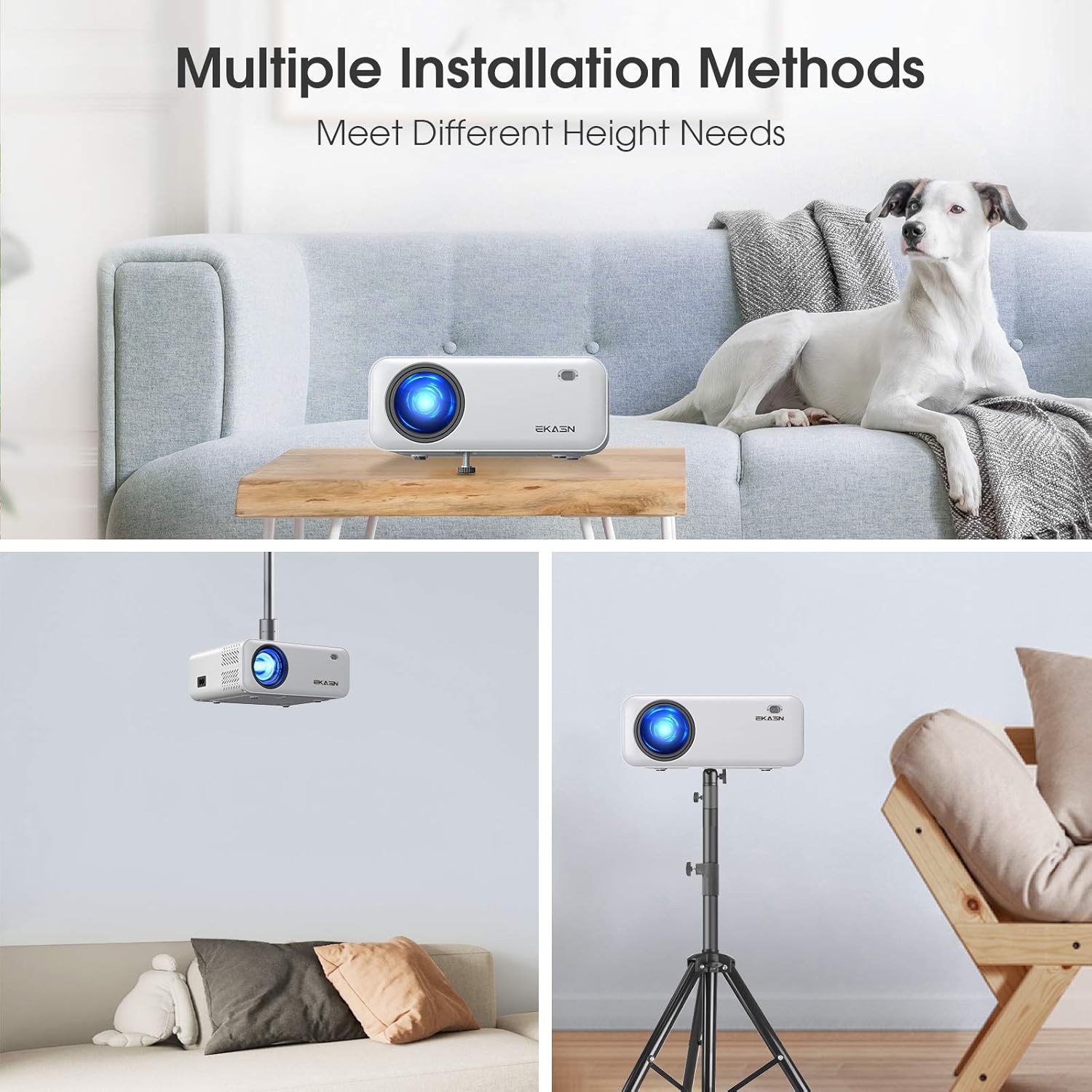
Slika: Tri bivšaamples of installation methods for the EKASN Creative E450 Mini Projector: tabletop placement, ceiling mount, and tripod mount.
- Stolni nosač: Place the projector directly on a table or flat surface. You can adjust the height using the screw on the bottom.
- Stropni nosač: The projector has a screw hole on its bottom for universal tripod or ceiling mounting. Ensure proper mounting hardware is used (not included).
- Tronožac: Attach the projector to a compatible tripod using the screw hole on the bottom.
Upute za rad
1. Basic Operation and Menu Navigation
Use the included remote control or the buttons on the projector to navigate the menu and control playback.
- Gumb za napajanje: Uključuje/isključuje projektor.
- Gumb Izvor: Selects the input source (HDMI, AV, USB, VGA).
- Gumb izbornika: Pristupa izborniku postavki projektora.
- Navigacijski gumbi (tipke sa strelicama): Kretanje kroz opcije izbornika.
- Gumb OK: Potvrđuje odabire.
- Gumbi za glasnoću: Podesite glasnoću zvuka.
2. Odabir izvora unosa
After connecting your device, press the "Source" button on the remote or projector to select the corresponding input (e.g., HDMI1, AV, USB, VGA).
3. Audio postavke
The projector has built-in stereo speakers. For enhanced audio, you can connect external speakers or headphones via the 3.5mm audio output jack.
Important Note on Dolby Sound: The projector does NE support Dolby sound. If you experience no sound while playing videos from streaming services like Netflix or Amazon Prime Video, you must turn off Dolby sound in the settings of your connected device (e.g., TV Stick, media player). Typically, this setting can be found under: Settings > Display & Sounds > Audio > Dolby Digital Output > Turn Dolby Digital Plus OFF.
4. Media Playback from USB
Insert a USB flash drive containing your media files into the USB port. Navigate to the USB input source and select the desired file for playback. Supported formats may vary.
Održavanje
Redovito održavanje pomaže u osiguravanju dugotrajnosti i optimalnih performansi vašeg projektora.
- Čišćenje leće: Koristite meku krpu koja ne ostavlja dlačice, posebno namijenjenu za optičke leće. Nemojte koristiti abrazivna sredstva za čišćenje ili krpe koje bi mogle ogrebati leću.
- Čišćenje tijela projektora: Wipe the exterior with a soft, dry cloth. For stubborn stains, a slightly damp Može se koristiti krpa, a zatim suho brisanje.
- Ventilacija: Ensure the ventilation openings are clear of dust and debris. Do not block them during operation. Periodically clean the vents with a soft brush or compressed air.
- Skladištenje: Kada se projektor ne koristi dulje vrijeme, pohranite ga na hladnom i suhom mjestu, dalje od izravne sunčeve svjetlosti i ekstremnih temperatura.
Rješavanje problema
Ako naiđete na probleme s projektorom, pogledajte sljedeće uobičajene probleme i rješenja:
| Problem | Mogući uzrok/rješenje |
|---|---|
| Mutna slika |
|
| No Sound from Streaming Apps (e.g., Netflix, Amazon Prime Video) | The projector does not support Dolby sound. Turn off Dolby sound output in the audio settings of your connected streaming device (e.g., TV Stick, media player). |
| No Signal / No Picture |
|
| USB Port Not Working for Phone Connection/Data Transfer | The USB port only supports USB flash drives for media playback. It does NOT support cord connection for smartphones or data transfer. For smartphone mirroring, an external HDMI adapter is required. |
| Slika je trapezoidna | Adjust the keystone correction knob until the image is rectangular. |
Tehnički podaci
Detailed technical specifications for the EKASN Creative E450 Mini Projector.
| Značajka | Detalj |
|---|---|
| Marka | EKASN |
| Model | Creative E450 |
| Tehnologija zaslona | LCD |
| Izvorna razlučivost | 1280 x 720 piksela |
| Podržana razlučivost | Up to 1920 x 1080 Pixels (1080P Full HD) |
| Svjetlina | 5500 LUX |
| Omjer kontrasta | 2000:1 |
| Omjer slike | 16:9 |
| Veličina projekcije | 33" do 170" |
| Udaljenost projekcije | 3.7 stopa do 19.7 stopa |
| Ispravak ključa | Ručno ±15° |
| Hardversko sučelje | 3.5mm Audio, HDMI, USB, VGA, AV |
| Kompatibilni uređaji | iPhone, Android Phones, TV Box, TV Stick, PCs, PS4, DVD, Laptops, Tablets, MacBook, USB Flash Drive, Media Players |
| Audio izlaz | Built-in Stereo Speakers, 3.5mm Audio Out |
| Wattage | 60 vata |
| Form Factor | Prijenosni |
| Vrsta montaže | Tabletop Mount, Ceiling Mount, Tripod Mount |
| Dimenzije proizvoda | 19.28 x 16.48 x 7.62 cm; 1.51 kg |
Jamstvo i podrška
EKASN provides comprehensive support for your projector.
- Jamstvo: The EKASN Creative E450 Mini Projector comes with a 2-year warranty.
- Tehnička podrška: Lifetime professional technical support is available.
- For any problems or inquiries, please contact EKASN customer service. Refer to your product packaging or the official EKASN webstranicu za konkretne kontaktne podatke.