
1. Uvod
The Blink Mini is a compact indoor plug-in smart security camera designed for monitoring your home. It offers 1080p HD video, infrared night vision, motion detection, and two-way audio capabilities, allowing you to stay connected to your indoor environment from anywhere via the Blink Home Monitor app.
2. Proizvod je gotovview
2.1 Ključne značajke
- 1080p HD video: Snimite i view clear video during the day and with infrared HD night vision after dark.
- Dvosmjerni zvuk: Communicate with people and pets in your home directly from your smartphone.
- Detekcija pokreta: Receive alerts on your smartphone when motion is detected. Customizable motion detection zones are available.
- Indoor Chime Functionality: Use the Mini as an indoor plug-in chime for a Blink Video Doorbell, providing real-time alerts when the doorbell is pressed.
- Fleksibilne mogućnosti pohrane: Save and share clips with a Blink Subscription Plan (30-day free trial included) or locally with a Sync Module 2 (sold separately).
- Alexa integracija: Compatible with Alexa-enabled devices for voice control of live view, arming, and disarming.
2.2 Što se nalazi u kutiji
- Blink Mini camera (quantity dependent on package)
- 1 stand (attached per camera)
- 2 montažna vijka (po kameri)
- 1 USB cable (per camera)
- 1 power adapter (per camera)
2.3 Komponente proizvoda

Slika 1: Blink Mini camera highlighting its core features.

Slika 2: Blink Mini camera demonstrating two-way audio functionality with a smart display.
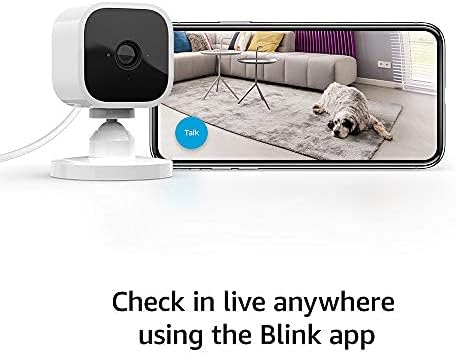
Slika 3: Monitoring live view from the Blink Mini camera using the Blink app on a smartphone.
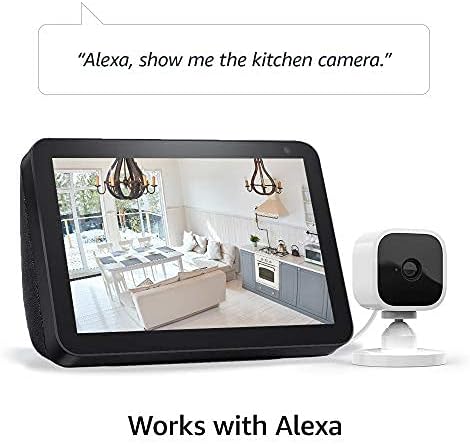
Slika 4: Blink Mini camera integration with Alexa for voice control and live viewna kompatibilnim uređajima.
3. Postavljanje
Setting up your Blink Mini camera is a straightforward process. Ensure you have a stable 2.4 GHz Wi-Fi connection available.
3.1 Početni koraci postavljanja
- Preuzmite aplikaciju Blink Home Monitor: Tražiti "Blink Home Monitor" in your smartphone's app store (iOS 17, Android 10, or Fire OS 8 or newer required) and install it.
- Napravi račun: Otvorite aplikaciju i slijedite upute na zaslonu za izradu novog Blink računa ili prijavu na postojeći.
- Dodajte uređaj: In the app, tap the "+" icon to add a new device and select "Blink Mini Camera."
- Skenirajte QR kod: Use your phone's camera to scan the QR code located on the back of your Blink Mini camera.
- Plug In the Camera: Connect the provided USB cable to the camera and the power adapter, then plug the adapter into a standard electrical outlet. The camera's blue LED will begin to flash.
- Spojite se na Wi-Fi: Follow the app's instructions to connect your Blink Mini to your 2.4 GHz Wi-Fi network. Ensure your Wi-Fi has a minimum 2 Mbps upload speed.
- Postavite kameru: Place the camera in your desired indoor location. The attached stand allows for flexible positioning on flat surfaces or mounting to a wall using the included screws.
4. Upute za rad
Once set up, your Blink Mini camera provides various monitoring and interaction features through the Blink Home Monitor app.
4.1 Uživo View i dvosmjerni audio
- To access live video, open the Blink Home Monitor app and tap the camera icon next to your Mini camera.
- Tijekom uživo view, tap the microphone icon to enable two-way audio. Speak into your phone to communicate through the camera's speaker.
4.2 Detekcija pokreta
- Enable motion detection in the camera settings within the Blink app to receive alerts when movement is detected.
- Customize motion detection zones to focus on specific areas and reduce unwanted notifications. Adjust sensitivity settings as needed.
4.3 Snimanje i pohranjivanje videa
- Video clips triggered by motion or initiated by live view može se spasiti.
- A Blink Subscription Plan provides cloud storage for video clips. A 30-day free trial is typically included with new devices.
- Alternatively, you can save clips locally to a USB drive when connected to a Blink Sync Module 2 (sold separately).
4.4 Integracija s Alexom
- Omogućite vještinu treptanja u aplikaciji Alexa.
- Link your Blink account to your Alexa account.
- Use voice commands such as "Alexa, show me [camera name]" to view live feeds on compatible Echo Show devices, or "Alexa, arm [system name]" to activate motion detection.
5. Održavanje
Regular maintenance ensures optimal performance and longevity of your Blink Mini camera.
5.1 Čišćenje
- Nježno obrišite objektiv i tijelo fotoaparata mekom, suhom krpom koja ne ostavlja dlačice.
- Avoid using liquid cleaners, aerosols, or abrasive solvents, as these can damage the camera.
5.2 Ažuriranja softvera
- Blink regularly releases software updates to improve performance, add features, and enhance security.
- Ensure your camera is connected to Wi-Fi and powered on to receive automatic updates.
- Refer to the Blink support page for information specific to your device's software security updates.
6. Rješavanje problema
If you encounter issues with your Blink Mini, try the following troubleshooting steps:
- Kamera izvan mreže: Check the power connection and ensure your Wi-Fi network is active and stable. Restart your Wi-Fi router if necessary.
- Loša kvaliteta videa: Ensure the camera lens is clean. Check your Wi-Fi signal strength in the app; a weak signal can affect video quality.
- Detekcija pokreta ne radi: Verify that motion detection is enabled in the app settings. Adjust sensitivity and ensure motion zones are correctly configured.
- Problemi s dvosmjernim zvukom: Check your smartphone's microphone and speaker settings. Ensure the camera's speaker is not obstructed.
- Aplikacija ne reagira: Close and reopen the Blink Home Monitor app. If the issue persists, restart your smartphone.
- Resetiranje kamere: If problems persist, you may need to reset the camera. Refer to the Blink support page for specific instructions on how to perform a factory reset.
7. Specifikacije
| Značajka | Detalj |
|---|---|
| Polje od view | 110° dijagonala |
| Rezolucija kamere | 1080p HD video (day), infrared HD night vision (dark) |
| Broj sličica u sekundi kamere | Do 30 sličice u sekundi |
| Veličina | 2 inča x 1.9 inča x 1.4 inča (50 mm x 49 mm x 36 mm) |
| Težina | 1.7 unci (48 grama) |
| CPU | Instantno vlasništvo – AC1002B, 4 jezgre / 200 MHz |
| Vlast | 2 metra mikro USB i adapter za napajanje, električna nazivna snaga: 100-240V 50/60 HZ 0.15A |
| Wi-Fi povezivost | Supports 2.4 Ghz 802.11g/n; requires minimum 2 Mbps upload speed. Does not support ad-hoc or paywall networks. |
| Dostupne boje | Bijelo, Crno |
| Minimalni zahtjevi za pametni telefon | iOS 17, Android 10, Fire OS 8 only |
| Aplikacija Blink | Treptaj HomeMonitor |
| Audio | Izlaz za zvučnik i dvosmjerno snimanje zvuka |
| LED diode | Jedna plava LED dioda za indikaciju aktivnosti (opcionalno) |
| Generacija | Prva generacija – izdanje 2020. |
8. Jamstvo i podrška
8.1 Informacije o jamstvu
The Blink Mini camera includes a 1-godišnje ograničeno jamstvo i servis. Use of Blink cameras is subject to the terms found on the official Blink webmjesto.
8.2 Korisnička podrška
For additional information, detailed guides, or technical assistance, please visit the official Blink Mini support page. You can typically find a link to the support page within the Blink Home Monitor app or on the Blink webmjesto.