
Uvod
This manual provides essential instructions for the proper use and maintenance of your Vikefon Type C Charging and Data Cable. This 1-meter cable is designed for efficient charging and high-speed data transfer between your Type C enabled devices and compatible power sources or computers.

Image: The Vikefon Type C Charging and Data Cable, featuring a standard USB-A connector on one end and a reversible USB-C connector on the other.
Značajke proizvoda
- USB Connector Quality: Ensures reliable charging and high-speed data transmission.
- Izlazna snaga: Supports up to 5V, 3 Amp za brzo punjenje.
- Univerzalna kompatibilnost: Fully compatible with all Type C mobile devices for fast charging and syncing.
- Reversible USB Type-C Connector: Allows for quick and easy connections in any orientation.
- Izdržljiv dizajn: Features intricate nylon braiding for enhanced durability and longevity, outlasting standard cables.
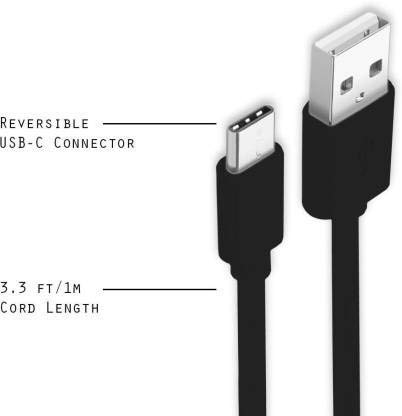
Image: A diagram illustrating the reversible nature of the USB-C connector and the cable's 1-meter (3.3 ft) cord length.
Postavljanje
- Prepoznajte priključke: The cable has a standard USB-A connector on one end and a smaller, oval-shaped USB Type-C connector on the other.
- Spajanje na izvor napajanja/računalo: Insert the USB-A end of the cable into a compatible USB port on a wall adapter, power bank, car charger, or computer.
- Povežite se s uređajem: Insert the USB Type-C end into the charging/data port of your smartphone, tablet, or other Type C enabled device. The USB Type-C connector is reversible, so it can be inserted in either orientation.
- Provjerite vezu: Provjerite jesu li oba kraja sigurno spojena. Vaš uređaj bi trebao pokazivati da se puni ili je spojen za prijenos podataka.
Upute za rad
Punjenje vašeg uređaja
- Connect the USB-A end of the cable to a compatible USB power adapter (e.g., wall charger, car charger, power bank).
- Spojite USB Type-C kraj na priključak za punjenje uređaja.
- Ensure the power adapter is plugged into a live power outlet. Your device should begin charging.
Prijenos podataka
- Connect the USB-A end of the cable to a USB port on your computer.
- Spojite USB Type-C kraj na svoj uređaj.
- On your device, you may receive a prompt asking to allow data access or to select a USB connection mode (e.g., "File Transfer," "MTP"). Select the appropriate option to enable data transfer.
- Your device should appear as a removable drive or media device on your computer, allowing you to transfer files.
Održavanje
- Ispravno rukovanje: Always grasp the connector head when plugging or unplugging the cable. Avoid pulling directly on the cable itself to prevent damage to the internal wires.
- Izbjegavajte savijanje: Do not excessively bend or crimp the cable, especially near the connectors, as this can cause internal wire breakage.
- Skladištenje: Store the cable in a clean, dry place away from extreme temperatures and direct sunlight. Avoid tangling the cable.
- Čišćenje: If necessary, gently wipe the cable and connectors with a dry, soft cloth. Do not use liquids or abrasive cleaners.

Slika: Krupni plan view highlighting the durable metal heads of the Vikefon Type C cable connectors, designed for anti-oxidation and corrosion resistance.
Rješavanje problema
- Uređaj se ne puni:
- Provjerite jesu li oba kraja kabela dobro spojena.
- Provjerite je li adapter za napajanje ispravno uključen u utičnicu pod naponom.
- Pokušajte upotrijebiti drugi adapter za napajanje ili USB priključak.
- Check your device's charging port for any debris or damage.
- Sporo punjenje:
- Ensure you are using a power adapter that supports fast charging (e.g., 3A output).
- Close any unnecessary background applications on your device.
- Bez prijenosa podataka:
- Confirm the cable is properly connected to both your device and computer.
- On your device, check the notification panel for USB options and select "File "Prijenos" ili "MTP".
- Pokušajte se spojiti na drugi USB priključak na računalu.
- Ponovno pokrenite i uređaj i računalo.
Tehnički podaci
| Značajka | Detalj |
|---|---|
| Marka | Vikefon |
| Naziv modela | Vrsta C |
| Broj modela | Tip C 0129 |
| Vrsta konektora | USB tip C (muški-muški) |
| Vrsta kabela | USB |
| Kompatibilni uređaji | Laptop, PC, Smartphone (e.g., Xiaomi Redmi 8A, Poco M2, Poco M2 Pro, Samsung, Motorola, Lenovo, Lava, Sony, HTC, LG, Karbonn, Maxx) |
| Posebne značajke | Charging Wire, Durable, High Data Transfer Rate, High Quality, Long Length |
| Brzina prijenosa podataka | Up to 0.48 Gigabits Per Second (480 Mbps) |
| Tehnologija povezivanja | USB |
| Specifikacija ispunjena | ISO |
| Boja | Crna |
| Oblik stavke | Krug |
| Outer Material Type | Rubber (with Nylon Braiding) |
| Duljina kabela | 1 metar |
Jamstvo i podrška
Specific warranty details for the Vikefon Type C Charging and Data Cable are not provided in this manual. For information regarding warranty coverage, returns, or technical support, please refer to the product packaging or contact the manufacturer directly through their official channels.