
JKING H2B
JKING H2B Electric Skateboard Longboard User Manual
Model: H2B | Brand: JKING
1. Uvod
Thank you for choosing the JKING H2B Electric Skateboard Longboard. This manual provides essential information for the safe operation, maintenance, and troubleshooting of your electric skateboard. Please read this manual thoroughly before your first ride to ensure optimal performance and safety.

Image: JKING H2B Electric Skateboard Longboard.
2. Sigurnosne informacije
Riding an electric skateboard can be dangerous. Always wear appropriate safety gear, including a helmet, knee pads, and elbow pads. Ride within your skill level and be aware of your surroundings. Do not ride in traffic, on wet surfaces, or at night without proper lighting. Always check your skateboard before each ride for any loose parts or damage.
- Uvijek nosite kacigu i zaštitnu opremu.
- Nemojte voziti pod utjecajem alkohola ili droga.
- Pridržavajte se lokalnih prometnih zakona i propisa.
- Izbjegavajte vožnju po neravnim površinama, rupama ili preprekama.
- Ensure the remote control is fully charged and paired before riding.
- Maksimalna nosivost: 210 lbs.
3. Sadržaj paketa
Upon unboxing, please verify that all items listed below are included:
- JKING H2B Electric Skateboard Longboard
- Bežični daljinski upravljač
- Adapter za struju (punjač)
- T-Tool (for maintenance)
- korisnički priručnik

Image: JKING H2B Electric Skateboard and its accessories.
4. Proizvod je gotovview
Familiarize yourself with the main components of your JKING H2B Electric Skateboard:
- paluba: Constructed from two layers of bamboo and six layers of maple for durability and flexibility.
- Hub Motors: Integrated into the rear wheels, providing power and a clean design.
- Battery Enclosure: Houses the UL 2272 certified 29.4V 4000mAh lithium battery.
- Priključak za punjenje: Located on the battery enclosure for recharging.
- Gumb za napajanje: To turn the skateboard on/off.
- Ručke: Integrated into the deck for easy carrying.

Image: Key components of the JKING H2B Electric Skateboard.
5. Postavljanje
5.1. Početno punjenje
- Locate the charging port on the side of the battery enclosure.
- Spojite adapter za napajanje na priključak za punjenje.
- Priključite strujni adapter u standardnu električnu utičnicu.
- The battery indicator lights on the remote control (or skateboard, if available) will show charging progress.
- A full charge takes approximately 4 hours. Disconnect the charger once fully charged.
5.2. Uparivanje daljinskog upravljača
Your remote control should be pre-paired with the skateboard. If re-pairing is necessary:
- Ensure both the skateboard and remote control are turned off.
- Turn on the skateboard by pressing and holding its power button for about 1 second.
- Turn on the remote control by pressing its power button.
- The remote control display should show a connection status. If not, refer to the troubleshooting section.
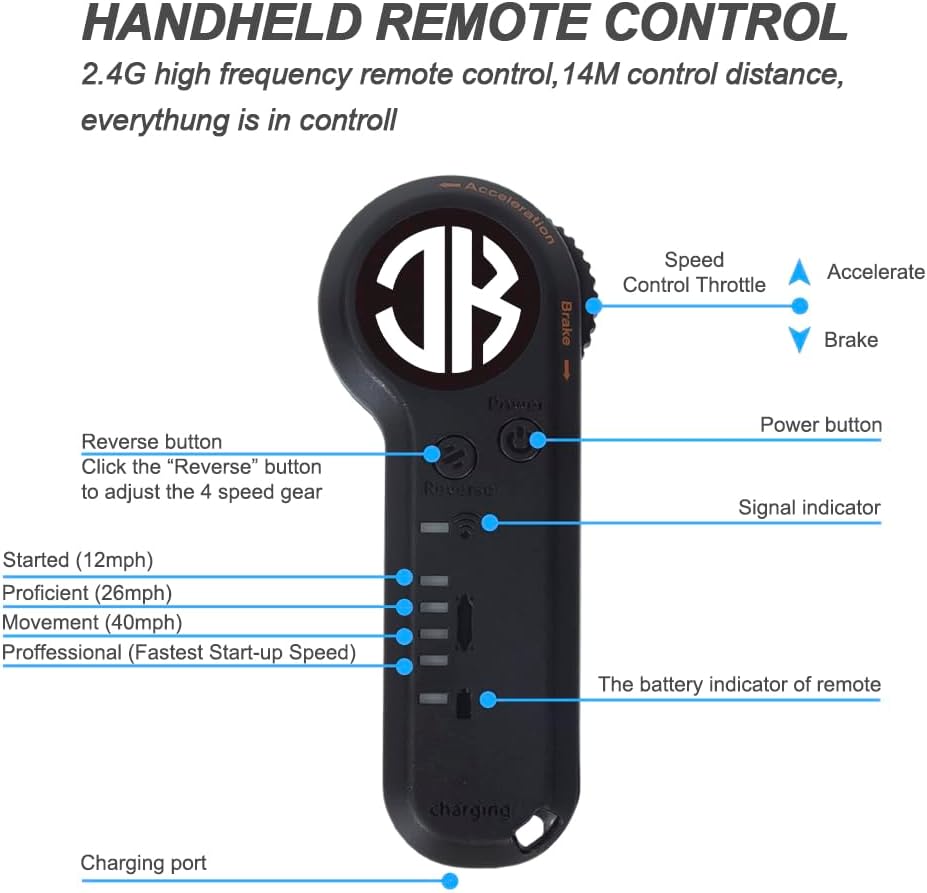
Image: JKING Electric Skateboard Remote Control.
6. Upute za rad
6.1. Uključivanje/isključivanje
- To turn on the skateboard: Press and hold the power button on the battery enclosure for approximately 1 second.
- To turn on the remote control: Press its power button.
- To turn off the skateboard: Press and hold the power button on the battery enclosure until it powers down.
- To turn off the remote control: Press and hold its power button until the display turns off.
6.2. Načini rada brzine
The JKING H2B offers 3 speed modes (Low, Medium, High) for different riding preferences and skill levels. Use the speed adjustment buttons on the remote control to switch between modes.
- Mala brzina: Ideal for beginners or crowded areas.
- Srednja brzina: Balanced speed for general cruising.
- Velika brzina: For experienced riders seeking maximum speed (up to 16.7 MPH).
6.3. Acceleration and Braking
The remote control features a throttle wheel for precise control:
- Ubrzanje: Gently push the throttle wheel forward to accelerate.
- Kočenje: Gently pull the throttle wheel backward to engage the brakes.
- Practice accelerating and braking in a safe, open area before riding in public.
6.4. Savjeti za vožnju
- Start in Low Speed mode to get accustomed to the board's response.
- Maintain a balanced stance with feet shoulder-width apart.
- Lean into turns to steer the board.
- Be mindful of your speed, especially when turning or on downhill slopes.
- Always be prepared to dismount safely if necessary.
7. Održavanje
- Čišćenje: Wipe the board clean with a damp cloth. Avoid direct water spray on electronic components.
- Njega baterije: Charge the battery regularly, even when not in use, to prolong its lifespan. Do not overcharge or completely drain the battery.
- Pregled kotača: Regularly check wheels for wear and tear. Replace worn wheels to maintain optimal performance and safety.
- Zategnite hardver: Use the provided T-tool to periodically check and tighten all nuts and bolts, especially on the trucks and wheel axles.
- Skladištenje: Store the skateboard in a cool, dry place away from direct sunlight and extreme temperatures.
8. Rješavanje problema
| Problem | Mogući uzrok | Otopina |
|---|---|---|
| Skejtbord se ne uključuje | Slaba baterija; Gumb za napajanje nije pravilno pritisnut | Charge the skateboard; Press and hold the power button for 1 second. |
| Daljinski se ne povezuje | Skateboard off; Remote battery low; Pairing issue | Ensure skateboard is on; Charge remote; Re-pair remote (see Section 5.2). |
| Smanjeni domet ili brzina | Low battery; Riding uphill; Heavy load; Worn wheels | Fully charge battery; Ride on flatter terrain; Check load capacity; Inspect and replace wheels. |
| Neobični zvukovi | Loose hardware; Debris in wheels/motors | Tighten all bolts; Clean wheels and motor area. |
Troubleshooting Video: Remote Connection
Video: Demonstrates how to troubleshoot remote connection issues with the JKING Electric Skateboard.
9. Specifikacije
- Marka: JKING
- Naziv modela: H2B
- Motor: 700W Hub-Motor (Dual 350W Brushless Hub-Motors)
- Najveća brzina: 16.7 MPH
- Raspon: 8.2 milja
- Baterija: 29.4V 4000mAh Lithium Battery (UL 2272 certified)
- Vrijeme punjenja: 4 sata
- Materijal palube: Two layers of bamboo and six layers of maple
- Duljina palube: 31.7 inča
- Širina palube: 9.5 inča
- Težina artikla: 12.3 funti
- Maksimalno opterećenje: 210 lbs
- Veličina kotača: 83 mm
- Materijal kotača: Poliuretan
- Kut penjanja: Maksimalno 12°
10. Jamstvo i podrška
For warranty information, technical support, or service inquiries, please contact JKING customer service through the retailer where the product was purchased or visit the official JKING webMolimo sačuvajte dokaz o kupnji za potrebe jamstva.
11. Videozapisi proizvoda
JKING Electric Skateboard Longboard Overview
Video: Kratak pregledview of the JKING Electric Skateboard Longboard, highlighting its features and remote control.
JKING H2B Electric Skateboard Features
Video: Showcasing the JKING H2B electric skateboard in action and its various features.
Riding the JKING Electric Skateboard
Video: A demonstration of the JKING Electric Skateboard being ridden, highlighting its smooth operation.
Ask a question about this manual
Ask about setup, troubleshooting, compatibility, parts, safety, or missing instructions. Manuals+ will review the question and use this page’s manual context to help answer it.