
Uvod
The BOAVISION S20-WIFI Outdoor Security Camera is a wireless, solar-powered surveillance solution designed for outdoor use. It features a 14400mAh rechargeable battery, Pan-Tilt-Zoom (PTZ) capabilities, color night vision, two-way audio, and PIR motion detection. With an IP66 waterproof rating, it is built to withstand various outdoor weather conditions, providing reliable security monitoring for your property.

Figure 1: BOAVISION S20-WIFI Outdoor Security Camera with integrated solar panel and a smartphone displaying its live feed.
Postavljanje
Sadržaj paketa
Before beginning installation, verify that all components are present in the package. The standard package includes the camera unit with integrated solar panel, mounting accessories, and a user manual.

Figure 2: Detailed diagram of the camera components and included accessories such as the solar panel, antennas, USB power cable, TF card slot, and screw bag.
- BOAVISION S20-WIFI Camera with Solar Panel
- Solar USB Power Cable
- Montažni vijci i sidra
- Papir za pozicioniranje
- korisnički priručnik
Napajanje kamere
The camera is equipped with a 14400mAh rechargeable battery and an 8W external solar panel. For initial setup, ensure the battery is sufficiently charged. The solar panel continuously recharges the battery, providing ultra-long standby time of up to 180 days without direct sunlight, depending on usage.
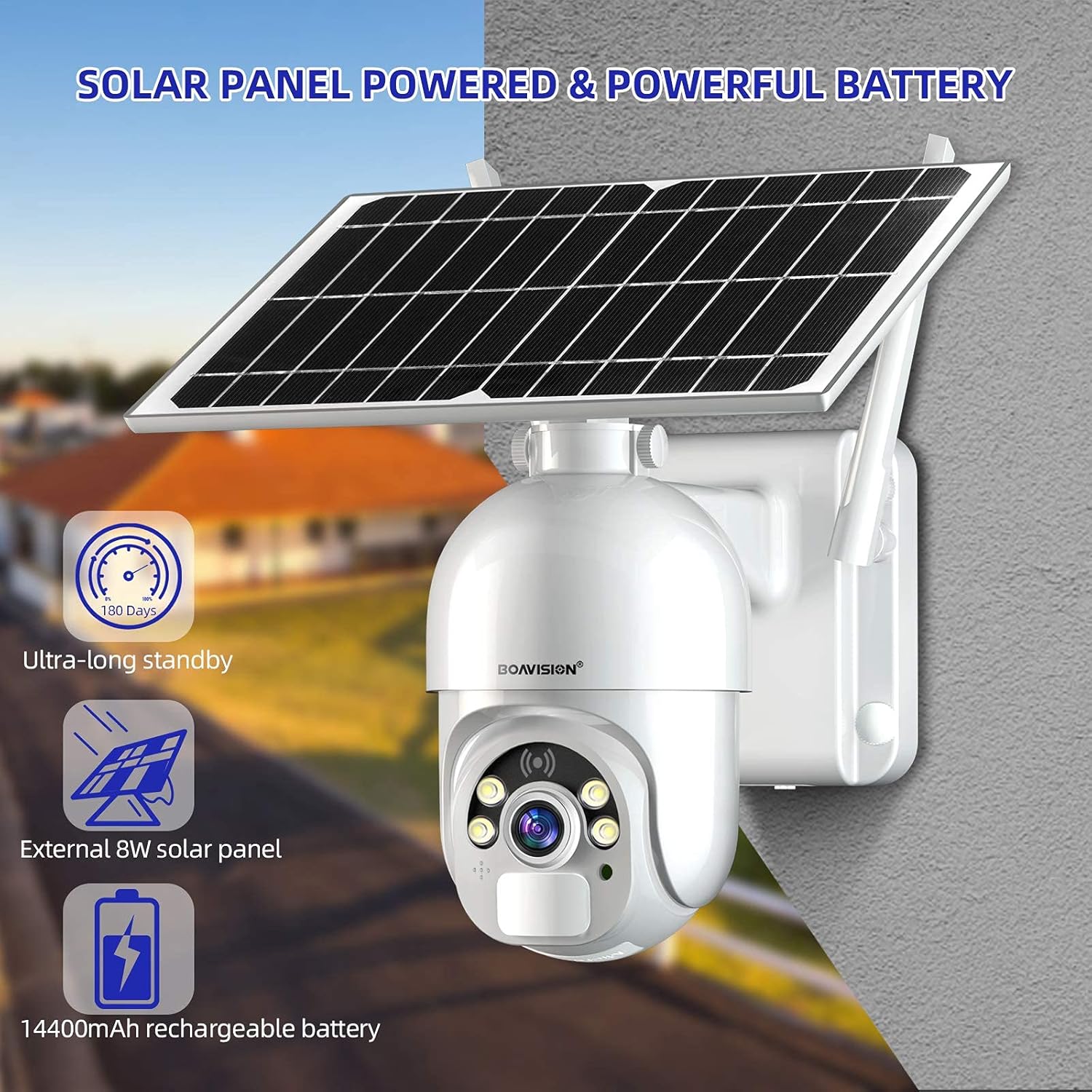
Figure 3: The camera's solar panel and powerful 14400mAh rechargeable battery, designed for extended outdoor operation.
- Connect the solar panel to the camera using the provided solar USB power cable.
- Ensure the camera's power switch is in the ON position.
- For first-time use or after prolonged storage, it is recommended to fully charge the camera using a standard 5V USB charger before relying solely on solar power.
Montaža kamere
Select a mounting location that provides an optimal view of the area you wish to monitor and receives adequate sunlight for the solar panel. The camera is designed for wall mounting.
- Choose a sturdy surface for mounting.
- Use the positioning paper to mark drill holes.
- Izbušite rupe i po potrebi umetnite tiple.
- Pričvrstite nosač kamere na zid pomoću priloženih vijaka.
- Attach the camera unit to the mounting bracket, ensuring it is firmly in place.
- Adjust the angle of the solar panel to maximize sun exposure throughout the day.
App Installation and Initial Pairing
The camera operates via a mobile application available for both iOS and Android devices. Tražiti the recommended app (e.g., "UBOX" as per some user feedback, though the manual should specify the official app name) on the App Store or Google Play.

Figure 4: The mobile application interface for live viewing i dvosmjernu audio komunikaciju.
- Download and install the official BOAVISION camera application from your device's app store.
- Registrirajte novi račun ili se prijavite ako ga već imate.
- Follow the in-app instructions to add your new camera. This typically involves scanning a QR code on the camera or connecting to its Wi-Fi hotspot.
- Ensure your smartphone is connected to a 2.4GHz Wi-Fi network during the pairing process, as the camera supports Wi-Fi connectivity.
Upute za rad
Živjeti Viewing i reprodukcija
Once connected, you can access the live video feed from your camera anytime, anywhere via the mobile application. The camera supports video recording to a micro SD card (up to 128GB) or an optional cloud storage service.
- Open the app and select your camera from the device list to view hrana uživo.
- Use the playback function within the app to review snimljeno footagpohranjene na SD kartici ili u oblaku.
Rotacija pomicanja i naginjanja
The camera features Pan-Tilt (PT) functionality, allowing you to remotely adjust its viewkut snimanja za sveobuhvatnu pokrivenost.

Figure 5: The camera offers 320-degree horizontal pan and 90-degree vertical tilt rotation, controllable via the app.
- Unutar uživo view interface of the app, use the directional controls to pan the camera horizontally up to 320 degrees and tilt it vertically up to 90 degrees.
Dvosmjerni audio
Communicate with visitors or deter intruders using the camera's built-in microphone and speaker.
- Dodirnite ikonu mikrofona u aplikaciji uživo view govoriti kroz kameru.
- The camera's speaker will transmit your voice, and its microphone will capture audio from the camera's vicinity.
PIR Smart Detection
The camera utilizes a highly sensitive Passive Infrared (PIR) motion sensor to detect human and animal movement, reducing false alarms from environmental factors. It has a 120-degree detection angle.

Figure 6: The camera's PIR sensor detects motion, triggering alerts and recording events to your phone app.
- Configure motion detection sensitivity and alert settings within the app.
- Upon detection, the camera will send push notifications to your smartphone and begin recording.
Day and Night Color Vision
The camera provides clear 1080P HD footage during the day and offers advanced night vision capabilities, including color night vision and infrared (IR) night vision up to 100 feet.

Figure 7: The camera's ability to provide clear color vision even in low-light conditions using its motion-activated spotlight.
- Kamera automatski prebacuje između dnevnog i noćnog načina rada na temelju ambijentalnog osvjetljenja.
- Dual LEDs enable motion-activated spotlight color night vision, providing full-color video even in darkness.
- Infrared LEDs provide traditional black-and-white night vision for discreet monitoring.
Održavanje
Battery and Solar Panel Care
To ensure optimal performance and battery longevity, regularly check the solar panel for any obstructions or dirt that might reduce its charging efficiency.

Figure 8: The camera's IP66 weatherproof design ensures reliable operation in various outdoor conditions, including rain and snow.
- Obrišite površinu solarnog panela mekom,amp cloth to remove dust, leaves, or other debris.
- Ensure the solar panel is positioned to receive maximum direct sunlight throughout the day.
- While the camera has a 14400mAh battery for extended standby, consistent solar charging is crucial for continuous operation without manual recharging.
Cleaning the Camera Lens and Housing
Periodically clean the camera lens and housing to maintain clear image quality and ensure proper functioning of sensors.
- Use a soft, lint-free cloth to gently wipe the camera lens. For stubborn dirt, a lens cleaning solution designed for optics can be used sparingly.
- Očistite kućište kamere oglasomamp krpom. Izbjegavajte abrazivna sredstva za čišćenje ili otapala koja bi mogla oštetiti završnu obradu ili brtve.
Otpornost na vremenske uvjete
The camera is rated IP66 waterproof, meaning it is protected against dust ingress and powerful water jets. While designed for outdoor use, extreme weather conditions may still impact performance or require additional protective measures.
- Ensure all cable connections are securely sealed to maintain the IP66 rating.
- Avoid submerging the camera in water.
Rješavanje problema
Camera Offline / No Connection
- Provjerite Wi-Fi signal: Ensure the camera is within range of your 2.4GHz Wi-Fi router and the signal strength is adequate. Obstacles like thick walls can weaken the signal.
- Status usmjerivača: Verify your Wi-Fi router is functioning correctly and has internet access.
- Ponovno pokretanje kamere: Turn the camera off and then on again using the power switch.
- Ponovno uparivanje kamere: If the issue persists, try re-pairing the camera with the app following the initial setup instructions.
Poor Image Quality / Blurry Video
- Čista leća: Nježno očistite objektiv kamere mekom krpom koja ne ostavlja dlačice.
- Propusnost mreže: Ensure your internet connection has sufficient upload bandwidth for smooth video streaming.
- Uvjeti osvjetljenja: Verify there are no strong light sources directly facing the camera at night that could cause glare.
Motion Detection Not Working / Too Many False Alarms
- Podešavanje osjetljivosti: In the app settings, adjust the PIR motion detection sensitivity. Lower sensitivity for fewer false alarms, higher for more precise detection.
- Zona detekcije: Ensure the camera's detection area covers the desired region.
- Čimbenici okoliša: Strong winds, moving branches, or direct sunlight changes can sometimes trigger false alarms. Adjust camera placement if possible.
Battery Not Charging / Low Battery
- Izloženost solarnih panela: Ensure the solar panel receives at least 4-6 hours of direct sunlight daily. Clear any obstructions.
- Kabelska veza: Provjerite je li kabel solarnog panela sigurno spojen na kameru.
- Manual Charge: If the battery is critically low, bring the camera indoors and charge it fully using a standard 5V USB charger.
Tehnički podaci
| Značajka | Detalj |
|---|---|
| Broj modela | S20-WIFI |
| Izvor napajanja | Punjiva baterija sa solarnim napajanjem od 14400 mAh |
| Solarna ploča Wattage | 8 vata |
| Povezivost | Wi-Fi (2.4 GHz) |
| Rezolucija video snimanja | 1080p HD |
| Pan/Tilt raspon | 320° vodoravno, 90° okomito |
| Domet noćnog vida | Up to 100 feet (Color Night Vision & IR) |
| Detekcija pokreta | PIR Sensor, 120° Detecting Angle |
| Audio | Dvosmjerni zvuk (ugrađeni mikrofon i zvučnik) |
| Mogućnosti pohrane | Micro SD kartica (do 128 GB), pohrana u oblaku (opcionalno) |
| Ocjena otpornosti na vremenske uvjete | IP66 |
| Dimenzije (D x Š x V) | 6.29 x 8.81 x 5.51 inča |
| Težina artikla | 3.36 funti |
| Kompatibilni uređaji | Pametni telefon (iOS, Android) |
| UPC | 735520282376 |
Jamstvo i podrška
Specific warranty terms and conditions for the BOAVISION S20-WIFI camera are not provided within this manual. For detailed warranty information, technical support, or customer service inquiries, please refer to the official BOAVISION webweb-mjesto ili izravno kontaktirajte njihovu korisničku podršku.
You may find additional resources and frequently asked questions on the manufacturer's support pages.
- Proizvođač: BOAVIZIJA
- Službenik Webstranica: Visit the BOAVISION Store on Amazon (za opće informacije o marki)