
1. Uvod
Hvala na kupnjiasing the Trevi CMP 588 DAB Portable Stereo System. This manual provides essential information for the safe and correct operation of your device. Please read it thoroughly before use and retain it for future reference.
The Trevi CMP 588 DAB is a versatile portable stereo system featuring DAB/DAB+ and FM radio with RDS, a CD/MP3 player, USB input, AUX-in, Bluetooth connectivity, and a headphone jack, all designed for an enhanced audio experience.
2. Sigurnosne informacije
- Izvor napajanja: Use only the specified power adapter or batteries. Ensure the voltage odgovara zahtjevima jedinice.
- Voda i vlaga: Do not expose the unit to rain, moisture, or immerse it in water. Avoid placing objects filled with liquids, such as vases, on the unit.
- Ventilacija: Osigurajte odgovarajuću ventilaciju. Ne blokirajte ventilacijske otvore.
- toplina: Držite uređaj dalje od izvora topline kao što su radijatori, grijalice, peći ili drugi uređaji (uključujući amplifiers) koji proizvode toplinu.
- Čišćenje: Prije čišćenja isključite uređaj iz zidne utičnice. Koristite meku, suhu krpu. Nemojte koristiti tekuća sredstva za čišćenje ili aerosolna sredstva za čišćenje.
- Servisiranje: Ne pokušavajte sami servisirati ovaj proizvod. Sve servise prepustite kvalificiranom servisnom osoblju.
- CD player: Nikada nemojte gledati izravno u lasersku zraku.
3. Sadržaj paketa
Provjerite jesu li svi predmeti prisutni i u dobrom stanju:
- Trevi CMP 588 DAB Portable Stereo System
- Kabel za izmjeničnu struju
- Daljinski upravljač
- Korisnički priručnik (ovaj dokument)
4. Značajke proizvoda
- DAB/DAB+ and FM Radio with RDS
- High Readability Dot Matrix Display
- CD Player (supports CD-DA, MP3)
- USB Input for MP3 Playback
- AUX-in for external audio devices
- Bluetooth povezivanje
- Utičnica za slušalice
- Prijenosni dizajn s ručkom za nošenje
- Daljinski upravljač uključen
5. Kontrole i veze

Slika 1: Prednja strana view of the Trevi CMP 588 DAB, showing speakers, display, and main controls.
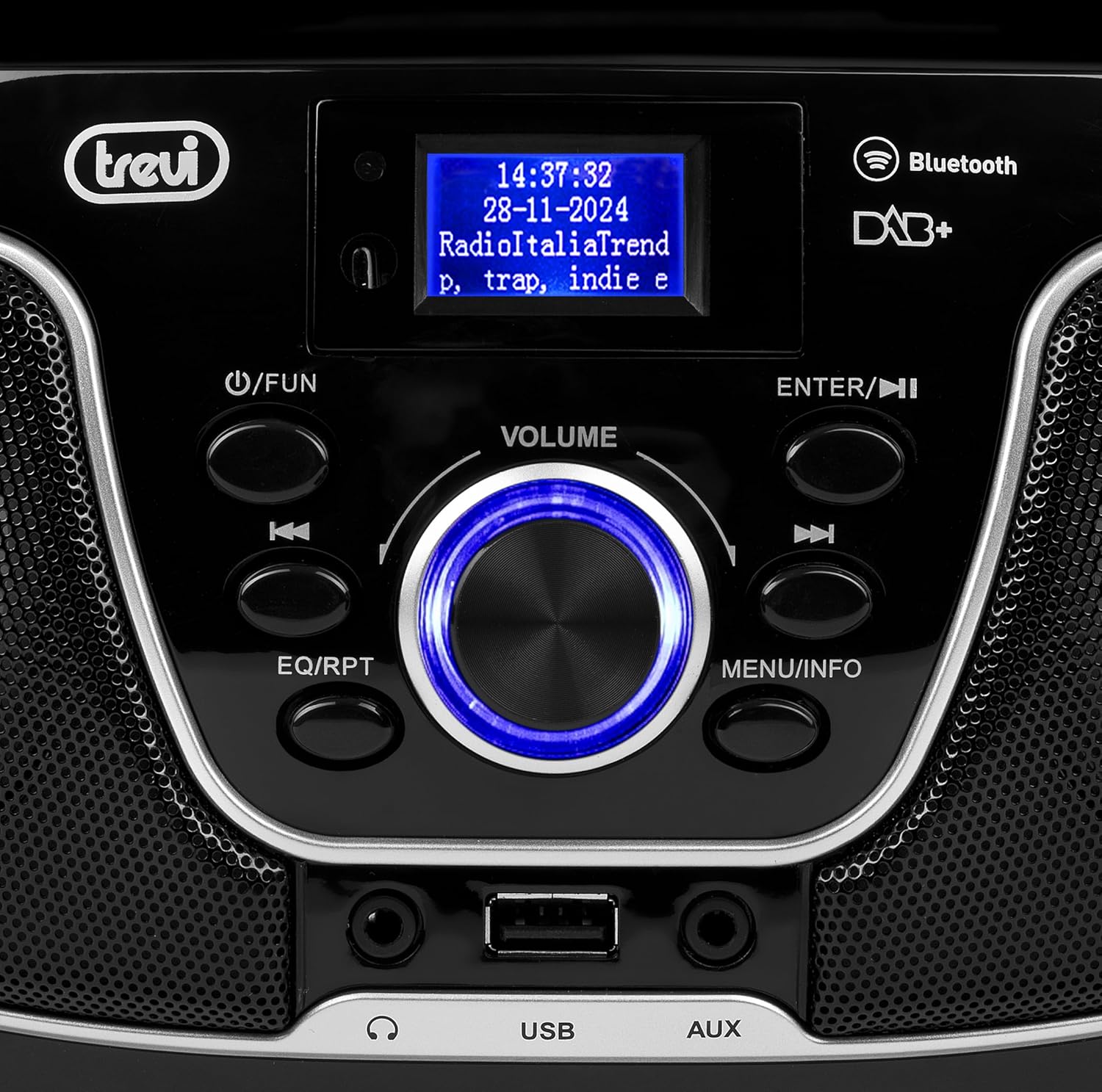
Slika 2: Detaljno view of the control panel, including power, function, volume knob, and navigation buttons.
Kontrole prednje ploče:
- POWER / FUN button: Press to turn on/off, press to switch functions (CD/USB/DAB/FM/Bluetooth/AUX).
- Tipka za glasnoću: Rotate to adjust volume. Press to confirm selections.
- ENTER / ►►I button: Confirm selection / Skip to next track/station.
- I▼▼ / EQ/RPT button: Skip to previous track/station / Equalizer settings / Repeat mode.
- MENU / INFO button: Access menu / Display information.
- USB priključak: Spojite USB uređaje za pohranu podataka za reprodukciju MP3 datoteka.
- AUX-in priključak: Spojite vanjske audio uređaje.
- Priključak za slušalice: Priključite slušalice za privatno slušanje.

Slika 3: Stražnji dio view of the Trevi CMP 588 DAB, showing the power input and telescopic antenna.
Priključci stražnje ploče:
- Ulaz izmjeničnog napajanja: Spojite isporučeni AC kabel za napajanje.
- Teleskopska antena: Izvucite za optimalni radio prijem.

Figure 4: Remote control for the Trevi CMP 588 DAB, showing various function buttons.
Funkcije daljinskog upravljača:
- PRIČEKAJ: Uključivanje/isključivanje.
- FUNC: Switch between modes (CD, USB, DAB, FM, Bluetooth, AUX).
- MUTI: Isključivanje/uključivanje zvuka.
- RPT: Način ponavljanja reprodukcije.
- SKENIRATI: Auto scan for radio stations.
- F+/CH+, F-/CH-: Navigate folders/channels.
- EQ: Postavke ekvilizatora.
- PLAY/PAUSE (►II): Pusti/pauziraj reprodukciju.
- PREV/TUN- (▼▼): Previous track/tune down.
- NEXT/TUN+ (►►): Next track/tune up.
- STOP (■): Zaustavi reprodukciju.
- IZBORNIK: Pristup izborniku.
- INFO: Prikaz informacija.
- PROG: Program tracks/stations.
- GLASNOĆA+ / GLASNOĆA-: Podesite glasnoću.
6. Postavljanje
6.1 Priključak za napajanje
- AC napajanje: Connect the supplied AC power cable to the AC power input on the rear of the unit, then plug the other end into a wall outlet.
- Battery Operation (Optional): For portable use, insert 6 x C-size batteries (not included) into the battery compartment on the bottom of the unit. Ensure correct polarity.
6.2 Početno uključivanje
Pritisnite tipku POWER / FUN gumb na jedinici ili PRIČEKAJ button on the remote control to turn on the system. The display will light up.
6.3 Setting Up the Antenna
For optimal radio reception, fully extend the telescopic antenna located at the rear of the unit. Adjust its position for the best signal.
7. Upute za rad
7.1 Rad DAB/DAB+ radija
- Pritisnite tipku POWER / FUN button repeatedly until "DAB" mode is selected.
- The unit will automatically scan for available DAB/DAB+ stations on first use. To perform a manual scan, press the JELOVNIK button, navigate to "Full Scan" and press ENTER.
- Kada skeniranje završi, upotrijebite ▼▼ or ►► buttons to browse through the available stations. Press ENTER za odabir postaje.
- Pritisnite tipku INFO button to cycle through different information displays (e.g., program type, signal strength, time).
7.2 Rad FM radija
- Pritisnite tipku POWER / FUN button repeatedly until "FM" mode is selected.
- To auto-scan and store stations, press the SKENIRATI button on the remote. The unit will scan and save strong signals.
- Za ručno ugađanje pritisnite i držite ▼▼ or ►► buttons to search for the next available station. Press briefly to fine-tune the frequency.
- The RDS function will display station information (if available).
7.3 Reprodukcija CD-a/MP3

Slika 5: Vrh view of the Trevi CMP 588 DAB with the CD compartment open, ready for disc insertion.
- Otvorite poklopac pretinca za CD.
- Place a CD (CD-DA or MP3 CD) onto the spindle with the label side facing up.
- Zatvorite poklopac pretinca za CD.
- Pritisnite tipku POWER / FUN button repeatedly until "CD" mode is selected.
- The unit will read the disc. Press PLAY/PAUSE (►II) za početak reprodukcije.
- Koristiti ▼▼ or ►► to skip tracks. Press and hold to fast forward/rewind.
- Pritisnite STOP (■) za zaustavljanje reprodukcije.
7.4 Reprodukcija s USB-a
- Umetnite USB flash pogon koji sadrži MP3 files u USB priključak.
- Pritisnite tipku POWER / FUN više puta pritisnite tipku dok se ne odabere način rada "USB".
- Uređaj će automatski prepoznati i početi reproducirati MP3 files.
- Koristiti ▼▼ or ►► preskakati pjesme.
7.5 Uparivanje i reprodukcija putem Bluetootha
- Pritisnite tipku POWER / FUN button repeatedly until "Bluetooth" mode is selected. The display will show "BT" or "PAIRING".
- Omogućite Bluetooth na svom mobilnom uređaju (pametnom telefonu, tabletu itd.).
- Tražiti available devices and select "TREVI CMP 588 DAB" from the list.
- Nakon uparivanja, možete reproducirati zvuk s uređaja putem stereo sustava.
- Use the controls on your mobile device or the stereo system to manage playback.
7.6 Rad s AUX ulazom
- Connect an external audio device (e.g., MP3 player, smartphone) to the AUX-in jack using a 3.5mm audio cable (not included).
- Pritisnite tipku POWER / FUN više puta pritisnite tipku dok se ne odabere način rada "AUX".
- Play audio from your connected device. The volume can be controlled via both the stereo system and the external device.
8. Održavanje
8.1 Čišćenje jedinice
Obrišite vanjski dio uređaja mekom, suhom krpom. Nemojte koristiti abrazivna sredstva za čišćenje, voskove ili otapala jer mogu oštetiti završnu obradu. Prije čišćenja provjerite je li uređaj isključen iz struje.
8.2 Njega CD leća
If the CD player experiences reading errors, the lens may be dirty. Use a commercially available CD lens cleaner to clean the lens. Do not touch the lens with your fingers.
8.3 Skladištenje
If the unit will not be used for an extended period, remove the batteries (if applicable) and unplug the power cable. Store the unit in a cool, dry place away from direct sunlight and extreme temperatures.
9. Rješavanje problema
| Problem | Mogući uzrok | Otopina |
|---|---|---|
| Nema struje | Power cable not connected; Batteries depleted or incorrectly inserted. | Check power cable connection; Replace batteries or ensure correct polarity. |
| Nema zvuka | Glasnoća preniska; Aktivna je funkcija isključivanja zvuka; Odabran je pogrešan izvor. | Increase volume; Deactivate mute; Select correct function (CD, USB, DAB, FM, BT, AUX). |
| Loš radio prijem | Antenna not extended or positioned incorrectly; Weak signal area. | Potpuno izvucite i podesite teleskopsku antenu; Pokušajte premjestiti uređaj na drugo mjesto. |
| CD/USB se ne reproducira | Disc dirty/scratched; Incorrect file formatiranje na USB-u; USB pogon nije pravilno umetnut. | Clean or replace disc; Ensure MP3 format for USB; Reinsert USB drive. |
| Bluetooth uparivanje nije uspjelo | Device too far; Bluetooth not enabled on source device; Unit not in pairing mode. | Move devices closer; Enable Bluetooth on source device; Ensure unit is in Bluetooth mode and searching. |
10. Specifikacije
- Model: CM 588 DAB
- Izvor napajanja: AC 230V ~ 50Hz or 6 x C-size batteries (not included)
- Potrošnja energije: 15 vata
- Vrsta zvučnika: Stereo (2 speakers)
- Povezivost: Bluetooth, USB, AUX ulaz
- Podržani audio formati: CD audio (CD-DA), MP3
- Radio frekvencije: DAB/DAB+, FM s RDS-om
- Dimenzije (D x Š x V): 50 x 50 x 28 cm (približno)
- Težina: 1.5 kilograma (približno)
- Boja: Crna
11. Jamstvo i podrška
This product is covered by a standard manufacturer's warranty. Please refer to the warranty card included in your package for specific terms and conditions, including the warranty period and coverage details.
Za tehničku podršku, servis ili reklamacije u okviru jamstva obratite se prodavaču ili službenoj Trevi službi za korisnike. Kontakt informacije obično se nalaze na Trevi... webmjestu ili pakiranju proizvoda.
Please retain your proof of purchase (receipt) for any warranty-related inquiries.