
1. Uvod
This manual provides essential information for the safe and efficient operation, maintenance, and troubleshooting of your SAMSUNG Jet 90 + Clean Station Bundle Cordless Stick Vacuum. Please read this manual thoroughly before using the appliance and retain it for future reference.
2. Sigurnosne informacije
Uvijek slijedite osnovne sigurnosne mjere pri korištenju električnih uređaja kako biste smanjili rizik od požara, strujnog udara ili ozljeda. Ovaj uređaj namijenjen je samo za kućnu upotrebu.
- Ne koristite usisavač s oštećenim kabelom ili utikačem.
- Ne koristite usisavač na mokrim površinama ili za usisavanje tekućina.
- Držite kosu, široku odjeću, prste i sve dijelove tijela dalje od otvora i pokretnih dijelova.
- Ne skupljajte ništa što gori ili se dimi, poput cigareta, šibica ili vrućeg pepela.
- Koristite samo kako je opisano u ovom priručniku. Koristite samo nastavke koje preporučuje proizvođač.
- Isključite sve kontrole prije isključivanja.
3. Sadržaj paketa
Provjerite jesu li sve komponente prisutne u vašem paketu:
- SAMSUNG Jet 90 Cordless Stick Vacuum Main Unit
- Čista stanica
- Meka četka
- Mini motorizirani alat
- Alat za duge pukotine
- Alat za kombiniranje
- Fleksibilni alat
- Punjiva baterija
- Stalak za punjenje

Image: All components included in the SAMSUNG Jet 90 + Clean Station Bundle.
4. Postavljanje
4.1 Sastavljanje usisavača
Attach the desired cleaning tool or pipe to the main vacuum unit. Ensure it clicks securely into place.
4.2 Punjenje baterije
The removable/reusable battery can be charged directly on the vacuum when docked on the charging stand, or separately on the dual charging station. A full charge takes approximately 3 hours.
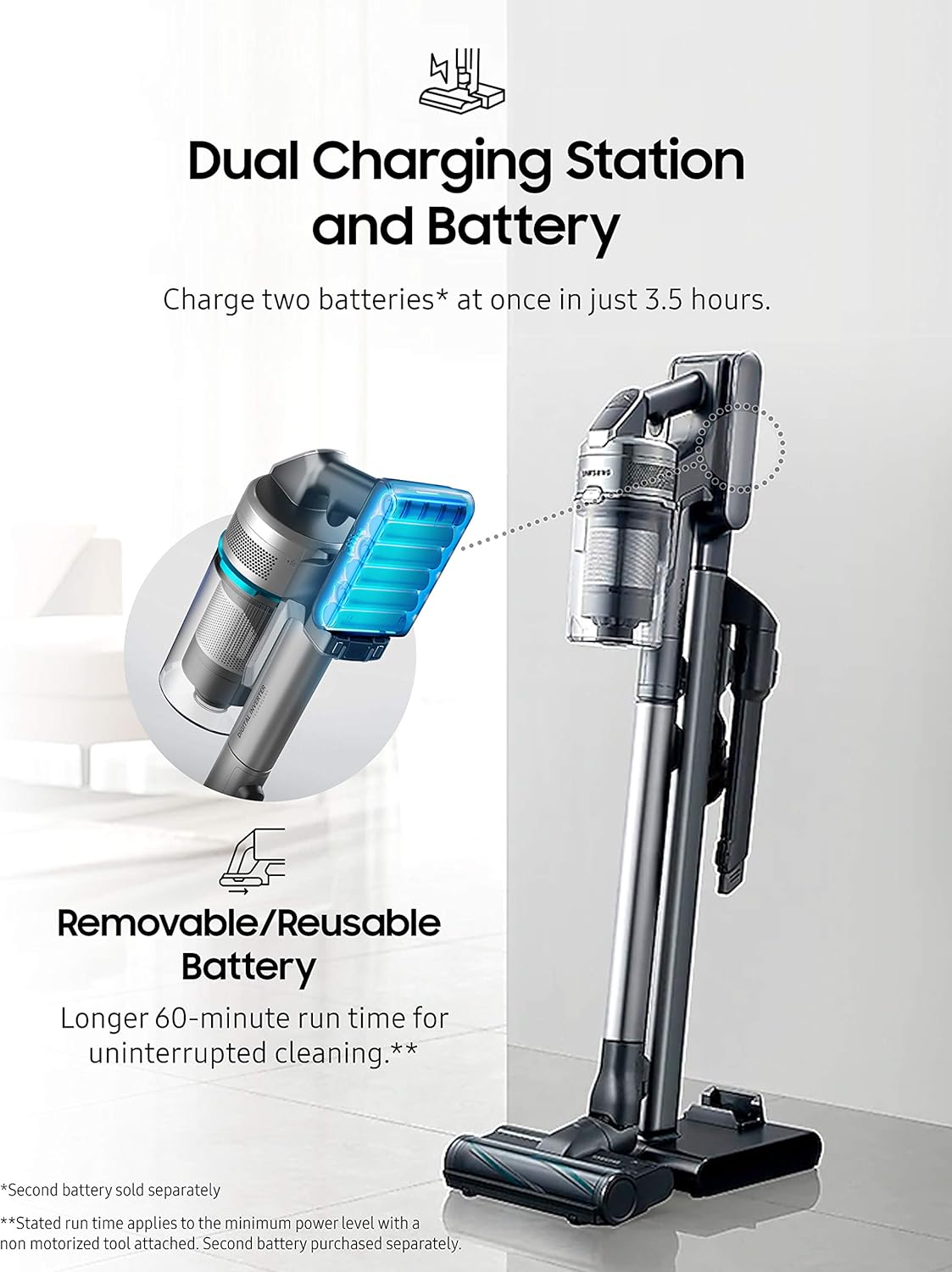
Image: The dual charging station allows for charging two batteries simultaneously.
4.3 Setting up the Clean Station
Place the Clean Station in a convenient location near a power outlet. It is designed to automatically empty the vacuum's dustbin.

Image: The Clean Station automatically empties the dust from your Jet Cordless Vacuum.
5. Operativni
5.1 Powering On and Adjusting Suction
Press the power button to turn on the vacuum. Use the control buttons to adjust the suction power according to your cleaning needs. The vacuum offers up to 200 Air Watts of cleaning performance.

Image: The vacuum provides powerful suction for various floor types.
5.2 Adjusting Telescopic Pipe Length
The telescopic pipe features four available length adjustments for comfortable use, allowing you to reach high or low areas with ease.

Image: The telescopic pipe can be adjusted to four different lengths for ergonomic cleaning.
5.3 Using the Soft Action Brush
The Soft Action Brush is ideal for delicate hard floors like parquet, effectively picking up dust and debris without scratching surfaces.

Image: The lightweight design allows for easy maneuverability under furniture and on stairs.
5.4 Using the Spinning Sweeper Mop Attachment (Optional)
If you have the Spinning Sweeper mop attachment, attach it to the main vacuum unit. Ensure the reusable wet pads or disposable wet pads are securely attached to the spinning discs. Fill the water tank on the attachment with water or a suitable cleaning solution. The spinning action of the pads will clean hard floors. Remember to remove and clean the pads after use.
6. Održavanje
6.1 Emptying the Dustbin with Clean Station
Place the vacuum's dustbin into the Clean Station. The Clean Station will automatically extract dust and debris into a disposable bag, ensuring a hygienic emptying process.
6.2 Cleaning the 5-Layer Filtration System
The vacuum features a 5-layer filtration system designed to capture pet dander, pollen, and other non-living allergens, trapping 99.999% of microdust. Regularly clean or replace the filters as recommended to maintain optimal performance and air quality.

Image: Diagram illustrating the 5-layer filtration system for enhanced air purification.
6.3 Cleaning Brush Heads and Mop Pads
Periodically inspect and clean the brush heads to remove tangled hair or debris. For the Spinning Sweeper mop attachment, remove and wash the reusable mop pads after each use. Replace disposable pads as needed.
7. Rješavanje problema
If you encounter issues with your SAMSUNG Jet 90 + Clean Station Bundle, refer to the following common solutions:
- Bez napajanja: Ensure the battery is fully charged and correctly inserted. Check if the charging stand is properly connected to a power outlet.
- Smanjeno usisavanje: Check the dustbin for fullness and empty it if necessary. Inspect the filters for clogs and clean them. Ensure there are no blockages in the brush head, pipe, or hose.
- Neobična buka: Turn off the vacuum immediately. Check for any foreign objects caught in the brush head or air pathways.
- Clean Station Not Emptying: Ensure the vacuum's dustbin is correctly seated in the Clean Station. Check if the Clean Station's disposable bag is full and needs replacement.
For persistent issues, please contact SAMSUNG customer support.
8. Specifikacije
| Značajka | Detalj |
|---|---|
| Marka | SAMSUNG |
| Naziv modela | Jet 90 + CS |
| Broj modela artikla | VS20R9046P3 |
| UPC | 887276523088 |
| Boja | Sivo |
| Posebna značajka | Bez vrećice |
| Vrsta filtra | Disk (5-Layer Filtration System) |
| Uključene komponente | Čista stanica |
| Je li bežični? | Da |
| Wattage | 500 vata |
| Vrijeme punjenja | 3 sata |
| Form Factor | Stick |
| Dimenzije proizvoda | 8.5 cm D x 9.8 cm Š x 44.7 cm V |
| Opis baterije | Litij-ionski |
| Razina buke | 78 dB |
| Težina artikla | 40.2 funti |
| Unutarnja/vanjska upotreba | Zatvoreni |
9. Jamstvo i podrška
For warranty information, product registration, or technical support, please refer to the official SAMSUNG webweb-mjesto ili se izravno obratite njihovoj korisničkoj službi. Sačuvajte dokaz o kupnji za slučaj zahtjeva za jamstvo.