
1. Uvod
This manual provides essential instructions for the safe and efficient use of your Generic charger, designed for Zebra TC51, TC52, TC56, TC57, TC52x, and TC57x Android Scanners. Please read this manual thoroughly before operating the device to ensure proper functionality and longevity.
2. Sigurnosne informacije
- Use only the provided power supply with the charger.
- Ne izlažite punjač vodi ili prekomjernoj vlazi.
- Izbjegavajte ispuštanje ili izlaganje punjača jakim udarcima.
- Čuvati izvan dohvata djece.
- Ne pokušavajte rastaviti ili modificirati punjač.
3. Sadržaj paketa
Provjerite jesu li svi artikli prisutni u vašem paketu:
- Generic Charging Cradle
- Napajanje (AC adapter)

Image: The Generic charging cradle and power supply, shown with a compatible Zebra scanner for illustration.
4. Proizvod je gotovview
The Generic charger is designed to provide reliable power to your Zebra TC51, TC52, TC56, TC57, TC52x, and TC57x Android Scanners. It features a removable insert to accommodate devices with or without a protective boot/case.

Slika: Detaljna view of the Generic charger cradle, highlighting its design.
5. Upute za postavljanje
5.1 Spajanje punjača
- Connect the DC power connector from the power supply to the machine's interface on the charging cradle.
- Uključite napajanje u standardnu električnu utičnicu.
5.2 Adjusting for Protective Case (Removable Insert)
The charging cradle features a removable insert (shim) to allow charging of your Zebra scanner with or without a protective boot/case.
- For devices without a protective case: Ensure the insert is in place within the charging cradle.
- For devices with a protective case: Gently remove the insert from the charging cradle. This provides additional space for the device with its case.
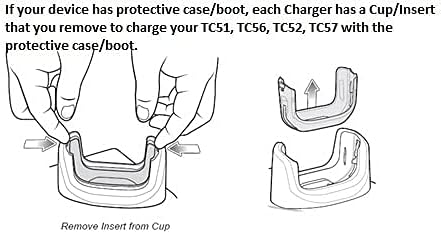
Image: Diagram illustrating the process of removing the insert from the charging cup to accommodate a device with a protective case.

Slika: Krupni plan view of the removable insert, highlighting its design and how it fits into the charging cradle.
5.3 Vizualni vodič za postavljanje
Video: A short demonstration of the charger and its fast-charging capabilities for your workday.
Video: An operational demonstration of the scanner charger cable for Zebra TC51, showing connection and charging status.
Video: A demonstration of the charger cradle for Zebra TC5X series, including how to insert and remove the device for charging.
Video: A visual guide on using the USB charger cable for Zebra TC51, TC510K, TC52, TC56, TC57 models.
6. Upute za rad
6.1 Punjenje vašeg uređaja
- Provjerite je li punjač pravilno priključen na izvor napajanja.
- Carefully place your Zebra scanner into the charging cradle, ensuring the charging contacts align.
- A charging indicator light (usually red or orange) on the scanner or cradle will illuminate to confirm charging has begun.
- The indicator light will change (e.g., to green) or turn off when charging is complete.
7. Održavanje
- Clean the charging contacts on both the cradle and your device regularly with a dry, soft cloth to ensure optimal connection.
- Čuvajte punjač na hladnom i suhom mjestu kada nije u upotrebi.
- Avoid wrapping the cable too tightly to prevent damage.
8. Rješavanje problema
8.1 Uređaj se ne puni
- Provjerite priključak napajanja: Ensure the power supply is securely plugged into both the wall outlet and the charging cradle.
- Verify Device Placement: Make sure the Zebra scanner is correctly seated in the cradle and the charging contacts are aligned.
- Pregledajte kontakte: Clean the charging contacts on both the device and the cradle for any debris or corrosion.
- Removable Insert: If using a protective case, ensure the removable insert has been taken out of the cradle. If not using a case, ensure the insert is properly seated.
- Isprobajte drugu utičnicu: Test the charger with a different electrical outlet to rule out power source issues.
9. Specifikacije
| Značajka | Specifikacija |
|---|---|
| Marka | Generički |
| Kompatibilni uređaji | Zebra TC51, TC52, TC56, TC57, TC52x, TC57x Android Scanners |
| Vrsta konektora | 2-pinski |
| Izvor napajanja | Električni na kabel |
| Wattage | 15 vata |
| Izlazni voltage | 5 volti |
| Izlazna struja | 3 Amps |
| Posebna značajka | Removable Insert for Protective Case |
| Tehnologija povezivanja | USB |
| Vrsta montaže | Stolni nosač |
| Boja | Crna |
10. Informacije o jamstvu
Molimo pogledajte pakiranje proizvoda ili upute prodavača website for specific warranty details. Keep your proof of purchase for any warranty claims.
11. Korisnička podrška
For further assistance, technical support, or inquiries, please contact the retailer or manufacturer directly. Contact information can typically be found on the product packaging or the seller's online store page.