
1. Uvod
The Avidsen HomeCam Battery is a 100% wireless outdoor surveillance camera designed for easy installation and robust home protection. Featuring 1080P Full HD resolution, a solar panel for continuous power, night vision, and two-way audio, this camera allows you to monitor your property remotely via a smartphone application without any subscription fees. This manual provides detailed instructions for setting up, operating, and maintaining your camera.
2. Što je u kutiji
Please check that all components are present in the package:
- 1 x Avidsen HomeCam Battery IP WiFi Camera
- 1 x Solar Panel (PV module)
- 2 x 18650 baterije
- 1 x Camera Sealing Gasket
- Vijci za montažu i zidni tiplovi

Image: The Avidsen HomeCam Battery camera and its accompanying solar panel, unmounted, showing the main components included in the box.
3. Vodič za postavljanje
3.1. Ugradnja baterije
- Pronađite odjeljak za baterije na fotoaparatu.
- Insert the two 18650 batteries, ensuring correct polarity (+/-).
- Čvrsto zatvorite odjeljak za baterije.
3.2. Montiranje kamere i solarne ploče
The camera and solar panel are designed for outdoor use and can be mounted separately or together. Choose a location that provides optimal sunlight exposure for the solar panel and a clear view za kameru.
- Montaža fotoaparata: The camera features an innovative magnetic mount for precise orientation. Secure the base of the mount to a wall using the provided screws and wall plugs. Attach the camera to the magnetic base and adjust its angle.
- Montaža solarnog panela: Mount the solar panel in a location that receives direct sunlight for several hours a day. Connect the solar panel cable to the camera's charging port.
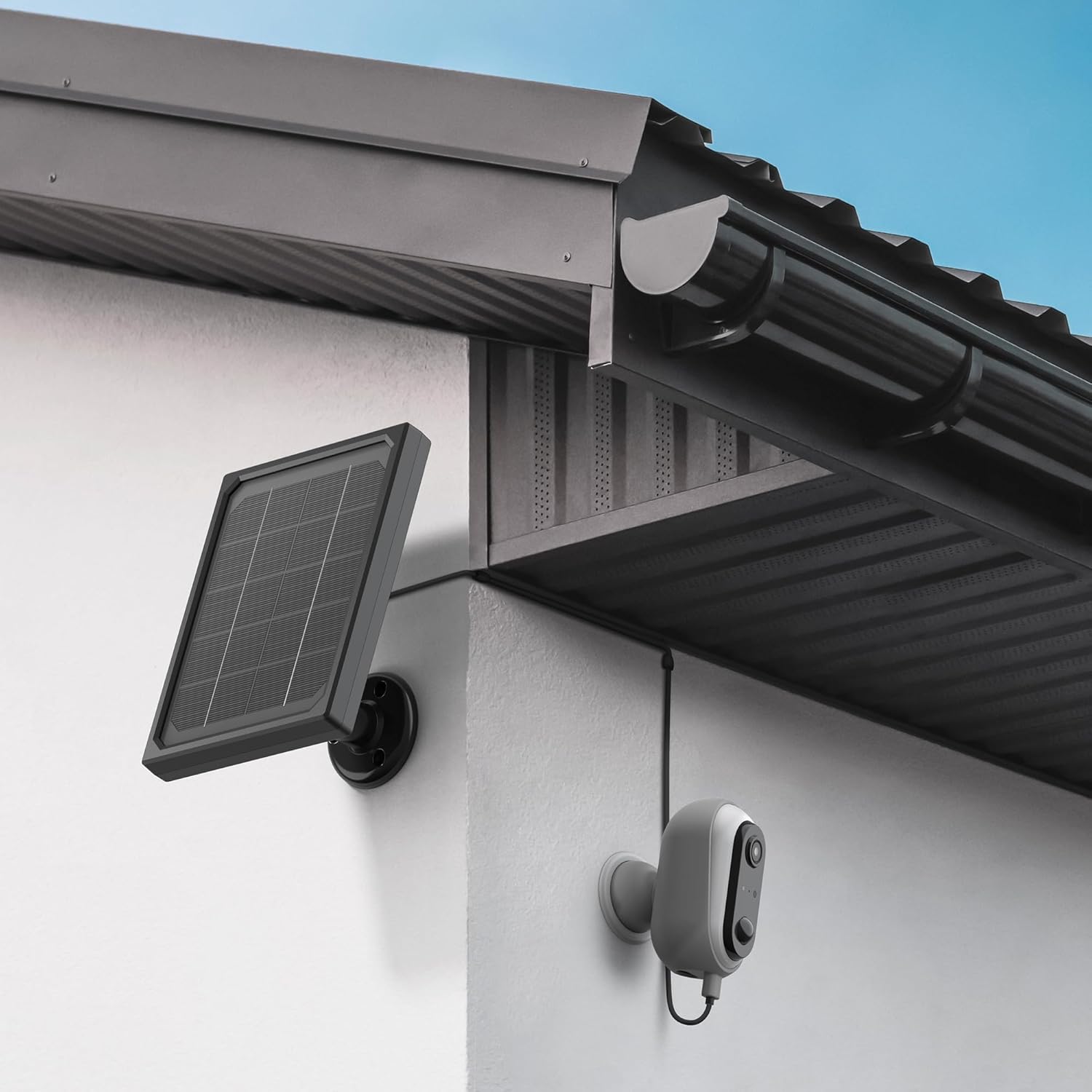
Image: The Avidsen HomeCam Battery camera and its solar panel are shown securely mounted on an exterior wall, positioned to capture sunlight and monitor the area.

Slika: Krupni plan view of the Avidsen HomeCam Battery camera, highlighting its adjustable magnetic mount which allows for flexible positioning and angle adjustments.
3.3. Preuzimanje aplikacije i početno uparivanje
- Download the "Avidsen Home" application from your smartphone's app store (available on Google Play and Apple App Store).
- Otvorite aplikaciju i kreirajte račun ili se prijavite ako ga već imate.
- Follow the in-app instructions to add a new device. This typically involves scanning a QR code on the camera or manually selecting the device type.
- Ensure your smartphone is connected to a 2.4GHz Wi-Fi network during the pairing process.
3.4. Wi-Fi veza
During the app pairing process, you will be prompted to connect the camera to your home Wi-Fi network.
- Enter your Wi-Fi network name (SSID) and password when requested by the app.
- The camera supports 2.4GHz Wi-Fi networks only. Ensure your router is configured accordingly.
- Once connected, the camera's indicator light will change, and the app will confirm successful pairing.
4. Upravljanje kamerom
4.1. Uživo View i Kontrole
Once connected, open the Avidsen Home app to access the live feed from your camera.
- Video uživo: Dodirnite kameru u aplikaciji za view the real-time video stream.
- Dvosmjerni zvuk: Use the microphone icon in the app to speak through the camera's speaker and the speaker icon to listen to audio from the camera's microphone.
- Snimanje: Manually record video or capture screenshots directly from the live view sučelje.
- Reprodukcija: Pristup snimljenom footage stored on the MicroSD card (not included) via the app's playback feature.

Image: A smartphone screen showing the Avidsen Home app, with options for live view, screenshot, two-way talk, recording, playback, and photo album.
4.2. Detekcija pokreta i obavijesti
The camera features motion detection to alert you to activity.
- Omogući/onemogući: In the app settings for your camera, you can enable or disable motion detection.
- Osjetljivost: Adjust the motion detection sensitivity to minimize false alarms.
- Obavijesti: When motion is detected, you will receive a notification on your smartphone.
- Snimanje: Motion-triggered events are automatically recorded to the MicroSD card (if installed).
4.3. Noćni vid
The integrated infrared LEDs provide clear visibility up to 8 meters in total darkness.
- Noćni vid se automatski aktivira u uvjetima slabog osvjetljenja.
- The camera provides a clear black and white image in night vision mode.
4.4. Local Storage (MicroSD Card)
The camera supports local storage via a MicroSD card (up to 128GB, not included).
- Insert the MicroSD card into the designated slot on the camera.
- Ensure the card is formatted correctly (FAT32 recommended).
- All recordings, including motion-triggered events, will be saved to this card.
4.5. Integracija pametnog doma
The Avidsen HomeCam Battery is compatible with Amazon Alexa and Google Assistant.
- Link your Avidsen Home account with your Alexa or Google Assistant app.
- Koristite glasovne naredbe za view prijenos s kamere na kompatibilnim pametnim zaslonima.
5. Održavanje
5.1. Čišćenje
- Regularly clean the camera lens and the surface of the solar panel with a soft, damp krpom kako biste osigurali optimalnu izvedbu.
- Izbjegavajte korištenje jakih kemikalija ili abrazivnih materijala koji bi mogli oštetiti površine.
5.2. Briga o bateriji
- The solar panel is designed to keep the batteries charged. Ensure the panel is free from obstructions and receives adequate sunlight.
- If the camera's battery level drops significantly, consider repositioning the solar panel or manually charging the batteries if possible (refer to specific battery charging instructions if applicable).
5.3. Connection Check
- Periodically check the physical connection between the solar panel and the camera to ensure it is secure and free from corrosion.
- Verify the camera's Wi-Fi connection status in the Avidsen Home app.
6. Rješavanje problema
6.1. No Power / Camera Not Turning On
- Ensure the 18650 batteries are correctly inserted with the right polarity.
- Check if the batteries are charged. If not, ensure the solar panel is connected and receiving sunlight, or try charging the batteries externally if possible.
- Verify the power button (if any) is pressed.
6.2. Ne mogu se povezati s Wi-Fi mrežom
- Provjerite je li vaša Wi-Fi mreža 2.4 GHz. Kamera ne podržava mreže od 5 GHz.
- Provjerite je li lozinka za Wi-Fi unesena u aplikaciju ispravna.
- Približite kameru Wi-Fi usmjerivaču kako biste poboljšali jačinu signala.
- Ponovno pokrenite ruter i kameru.
- If issues persist, try resetting the camera to factory settings (refer to the reset procedure in the app or device manual) and re-pairing.
6.3. Loša kvaliteta slike
- Očistite objektiv fotoaparata kako biste uklonili prljavštinu ili mrlje.
- Pazite da ispred objektiva nema prepreka.
- Check your Wi-Fi signal strength; a weak signal can affect video streaming quality.
6.4. Detekcija pokreta ne radi ili previše lažnih alarma
- Verify motion detection is enabled in the Avidsen Home app.
- Adjust the motion detection sensitivity settings in the app. Lower sensitivity for fewer false alarms, higher for more sensitive detection.
- Osigurajte vidno polje kamere view is clear and not obstructed by moving objects like tree branches.
7. Specifikacije
| Naziv modela | HOME CAM BATTERY (127070) |
| Rezolucija | 1080p Full HD |
| Povezivost | Bežično (Wi-Fi 2.4 GHz) |
| Izvor napajanja | Solar Panel (5V 3W), 2x 18650 Batteries |
| Domet noćnog vida | Do 8 metara |
| Polje od View | 130° |
| IP ocjena | IP65 (Outdoor use) |
| Skladištenje | MicroSD card (up to 128GB, not included) |
| Posebne značajke | Motion Detection, Two-Way Audio, Smart Home Compatibility (Alexa, Google Assistant) |
| Dimenzije | 31.5 x 21 x 8.5 cm |
| Težina | 1100 gram |
8. Jamstvo i podrška
8.1. Jamstvo proizvođača
This Avidsen product is covered by a 2-godišnje jamstvo proizvođača od datuma kupnje. Molimo sačuvajte dokaz o kupnji za reklamacije. Jamstvo pokriva nedostatke u materijalu i izradi pri normalnoj uporabi.
8.2. Tehnička podrška
For technical assistance, troubleshooting, or further inquiries, please visit the official Avidsen website or contact their customer support. You can find contact information and FAQs on their webstranica: