
1. Proizvod je gotovview
Discover the ForceClima 12300 Connected Heating portable air conditioner, designed to adapt to your needs at any time with its portable design and five operating modes. It ventilates, cools, heats, and dehumidifies any room in your home, or allows for peaceful rest with its night mode. Featuring Wi-Fi control, a remote control, a touch panel, and an LED screen, it ensures you can enjoy the optimal environment with maximum comfort.

Slika 1.1: Prednja strana view of the Cecotec ForceClima 12300 portable air conditioner.

Image 1.2: Another perspective of the Cecotec ForceClima 12300 portable air conditioner.
2. Sigurnosna upozorenja
Please read all safety warnings and instructions carefully before using the appliance to prevent personal injury or damage to the product. Keep this manual for future reference.
- Raspakiranje: Remove the product from its box and remove all packaging materials. Ensure all components are present and undamaged.
- Plasman: Place the unit on a stable, flat surface. Ensure adequate clearance around the unit for proper airflow.
- Napajanje: Connect the appliance only to a grounded power outlet with the correct voltage kako je navedeno na naljepnici proizvoda.
- Djeca i kućni ljubimci: Držite djecu i kućne ljubimce podalje od uređaja tijekom rada.
- Održavanje: Ne pokušavajte sami popravljati ili modificirati uređaj. Za popravke se obratite kvalificiranom servisnom osoblju.
- Voda: Do not immerse the appliance in water or other liquids. Avoid spilling liquids on the unit.
- Ventilacija: Ensure the exhaust hose is properly installed and vented outdoors to prevent heat buildup.
3. Značajke proizvoda
- Visoki kapacitet hlađenja/grijanja: Portable air conditioner with a powerful 12000 BTU capacity, suitable for quickly and efficiently reaching desired temperatures in areas up to approximately 25 m². Features a heat pump for effective heating during winter.
- Wi-Fi povezivanje: Configure the appliance remotely via Wi-Fi connection, allowing full control from your smartphone from anywhere.
- Više brzina: Three fan speeds (Low, Medium, High) to adapt operation according to immediate needs.
- Daljinski upravljač: Includes a remote control for convenient operation from any location without needing to approach the unit.
- Intuitive Display and Control: LED screen displays all possible configurations and highlights current settings for easy control. The top touch control panel provides practical and simple operation.
- Pet načina rada: Offers Fan mode, Cooling mode, Heating mode, Dehumidification mode, and Night mode.
- Visoki kapacitet odvlaživanja: Dehumidification mode can capture up to 26 liters per day, contributing to a healthier environment in your home.

12000 BTU Capacity

Grijanje i hlađenje

Wi-Fi kontrola

Daljinsko upravljanje i upravljanje dodirom

LED zaslon

5 načina rada

3 brzine ventilatora

odvlaživanje
4. Postavljanje i instalacija
Proper setup is crucial for the optimal performance of your portable air conditioner. Follow these steps for installation:
- Raspakirati: Carefully remove the air conditioner and all accessories from the packaging. Ensure you have the unit, exhaust hose, window kit, and remote control.
- Pozicioniranje: Place the unit on a firm, level surface near a window and a grounded electrical outlet. Ensure there is at least 20 cm (8 inches) of space around the unit for proper air circulation.
- Komplet za ugradnju prozora:
- Sastavite komplet brtvenih ploča za prozor prema vrsti vašeg prozora (klizni ili preklopni).
- Pričvrstite komplet za prozor u otvorenom prozoru, osiguravajući čvrsto brtvljenje kako biste spriječili curenje zraka.
- Pričvrstite ispušno crijevo:
- Spojite jedan kraj ispušnog crijeva na otvor za zrak na stražnjoj strani uređaja.
- Connect the other end of the exhaust hose to the adapter in the window kit. Extend the hose as little as possible and avoid sharp bends to maximize efficiency.
- Drainage (Dehumidification/Cooling): For continuous drainage during dehumidification or cooling in high humidity, connect a drain hose (not included) to the continuous drain port and lead it to a floor drain or suitable container. Otherwise, the internal water tank will collect condensate and require manual emptying.
- Priključak za napajanje: Uključite kabel za napajanje u uzemljenu električnu utičnicu od 230 volti.

Image 4.1: Proper placement of the unit with the exhaust hose connected to a window.
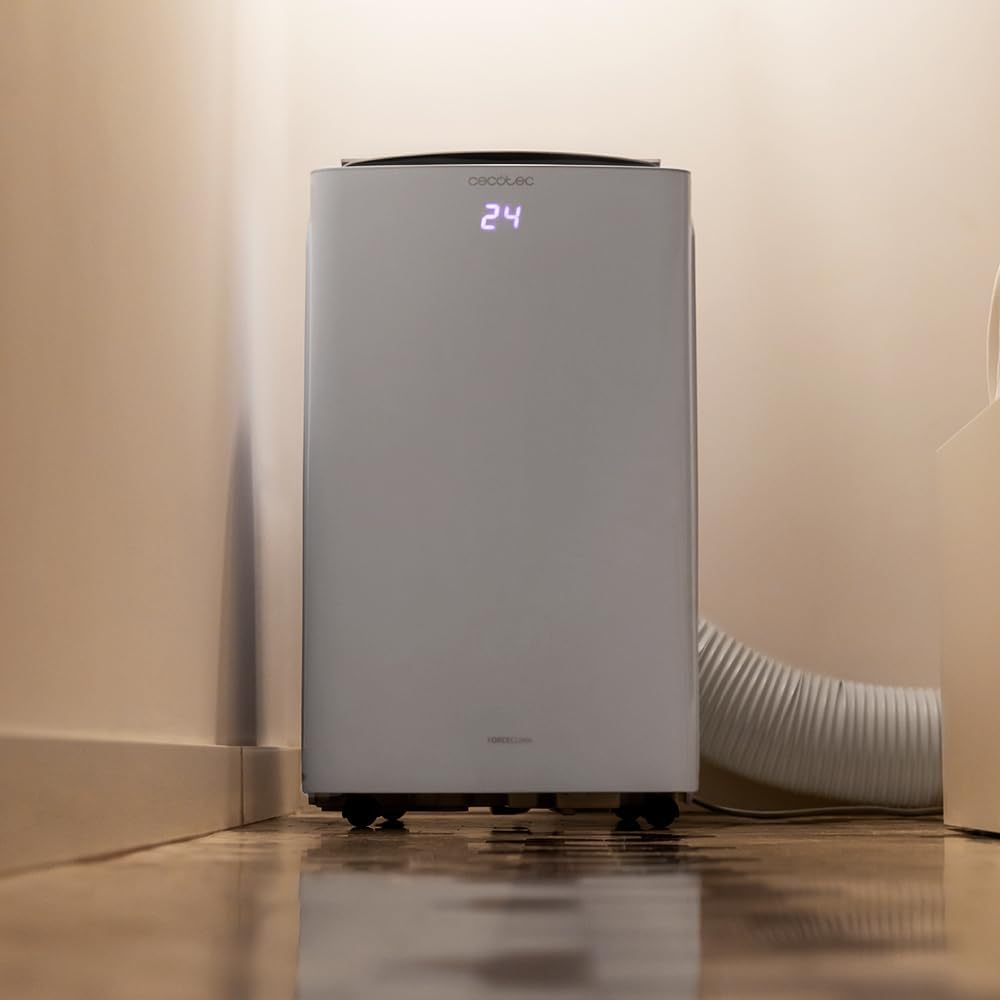
Image 4.2: Close-up of the exhaust hose connection at the base of the unit.
5. Upute za rad
Your ForceClima 12300 offers various ways to control its functions:
5.1. Rad upravljačke ploče
The touch control panel on top of the unit allows direct access to all functions.

Image 5.1: User interacting with the top control panel of the air conditioner.
- Gumb za napajanje: Pritisnite za uključivanje ili isključivanje jedinice.
- Gumb za način rada: Cycle through the 5 operating modes: Cooling, Heating, Fan, Dehumidification, and Night.
- Tipka za brzinu ventilatora: Odaberite željenu brzinu ventilatora: Niska, Srednja ili Visoka.
- Podešavanje temperature: Pomoću strelica gore/dolje postavite željenu temperaturu.
- Gumb mjerača vremena: Postavite timer za automatsko uključivanje/isključivanje.
5.2. Rad daljinskim upravljačem
The included remote control provides convenient operation from a distance.

Image 5.2: Remote control for the Cecotec ForceClima 12300.
- All functions available on the control panel can be accessed via the remote control.
- Ensure the remote control is pointed towards the receiver on the unit.
- Install batteries (not included) as per the markings inside the battery compartment.
5.3. Wi-Fi i upravljanje aplikacijama
Control your air conditioner from anywhere using the dedicated smartphone application.

Image 5.3: Smartphone displaying the Cecotec control application.
- Download the official Cecotec app from your smartphone's app store.
- Follow the in-app instructions to pair your ForceClima 12300 unit with your Wi-Fi network.
- Once connected, you can remotely adjust modes, temperature, fan speed, and set schedules.

Image 5.4: The air conditioner seamlessly integrated into a home environment.
6. Održavanje
Redovito održavanje osigurava dugotrajnost i učinkovit rad vašeg klima uređaja.
- Čišćenje zračnog filtra:
- Isključite uređaj i odspojite ga iz struje prije čišćenja.
- Remove the air filter (location typically on the back or side, refer to diagrams in the full manual if available).
- Clean the filter with a vacuum cleaner or wash it gently with lukewarm water and mild detergent. Rinse thoroughly and allow it to air dry completely before reinserting.
- Clean the air filter every two weeks or more frequently if the unit is used often or in dusty environments.
- Ispuštanje vode:
- When the internal water tank is full, the unit will stop operating and an indicator light will illuminate.
- Postavite plitku posudu ili pladanj ispod otvora za odvod na donjoj stražnjoj strani uređaja.
- Remove the drain plug to allow water to flow out. Replace the plug once the tank is empty.
- Čišćenje vanjštine uređaja: Obrišite vanjštinu mekom, damp krpom. Ne koristite jake kemikalije, abrazivna sredstva ili otapala.
- Skladištenje: If storing the unit for an extended period, ensure the water tank is completely drained and the unit is clean and dry. Store it in a cool, dry place, preferably in its original packaging.
7. Rješavanje problema
Prije kontaktiranja korisničke podrške, pogledajte sljedeće uobičajene probleme i rješenja:
| Problem | Mogući uzrok | Otopina |
|---|---|---|
| Jedinica se ne uključuje. | Nema struje, kabel za napajanje isključen, osigurač se isključio. | Provjerite priključak za napajanje, resetirajte osigurač. |
| Uređaj radi, ali ne hladi/grije. | Air filter dirty, exhaust hose blocked/disconnected, room too large, doors/windows open. | Clean air filter, check hose connection, close doors/windows, ensure unit is sized for the room. |
| Curenje vode. | Drain plug loose, continuous drain hose blocked or improperly connected, water tank full. | Ensure drain plug is secure, check drain hose, empty water tank. |
| Jedinica je bučna. | Uređaj nije na ravnoj površini, ventilator je blokiran. | Postavite na ravnu površinu, provjerite ima li prepreka u području ventilatora. |
| Daljinski upravljač ne radi. | Prazne ili nepravilno umetnute baterije, postoji prepreka između daljinskog upravljača i uređaja. | Replace batteries, ensure clear line of sight to unit's receiver. |
8. Specifikacije
Detailed technical specifications for the Cecotec ForceClima 12300 Connected Heating Portable Air Conditioner:
| Specifikacija | Vrijednost |
|---|---|
| Marka | Cecotec |
| Broj modela | 05959 |
| Dimenzije proizvoda (D x Š x V) | 47.5 x 40.5 x 88 cm |
| Težina | 27 kilogram |
| Ocjena energetske učinkovitosti | A |
| Godišnja potrošnja energije | 1.1 kilovat-sati |
| Kapacitet hlađenja | 12000 BTU |
| Vlast | 1350 vata |
| Voltage | 230 volti |
| Razina buke | 65 dB |
| Kapacitet odvlaživanja | Do 26 litre/dan |
| Područje pokrivenosti | cca. 25 m² |
| Vrsta instalacije | Prozor |
| Tip | Prijenosni |
| Posebne značajke | Dehumidifier, Heating, Wi-Fi Control, Remote Control, LED Display |
| Boja | Bijela |
| Materijal | Plastični |
| Uključene komponente | 1 x Air conditioner; 1 x Window kit; 1 x Remote control; 1 x User manual |

Image 8.1: EU Energy Label for the ForceClima 12300, showing A-rated energy efficiency.
9. Jamstvo i podrška
For warranty information, technical support, or spare parts availability, please refer to the warranty card included with your product or contact Cecotec customer service directly. Information regarding spare parts availability was not provided at the time of this manual's creation.
You can typically find contact details for Cecotec customer support on their official webmjestu ili unutar pakiranja proizvoda.