
1. Uvod
The trimmOne LITE is a state-of-the-art GPS bicycle computer designed to enhance your cycling experience. Weighing only 59 grams and with a slim profile of 13.5 mm, it offers advanced navigation, precise data tracking, and seamless connectivity. Its 3.2-inch LCD screen with 200 DPI resolution ensures clear visibility of all your ride data, day or night.

Image 1.1: The trimmOne LITE displaying both navigation and detailed ride metrics.

Slika 1.2: Razno views of the trimmOne LITE, showcasing its sleek design and integrated mounting system.
2. Što je u kutiji
Upon unboxing your trimmOne LITE, please ensure all the following components are present:
- trimmOne LITE Bicycle Computer
- Nosač
- Kabel za punjenje
- Rubber Rings for mounting
3. Postavljanje
3.1 Punjenje uređaja
Before first use, fully charge your trimmOne LITE using the provided charging cable. The device also features solar charging capabilities for extended battery life during rides.
3.2 Mounting the trimmOne LITE
Attach the mounting bracket to your bicycle's handlebars or stem using the rubber rings. Ensure the bracket is securely fastened. Align the trimmOne LITE with the bracket and twist to lock it into place.

Image 3.1: The trimmOne LITE securely mounted on a bicycle, showcasing njegov tanak profesionalacfile.
3.3 Initial Power On and App Pairing
Press and hold the power button to turn on the device. Download the dedicated trimmOne mobile application from your smartphone's app store. Follow the in-app instructions to pair your trimmOne LITE, plan routes, and customize settings.
4. Upute za rad
4.1 Display and Data Fields
The 3.2-inch high-contrast LCD screen provides clear visibility of various data fields. You can customize the displayed information through the mobile application to show metrics most relevant to your ride, such as speed, distance, altitude, cadence, heart rate, and power.
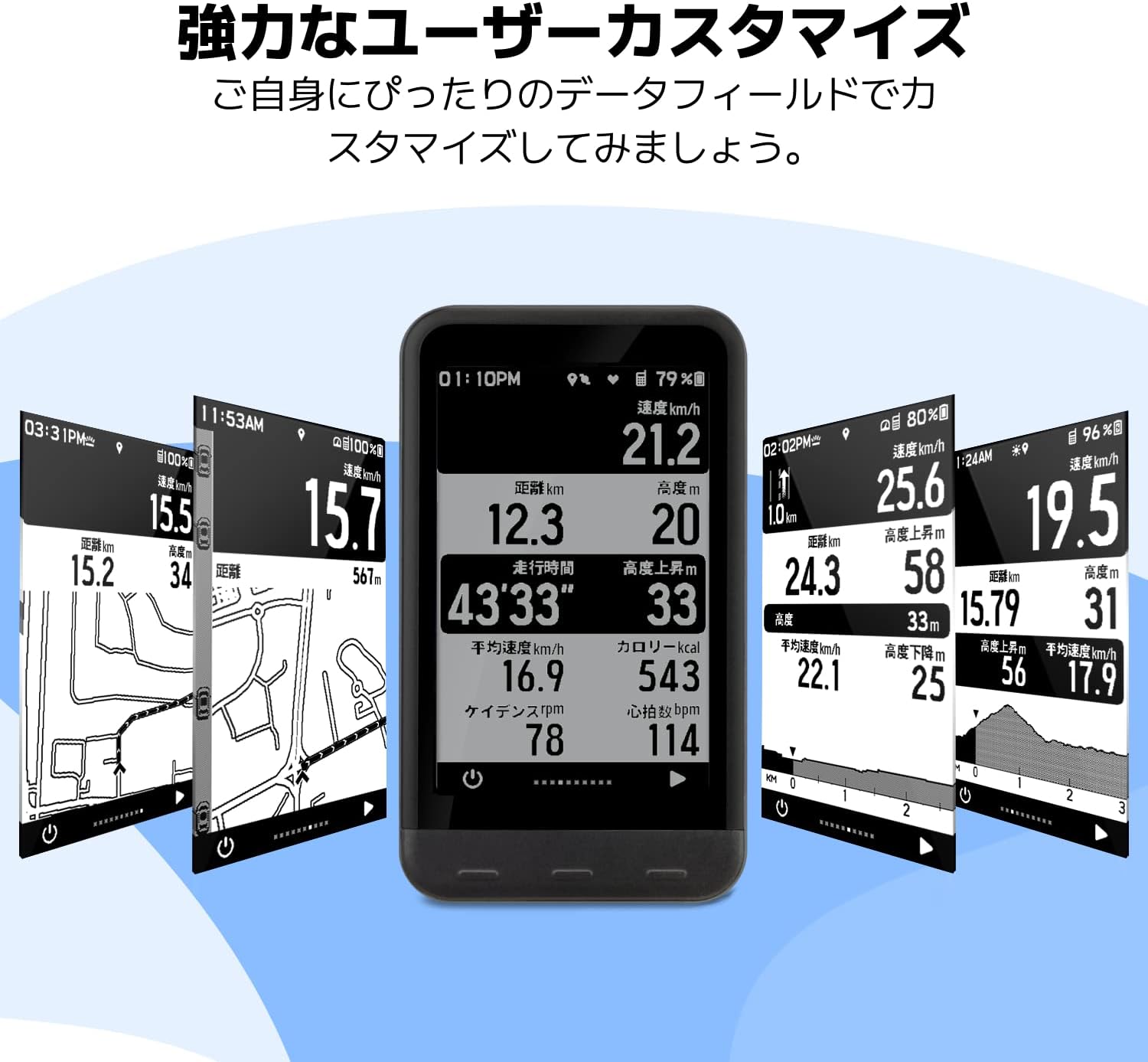
Image 4.1: The trimmOne LITE's customizable display, allowing users to arrange data fields to their preference.

Image 4.2: The trimmOne LITE's display clarity, ensuring data is easily readable in various environments.
4.2 Navigacijske značajke
The trimmOne LITE offers robust navigation capabilities. It can calculate new routes from your current location and provides real-time re-routing if you deviate from your planned path. The detailed map display helps you stay on track.

Image 4.3: The trimmOne LITE's navigation screen, showing map details and re-routing suggestions.
4.3 Connectivity (Bluetooth 5.0 & ANT+)
The trimmOne LITE supports both Bluetooth 5.0 and ANT+ protocols, allowing it to connect with a wide range of external sensors and devices, including power meters, rear radars, smartwatches, heart rate monitors, cadence sensors, and speed sensors.

Image 4.4: Connectivity diagram illustrating the trimmOne LITE's compatibility with various cycling sensors and devices.
4.4 Integracija mobilnih aplikacija
The trimmOne mobile application serves as a central hub for your cycling data. It allows you to plan routes, record and analyze ride data, and automatically update your device. The app also supports integration with popular cycling platforms like Strava, Komoot, and TrainingPeaks.

Image 4.5: The trimmOne mobile application interface, demonstrating ride history and integration with third-party cycling services.
5. Održavanje
5.1 Čišćenje
To clean your trimmOne LITE, gently wipe the device with a soft, damp cloth. Avoid using harsh chemicals or abrasive materials, as these can damage the screen or casing. Ensure the charging port cover is securely closed to prevent water ingress.
5.2 Njega baterija
The trimmOne LITE uses a Lithium-Polymer battery. For optimal battery life, avoid fully discharging the device frequently. Store the device in a cool, dry place when not in use for extended periods. Regular charging, even if not fully depleted, can help maintain battery health.
5.3 Ažuriranja softvera
Periodically check the trimmOne mobile application for available software updates. Updates often include performance improvements, new features, and bug fixes. Ensure your device is sufficiently charged before initiating any software update.
6. Rješavanje problema
6.1 Uređaj se ne uključuje
- Provjerite je li uređaj potpuno napunjen. Spojite ga na izvor napajanja i pričekajte nekoliko minuta prije nego što ga ponovno pokušate uključiti.
- If the issue persists, perform a soft reset by holding the power button for 10-15 seconds.
6.2 Problemi s GPS signalom
- Provjerite jeste li na otvorenom prostoru s čistim view od neba.
- Wait for the device to acquire a GPS signal, which may take a few minutes on first use or after a long period of inactivity.
6.3 Connectivity Problems with Sensors/App
- Ensure Bluetooth on your smartphone and ANT+ on your sensors are enabled.
- Restart both the trimmOne LITE and your smartphone.
- Check if the sensors' batteries are charged.
- Unpair and re-pair the device/sensors through the trimmOne app.
7. Specifikacije
| Značajka | Specifikacija |
|---|---|
| Broj modela | TRIMM trimmOne LITE |
| Dimenzije | 56 x 96.9 x 13.5 mm |
| Težina | 59 g (2.18 unce) |
| Veličina zaslona | 3.2 inča |
| Razlučivost zaslona | 200 DPI |
| Vrsta materijala | Plastični |
| Vrsta baterije | 1 Lithium-Polymer Battery (included) |
| Povezivost | Bluetooth 5.0, ANT+ |
| IP certifikacija | IP54 |
| Boja | Crna |
8. Jamstvo i podrška
For warranty information and technical support, please refer to the official Trimm webweb-mjesto ili se obratite njihovoj korisničkoj službi. Sačuvajte dokaz o kupnji za bilo kakve jamstvene zahtjeve.